
I have a rule for my business: I don’t repeat myself.
If I have to explain a task to a human contractor more than twice, I write an SOP.
But for the last two years, we’ve treated AI completely differently.
We open a chat window. We paste in our context. We write a prompt. We critique the output. We copy-paste.
Next day?
We do it all over again.
This is not leverage.
This is manual labor with a better interface.
We’ve been calling it “prompt engineering.”
But there’s a more honest name for it: the Content Treadmill — AI Edition.
You’re working harder. The output looks smarter. But nothing is actually building.
That changes today.
We’re not talking about chatting with AI anymore.
We’re talking about deploying AI.
The difference isn’t subtle. It’s the difference between hiring a smart intern every single morning and never onboarding them — versus having a trained employee with a permanent handbook who executes without being asked.
Today, I’m going to show you how to build your first “Substack Employee.”
An agent that lives inside your system.
Knows your writing style.
Handles your content distribution.
And doesn’t need to be prompted the same thing twice.
What Is An Agentic Workflow?
An Agentic Workflow is a system where AI operates with defined permissions and skills — not one-off prompts.
Instead of a conversation, it’s an execution loop:
You define the outcome. The agent selects the tools and steps to get there. Autonomously.
Here’s the problem with the chat window:
It’s ephemeral. It resets every session. It was built for brainstorming — not building.
Real leverage comes when you stop chatting and start engineering.
This shift is now possible with Claude Code, using a feature that lets a simple markdown file act as a permanent brain implant for your AI.
The official term is “Skills.”
I call it Agentic Architecture.
How Do Claude Skills Work?
A Skill is a markdown file stored in a hidden .claude directory.
It defines a specific Standard Operating Procedure — a permanent SOP.
When you trigger a command, the AI accesses this file (its long-term memory) and executes complex tasks with zero new instructions.
Think of it this way.
Custom Instructions = a sticky note on your intern’s monitor. “Be concise. Use my brand voice.”
Claude Skills = the Employee Handbook locked in their desk drawer. Permanent. Structured. Referenced automatically every single time.
It lives here: .claude/skills/
When you type a command, Claude checks this folder. If it finds a matching skill, it executes the trained behavior instantly.
No prompting. No setup. No repetition.
Skills vs. Projects — Know the Difference
People confuse these constantly.
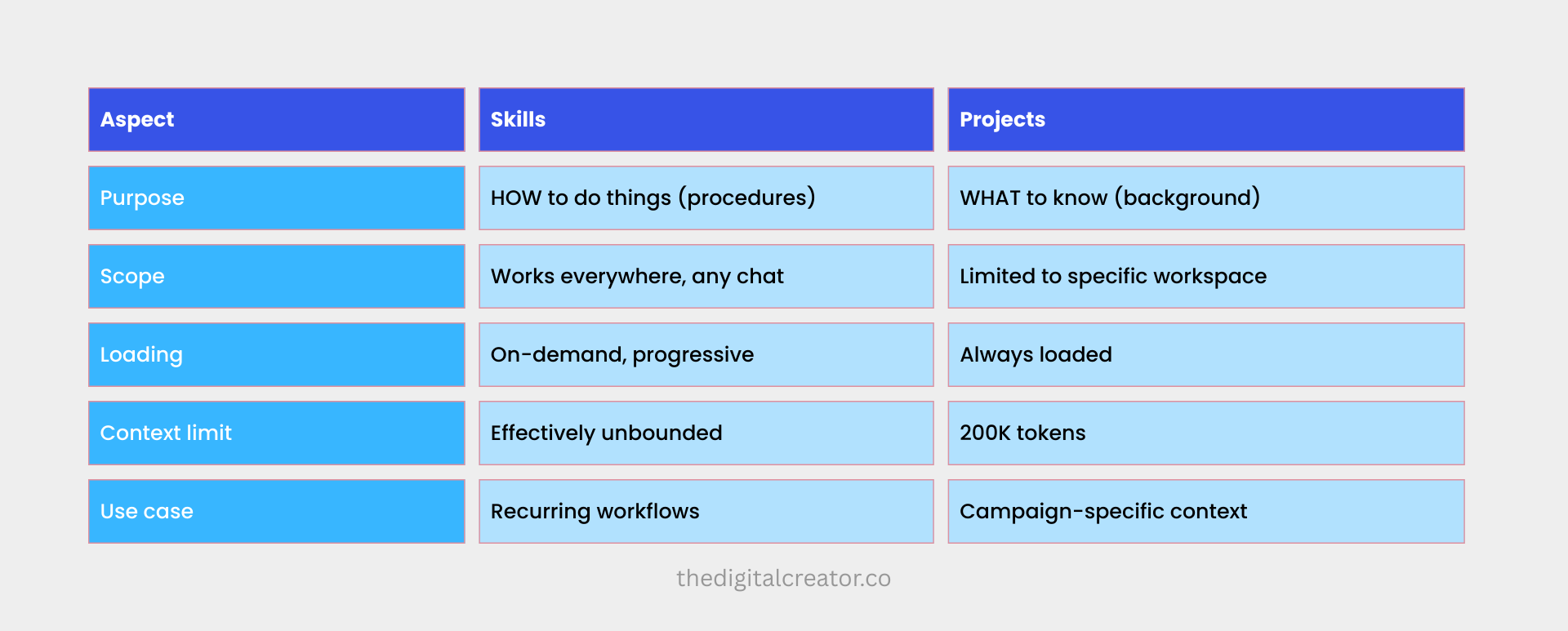
Use Skills for tasks you repeat.
Use Projects for campaigns or specific client work.
The Build: Creating Your “Substack Employee”
Here’s what we’re building:
An agent that repurposes your newsletter ideas into Substack Notes — and saves them directly to your Notion database.
No extra prompting. No copy-pasting instructions. No starting from scratch.
The folder structure looks like this:
.claude/
└── skills/
    └── substack_employee/
        ├── SKILL.md        → the brain (SOP)
        ├── voice-guide.md  → your writing style
        └── examples/       → your top-performing Notes
Each skill is self-contained.
Everything it needs to execute lives inside that folder.
This is where it gets good.
The full build — the SKILL.md logic, the Voice Guide method, the Notion database setup, and the complete step-by-step workflow — is inside the paid section of this newsletter.
What you get as a paid member:
✅ The exact SKILL.md architecture (copy-paste ready)
✅ The Voice Guide framework — how to train Claude to sound like you, not generic AI
✅ The “Calibration Pairs” method that eliminates AI-sounding output permanently
✅ The complete Notion database setup (columns, structure, workflow)
✅ My real numbers: how I went from 45 minutes per content batch to 12 minutes
✅ A brutally honest breakdown of what this system actually does — and what it doesn’t
This is not theory. I built this. I use it weekly.
Paid members get the full blueprint below. 👇
Not a member yet?
→ Upgrade to Paid — $39/month or $150/year
Premium membership also includes
→ 45% off all courses,
→ 5 Premium Claude Skills,
→ the AI Agents Collection,
→ the Substack SEO/AEO Toolkit.
The Substack Employee you’re about to build is one of them.
The Build: Creating the “Substack Employee”
Let’s build a practical asset: