

Welcome to The Digital Creator — helping creators accelerate with AI.
You have a call in 45 minutes.
You open your calendar. You see the name. You vaguely remember the last conversation. You open a new tab. Then another. Then LinkedIn. Then their website. Then you realize you’re still not sure what you actually want to get out of this meeting.
This is how most us operates today…
And here’s what I know about most creators and solopreneurs: they’re good at showing up. They show up consistently. They take the calls.
But they walk into those calls unprepared.
Not because they don’t care. Because prep takes time they don’t have. So they wing it and they walk away from meetings thinking, “I should have asked that,” or “I forgot to bring up the thing that actually mattered.”
That’s not a discipline problem. That’s a system problem.
And in 2026, a system problem has a system solution.
Here’s what I built and what you’re going to copy today.
A Meeting Prep Agent inside Claude. No automation tools. No code. No new subscriptions.
Just a Claude Project, a smart setup, and one copy-paste prompt and before every meeting, you get a clean briefing document that tells you exactly who you’re meeting, what to cover, what to ask, and what outcome to drive toward.
I’m going to walk you through the exact build, step by step.
By the end of this issue, you’ll have a working agent. Not a concept. Not “something to try someday.”
A working agent.
Let’s build it.
What This Agent Actually Does
Before we build, let me show you what you’re actually building.
Because most creators, when they hear “AI agent,” picture something complex. Something technical. Something that requires a developer or a 3-hour YouTube tutorial.
This isn’t that.
What you’re building is essentially a smart briefing assistant that lives inside Claude…and knows how to prepare you for any meeting, any time, in under 2 minutes.
Here’s what it produces every single time you use it:
A ready-to-read Meeting Brief that covers:
1. Who you’re meeting Not just a name. Context. What they do, what they’re building, what matters to them…pulled from whatever you feed it (email threads, notes, a LinkedIn bio, a proposal).
2. The purpose of this specific meeting What does success look like at the end of this call? Your agent frames the meeting around an outcome — not just a topic.
3. Talking points tailored to them Not generic conversation starters. Points that are relevant to this person, this conversation, this moment.
4. Smart questions to ask The kind of questions that make you sound like you’ve done your homework…because you have. Except Claude did it for you.
5. Potential friction points or objections If there’s something sensitive, unresolved, or worth navigating carefully…your agent flags it. So you’re not caught off guard.
You get all of that… in under 2 minutes…before every single meeting. Just by pasting a prompt.
That’s what “AI as a co-pilot” actually looks like in practice. Not hype. Not vague promises about productivity. A real output you can read over coffee before you jump on a call.
Why Claude? Why not a dedicated tool?
There are tools built specifically for meeting prep. Lindy, Reclaim, Otter…they all have versions of this. And some of them are genuinely good.
But here’s why I’m showing you the Claude-native approach first:
You already have it. If you’re reading this newsletter, there’s a strong chance Claude is already part of your workflow. No new subscription. No new login.
It’s faster to set up. We’re talking 10 minutes to a working agent…not a multi-step integration with your calendar, CRM, and email.
You control the output. Dedicated tools give you their format. With Claude, the brief looks exactly the way you want it to look. You define the structure. You define the tone. You own the system.
And honestly? The output quality is exceptional…when you set it up correctly. Which is exactly what this issue is about.
What you’ll need before we build:
A Claude account (free works, Pro is better…more on why in a moment)
10 minutes
One upcoming meeting to test it on
That’s it.
Let’s get into the build.
The Setup: Build Your Meeting Prep Agent in Claude
This is where we build.
Follow these steps in order. Don’t skip ahead. The magic isn’t in any single step…it’s in how they work together.
Before the steps, I want to show how the output looks. Here is the meeting prep. I got to meet with Chris Tottman (this is a made-up scenario)
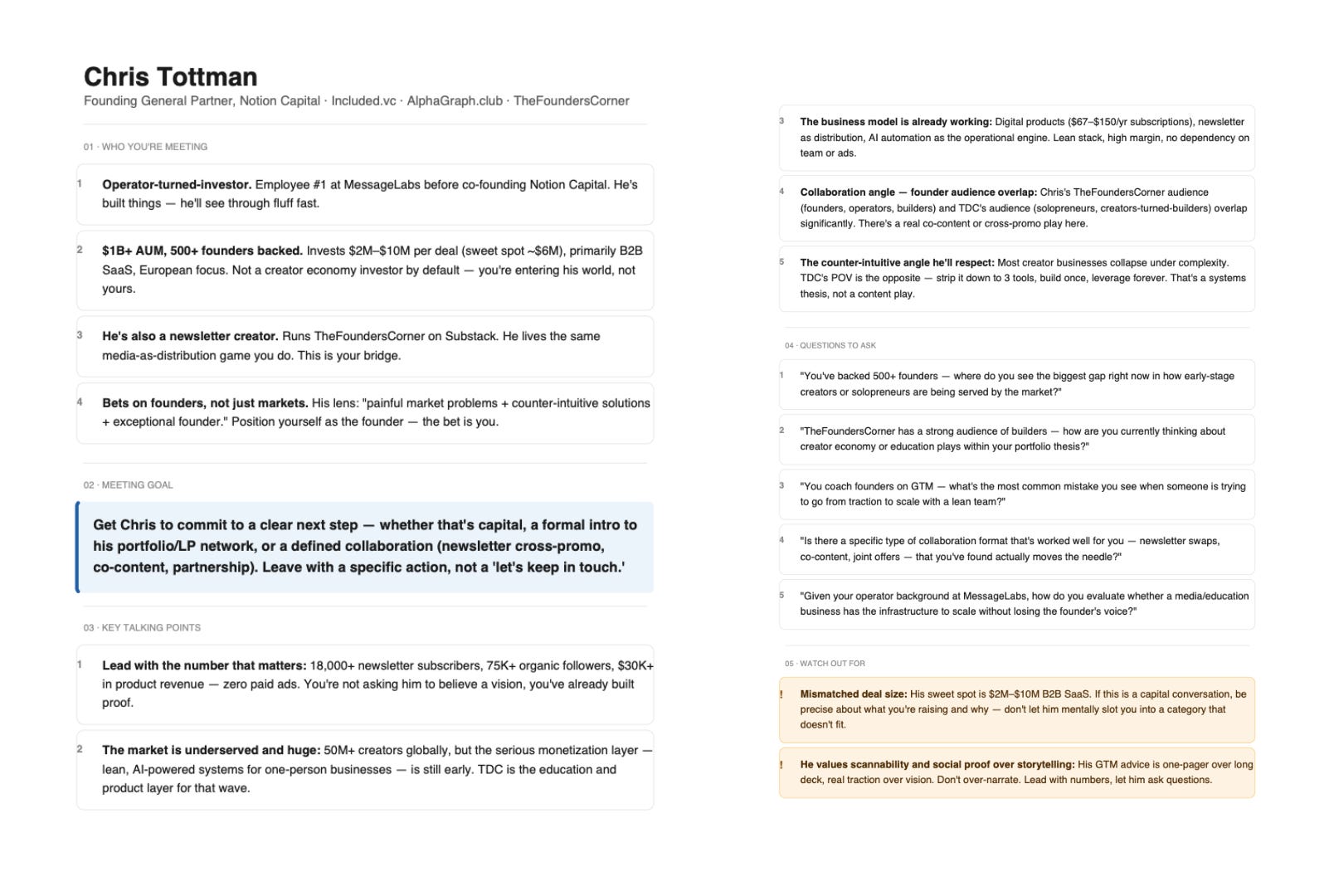
Let’s start creating this agent…
Step 1: Create a Dedicated Claude Project
If you’ve been using Claude as a regular chat window…opening a new conversation every time…you’ve been leaving a lot of power on the table.
Claude Projects are different.
A Project gives Claude a persistent memory of who you are, what you do, and how you want it to work…across every conversation inside that project. You set it up once. It remembers everything. Every time you come back, it picks up right where you left off.
For a Meeting Prep Agent, this is everything. Because your agent needs to know you — your business, your clients, your context — before it can prep you for anything.
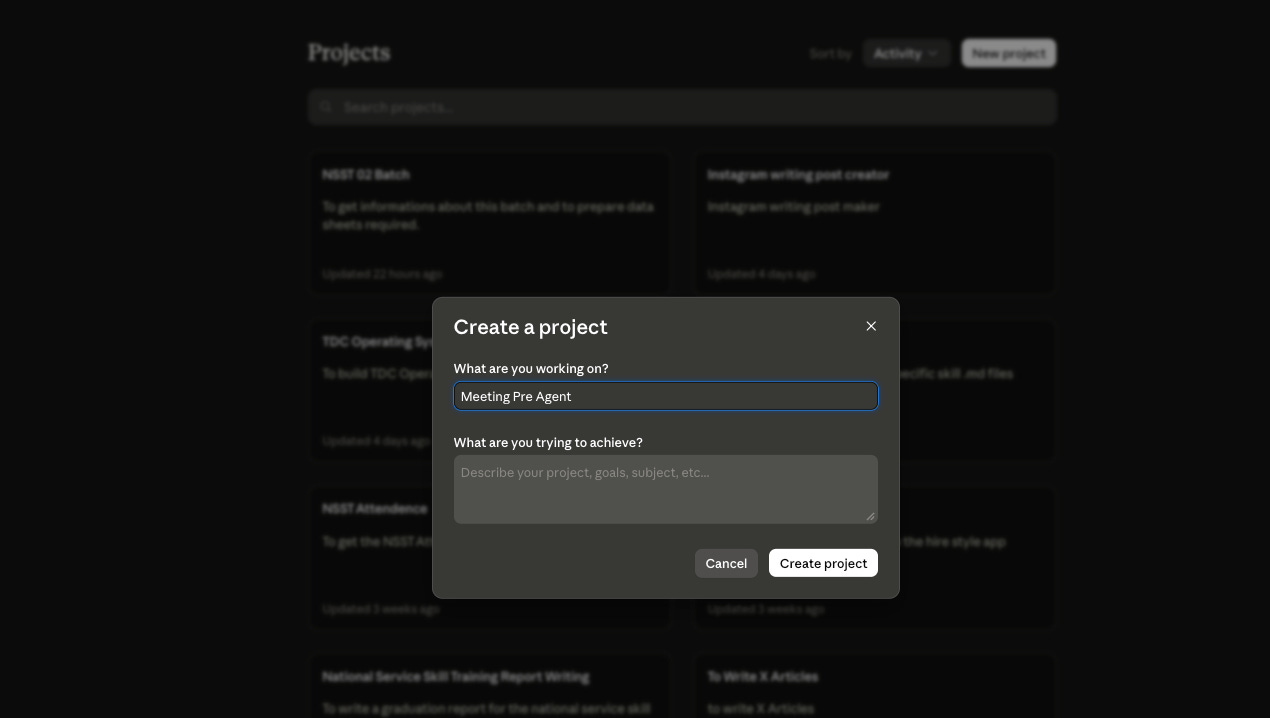
Here’s how to create one:
Open Claude at claude.ai
On the left sidebar, click “Projects”
Click “New Project”
Name it something clear — “Meeting Prep Agent” works perfectly
You’re in. Now let’s configure it.
Step 2: Write Your System Prompt (The Agent’s Brain)
This is the most important step.
Your system prompt is the set of instructions Claude follows every single time you use this project. It’s what transforms a general-purpose AI into your meeting prep agent…one that understands your context, your style, and your standards.
Think of it as hiring an assistant and writing their job description. The more specific you are, the better they perform.