

You open ChatGPT to draft an email to your newsletter subscribers.
“Write a promotional email for my new digital product,” you type.
The AI spits out something generic. Corporate. Stiff. Nothing like how you actually communicate with your audience.
So you add more context.
“Make it casual and conversational. I’m a solopreneur who helps creators build digital products with AI. My audience doesn’t like hype or hard sales tactics.”
Better... but still not quite right.
Now you’re editing. Rewriting entire paragraphs. Adjusting the tone. Removing phrases you’d never actually use.
Fifteen minutes later, you’ve spent more time fixing AI output than it would’ve taken to write it yourself.
100% this is how some people work today. I did this..but not now…
Here’s what most creators don’t realize: You’re paying a hidden tax every single time you use AI.
Not in money. In time and mental energy.
Every conversation with ChatGPT or Claude starts from zero. You re-explain your business, your voice, your audience, your goals... over and over again.
You’re training the AI fresh in every single session.
And according to research, this repetitive context-setting is eating up 73% of solo operators’ working time…the hours you could be spending on the expertise that actually generates revenue.
There’s a better way.
What if AI already knew everything about your business before you even started typing?
What if it understood your voice, your audience, your offers, and your boundaries automatically?
What if you could hand AI a brief one-sentence prompt and get back content that sounds exactly like you…without the back-and-forth editing loop?
That’s not theoretical.
Creators and solopreneurs are doing this right now using something called a Business Context File.
It’s a structured document that gives AI tools like Claude and ChatGPT persistent knowledge about your brand. Think of it as training a new team member once... and they remember everything forever.
The results?
Adobe’s research shows creators using this approach save 14 hours per week. That’s nearly two full workdays back in your schedule.
One freelancer scaled from $500/month to $7,000/month by using context files to maintain voice consistency across multiple clients without burning out.
Another creator documented saving 3 hours daily…70 hours monthly…using what she calls her “Brand Blueprint” method.
Teams using AI with proper context produce 75% more content than those without it. And in blind tests, brand experts chose AI-generated content with proper context over human-written content 50% of the time.
This isn’t about replacing your creativity. It’s about eliminating the grunt work that’s consuming most of your day.
Today, I’m going to show you exactly how to build your own Business Context File...the same system I use to create consistent content across my newsletter, X, LinkedIn, and Digital Products without re-explaining myself to AI fifty times a week.
By the end of this post, you’ll have:
✅ A clear understanding of what a Business Context File actually is
✅ The 5 essential components every context file needs
✅ A step-by-step framework to build yours this week
✅ A template you can copy and customize
Let’s turn AI from a tool that needs constant supervision into a trained team member that actually gets you.
What a Business Context File Actually Is (And Why It’s Different from Brand Guidelines)
Let me start by clearing up the confusion.
You might be thinking, “Wait, isn’t this just a brand style guide?”
Not quite.
Traditional brand guidelines are designed for humans to interpret. They focus on visual identity…logos, color palettes, typography, maybe some tone-of-voice adjectives like “friendly” or “professional.”
Those work great when you’re briefing a designer or copywriter who can use judgment and intuition.
But AI doesn’t work that way.
AI needs explicit, literal instructions. It can’t read between the lines. It can’t interpret “be casual but professional” without examples of what that actually looks like.
A Business Context File is a structured document optimized for AI parsing.
Think of it like this:
Brand guidelines = “Here’s what our brand looks and feels like”
Business Context File = “Here’s exactly how to communicate as this brand, with examples of what to do and what not to do”
It’s the difference between showing someone a mood board and giving them a detailed instruction manual.
The Three Core Outcomes
When you build a proper Business Context File, you unlock 3 immediate benefits:
1. Voice Consistency Across All Content
No more output that sounds like it was written by a corporate robot. AI understands your specific style…sentence structure, vocabulary, tone…and applies it automatically.
Whether you’re writing an X thread, a newsletter, or a product description, it all sounds like you.
2. Elimination of Repetitive Context-Setting
You explain your business once. Not fifty times a week.
Every new conversation with AI starts with full knowledge of who you are, what you do, who you serve, and how you communicate.
3. Scalable Content Production Without Sacrificing Authenticity
Here’s the big one: you can create more content without losing your voice or burning out.
Research shows creators using AI with proper context produce 75% more content than those without it…and it actually sounds like them.
One creator I follow went from publishing 2 newsletters a month to 8... without hiring anyone or working longer hours.
The secret? A well-built context file that made AI an extension of her voice, not a generic content mill.
What Makes These Files Actually Work
The difference between a context file that works and one that doesn’t comes down to specificity.
Here’s what I mean:
Generic instruction (doesn’t work):
“Write in a friendly, approachable tone.”
Specific instruction (works):
“Write like you’re explaining something to a smart friend over coffee. Use ‘you’ and ‘I’ frequently. Keep sentences under 20 words. Use em dashes…like this…instead of parentheses. Avoid corporate jargon like ‘leverage,’ ‘synergy,’ or ‘ecosystem.’ Start paragraphs with one-sentence hooks.”
See the difference? (by the way, this is just an example; I have full prompt below…)
The first one is vague. AI could interpret “friendly” a hundred different ways.
The second one gives concrete, measurable rules AI can follow.
The best context files include:
Anti-patterns: Explicit “don’t do this” examples
Few-shot samples: Actual content pieces AI can learn from
Structural specs: Sentence length, punctuation style, vocabulary rules
Audience context: Who you’re talking to and what problems they have
This isn’t about creating more work for yourself upfront. It’s about doing the setup once so you never have to do it again.
A Quick Reality Check
I know what you might be thinking:
“This sounds complicated. I barely have time to create content as it is.”
Here’s the truth: Building this takes about 4 hours upfront.
That’s it.
And in return, you save 14 hours every single week.
Do the math: After the first week, you’re already ahead. By month two, you’ve saved 50+ hours.
The creators who don’t see results? They skip this step. They keep using AI the hard way…constantly re-explaining, constantly editing, constantly frustrated with generic output.
The ones who win? They invest the 4 hours upfront and never look back.
Next, I’m going to break down the exact structure you need…the 5 essential components that make a Business Context File actually work.
The 5 Essential Components Every Business Context File Needs
Here’s what makes a context file actually work: modular architecture.
Instead of dumping everything into one giant wall of text, you break it into five distinct sections. Each section does a specific job.
This isn’t just cleaner…it’s how AI processes information most effectively.
Think of it like building with LEGO blocks. Each component snaps together, and you can swap out or update individual pieces without rebuilding the whole thing.
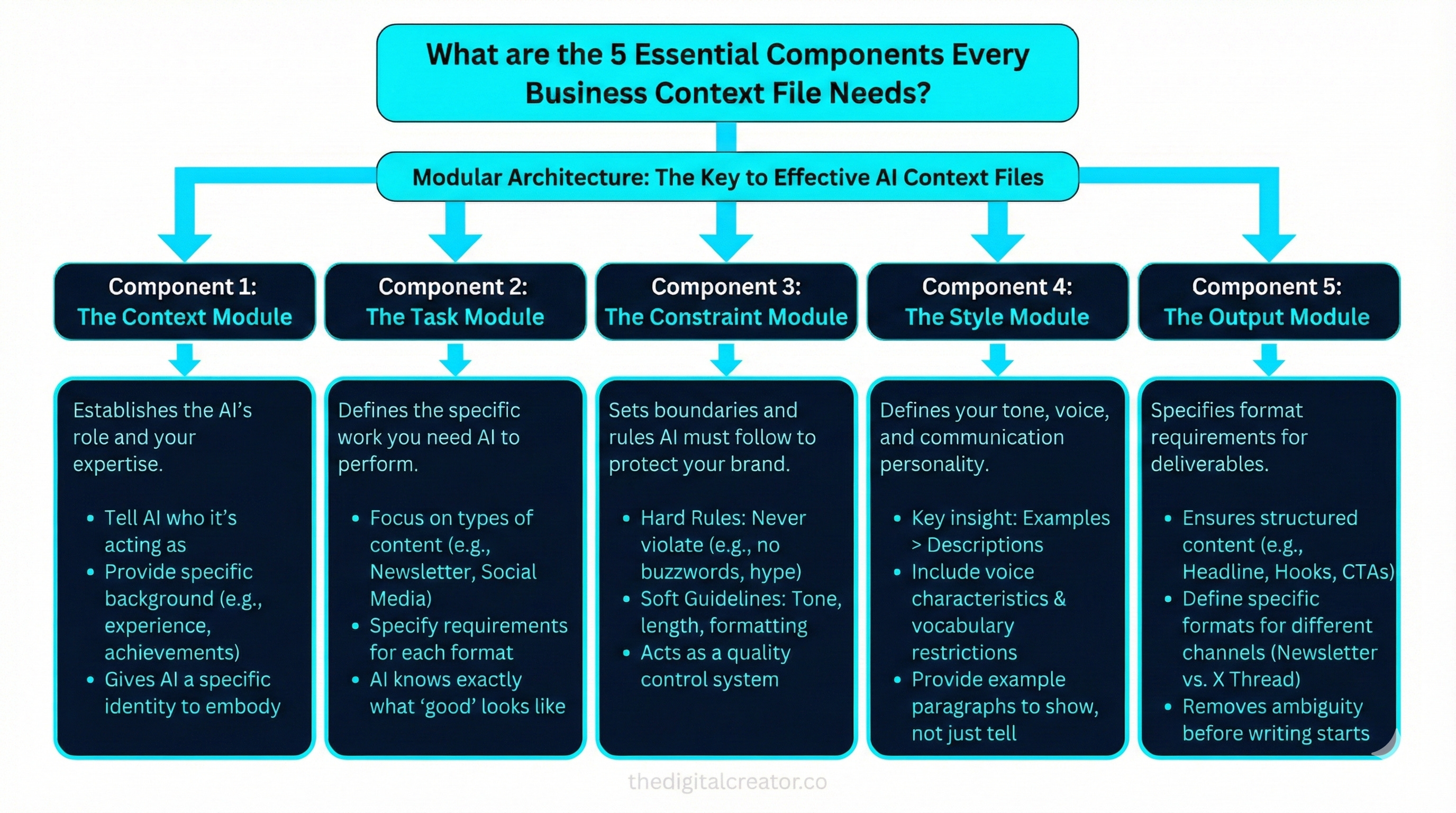
Let’s break down each one.
Component 1: The Context Module
What it does: Establishes the AI’s role and your expertise.
This is where you tell AI who it’s acting as and what knowledge it should draw from.
Bad example:
“You’re a helpful newsletter writing assistant.”
Good example:
“You are Sharyph, creator of The Digital Creator…a newsletter and brand helping solopreneurs turn their skills into income using AI and lean systems. You have:
75K followers on X built through consistent, valuable content
18K newsletter subscribers who trust your practical, tested strategies
Deep expertise in AI workflows, content systems, and digital product creation
You speak from experience, not theory. You’ve built a one-person business that generates consistent income while supporting your life, not stealing from it.”
See how the second version gives AI a specific identity to embody? It’s not pretending to be you…it’s writing as if it understands your background and perspective.
Component 2: The Task Module
What it does: Defines the specific work you need AI to perform.
This isn’t about individual prompts…it’s about the types of content you create regularly.
Example:
“Your primary tasks include:
Newsletter writing:
Create educational, actionable posts (1,500-3,000 words)
Focus on systems, workflows, and frameworks…not just theory
Include specific examples from real creator experiences
End with clear next steps readers can take this week
Social media content:
Write threads that break down complex topics into 8-12 tweets
Lead with curiosity-driven hooks
Use storytelling and concrete examples
No corporate jargon or hype language
Product descriptions:
Explain what the product does and the transformation it creates
Focus on outcomes, not just features
Include pricing and clear calls-to-action
Address common objections proactively”
Notice how each content type has specific requirements? AI now knows exactly what “good” looks like for each format.
Component 3: The Constraint Module
What it does: Sets boundaries and rules AI must follow.
This is where you prevent AI from doing things that would damage your brand.
Example:
“Hard Rules…Never Violate:
❌ Don’t use corporate buzzwords: ‘synergy,’ ‘leverage,’ ‘ecosystem,’ ‘thought leader,’ ‘game-changer’
❌ Don’t write in a salesy, hype-driven tone
❌ Don’t make promises I haven’t personally delivered (’make $10K in 30 days’)
❌ Don’t use excessive emojis (max 3 per post)
❌ Don’t write listicles without actionable context
Soft Guidelines:
Keep paragraphs under 100 words
Vary sentence length for rhythm
Use questions to engage readers, but not more than 2 per section
Include data/statistics when available, with sources
Always end with actionable next steps”
This is your quality control system. The more specific your constraints, the less editing you’ll do later.
Component 4: The Style Module
What it does: Defines your tone, voice, and communication personality.
This is the most important section…and the one most people get wrong.
Here’s the key insight: Descriptions don’t work. Examples do.
What doesn’t work:
“Write in a casual, conversational tone.”
What works:
“Tone: Practical and direct, like a mentor who’s been through it sharing real lessons over coffee.
Voice characteristics:
Use contractions (you’re, I’ve, don’t)
Address reader directly (’you’) frequently
Short sentences for impact. Long sentences for context.
Start paragraphs with clear statements, then elaborate
Use em dashes—like this—for asides
Bold for emphasis, not ALL CAPS
Vocabulary:
Say: ‘build,’ ‘create,’ ‘system,’ ‘framework,’ ‘clarity’
Avoid: ‘hack,’ ‘secret,’ ‘exclusive,’ ‘limited-time,’ ‘transform your life’
Example paragraph in my voice:
‘Here’s what most creators get wrong. They build an audience, create some content, and wonder why nothing sells. The problem isn’t their product or their marketing. It’s that they skipped the step that actually matters: clarity. You can’t sell what you can’t clearly explain. And if you’re confused about your offer, your audience will be too.’”
See how that example paragraph shows AI exactly what your voice sounds like? That’s worth more than ten adjectives.
Component 5: The Output Module
What it does: Specifies format requirements for deliverables.
This ensures AI structures content the way you actually need it.
Example:
“Newsletter Format:
Compelling headline (under 60 characters for email subject lines)
Opening hook (2-3 paragraphs establishing the problem)
3-5 main sections with H2 headers
Include [SCREENSHOT SUGGESTION] markers where visuals would help
Bullet points for lists (not numbered unless sequence matters)
Clear CTA at end linking to relevant offer or lead magnet
Keep total length 1,800-2,500 words
X Thread Format:
Tweet 1: Hook (make them stop scrolling)
Tweets 2-3: Setup (establish context/problem)
Tweets 4-9: Core content (insights, steps, examples)
Tweet 10: Summary + CTA
Use line breaks for readability
One idea per tweet maximum”
This removes ambiguity. AI knows exactly how to structure its output before it starts writing.
Pro Tip: You can just ask AI to visit your newsletter, in my case [https://newsletter.thedigitalcreator.co] and learn the voice.
Why I am Using this 5 Module Approach.
Breaking your context file into these five components does three things:
1. Makes it easier to build
You don’t have to write everything at once. Start with Context and Style, add the others later.
2. Makes it easier to update
Your Task module might change as you add new content types. Your Style module stays the same. You can update one without touching the others.
3. Makes it easier for AI to parse
AI processes structured information better than unstructured rambling. These clear sections help it quickly locate the relevant instructions for any task.
The creators I see getting the best results? They spend 2-3 hours building these five components once... then tweak them based on real output over the next few weeks.
It’s not about perfection upfront. It’s about getting the structure right so you can iterate efficiently.
Next, I’ll walk you through the exact process to build your own context file…starting with the fastest way to capture your unique voice without overthinking it.
How to Build Your Context File (Step-by-Step)
Alright, let’s get practical.
You understand what a Business Context File is.
You know the five components it needs.
Now here’s how to actually build one…without overthinking it or spending a week on this.
The biggest mistake I see?
Creators trying to describe their voice from scratch.
They sit down with a blank document and try to articulate “how they write.” It’s like trying to explain how you walk. You just... do it. Putting it into words is surprisingly hard.
There’s a better way: Let AI figure it out for you.