

Two weeks after launching AI Offer Crafter, I typed aioffercrafter.com/robots.txt into my browser.
It showed my login page.
That file is the first thing Google reads to learn what it’s allowed to crawl. Mine was handing Google a sign-in form.
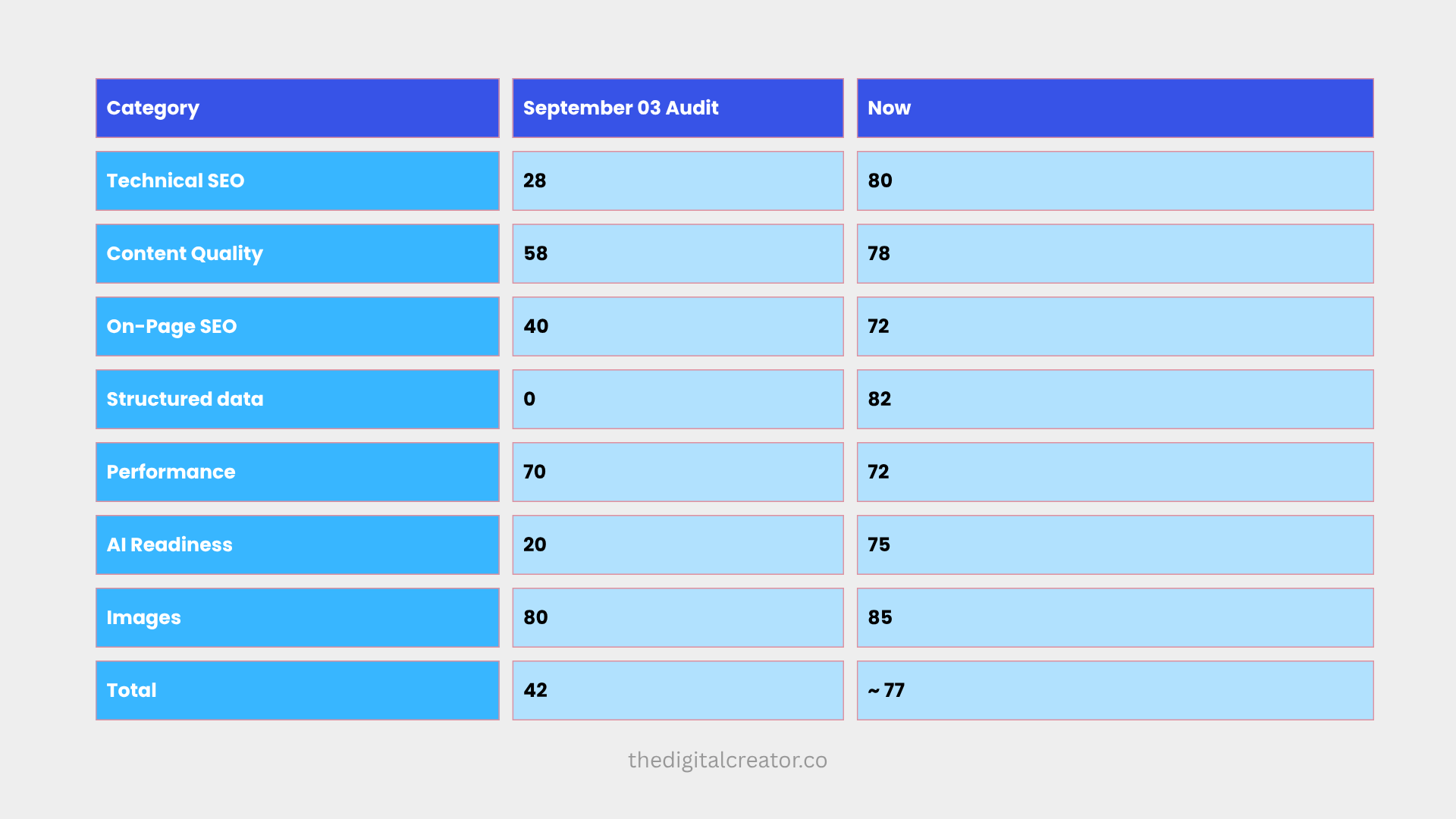
So I ran a proper SEO audit. The score was 42/100. The content wasn’t the problem. Every failure was configuration: things I hadn’t set up or had set up wrong.
Two weeks later, Google Search Console shows 16 pages indexed, 28 impressions, and my first organic click. And the recent audit score 77/100.
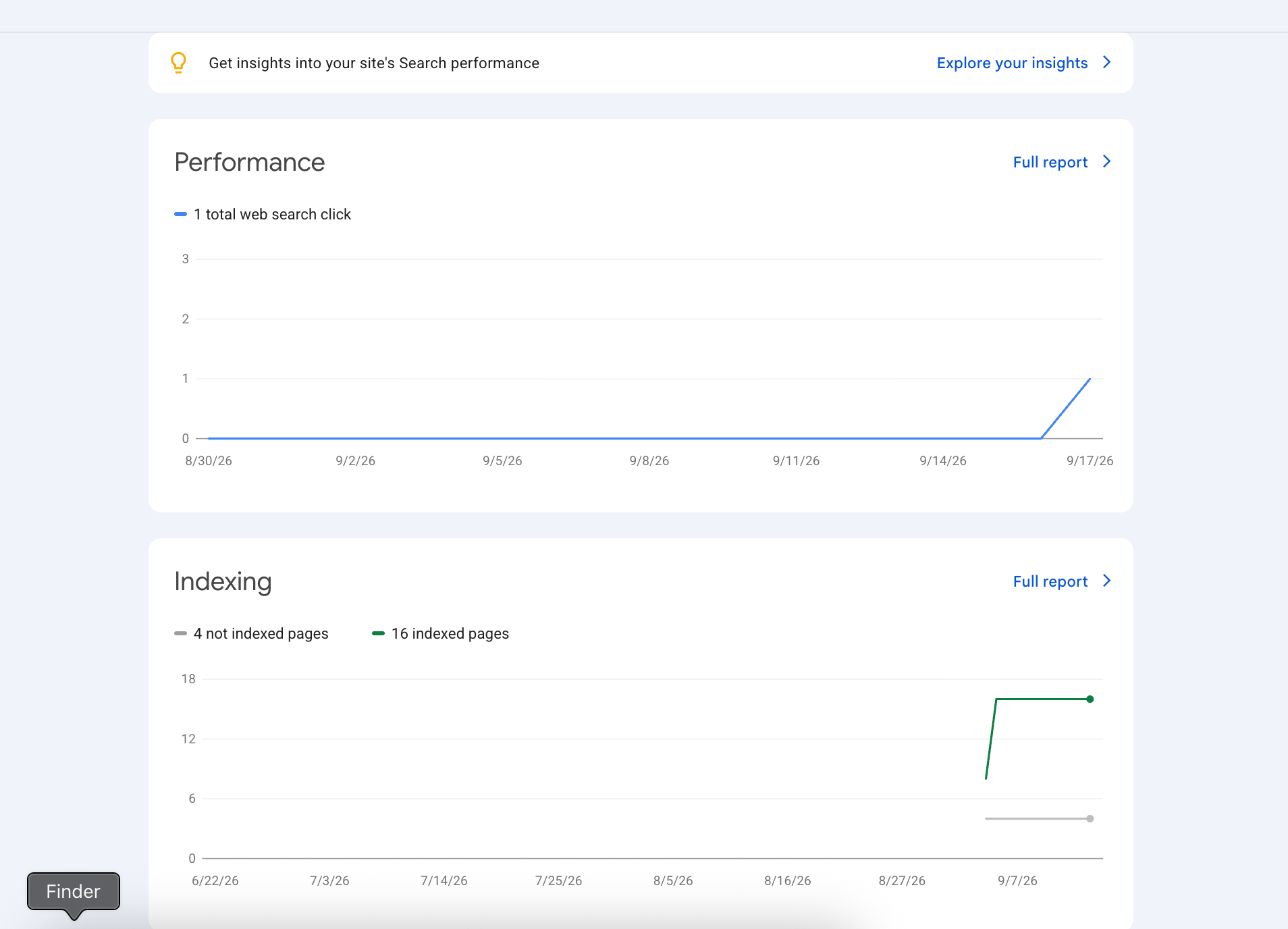
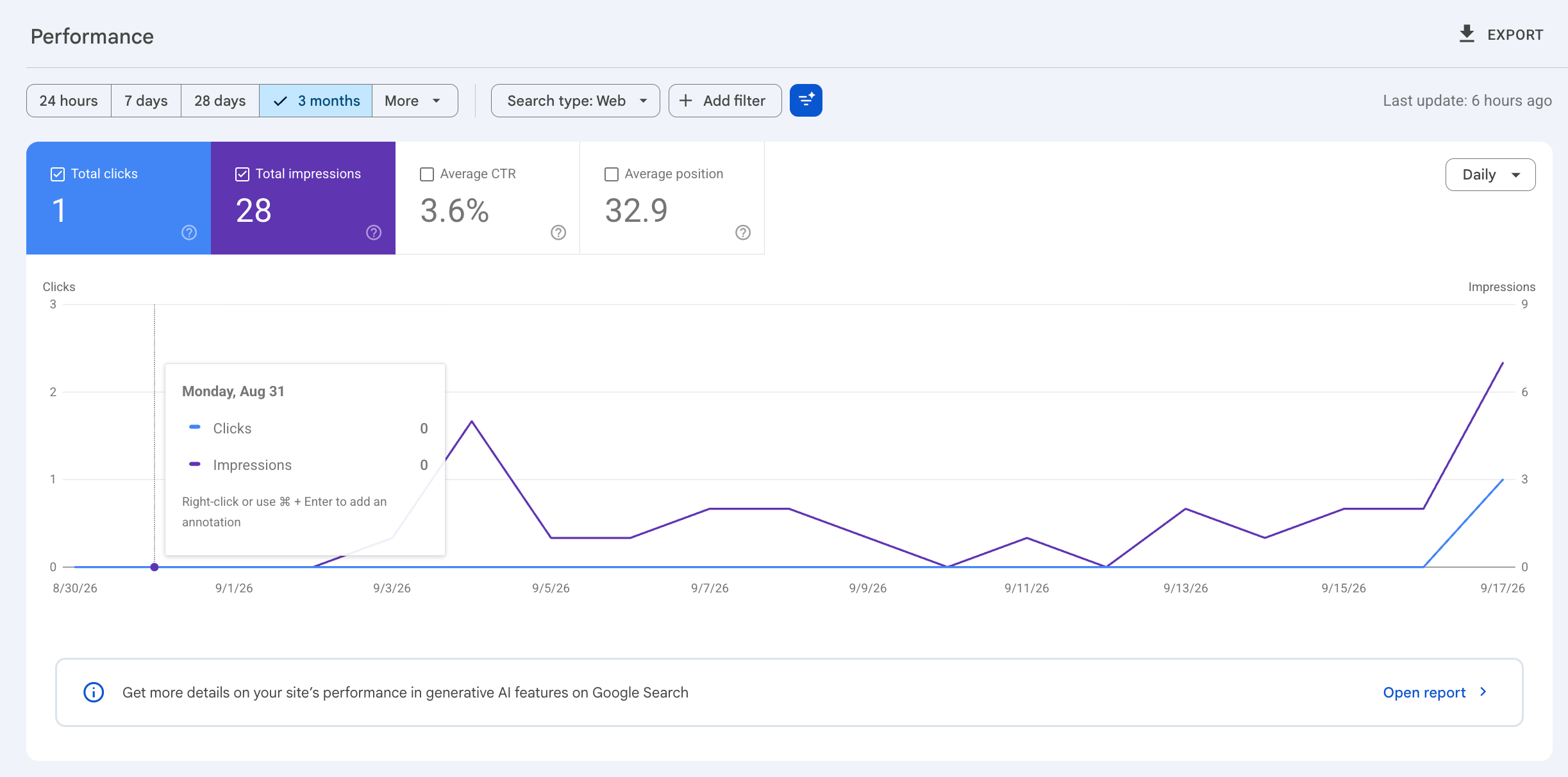
Those are small numbers, and I’ll be straight about that. This isn’t a traffic story. It’s a foundation story: the site is now crawlable, indexable and understood.
Before we begin to show you exactly what I did, I want to shout out to builders/founders who trusted me and submitted their products to TraffikList
(a platform I am currently working on…my goal is to grow this to the biggest launching platform where builders/founders get real traction to their builds)
Premium and Most Upvoted Products of Last week:
Moxie is an AI marketing manager built for that gap. She keeps your Google Business Profile accurate and active, writes and publishes blog content and social posts that feed search and AI engines, requests and responds to reviews, and reports what is actually working in plain language.
Flit is the local Wispr Flow alternative for Mac. Finished, formatted text in any app, in under a second.
One SDK that sends errors, network requests, performance traces, Web Vitals, and cookie-free analytics
Intilq writes, designs, schedules, and auto-posts a complete social campaign — in native Arabic and English — across Instagram, TikTok, LinkedIn, Facebook, and X
Share product updates. Get discovered by AI
Back to today’s post, let’s get started with what exactly I did.
What I did
Here’s everything I did, in order.
I built this on Next.js, so the code is Next.js, but every step is a concept you can check on any site.
SEO in 90 seconds
Three words are all you need:
👉 Crawl: Google’s bot visits your page.
👉 Index: Google stores the page so it can appear in search.
👉 Rank: Google decides where it appears.
Almost everything serves three jobs: let the bots in, tell them what each page is, and give them reasons to trust you. Most new sites fail at job one and never find out. That was me.
Step 0: Set up your repo so SEO changes are safe to ship.
My code lives in a GitHub repo connected to Vercel. Every push to main deploys automatically. That makes every SEO change a small commit I can read and undo.
Three habits made it work:
👉 Small, single-purpose commits. “Add robots.txt” is one commit and “Add FAQ schema” is another. When something breaks, you know where to look.
👉 Feature branches for big changes. The site redesign lived on its own branch until it was ready. The small SEO fixes went straight to main.
👉 Content and notes inside the repo. My blog posts are markdown files in content/posts/. My audit report lives in an SEO-Works/ folder. Publishing a post is a commit.
Two gotchas. On Vercel, files read at runtime aren’t always bundled into the deployment. My posts worked locally and would have 404’d in production until I listed the folder under outputFileTracingIncludes in next.config.ts.
And I once dated posts by my content calendar instead of the day I published them, which quietly scrambled my blog and sitemap order. Use the real publish date.
Step 1: Audit before you change anything.
Run an audit and let it write your to-do list.
Mine found four critical failures:
1. No working robots.txt.
2. No sitemap that included my homepage.
3. No canonical URL setup, so aioffercrafter.com and www.aioffercrafter.com could count as duplicates.
4. No social preview tags on the homepage.
It also found what was fine: strong copy, HTTPS, decent speed.
Knowing what not to touch saves you a week. Save the report in your repo, because you’ll want to re-run it later.
To begin, I use 2 GitHub repos:
https://github.com/AgriciDaniel/claude-seo
The SEO audit plugin (claude-seo) behind the original 42/100 audit, found in your plugin config
https://github.com/Outrank-SAS/outrank-nextjs-blog
The blog starter you used first, then dropped on Sep 3 for local markdown. Mention it only if you tell that story.
Step 2: Let the crawlers in
robots.txt tells bots where they can and can’t go. In Next.js it’s one file, src/app/robots.ts:
export default function robots(): MetadataRoute.Robots {return {

    rules: [{

      userAgent: “*”,

      allow: [”/”, “/blog”],

      disallow: [”/projects/”, “/settings/”, “/auth/”, “/api/”],

    }],

    sitemap: [”https://www.aioffercrafter.com/sitemap.xml”,

              “https://www.aioffercrafter.com/blog/sitemap.xml”],

  };

}
A sitemap lists the URLs you want indexed. src/app/sitemap.ts returns them, and my blog generates its own from the markdown files.
A canonical URL tells Google which version of a page is the “real” one. I set metadataBase in layout.tsx to the www version, so every canonical resolves correctly.
Then came the trap that cost me the most time. My own login middleware was blocking the crawlers. It redirected every logged-out visitor to /login, including Googlebot fetching robots.txt.
The fix was adding the SEO files to my public-paths list:
const PUBLIC_PATHS = [”/blog”, “/robots.txt”, “/sitemap.xml”, “/llms.txt” /* ... */];Verify each one. Open the URL in a browser or run
curl -I https://yoursite.com/robots.txt. You want plain text or XML, not a login screen.
Step 3: Tell them what each page is
Each page needs to say what it is:
👉 Title tag: aim for 60 characters or fewer, with the searchable words up front. Mine started as just “AI Offer Crafter”, a brand name and not a description. It’s now “AI Offer Crafter — Find the Sellable Offer in Your Published Content”.
👉 Meta description: 120–160 characters. It’s the sentence people read before they click.
👉 One H1 per page, and H2s with real topic words instead of clever labels.
👉 Open Graph and Twitter tags: these control the preview card when someone shares your link. I added them with a 1200×630 image.
A gotcha here: my posts had no image, so shared links showed a broken icon. A Next.js opengraph-image.tsx file now generates a branded card from each post’s title. If you return an explicit openGraph object with images: undefined, Next.js drops that fallback. I had to spell the URL out.
Step 4: Add structured data
Structured data (JSON-LD) is a small block of code that tells Google exactly what a page contains. It makes you eligible for rich results like expandable FAQs.
I used four types: FAQPage and SoftwareApplication on the homepage, BlogPosting on every post, and FAQPage and HowTo on posts that have them. The FAQ block looks like this:
{ “@type”: “FAQPage”,

  “mainEntity”: [{ “@type”: “Question”, “name”: “Your question?”,

    “acceptedAnswer”: { “@type”: “Answer”, “text”: “Your answer.” } }] }
One rule: the schema must match what’s visible on the page. After deploying, paste your URL into Google’s Rich Results Test to confirm it’s valid.
Step 5: Write for AI answers, too
More searches now end in an AI answer instead of a click. Three cheap things help:
👉 A direct answer right under the H1. Each post opens with one bolded, self-contained sentence that answers the target question, ready to be lifted whole.
👉 A real FAQ section with 3–4 questions, matching the schema exactly.
👉 An llms.txt file in /public with a summary of your site and the pages you’d want an AI to cite.
Be honest about that last one. llms.txt is an emerging convention and nobody can promise it does anything yet. It took 20 minutes, so I did it.
My first version listed three pages that didn’t exist, so check that every URL is live.
Step 6: Build trust and topical authority
Google wants to know who is behind a page and whether they know the topic. I added a founder section with a real photo and real numbers, and I named an author in every post’s schema.
I also publish in clusters: 6 topics, each with one big “pillar” post plus two supporting posts that link to each other. No post ships with fewer than two internal links. So far I’ve published 13.
Step 7: Measure it and get discovered
1. Add the site to Google Search Console and submit your sitemap. This is where you learn whether Google actually indexed anything.
2. Install simple analytics.
3. Get listed in a few directories (CodeHype, Traffiklist, Launch Llama Tools). They’re small, but each is an early link back.
The re-audit: 42 → ~77
I scored the site twice with the same categories and weights. The second score is my own re-score, so treat it as approximate.
Real Search Console numbers as of mid-September: 16 pages indexed, 4 not indexed yet, 28 impressions, 1 click, average position 32.9 (roughly page 3 or 4, normal for a brand-new domain).
The score rose a lot, and the traffic hasn’t yet. That’s expected. The audit measures whether Google can find you, and traffic comes from publishing consistently after that.
What I still get wrong
The audit also gave me a to-do list, and I’m not going to hide it:
1. My titles are too long. I told you to aim for 60 characters, and 12 of my 13 posts run 66–75 characters once the brand suffix is added. One is 115. Google will truncate them.
2. My blog index page has no canonical, social tags or schema. Only the homepage and posts do.
3. My private pages are indexable. /login and /access-required have no noindex tag, which may explain some of my 4 unindexed pages. I’m checking the Search Console report to confirm.
4. Unknown URLs don’t return a real 404. Mine redirect to the login page, which Google can read as a “soft 404”.
5. My default social image is 1 MB. It should be under about 300 KB.
Yes, this is a checklist I haven’t finished. Fixing it in the open is the point.
Your checklist
✅ yoursite.com/robots.txt returns plain text, not your homepage
✅ yoursite.com/sitemap.xml lists every page you want indexed
✅ Login or redirect rules don’t block those files
✅ One canonical domain (www or non-www)
✅ Every title is 60 characters or fewer including the brand suffix
✅ Descriptions are 120–160 characters
✅ An Open Graph image on every page you’d want shared
✅ Schema that matches the visible content
✅ A bolded direct answer under each blog H1
✅ Login and account pages set to noindex
✅ Missing pages return a real 404
✅ Site added to Search Console, sitemap submitted
✅ 2+ internal links on every post
If you only do three things this week, do the first three. They decide whether Google can see you at all.

Here’s the prompt, written for someone who already has a Next.js repo on GitHub and a Vercel deployment.
It follows the newsletter’s order: audit first, then fixes, then a re-audit. It also builds in the traps we hit (middleware blocking crawlers, title length, noindex on private pages, soft 404s).
Fill in the four placeholders at the top before pasting it into Claude Code, run from the repo root. (Please read it carefully; I know it is long)
You are helping me optimize my website for SEO. Work in this repo, which is a Next.js project deployed on Vercel from GitHub. Follow the phases below in order. Do not skip ahead, and do not change anything until Phase 1 (the audit) is finished and I’ve approved the plan.
About my project (fill these in before running)
- Live domain (canonical version, e.g. https://www.example.com): [YOUR_DOMAIN]
- What the site/product is, in one sentence: [WHAT_IT_IS]
- Who it’s for and what they search for: [AUDIENCE_AND_SEARCH_TERMS]
- Blog/content setup (none / markdown files in the repo / a CMS): [BLOG_SETUP]
Ground rules
1. Work on a new git branch called `seo-optimization`. Never commit directly to main.
2. Make small, single-purpose commits with clear messages (e.g. “Add robots.ts”, “Add FAQ schema to homepage”). One fix per commit.
3. Do not push, merge, or deploy anything without asking me first. Vercel deploys on push to main, so a push is a deploy.
4. Do not install any new dependency without asking me first. Prefer Next.js’s built-in metadata features.
5. Do not invent facts. Any claim, statistic, price, name, or bio you put into metadata or schema must come from the site’s existing content or from me. If you need one you don’t have, ask.
6. Anything that must match visible page content (FAQ schema, product schema, prices) must match it exactly.
7. Explain trade-offs when there is a real decision. Don’t narrate routine work.
8. Ask me before changing anything that looks intentional but might hurt SEO (e.g. a redirect, a noindex, a blocked path).
Phase 0: Understand the project (read-only)
Before touching anything, find out and summarize:
- Next.js version, whether it uses the App Router (`src/app` or `app`) or the Pages Router, and whether TypeScript
- The package manager (pnpm, npm, or yarn) so you use the right commands.
- Every public route and every private or authenticated route.
- Whether there is middleware (`middleware.ts`) and what it does, especially auth redirects.
- Where the current metadata lives (`layout.tsx`, page-level `metadata` or `generateMetadata` exports).
- How blog content is stored and rendered.
- Existing files: `robots.ts` or `robots.txt`, `sitemap.ts` or `sitemap.xml`, `llms.txt`, an OG image, JSON-LD scri
- Which config or env values exist for the site URL.
Report this to me in a short summary, and list any assumptions you’re making.
Phase 1: Audit (read-only, no code changes)
Audit the LIVE site at [YOUR_DOMAIN] using curl (not just the code), and audit the code too. Check each of the following and record pass/fail with evidence.
1. Crawlability and indexation
- `/robots.txt`: does it return `text/plain`, not HTML or a login page? What does it allow and disallow? Does it li
- `/sitemap.xml` (and any blog sitemap): does it return XML with a 200? Does it contain every page that should be indexed, and only those?
- Does the middleware or an auth redirect block crawlers from robots.txt, sitemap.xml, llms.txt, or any public page` and confirm the status and content type. Watch for redirects to a login page.
- Does the non-www domain redirect to the canonical domain with a single 301/308 redirect?
- Do private pages (login, account, dashboard, checkout, thank-you pages) have a `noindex` directive or a `Disallow pages that shouldn’t be.
- What does a nonexistent URL return? It should be a real 404, not a redirect to a login page and not a 200 (that’s a “soft 404”).
- Are there any redirect chains or loops on public pages?
2. Canonicals and site URL
- Is `metadataBase` set in the root layout to the canonical domain?
- Does every public page have a `<link rel=”canonical”>` with an absolute URL that matches the canonical domain? Ch index, and several posts.
3. On-page basics, for every public page
- Title tag: present, unique, and 60 characters or fewer INCLUDING any brand suffix added by a title template. Flag every page over the limit and show the character count.
- Meta description: present, unique, 120-160 characters.
- Exactly one H1. Headings in a sensible order. H2s that contain real topic words instead of vague labels.
- Every image has descriptive alt text.
- `<html lang>` is set, and the viewport meta tag is present.
4. Social sharing
- Open Graph tags: og:title, og:description, og:url, og:image, og:type, og:site_name.
- Twitter card tags: twitter:card (summary_large_image), title, description, image.
- The OG image exists, returns 200, is 1200x630, and is under about 300 KB. Report its actual size.
- Do blog posts without their own image get a generated or fallback OG image, or do they show a broken image?
5. Structured data (JSON-LD)
- What schema exists on each page type? Validate that it parses as valid JSON.
- Expected: Organization or WebSite and a product/app schema on the homepage; FAQPage where the page has a visible FAQ; BlogPosting (with author, publisher, datePublished, dateModified, mainEntityOfPage) on blog posts; HowTo on step-by-step tutorials;
BreadcrumbList where relevant.
- Check that every schema matches the visible content on its page.
6. Content and internal linking
- Count published posts and the word count of each.
- Does each post open with a direct, self-contained answer to its target question?
- Does each post have a real FAQ section? Does it link to at least 2 other pages on the site?
- Is the site organized in topic clusters (pillar posts linking to supporting posts and back)? Are any pages orphaned (in the sitemap but linked from nowhere)?
- Is there visible author/founder information with real credentials (E-E-A-T)?
7. AI-search readiness
- Does `/llms.txt` exist and return plain text? Does every URL listed in it return 200? Does it list all published posts?
- Do posts have direct-answer openers, FAQ sections, and specific facts (numbers, dates, names) that an AI could ci
8. Performance and technical hygiene
- Time to first byte for the homepage, a blog index, and a post (use `curl -w`).
- Cache-control headers on public pages.
- HTTPS and HSTS. Security headers: X-Content-Type-Options, X-Frame-Options, Referrer-Policy, Permissions-Policy.
- Font loading: how many font files are preloaded, and are all of them used?
- If a PageSpeed Insights API key is available, run Lighthouse on mobile for the homepage and one post. If not, say so and don’t guess.
9. Repo and deployment setup
- Is the repo connected to Vercel with git integration (push to main deploys)?
- Is the site URL configured in one place (an env var or constant) rather than hard-coded in many files?
- If content is read from disk at runtime (markdown files), is that folder included in the deployment via `outputFit.config`? Confirm the posts actually work in production, not just locally.
- Are blog post dates the real publish dates? Wrong dates scramble the blog order and the sitemap.
Scoring
Score each category out of 100, then compute the weighted total:
- Technical SEO: 22%
- Content quality: 23%
- On-page SEO: 20%
- Structured data: 10%
- Performance: 10%
- AI-search readiness: 10%
- Images: 5%
Be honest about what you could not measure (for example, Lighthouse if there’s no API key) and mark those scores as estimates.
Deliverable for Phase 1
Save the audit as `SEO-Works/audit-YYYY-MM-DD/AUDIT.md` in the repo, containing:
1. The score table with the weighted total.
2. What’s working (so we don’t touch it).
3. Every finding, with severity (Critical / High / Medium / Low), the evidence (the exact command and output, or file and line), and the recommended fix.
4. A prioritized action plan with estimated effort for each item.
STOP after the audit and show me the summary. Wait for my approval before making any changes.
Phase 2: Fix crawlability first (Critical)
Do these in order, one commit each. After each fix, run the code locally and verify with curl against the local dev
1. **robots.** Create `src/app/robots.ts`. Allow public pages. Disallow private and app routes (login, account, dasevery sitemap URL. Do not accidentally block CSS, JS, or images.
2. **Sitemap.** Create `src/app/sitemap.ts` covering every public page, with real `lastModified` dates (not `new Date()` on every build). If the blog is generated from content files, generate blog URLs from the same source. Never list private pages or
redirects.
3. **Middleware.** If the middleware blocks logged-out visitors, add `/robots.txt`, `/sitemap.xml`, `/llms.txt`, and every public path to its public list, or exclude them in the matcher. Verify with `curl -I` that each returns its own content type, not a
redirect to login.
4. **Canonical domain.** Set `metadataBase` in the root layout, and add `alternates.canonical` to the homepage, the blog index, and every post.
5. **Private pages.** Add `robots: { index: false, follow: false }` metadata to login, account, and checkout pages,tle.
6. **404 behavior.** Make unknown URLs return a real 404, not a redirect to login and not a 200. If the middleware causes the redirect, make an exception so that non-existent public paths reach Next.js’s not-found handling. Ask me before changing auth
behavior.
Phase 3: Fix on-page metadata
1. Set up a root title template. Then rewrite the titles so that, INCLUDING the brand suffix, none is over 60 chararal title is long, use `title: { absolute: “...” }` or a shorter SEO title. Put the target keyword near the front.
2. Write unique meta descriptions of 120-160 characters for every page. Write them for a human deciding whether to click.
3. Add full Open Graph and Twitter metadata to the homepage, the blog index, and every post.
4. Create a 1200x630 OG image for the site (compressed under about 300 KB). Add a per-post generated OG image with Next.js’s `opengraph-image.tsx` file convention, with the post title. Gotcha: if `generateMetadata` returns an explicit `openGraph` or
`twitter` object with `images: undefined`, Next.js stops using the file-convention fallback, so spell out the fallb
5. Fix headings: one H1 per page, and rewrite vague H2s to contain real topic words. Show me the before/after for each change before applying.
Phase 4: Add structured data (JSON-LD)
Add JSON-LD as `<script type=”application/ld+json”>` in server components:
1. Homepage: Organization or WebSite, plus the product/app schema (SoftwareApplication, Product, or whichever fits)rice and currency if there is a public price, and the creator/founder.
2. Homepage FAQ: FAQPage generated from the same data array that renders the visible FAQ, so they can never drift apart.
3. Blog posts: BlogPosting with headline, description, image, author (a real Person), publisher, datePublished, datfPage set to the canonical URL.
4. Blog posts with a FAQ section: FAQPage, generated from frontmatter or content data that also renders the visible FAQ.
5. Step-by-step tutorials: HowTo, mapped to the post’s existing step headings.
6. Blog index: CollectionPage or Blog. Also add BreadcrumbList where the page has breadcrumbs.
Then validate each schema: check that it parses as JSON, and tell me to paste the live URLs into https://search.google.com/test/rich-results after deployment.
Phase 5: Content and AI-search readiness
1. For every post, check the opening: the first line under the H1 should be a bolded, self-contained sentence that directly answers the post’s target question. Propose rewrites where it doesn’t, and show me each before applying.
2. Make sure every post has a “Frequently asked questions” section of 3-4 questions, matching its FAQ schema exactl
3. Create `public/llms.txt`: a short description of the site and its creator, then a list of citeable page URLs (homepage, blog index, every published post), then a “do not index” list of private paths. Every URL listed must return 200. Note honestly in
your summary that llms.txt is an emerging convention with no guaranteed effect.
4. Internal linking: give every post at least 2 contextual internal links. Find orphan pages. If the site has topic clusters, make sure each supporting post links to its pillar and each pillar links back to its supporting posts. Propose the links, and show
me the exact anchor text and location before applying.
5. E-E-A-T: if there’s no visible founder or author section, propose one. Use only real facts I give you. Ask me for the photo, bio, and credentials. Never invent any.
6. Set up a small checklist file, `SEO-Works/post-checklist.md`, for every new post: title under 60 characters withf 120-160 characters, keyword in the title or first paragraph, direct-answer opener, FAQ section and schema, 2+internal links, correct publish date, and a new entry in llms.txt.
Phase 6: Technical hygiene
1. Add security headers in `next.config` (X-Content-Type-Options: nosniff, X-Frame-Options: SAMEORIGIN, Referrer-Policy: strict-origin-when-cross-origin, Permissions-Policy). Don’t add a Content-Security-Policy without asking me, since it can break scripts.
2. If runtime file reads (like markdown posts) work locally but could fail on Vercel, add them to `outputFileTracinactly how to verify on the deployed site.
3. Check that fonts and images follow Next.js best practices (`next/font`, `next/image`, sensible sizes). Report the findings; don’t make sweeping changes.
4. Put the canonical site URL in one constant or env var and reuse it, so a domain change is a one-line edit.
Phase 7: Verify locally, then deploy with my approval
1. Run the build (`build` script for my package manager), the linter, and the type check. Fix anything you broke.
2. Run the dev server and re-check every changed page with curl: robots.txt, sitemap.xml, llms.txt, the homepage, the blog index, and one post. Show me the actual output for the metadata tags and JSON-LD blocks.
3. Show me a summary of the branch: every commit and every file changed.
4. Ask for my approval, then push the `seo-optimization` branch. Vercel will create a preview deployment. Tell me how to find the preview URL, and re-run the key curl checks against the preview.
5. Only after I approve the preview, tell me how to merge to main.
Phase 8: Search Console and measurement (steps for me to do)
Give me a clear step-by-step for these, since you can’t do them for me:
1. Add the domain as a property in Google Search Console (Domain property with DNS verification, or URL-prefix with an HTML tag).
2. Submit the sitemap URLs.
3. Use URL Inspection to request indexing for the homepage and the newest posts.
4. Check the “Pages” report a week later and read the reason for every “Not indexed” page. Explain the common reasoch.
5. What numbers to watch (indexed pages, impressions, clicks, average position) and how often, with realistic expectations for a new domain: indexing comes first and traffic comes much later.
6. Optional: a lightweight analytics script, and 2-3 relevant directories for early backlinks.
Phase 9: Re-audit
After deployment, re-run the Phase 1 audit against the live site using the same categories and weights. Save it as D/AUDIT.md` (new date), and produce a before/after comparison table:
| Category | Before | After | What changed |
|---|---|---|---|
List every issue that is still open, prioritized, so I know what to fix next. Be honest about the limits of the measurement (self-scored, no Lighthouse if no API key), and never claim a result you didn’t measure.
Output style
- Start every phase with a one-line summary of what you’re about to do, and end it with what you did, what you verified (with real command output), and what needs my decision.
- Show evidence for every claim: the command and its output, or the file and line number.
- When you’re unsure, ask instead of guessing.
- Keep going through the phases in order, but always stop at the checkpoints: after Phase 1 (audit approval), beforbefore merge.
Start now with Phase 0.
Hope you find it helpful.
This project is new; I will update and provide guides like this time and time again.
If you have any questions, let me know, send me a DM, or comment below
By the way, I have just started a new project (not AI Offer Crafter) but TraffikList, something I wanted to do, for almost a year now. At least it is live now, and I am taking submissions, but it is still developing. There is a lot to do. If you have a product, tool or app, you are most welcome to submit.
Sharyph
Founder of The Digital Creator
This is so clever. Off to update trevisanconsulting.com right now!
Honestly, the robots.txt thing is such a good catch. You'd never think to check it because it feels like a technical detail, but if that's broken, nothing else matters.