

Three months ago I didn’t know what a “Claude Skill” was either.
I was doing what most people do; opening a chat, typing out the same instructions I’d typed a hundred times before, copy-pasting old examples so the tone came out right, re-explaining my business every single time.
Then I learned there’s a way to stop starting from zero. It’s not a plugin you buy, not a subscription, not a secret model. It’s a plain text file. That’s it. A text file that tells Claude “here’s exactly how I do this job, do it this way every time.”
It’s called a Skill. And once I understood it, I rebuilt how my entire business runs on top of it.
This issue is the full walkthrough…starting from “what even is Claude” all the way to the actual files I use, so you can copy the whole system. No gatekeeping, no “join my course to learn the rest.” It’s all here.
By the end of this, here is what you are going to get:
What Claude actually is, for anyone who’s never touched it
What a Skill is (and the one-sentence idea that makes it click)
What a Plugin is, and how Skills + Plugins work together
Why this specific thing has creators obsessed right now
The mistakes almost everyone makes when they start
How to set one up for your business, correctly, in one sitting
How this actually grows revenue…not just saves time
By the end, you won’t just understand Skills. You’ll have a folder of your own.
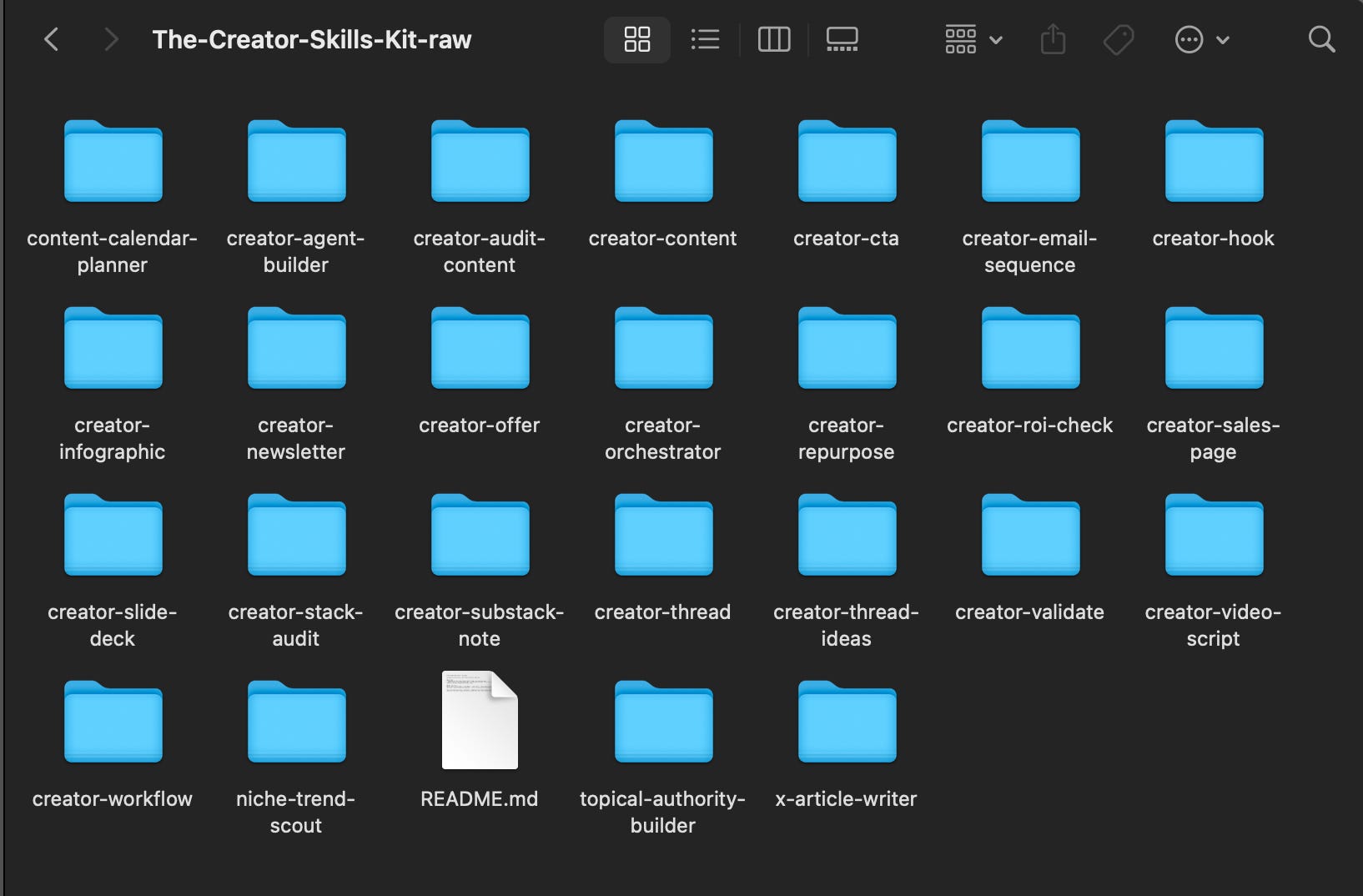
Before we start, throughout this post I will be using my Cluade Skill Kit for examples, so here is my Claude Skill Kit
WHAT CLAUDE IS, AND WHAT A SKILL ACTUALLY IS
Let’s back all the way up, because I want this guide to help you, even if you haven’t opened Claude before, and I don’t want to lose you in paragraph two.
Claude is an AI you talk to like a person. You type a message, it types back. No coding, no dashboard to learn. You could ask it to write an email, explain a contract, plan a trip, or draft your next newsletter…same way you’d ask a smart friend, except it never gets tired and it answers in seconds.
And..every new conversation begins from zero. Claude doesn’t remember that you run a newsletter, that you hate em-dash overload except when you use them on purpose, that your offer is $97 not $997. You either re-explain all of that every time, or you paste in a wall of context before you even ask your real question.
That’s the exact problem I had. And it’s the exact problem a Skill solves.
Here’s the one-sentence version:
A skill is a written job description you hand Claude, so it acts like someone who already knows your business, instead of a smart stranger you have to brief from scratch every time.
Think about the difference between two hires:
Hire A is talented, but it’s their first day. You explain your brand voice, your audience, your format, your rules…every single project.
Hire B has a written playbook for the job. You say “write the newsletter” and they already know your voice, your structure, your do’s and don’ts. You just review and ship.
A Skill turns Claude into Hire B. Permanently, not just for one chat.
So what is a Skill, physically? It’s not an app, not a plugin you install from a store, not something you pay for. It’s a plain text file called SKILL.md. .md just means “Markdown”…a simple text format, nothing fancier than what you’re reading right now. Anyone can open it, read it, edit it in five minutes.
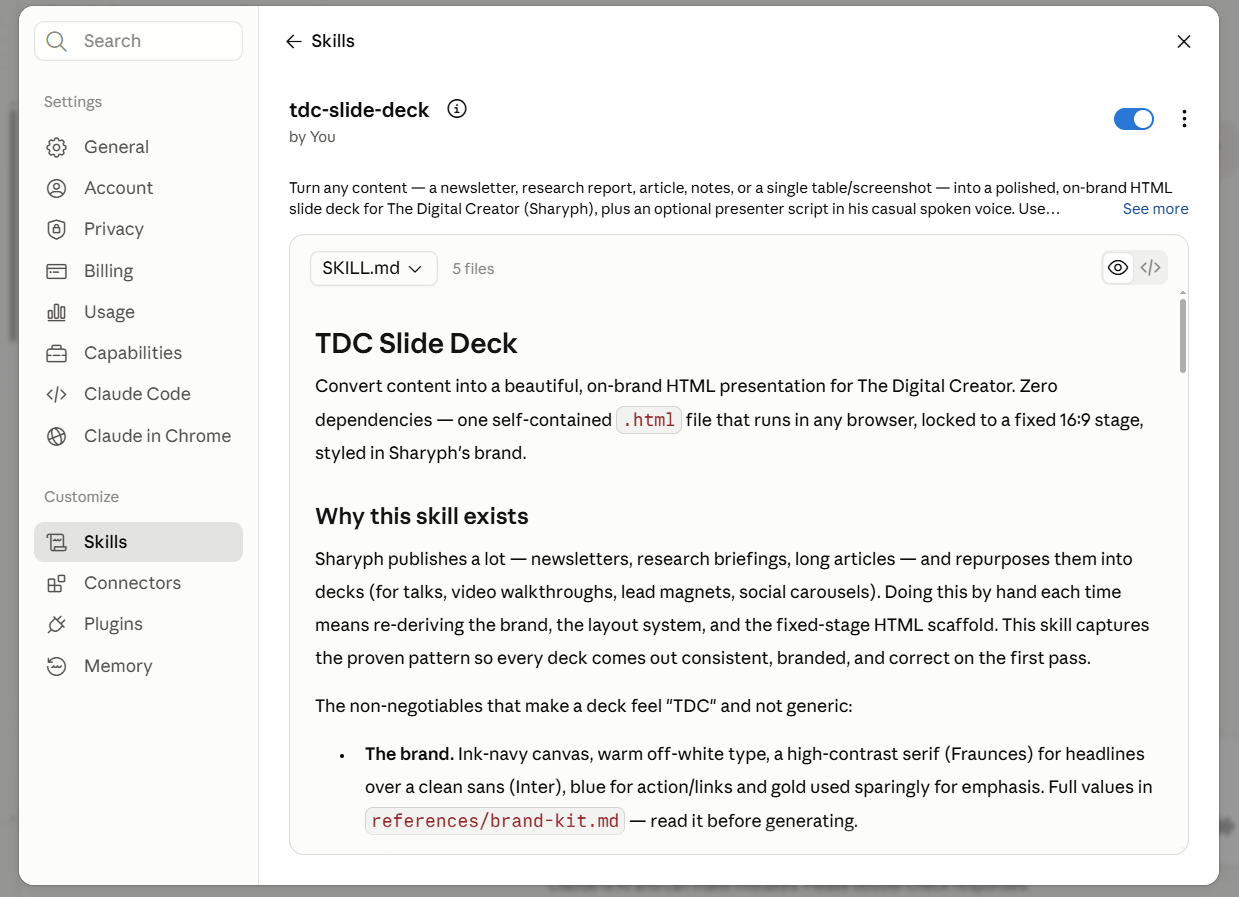
Every SKILL.md has two parts:
The description: a short note at the top telling Claude when to use this skill. Something like: “Use this whenever I ask for a newsletter, or say ‘draft this week’s issue.’”
The instructions: the actual playbook. The structure to follow, the tone rules, the things to never do, the exact format to hand back.
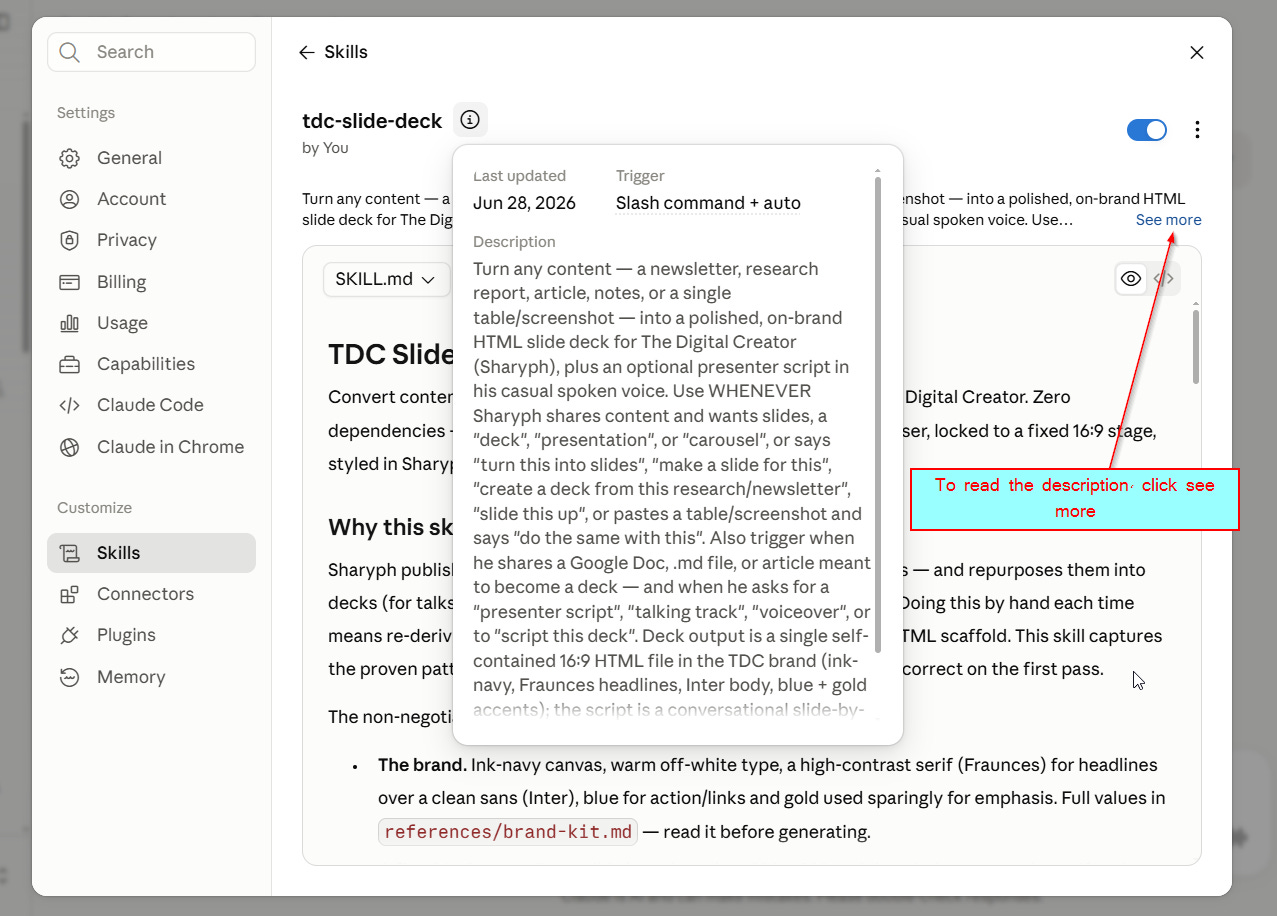
That’s it. That’s the whole mechanism. No code. No engineering degree required.
You’re not “building software”…you’re writing down how you already do the job, once, so Claude can do it the same way every time after.
One Skill fixes one job. Which is exactly why the next question matters: what happens when your business needs a dozen jobs done, in the right order, without you stitching them together by hand?
That’s where Plugins come in… (explained in next section)
WHAT A PLUGIN IS, AND HOW SKILLS + PLUGINS WORK TOGETHER
One Skill fixes one job. Write a newsletter. Write a thread. Audit a tool stack. Each one is a specialist, sitting quietly until you need that exact task done.
But your business isn’t one job. It’s a sequence of jobs, in order, that add up to a result.
Find a topic → turn it into a hook → write the newsletter → chop it into a Substack Note and a LinkedIn post. Four jobs, four specialists, one outcome.
You could run each Skill one at a time, by hand, copying the output of one into the next. That works. It’s also exactly the kind of manual stitching-together we’re trying to get rid of.
A Plugin is the fix: it’s a bundle of Skills packaged together, so instead of loading four specialists one at a time, you load the whole team at once.
Same hiring analogy from last section, one level up.
A Skill is one great employee with a clear job description.
A Plugin is a small department…several employees whose jobs are designed to hand off to each other in order, without you managing the handoff yourself.
Here’s what that actually looks like as a real chain, start to finish:
Find a topic — a Skill scans what’s trending in your niche right now and hands you a shortlist.
Write the hook — a Skill takes the topic you picked and writes five opening-line options built to earn the click.
Write the newsletter — a Skill takes the winning hook and writes the full issue around it, in your structure, your voice.
Repurpose it — a Skill takes that finished issue and turns it into a thread, a LinkedIn post, and a short-form Note.
One idea in. A topic, a hook, a full issue, and three more pieces of content out…in one sitting, without you rewriting the brief four times.
That’s the difference that actually matters: a Skill saves you from re-explaining one job. A Plugin saves you from re-explaining the entire workflow.
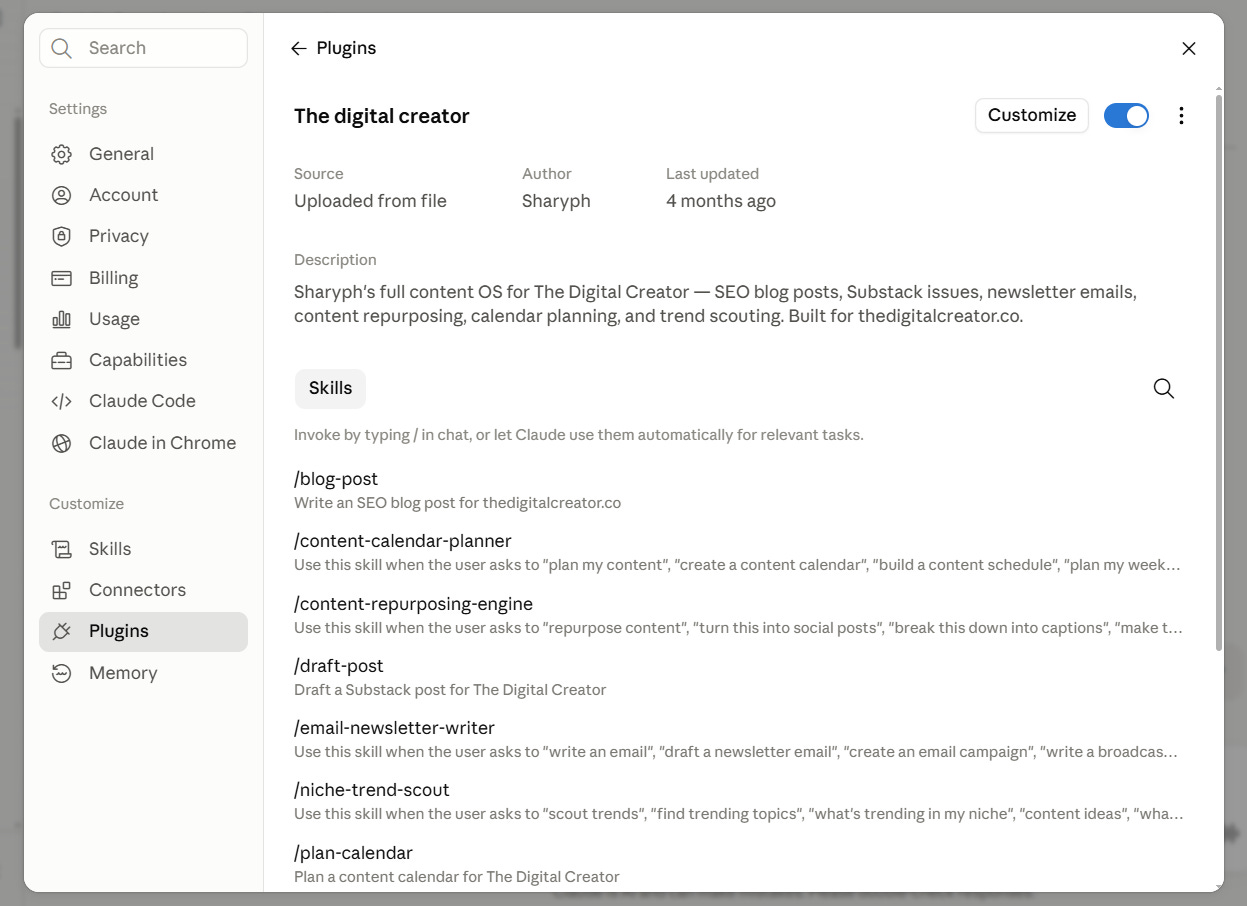
A couple of things worth clearing up here, because I got both wrong at first:
A Plugin isn’t a different kind of technology. It’s just Skills, organized. If you understand a Skill, you already understand 90% of a Plugin.
You don’t have to build the chain from scratch every time. You write the sequence once…“do step 1, then 2, then 3, then 4”…and reuse that same instruction every time you want that outcome. That one instruction is the plugin, in practice, even before you ever package it as an official installable thing.
This is also where people’s eyes light up when I explain it…because it’s the first moment Claude stops feeling like “a chatbot I ask questions” and starts feeling like “a small team running parts of my business.”
Which is exactly why this next part matters: why this specific idea has creators so worked up right now, and what’s actually driving that.
WHY CREATORS ARE SUDDENLY OBSESSED WITH THIS…
If you’ve been anywhere near X or LinkedIn in the last few months, you’ve probably seen it: people posting screenshots of folders full of .md files like they just found a cheat code.
Some of it’s hype. Most of it isn’t. Here’s the actual reason.
For two years, AI tools sold you speed. Skills are the first thing selling you continuity.
Every AI tool before this promised the same thing: faster writing, faster research, faster whatever. Useful, but it never compounded.
You were fast today, and tomorrow you were starting over, re-teaching the same AI the same things, at the same speed as yesterday.
Speed without memory is just a treadmill.
A Skill is the first version of “teach it once, keep the result forever.”
You’re not paying for a faster brain. You’re building a permanent asset…a written playbook that gets more valuable every time you refine it, not a prompt you retype and then lose in your chat history.
That’s the real shift.
Skills turned “I had a good conversation with AI” into “I built a system.”
One of those disappears the moment you close the tab.
The other one runs your business next week without you.
There’s a second reason, and it’s the one that actually matters for your bank account, not just your workflow.
Most of the creators are not short on ideas, they’re short on a repeatable process for turning ideas into finished, on-brand output without reinventing your approach every single time.
A Skill is that repeatable process, written down.
And the third reason, the one nobody says out loud, is that this is genuinely one of the few “learn this now” moments where being early actually pays off. Not because the technology disappears if you wait. Because the compounding does.
Every week you run your Skills, they get sharper…you notice what to adjust, what examples to swap in, what to cut. The person who started three months ago isn’t just “further along.” Their system is better, because it’s been used and refined three months longer than someone starting today.
That’s the obsession, stripped of hype: it’s the first AI habit that compounds instead of resets.
None of that matters, though, if you set it up wrong on day one…and almost everyone does.
That’s next: the specific mistakes I made (and still see people making) when they first start with Skills.
THE MISTAKES ALMOST EVERYONE MAKES
(I MADE ALL 3)
Before I show you how to set one up, I want to save you three months of doing it wrong.
Because I did all three of these, in order, before it clicked.
Mistake #1: Downloading 20 Skills on day one and using none of them well.
The moment you see a folder of 25 Skills sitting there, the instinct is to install all of them immediately. It feels productive. It isn’t. You end up with 25 half-understood tools and zero habits…you don’t know which one to reach for, so you default back to the plain chat box, and the whole folder just sits there unused.
The fix is almost insultingly simple: pick the one Skill tied to the task you already do most, and use only that one for a week.
Not because the others aren’t good…because a Skill only compounds once it’s a habit, and you can’t build a habit around 25 things at once.
Mistake #2: Never replacing the placeholders, so everything sounds like it came from someone else’s business.
Every Skill worth using ships with fill-in-the-blanks: [Your Brand], [your audience], [your offer link]. The mistake is treating those as optional. People run the Skill straight out of the box, get a perfectly good newsletter, for a business that isn’t theirs. It reads on-brand for nobody, because it’s on nobody’s brand yet.
A Skill only sounds like you once you’ve told it who you are…once, in one file. Skip that step and you’ve just automated generic.
Mistake #3: Treating a Skill like a one-off prompt instead of a reusable asset.
This one’s subtle. People write a great instruction, get a great result, and then... don’t save it anywhere.
Next week, same task, they retype the whole thing from memory, worse than the first version. That’s not a Skill…that’s just a prompt you happened to write twice.
A Skill is only doing its job if it lives somewhere permanent and gets slightly better every time you use it…
a line added here, an example swapped there. The version of my newsletter Skill I use today is not the version I wrote three months ago. It’s been edited maybe fifteen times.
That’s not a flaw in the system, that’s the system working.
One more, smaller than the first three but worth naming:
Starting with a content Skill before you’ve set up your brand context Skill.
It’s like handing Hire B a flawless job description for “write the newsletter”…but never telling them your name, your audience, or your voice. Good structure, wrong voice.
Set up the brand-context file first; every other Skill gets sharper the moment you do.
Every one of these mistakes has the same root: treating a Skill like a clever trick instead of a piece of infrastructure. Tricks get used once. Infrastructure gets built once and used forever.
So…how do you actually avoid all four of these and set one up correctly, in one sitting?
That’s next, and it’s the part where you stop reading about this and actually have your own folder running.
HOW TO SET ONE UP CORRECTLY, IN ONE SITTING
Everything so far has been the “why.”
This is the “how”…the exact sequence, start to finish, so you’re not guessing.
Step 1: Start with a Skill someone already wrote. Don’t write one from scratch on day one.
This is the opposite of what feels productive, but it’s the right move.
Writing a great Skill from a blank page takes iteration…you write it, use it, notice what’s missing, fix it, repeat. Skip that whole learning curve by starting from a real, already-working file and adjusting it, instead of staring at an empty document.
I guess this is the best time to give you the skills I have built to grow and scale my brand, The Digital Creator.

Step 2: Set up your brand file first, before any content Skill.
Remember the mistake from last section: good structure, wrong voice, if you skip this.
Open the brand-context file, and fill in the blanks, your name, what you do, who you help, how you sound, your real links and offers.
This one file is what every other Skill reads from, so it’s worth doing properly, once.
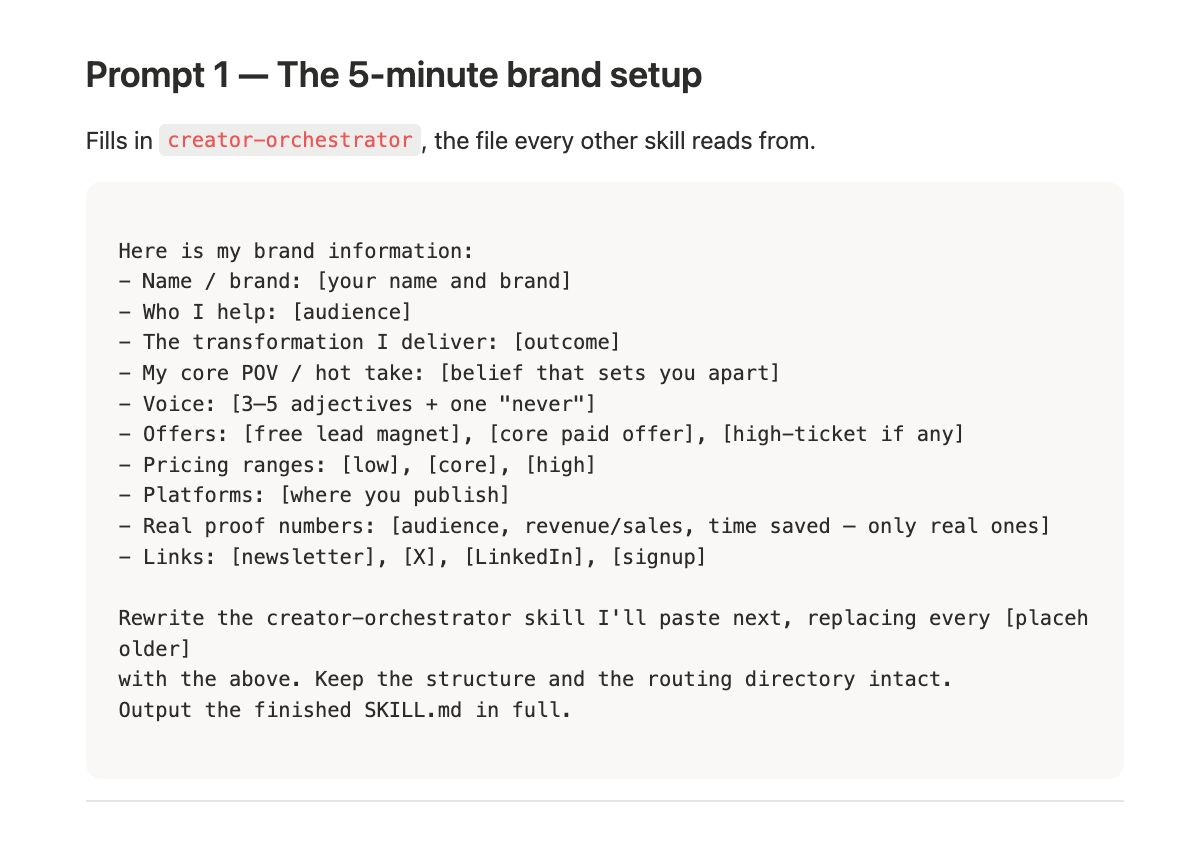
You can get this prompt inside Create Skill Kit
Step 3: Load it into Claude, two ways, pick based on how often you’ll use it.
Option A — just paste it. Zero setup, works right now.
Open a new chat with Claude, paste the entire Skill’s text in, then type your actual request underneath it. For example, you can say…
“Now use this to write me a newsletter about [topic].”
Claude reads the Skill and follows it for that conversation. This is the fastest way to try a Skill before committing to it.
Option B — install it properly, so it loads itself.
This takes 3 minutes and means you never paste it again:
Go to Settings → Capabilities, and make sure “Code execution and file creation” is turned on. Skills won’t appear without this.

Go to Customize → Skills.
Click the “+” button, then “+ Create skill.”
Select “Upload a skill.”
Upload the Skill as a ZIP file — the zip needs to contain the whole folder (not just the loose
SKILL.mdfile on its own).It’ll appear in your skills list. Make sure the toggle next to it is switched on.
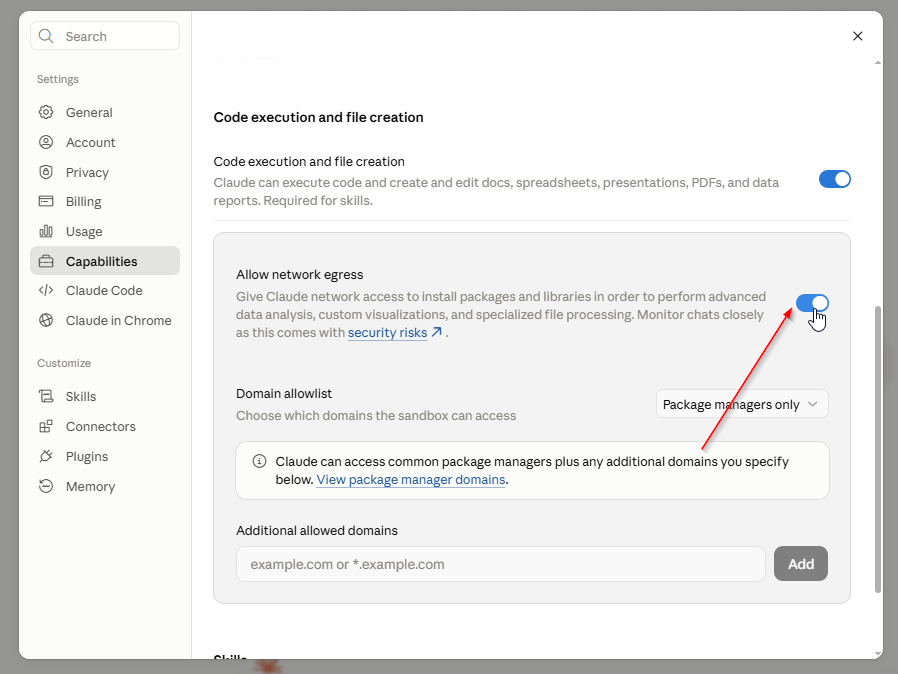
That’s it. From here, you don’t open the file again. You just ask for the task in plain language…“write this week’s newsletter”…and Claude recognizes it matches the Skill’s description and uses it automatically.
Step 4: Test it before you trust it.
Ask for the exact task the Skill is meant to handle, using natural language, not special commands.
If the output already sounds close to right, it’s working. If it feels generic, go back to Step 2; it’s almost always a placeholder you forgot to fill in.
HOW THIS ACTUALLY GROWS REVENUE, NOT JUST SAVES TIME
Everything up to here could sound like “a tidier way to use AI.” That undersells it.
Let me show you where this actually hits the business, not just the to-do list.
Every business…yours included…runs on four kinds of work, whether you’ve named them or not:
1. Content — the writing, the ideas, the stuff that earns attention.
2. Strategy — knowing what to make and when, instead of guessing.
3. Monetization — turning attention into an actual offer people pay for.
4. Systems — the plumbing that runs it without you touching every piece by hand.
Most creators are fully staffed on none of these. You’re doing all four yourself, badly, at 11pm.
A folder of Skills is what it looks like to finally have someone…or something… covering each of those four jobs.
Here’s what that looks like concretely, one per area:
Content: a Skill that writes your newsletter, another that turns it into a Notes, another that finds what’s worth writing about before you even open a blank page.
Strategy: a Skill that builds a full content calendar, so “what do I post today” stops being a daily decision you make from scratch.
Monetization: a Skill that pressure-tests a product idea before you spend a weekend building it, another that writes the sales page once you know it’s worth building.
Systems: a Skill that audits your tool stack and tells you what to cut, another that designs the automation for whatever’s left.
But the real unlock isn’t any single Skill…it’s chaining them, the way I showed you before.
One Skill saves you an afternoon.
A chain of them turns one idea into a finished, sellable thing without you managing every handoff.
Here’s a real one:
→ an idea comes in
→ a Skill checks if it’s actually worth building
→ a Skill packages it into an offer with real pricing
→ a Skill writes the sales page
→ a Skill writes the launch emails.
Four Skills, one weekend, one new offer live… instead of the version where that idea sits in your notes app for two months because “productize this” felt like a whole project on its own.
That’s the actual shift: you stop being the bottleneck in your own business.
Not because you’re doing less…because the parts that used to require you to sit down and re-figure-it-out from scratch now have a playbook that already knows how.
This is why I stopped thinking of these as “AI prompts” a while ago.
A prompt helps you do a task once.
A Skill, and a chain of them…is closer to hiring your first employee, except the salary is whatever you’re already paying for Claude.
That’s everything I wanted to walk you through…what these are, why they matter, how to set one up right, and where it actually touches revenue.
Last thing: the one-sentence version of all of this, and where to get the actual folder so you don’t have to build it from scratch.
GRAB ALL MY SKILLS
If you remember nothing else from this issue, remember this:
You don’t need more tools. You need Claude to already know how you work, that’s the entire idea behind a Skill.
Everything else…the plugins, the chains, the four business areas…is just that one idea, applied.
Three months ago I was re-explaining my business to Claude every single day. Now I have a folder that already knows it…my voice, my structure, my offers, my rules…and it gets a little sharper every week I use it.
I didn’t want to just tell you about this and let you rebuild it from scratch. So I didn’t.
I packaged the entire thing…all 25 of the actual Skills running The Digital Creator, the plugin chains from Section 3 and 7, and the exact prompts to make every one of them sound like you instead of me…into one free download.
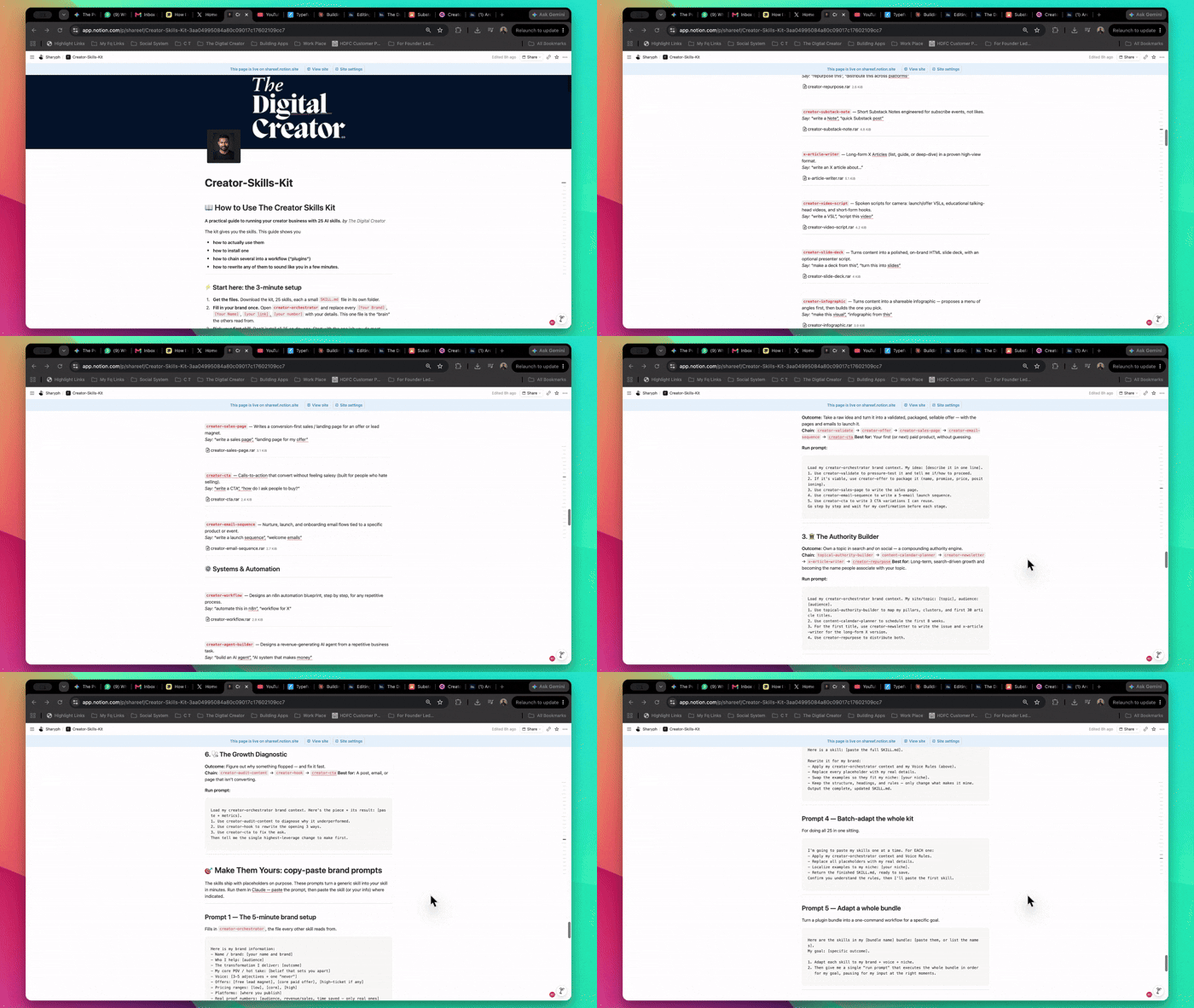
No “here’s 3 of the 25 to tease you.” It’s the whole thing, free, because the goal was never to hide the system — it was to prove it works by handing it over.
Inside, start exactly where I told you to ,open the brand-context file, fill it in once, pick one Skill, and use it for a week before you touch the rest.
Keep it simple,
Sharyph
Founder of The Digital Creator
Right on the money. Speed without memory is a recipe for disaster.
"Speed without memory is just a treadmill." What a killer line! Building reusable AI playbooks is such a game-changer for moving from repetitive prompt writing to actual, scalable leverage.