

Welcome to The Digital Creator, helping creators accelerate with AI. I show you how to use AI to start, create, grow, and scale faster.
Let me ask you something.
Every time you sit down to write a newsletter…
Do you spend the first 5 minutes explaining your brand to Claude?
Your tone. Your audience. Your offer. Your voice.
And Claude helps. It always helps.
But the next session? You do it all again.
Same explanation. Same context. Same setup.
Week after week.
I’ve been there.
When I first started using Claude seriously for The Digital Creator, I was getting good outputs.
But I was working so hard to get them.
Every single prompt started with a brief.
“I’m Sharyph. I run a newsletter for creators and solopreneurs. My audience struggles with tool overwhelm and monetization. My voice is direct, systematic, anti-fluff…”
You know what that is?
That’s not leverage. That’s just a more expensive search engine.
Here’s what I’ve learned after building a lean AI-powered creator business from scratch…
Most creators use Claude as an assistant.
They ask questions. They get answers. They close the tab.
The context resets. The work resets. They reset.
But the creators who are actually saving 10–15 hours a week?
They use Claude as an employee.
An employee who already knows your brand. Your audience. Your offers. Your voice rules.
An employee who never forgets, never clocks off, and costs $20 a month.
That’s the difference between using AI and building systems with AI.
That shift happened for me when I built something called a Skill.
One file. Written once. Lives in your Claude Project forever.
Now when I type “repurpose this” — Claude already knows my voice, my platforms, my CTAs, and my audience’s pain language.
No briefing. No editing. No starting over next week.
I published the “50 AI Agents” newsletter last week. The moment I finished writing it, I came to Claude and typed two words:
“Repurpose this.”
Within 60 seconds I had a full X thread, a LinkedIn post, and a Substack Note — all platform-native, all in my voice, all ready to schedule.
That’s 2–3 hours of work. Done in under 2 minutes.
In this newsletter, I’m going to show you exactly how to build that system for your creator business.
You’ll learn:
What Skills and Agents actually are → in plain English, not tech-speak
The architecture → how to think about your business as a system
The 5 Skills to build first → and in what order
How to write your Orchestrator → the most important file you’ll ever create
The complete templates → copy-paste ready, customizable for your brand
Whether you’re a newsletter writer, social media creator, or digital product builder…by the end of this issue, you’ll have everything you need to build a Claude operating system that runs your business.
Let’s get into it.
What Skills and Agents Actually Are
Before we build anything…let me clear up the confusion.
Because “AI agents” sounds technical.
It sounds like something for developers.
It’s not.
Here’s the plain English version.
Right now, every time you ask Claude to write a thread, you’re doing this:
You hire a freelancer.
You brief them from scratch…your brand, your audience, your tone, your offer.
They produce something.
You edit it to sound like you.
You move on.
Next week…you hire that same freelancer again. They remember nothing.
That’s exhausting. And it doesn’t scale.
A Skill fixes this.
A Skill is a Markdown file…just a plain text document…that contains everything Claude needs to do a specific job for your business.
Your voice rules. Your audience profile. Your offer. Your frameworks. Your CTA preferences.
You write it once. Claude uses it every single time.
It’s like giving that freelancer a complete brand handbook on day one…and never briefing them again.
An Agent takes it one step further.
An Agent is a Skill with a trigger.
Instead of waiting for you to ask…it fires automatically when something happens.
Newsletter published → content repurposed across platforms automatically.
New subscriber → right email sequence triggered based on how they signed up.
New week → content ideas researched and delivered to your inbox on Monday morning.
The key difference:

Here’s the architecture I built for The Digital Creator:
1 Orchestrator → 3 Agents → 14 Skills
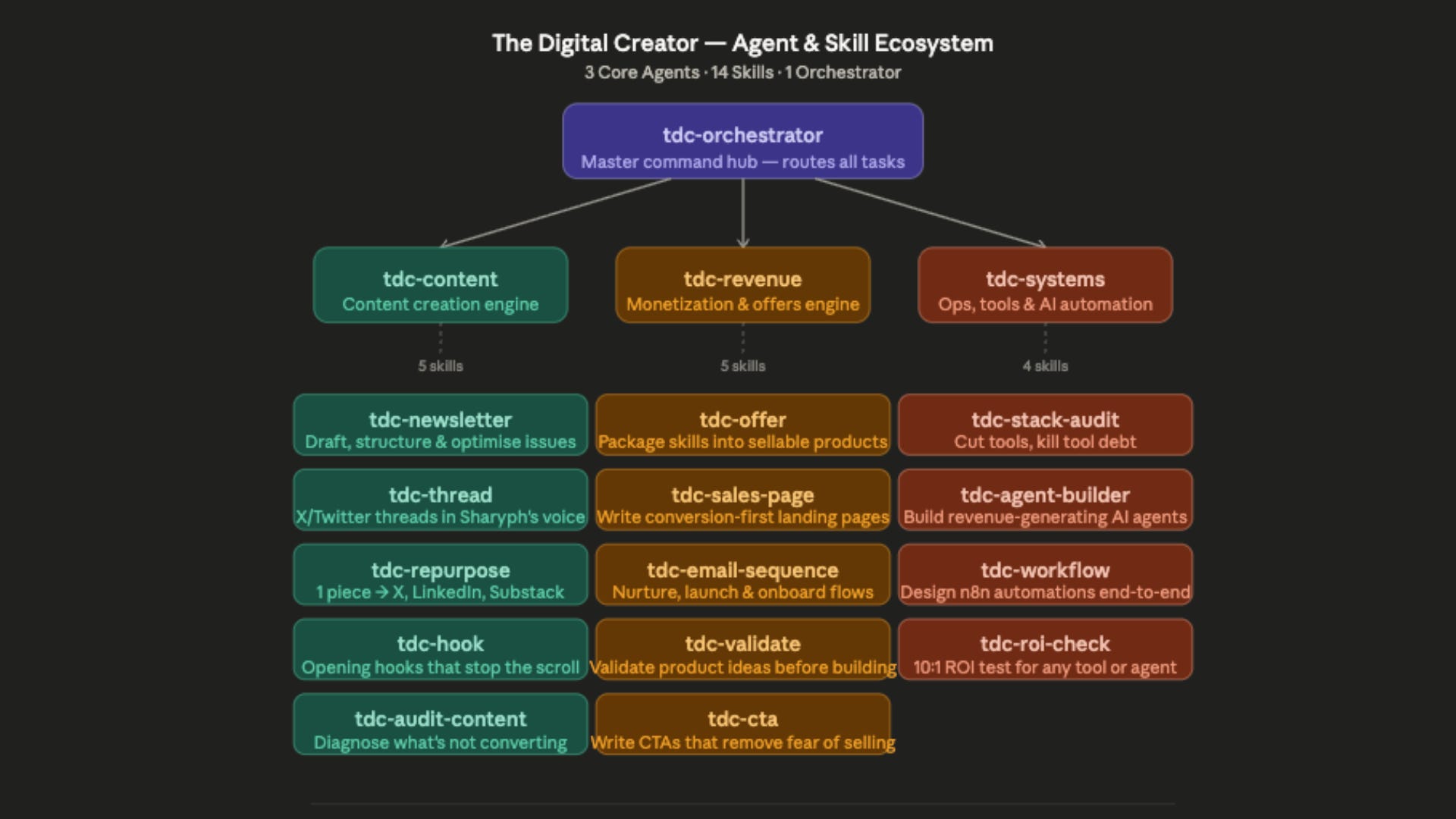
The Orchestrator is the master brain. It holds everything about your brand.
The three Agents handle the three operating layers of your business.
The 14 Skills are the specialists…each one built to handle one specific job perfectly.
Let me break down the three layers.
The 3 Operating Layers of Every Creator Business
Before you build a single Skill, you need a map.
Every creator business — newsletter writers, digital product creators, social media experts — runs on three layers.
And right now, most creators are manually doing all three. Switching context constantly. Burning their best hours on work a system could handle.
Layer 1: Content
Everything from idea to published piece.
Writing newsletters. Creating threads. Repurposing across platforms. Generating hooks. Auditing what’s not working.
This is where most creators spend the majority of their time — and where the ROI on systemization is highest.
The Skills in this layer:
newsletter— Write and structure complete issues in your voicethread— X/Twitter threads with hooks that stop the scrollrepurpose— 1 newsletter becomes 3 platform-native pieces automaticallyhook— 8 opening hook options for any topic in secondsaudit-content— Diagnose exactly why a piece isn’t converting
Layer 2: Revenue
Everything from offer clarity to the sale.
Packaging a product. Writing a sales page. Building an email sequence. Writing CTAs that don’t feel like selling.
This is where most creators leave money on the table — not because their offers are bad, but because the messaging and the system around the offer are broken.
The Skills in this layer:
offer— Package your skill into a clear, priced, positioned productvalidate— Test demand before you spend 3 weeks building something nobody wantssales-page— Conversion-first landing page copy in your voiceemail-sequence— Nurture, launch, and onboarding flows for Kitcta— CTAs that remove the psychological fear of selling
Layer 3: Systems
Everything that keeps the machine lean.
Tool stack decisions. Automation workflows. AI agent design. ROI checks on every investment.
This is where you practice what you preach. The 3-tool stack. The 10:1 ROI rule. Assets over activities.
The Skills in this layer:
stack-audit— Cut tool debt using the same framework I used to go from 21 tools to 3agent-builder— Design revenue-generating AI agents from scratchworkflow— n8n automation blueprints, node by noderoi-check— The 10:1 test for every tool, hire, or system you’re considering
The goal is simple:
Stop manually operating all three layers.
Build the Skills once. Let them handle the execution. Put your thinking where it matters most.
The 5 Skills to Build First
Don’t try to build 14 Skills in a weekend.
That’s the same trap as buying 21 tools…complexity disguised as progress.
These five Skills cover 80% of your weekly creative work as a creator. Start here.
Skill 1: The Orchestrator (Build This First)
This is the most important file you will ever create for your AI system.
The Orchestrator is your brand’s master context file. Every other Skill inherits from it.
It holds:
Your mission and core POV
Your audience’s exact pain language (their words, not yours)
Your active offers and pricing philosophy
Your voice rules — what you always do and never do
Your platform priorities and CTAs
Without the Orchestrator, every other Skill starts from zero.
With the Orchestrator, every conversation with Claude starts from a place of complete brand context — automatically.
Skill 2: Newsletter
Stops you re-explaining your voice, structure, and audience every time you sit down to write.
The Newsletter Skill knows:
Your hook formulas and emotional arc
Your section structure (hook → insight → takeaway → CTA)
Your sign-off style
Which CTA to use based on where the reader is in the journey
You give it a topic. It gives you a complete, publish-ready issue.
Time saved: 45–60 minutes per issue.
Skill 3: Repurpose
One newsletter. Three platform-native pieces. Automatically.
Not copy-paste reformatting.
Actual adaptation — the Repurpose Skill knows how X threads, LinkedIn posts, and Substack Notes each need to be written differently to perform on their platform.
The X thread earns follows and shares.
The LinkedIn post earns authority.
The Substack Note earns clicks back to the full issue.
Time saved: 2–3 hours every week.
Skill 4: Hook
Generates 8 opening hook options for any topic using the formulas that actually stop the scroll.
Counter-intuitive flips. Specific numbers. Pain-naming. Before/after frames.
Replaces the 20 minutes you spend staring at a blank first line.
Time saved: 20–30 minutes per piece of content.
Skill 5: CTA
Built specifically to solve the fear of selling.
Most creator CTAs are buried or apologetic.
“If you found this useful, maybe you’d consider…”
That’s not a CTA. That’s a mumble.
The CTA Skill writes direct, confident asks that feel like a natural next step — not a pitch. Five different CTA types matched to where your reader is in the journey.
ROI: Direct revenue impact every issue.
The Implementation Guide
You now know what to build and why it works.
The 5 Skills. The 4 Agents. The architecture behind it.
What comes next is the part that most people skip…and why most creators never actually build the system.
Here’s what’s inside the Premium implementation guide:
✅ The Skill Builder Project setup — the exact project structure I use to generate SKILL.md files, including the three files you need to load before writing a single prompt
✅ The build prompt for every Skill — the exact prompts I used to generate all 14 Skills, written so Claude produces output that sounds like your brand, not a generic template
✅ The 4 Agent SKILL.md files — Orchestrator, Content Agent, Revenue Agent, Systems Agent — pre-built for The Digital Creator, ready to use as your reference
✅ The complete Skill Builder prompt library — so you can build any new Skill for your brand in under 10 minutes
✅ Step-by-step setup guide for Claude Projects — how to install your Skills so they’re always active, no copy-pasting required
Premium also includes:
5 Premium Claude Skills (pre-built, install-ready)
AI Agents Collection
Substack SEO/AEO Implementation Toolkit
45% off all paid courses
Access to the community
Pricing: $39/month or $150/year (save 40%)
If you’re already a Premium Member — keep scrolling. The full implementation guide is below.
If you’re not yet a member:
How to Build the Skills.md files.
Here I will show you how to build the skill files. For me to run my business I have identified a total of 14 skills and 4 agents.
First, I will show you how I create the skill.md files.