

Here’s a number that should stop you mid-scroll.
$50,000,000,000.
That’s the projected size of the AI agent market by 2030.
And right now…in 2025…we’re still in the early innings.
More than 10,000 custom AI agents are being published every single week on platforms like the GPT Store, Poe, and AWS Marketplace.
Developers. Creators. Solopreneurs. Freelancers.
They’re all building agents and selling them.
Most of them don’t have a computer science degree.
Most of them aren’t engineers.
They’re people like you…who understood one thing early:
The next wave of digital products isn’t templates or eBooks.
It’s autonomous AI tools that do real work for real businesses.
And the window to get in early? It’s still open. But it won’t be forever.
So... what exactly is an AI agent?
Let me make this simple.
A regular AI tool responds when you ask it something.
An AI agent takes action on your behalf — without you having to prompt it every single step.
It’s the difference between a calculator and an employee.
You give an agent a goal. It figures out the steps. It executes.
Some examples:
👉 An agent that monitors your inbox, summarizes every email, and drafts replies — automatically.
👉 An agent that checks your sales data every morning, spots a low-stock item, and sends a reorder request…without you touching it.
👉 An agent that reads a customer support ticket, searches your knowledge base, and responds with the right answer…24/7.
This isn’t sci-fi.
This is being built and sold right now. Today.
And here’s the truth nobody wants to tell you:
The people building these agents don’t need to be technical.
They need to understand a problem, know the right tools, and be willing to put it together.
That’s it.
Why creators and solopreneurs are perfectly positioned
Think about it.
You already understand your audience’s pain points better than any developer sitting in a corporate office.
You know what keeps a content creator up at night.
You know what a small business owner struggles with at 11pm.
You know what a freelancer wastes 3 hours on every single week.
That knowledge? That’s your unfair advantage.
You don’t need to build the next ChatGPT.
You need to build a specific agent that solves one specific problem for one specific person…and charge for it.
A meeting scheduler for real estate agents.
A content repurposing agent for newsletter writers.
A client onboarding agent for freelance designers.
Specific. Focused. Valuable.
That’s the formula.
The shift that’s happening right now
For the last few years, digital products meant eBooks, templates, and courses.
Those still work.
But the market is shifting.
Buyers are getting smarter. They don’t just want to learn how to do something.
They want something that does it for them.
That’s exactly what AI agents deliver.
And here’s what makes this even more exciting for builders like you:
The marketplaces are already built. The infrastructure is already there. Platforms like the GPT Store, Poe, and Gumroad are actively looking for agents to list and sell.
You build it once.
It sells while you sleep.
Sound familiar?
That’s exactly how I built my first digital product that went on to do 700+ sales — without paid traffic.
The same model applies here.
Build once. Sell repeatedly. Scale without trading time for money.
In the rest of this newsletter, I’m going to give you:
✅ 50+ specific AI agent ideas — with descriptions, target buyers, and pricing
✅ A step-by-step build guide — from idea to live product
✅ The exact tools you need to build and sell them
Let’s get into it.
The 50+ AI Agent Ideas (Your Complete Vault)
Let me be clear about something before we dive in.
These aren’t random ideas I pulled from thin air.
This is based on real market research. Real platforms. Real buyers already spending money on these tools.
Your job is simple: pick one, build it, sell it.
Don’t try to build all of them.
Read through the list. Find the one that matches your audience, your skills, or the niche you already understand.
That’s your starting point.
🗂️ CATEGORY 1: Productivity Agents
Target buyers: Busy professionals, executives, remote teams, solopreneurs
1. Meeting Scheduler Agent Books, reschedules, and cancels meetings automatically through natural language. Connects to Google or Outlook calendars, handles time zones, resolves conflicts, and sends reminders — without the back-and-forth.
💰 Pricing: $10–20/user/month
2. Email Summarization Agent Reads through long email threads and surfaces what actually matters. Highlights action items, flags priorities, and even drafts replies. Built for executives and sales reps drowning in their inbox.
💰 Pricing: $15–25/user/month
3. Task Prioritization Agent Looks at a user’s task list and intelligently ranks what needs to happen first — based on deadlines, dependencies, and importance. Think of it as a personal chief of staff for your to-do list.
💰 Pricing: $10–15/user/month
4. Document Drafting Agent Turns bullet points, rough notes, or voice memos into polished documents. Reports, proposals, SOPs — formatted and ready to send. Saves hours of writing time every week.
💰 Pricing: $20–30/user/month
5. Focus & Deep Work Coach Agent Builds personalized focus schedules, blocks distractions, tracks deep work sessions, and sends accountability nudges. Built for freelancers and remote workers who struggle with focus.
💰 Pricing: $8–12/user/month
🗂️ CATEGORY 2: Marketing Agents
Target buyers: Small businesses, content creators, marketing teams, coaches
6. Social Media Content Agent Takes a topic, brand voice, or content brief and generates a full week of social posts — captions, hashtags, and platform-specific formatting included. Works across X, LinkedIn, and Instagram.
💰 Pricing: $29–49/month
7. SEO Blog Writing Agent Researches keywords, outlines a post, and drafts SEO-optimized content in your brand voice. Handles meta descriptions, headers, and internal link suggestions automatically.
💰 Pricing: $49–99/month
8. Ad Copy Generator Agent Writes high-converting ad copy for Facebook, Google, and LinkedIn campaigns. Give it a product description and target audience — it produces multiple variations ready to test.
💰 Pricing: $29–59/month
9. Email Campaign Builder Agent Designs full email sequences for product launches, lead nurture, and onboarding. Writes subject lines, body copy, and CTAs — personalized for different audience segments.
💰 Pricing: $39–79/month
10. Local Marketing Advisor Agent Analyzes local demographics and market conditions, then suggests promotions, local ad strategies, and seasonal campaigns. Built for brick-and-mortar businesses with no dedicated marketing team.
💰 Pricing: $99–199/month per client
🗂️ CATEGORY 3: Customer Support Agents
Target buyers: SaaS companies, e-commerce stores, service businesses
11. Niche SaaS Support Chatbot A trained support agent that knows your product inside out. Uses your documentation and knowledge base to answer customer questions instantly — 24/7, without a human.
💰 Pricing: $99–299/month
12. Order Status Bot Handles the #1 customer support question for e-commerce: “Where is my order?” Connects to order databases, gives real-time shipping updates, and processes return requests automatically.
💰 Pricing: $49–149/month
13. FAQ Automation Agent Turns your existing FAQ page into a conversational agent. Instead of customers searching for answers, they just ask — and get accurate, instant responses.
💰 Pricing: $29–79/month
14. Support Ticket Router Agent Reads incoming tickets, classifies by urgency and topic, and routes them to the right team or person automatically. Saves support teams hours of manual triaging every day.
💰 Pricing: $49–99/month
15. Customer Feedback Bot Reaches out to customers post-purchase or post-service, collects feedback conversationally, analyzes sentiment, and alerts the business when something is going wrong.
💰 Pricing: $29–59/month
🗂️ CATEGORY 4: Developer Tools Agents
Target buyers: Software teams, startups, DevOps engineers, indie developers
16. Code Review Assistant Integrates with GitHub or GitLab, reviews pull requests automatically, flags issues, suggests improvements, and explains code changes in plain English.
💰 Pricing: $20–50/developer/month
17. API Integration Helper Answers developer questions about third-party APIs using the actual documentation. Generates sample code, explains endpoints, and cuts integration time dramatically.
💰 Pricing: $19–39/month per team
18. CI/CD Deployment Agent Controls build and deployment pipelines through natural language commands. Trigger builds, check status, and manage releases — all from a simple chat interface.
💰 Pricing: Enterprise subscription, $200–500/month
19. Infrastructure Advisor Agent Recommends the right cloud architecture for startups and small teams. Takes your requirements and outputs a cost-optimized, scalable infrastructure plan.
💰 Pricing: $99–199/month
20. Bug Tracker & Explainer Agent Monitors your codebase, identifies recurring bugs, and generates plain-language summaries of what’s breaking and why. Especially useful for non-technical founders managing technical teams.
💰 Pricing: $29–79/month
🗂️ CATEGORY 5: Education Agents
Target buyers: Students, tutoring platforms, course creators, schools
21. Personal Online Tutor Agent Adapts to each student’s learning level and pace. Explains concepts, answers questions, gives quizzes, and tracks progress — available 24/7.
💰 Pricing: $10–25/student/month
22. Quiz & Assessment Generator Takes any piece of content — a textbook chapter, a video transcript, a blog post — and generates a full quiz with multiple choice, short answer, and true/false questions.
💰 Pricing: $19–49/month
23. Personalized Study Planner Builds a custom study schedule based on exam dates, weak areas, and available time. Adjusts dynamically as the student progresses.
💰 Pricing: $9–15/month
24. Language Learning Coach Agent Runs daily conversational practice in a target language. Corrects grammar, expands vocabulary, and adapts difficulty to the learner’s current level.
💰 Pricing: $12–20/month
25. Course Content Summarizer Takes long-form course videos or transcripts and produces clean, scannable summaries, key takeaways, and action items. Built for busy professionals learning on the go.
💰 Pricing: $15–29/month
🗂️ CATEGORY 6: Healthcare Agents
Target buyers: Clinics, telehealth platforms, wellness apps, health coaches
26. Symptom Checker Agent Guides users through a structured symptom assessment and provides general health information. Always paired with a disclaimer to consult a doctor — but helps people understand what they’re dealing with.
💰 Pricing: $99–299/month per clinic
27. Appointment Scheduling Agent Handles the full booking workflow for clinics and health practices. Confirms appointments, sends reminders, and manages cancellations — without staff involvement.
💰 Pricing: $49–149/month
28. Medication Reminder Agent Sends personalized reminders for medications, tracks adherence, and flags missed doses. Built for elderly patients and people managing chronic conditions.
💰 Pricing: $9–19/user/month
29. Mental Wellness Check-In Bot Conducts daily mood and wellbeing check-ins through conversation. Tracks patterns over time and surfaces insights for the user — or their therapist.
💰 Pricing: $15–29/user/month
30. Health & Fitness Tracker Agent Logs workouts, nutrition, sleep, and hydration conversationally. Gives weekly summaries and personalized suggestions to help users hit their health goals.
💰 Pricing: $10–20/month
🗂️ CATEGORY 7: Finance Agents
Target buyers: Individuals, freelancers, small business owners, financial coaches
31. Personal Finance Advisor Agent Connects to transaction data, analyzes spending patterns, and gives clear, actionable budgeting advice — without the jargon of a traditional financial advisor. 💰 Pricing: $9–19/month (freemium model)
32. Invoice Tracker Agent Monitors outstanding invoices, sends automated follow-ups to late payers, and gives freelancers and consultants a clear view of cash flow. 💰 Pricing: $15–29/month
33. Budget Planning Agent Creates a personalized monthly budget based on income, fixed expenses, and financial goals. Adjusts dynamically and alerts users when they’re off track.
💰 Pricing: $9–15/month
34. Expense Categorization Agent Reads receipts, bank statements, or transaction exports and automatically categorizes every expense. Saves small business owners hours at tax time.
💰 Pricing: $19–39/month
35. Savings Goal Agent Helps users set, track, and stay on course with specific savings goals. Gives weekly progress reports and suggests micro-adjustments to reach the goal faster.
💰 Pricing: $8–12/month
🗂️ CATEGORY 8: Creative Agents
Target buyers: Writers, content creators, marketers, indie filmmakers, podcasters
36. Story & Fiction Generator Helps writers develop plots, characters, and full chapters. Give it a genre and premise — it builds a structured story from there. Great for novelists, screenwriters, and hobbyists.
💰 Pricing: $0.01/word or $15–29/month
37. Blog Post Writer Agent Takes a keyword or topic and produces a full, structured blog post — introduction, body sections, conclusion, and CTA. Ideal for content creators who need volume without sacrificing quality.
💰 Pricing: $29–79/month
38. Image & Logo Design Agent Generates custom graphics, logos, and brand visuals from a text description. Multiple variations, multiple styles — on demand.
💰 Pricing: Per image or $29–49/month subscription
39. Video Script Writer Agent Takes a topic, audience, and format (YouTube, TikTok, ad) and writes a full video script — hook, body, CTA. Saves creators hours of scripting time.
💰 Pricing: $29–59/month
40. Podcast Show Notes Agent Takes a podcast transcript and produces show notes, timestamps, key takeaways, and a short social media summary — ready to publish.
💰 Pricing: Per episode or $19–39/month
🗂️ CATEGORY 9: Operations Agents
Target buyers: Retailers, e-commerce brands, manufacturers, logistics companies
41. Inventory Forecasting Agent Analyzes historical sales data and predicts future demand. Flags low-stock items before they become a problem and generates reorder recommendations automatically.
💰 Pricing: $500–1,000+/month per client
42. Supply Chain Tracker Agent Monitors shipments in real time, predicts delays, and sends alerts when something is off schedule. Gives logistics managers full visibility without manual tracking.
💰 Pricing: $199–499/month
43. Vendor Selection Assistant Analyzes supplier catalogs, ratings, pricing, and lead times — then recommends the best vendor for each purchase. Cuts procurement research time dramatically.
💰 Pricing: Per-project or $199–399/month
44. HR Onboarding Agent Guides new employees through the full onboarding process. Answers HR questions, delivers training materials, collects documents, and tracks completion — without HR lifting a finger.
💰 Pricing: $99–249/month
45. Meeting Room & Resource Booking Agent Manages internal resource bookings for offices and teams. Books rooms, equipment, and shared resources through a simple chat interface.
💰 Pricing: $49–99/month
🗂️ CATEGORY 10: Niche SMB Agents
Target buyers: Small and medium business owners in specific verticals
46. Restaurant Table Booking Agent Handles reservations, waitlists, special requests, and reminders for restaurants — without requiring staff to answer phones.
💰 Pricing: $49–149/month
47. Real Estate Assistant Agent Answers property queries, schedules viewings, qualifies leads, and provides market data for real estate agents and agencies.
💰 Pricing: $99–299/month per agent
48. Personal Fitness Coach Agent Builds custom workout plans, tracks progress, adjusts programs based on performance, and provides daily motivation and accountability check-ins.
💰 Pricing: $15–39/month
49. Property Management Bot Helps landlords collect rent reminders, handle maintenance requests, communicate with tenants, and track lease renewals — all automated.
💰 Pricing: Percentage of rent or $49–99/month
50. Salon & Spa Booking Agent Manages appointment scheduling, sends reminders, handles cancellations, and upsells additional services — 24/7, without a receptionist.
💰 Pricing: $39–99/month
51. Legal Document Summarizer Agent (Bonus) Takes lengthy contracts or legal documents and summarizes them in plain English. Flags key clauses, deadlines, and potential risks. Built for freelancers and small business owners who can’t afford a lawyer for every document.
💰 Pricing: Per-document or $29–79/month
52. E-Learning Platform Assistant Agent (Bonus) Embedded inside online course platforms, this agent answers student questions about course content, guides learners to the right lesson, and reduces drop-off rates.
💰 Pricing: $49–199/month per platform
Here’s what I want you to notice.
Every single one of these ideas targets a real problem that a real business is already paying to solve.
You’re not inventing a problem.
You’re just delivering the solution in a smarter, faster, more automated way.
That’s the difference between building a product people want versus building a product you hope they’ll want.
How to Build Your AI Agent (Step-by-Step)
Okay.
You’ve picked your idea.
Now the question everyone asks:
“But Sharyph... I’m not a developer. Can I actually build this?”
Here’s the truth:
You don’t need to write a single line of code to build a sellable AI agent.
Some of the most profitable agents being sold right now were built entirely with no-code tools.
What you do need is a clear process.
So let me walk you through exactly how to go from idea to live, sellable product.
Seven steps. No fluff.
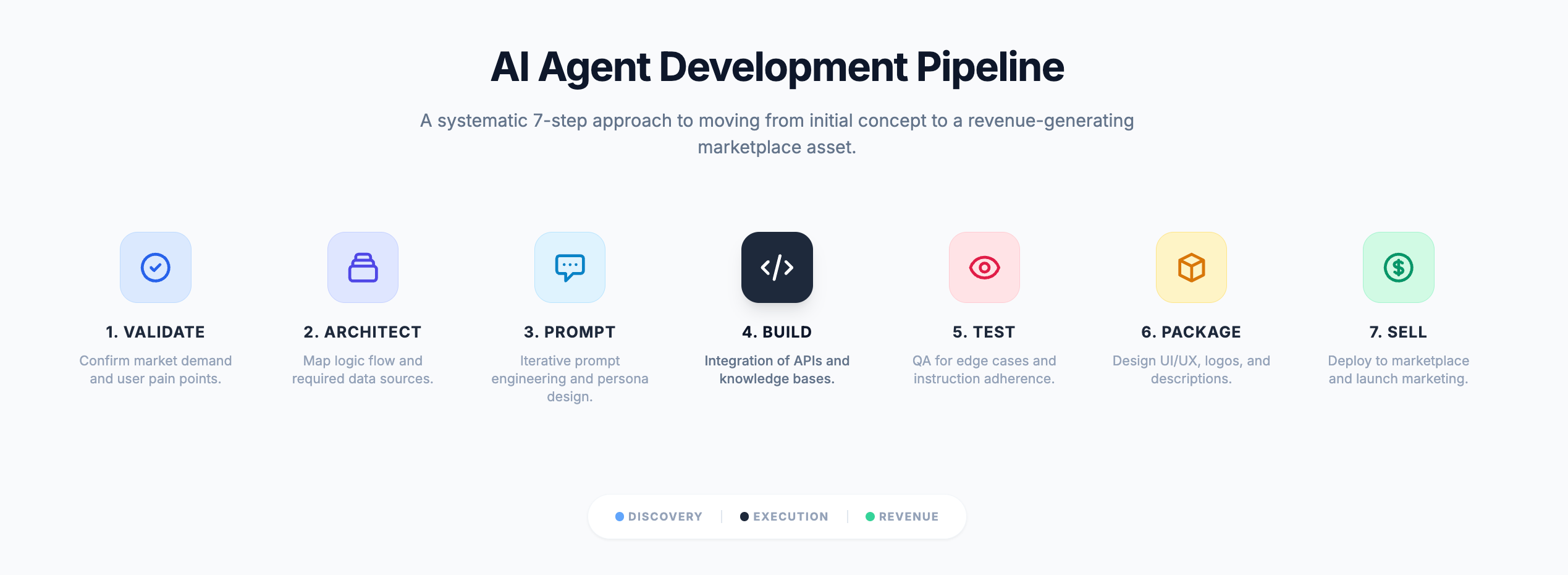
Step 1: Choose Your Niche and Validate the Idea
This is where most people skip ahead.
Don’t.
I’ve seen creators build entire products for weeks — only to launch to silence.
Not because the product was bad.
Because nobody actually wanted it.
Validation first. Building second.
Here’s how to validate in 48 hours:
👉 Search for the problem on Reddit, Facebook Groups, and X. Are people actively complaining about this? Are they asking for solutions? Real complaints = real demand.
👉 Look for existing tools doing this badly. If there’s already a clunky, expensive, or confusing tool in this space — that’s a green light. You don’t need to create demand. You just need to serve it better.
👉 Ask your audience directly. Post a question. Run a poll. Send a reply to your newsletter list. One honest response from a real person is worth more than any market research report.
👉 Check the marketplaces. Search the GPT Store or Poe for similar agents. If similar ideas have thousands of users — the demand is proven. Your job is differentiation.
The rule I follow: If I can find 10 people who would pay for this today, I build it.
Not 10,000. Not 1,000.
Ten.
Step 2: Pick Your Architecture
Don’t let this word scare you.
Architecture just means: how is your agent going to work under the hood?
There are two main options:
Option A: Simple (Single-step agent)
The user inputs something → the agent processes it → the agent outputs a result.
This is your starting point if you’re new.
Examples: Email summarizer, blog writer, quiz generator, feedback bot.
Best for: Beginners. Fastest to build. Easiest to sell.
Option B: Advanced (Multi-step agent)
The agent takes a goal → breaks it into steps → executes each step → delivers a final result.
This involves tool use — connecting to external APIs, calendars, databases, or the web.
Examples: Meeting scheduler, inventory forecaster, support chatbot with a knowledge base.
Best for: Higher price points. More complex problems. More defensible products.
My recommendation?
Start with Option A.
Ship something simple. Get your first paying customer. Then upgrade.
Done beats perfect. Every single time.
Step 3: Prompt Engineer Your Agent’s Brain
This is the most underrated step in the entire process.
And the one that separates mediocre agents from ones people actually pay for.
Your agent’s behavior is controlled by its system prompt — the set of instructions that tells it who it is, what it does, and how it responds.
Get this right, and your agent feels like a professional.
Get it wrong, and it feels like a broken chatbot from 2018.
Here’s the framework I use:
The 5-Part System Prompt Formula:
1. Role — Who is this agent? “You are a professional email assistant for busy executives...”
2. Task — What does it do? “Your job is to read email threads and produce a 3-bullet summary with action items...”
3. Rules — What should it always / never do? “Always use plain English. Never make assumptions about the sender’s intent. Never fabricate information...”
4. Format — How should it structure its output? “Always respond with: Summary (2–3 sentences), Action Items (bullet list), Priority Level (High/Medium/Low)...”
5. Tone — How should it sound? “Professional but concise. No filler phrases. No unnecessary pleasantries...”
Write this out before you touch any tool.
It’s your agent’s DNA.
And once you have it dialed in — it becomes a reusable asset you can deploy across multiple products.
Step 4: Build the Interface
Now we build.
The good news: you have options at every level of technical ability.
If you want zero code:
These platforms let you build, configure, and deploy agents through a visual interface — no coding required.
Voiceflow — Drag-and-drop conversation builder. Great for customer support and FAQ agents.
Botpress — Powerful no-code chatbot builder with native AI integration.
Stack AI — Build AI workflows and agents visually. Connect to any API without code.
Flowise — Open-source, visual LangChain builder. Free to use.
Make (formerly Integromat) — Automate multi-step agent workflows with a visual drag-and-drop builder.
If you’re comfortable with low-code / basic scripting:
n8n — Open-source automation tool. Incredibly powerful for multi-step agent workflows.
Bubble — Build full web apps around your agent without deep coding knowledge.
Glide — Turn your agent into a mobile-friendly app from a spreadsheet.
If you want full control (and are willing to learn):
LangChain — The most popular framework for building multi-step AI agents in Python or JavaScript.
OpenAI Assistants API — Build agents with persistent memory, tool use, and file handling directly via API.
Anthropic Claude API — My personal favourite for agents that need nuanced reasoning and long context.
Here’s my honest advice:
Don’t pick the most powerful tool. Pick the tool you’ll actually finish with.
A simple agent that’s live and selling beats a sophisticated agent that’s still being built.
Step 5: Test, Break, and Iterate
Before you show this to anyone — try to break it.
I mean that literally.
Ask it the weirdest questions your future users might ask.
Push it to its edges.
Here’s my testing checklist:
✅ Does it stay on task — or does it go off on tangents?
✅ Does it handle unexpected inputs gracefully — or does it crash?
✅ Does the output format stay consistent every time?
✅ Does it give wrong or made-up information at any point?
✅ Would a complete stranger understand how to use it in under 60 seconds?
If you find issues — go back to your system prompt first.
90% of agent problems are prompt problems.
Fix the prompt before touching the code or the tool configuration.
Then give it to 3–5 real people.
Not your friends who will be nice about it.
People who would actually use this product.
Watch them use it. Don’t explain anything. See where they get confused.
That confusion? That’s your product roadmap.
Step 6: Package It as a Sellable Product
This is where most technical builders drop the ball.
They build something great — and then present it like a rough prototype.
Packaging is not optional.
People buy the presentation as much as the product.
Here’s what a sellable AI agent package looks like:
The Product Package Checklist:
✅ A clear name — Not “AI Bot v2.” Something specific. “InboxZero Assistant.” “ReviewReply Pro.” “SalonBooker AI.”
✅ A one-line description — What it does and who it’s for. In plain English. “An AI agent that handles all your customer support emails — so you never miss a reply.”
✅ A short demo video — 60–90 seconds showing the agent in action. Screen record it. No fancy editing needed. Just show the transformation: messy problem in, clean solution out.
✅ 3 clear use cases — Give buyers 3 specific scenarios where this saves them time or money.
✅ A simple pricing page — One price. One CTA. No confusion.
✅ A delivery mechanism — How does the buyer get access? A shared GPT link? A web app URL? An embed code for their website? Make it frictionless.
Pricing guidance:
Start lower than you think you should.
Your goal at launch is not maximum revenue.
Your goal is 10 real customers and 10 real testimonials.
Those testimonials will let you charge 3x more in 60 days.
Step 7: List It and Sell
Your agent is built. It’s packaged. Now it’s time to get it in front of buyers.
Here’s where to list it:
Marketplaces (for discovery):
GPT Store — OpenAI’s native marketplace. Over 3 million custom GPTs already published. High discovery, lower price points.
Poe by Quora — Allows creators to monetize bots directly. Revenue sharing model.
AWS Marketplace / Salesforce AgentExchange — For B2B-focused agents targeting enterprise buyers. Higher price points, longer sales cycles.
Sell direct (for maximum margin):
Gumroad — My go-to for digital product sales. Simple setup, instant payouts, no monthly fees.
Lemon Squeezy — Great alternative to Gumroad with built-in affiliate management.
Your own newsletter — This is the highest-converting sales channel you have. Your subscribers already trust you. Sell to them first.
And here’s the thing most people miss:
You don’t need a marketplace to get your first sale.
You need one person who has the problem your agent solves.
Find that person.
Give them a free trial.
Get their feedback.
Ask for a testimonial.
Then raise your price and sell to the next ten.
That’s how every successful digital product I’ve built started.
Not with a big launch.
With one conversation. One sale. One piece of proof.
And then the system takes over.
The Tools You Need to Build AI Agents
Let me save you weeks of research.
When I started building AI-powered products, I wasted so much time jumping between tools.
Trying this platform. Testing that framework.
Installing things that didn’t work.
Paying for subscriptions I didn’t need.
Here’s what I know now:
You don’t need many tools. You need the right ones.
Most builders get this done with 4–5 tools total.
That’s it.
Below is the complete stack — broken down by category, with honest notes on what each tool is actually good for.
Pick what fits your level. Start lean. Add as you grow.
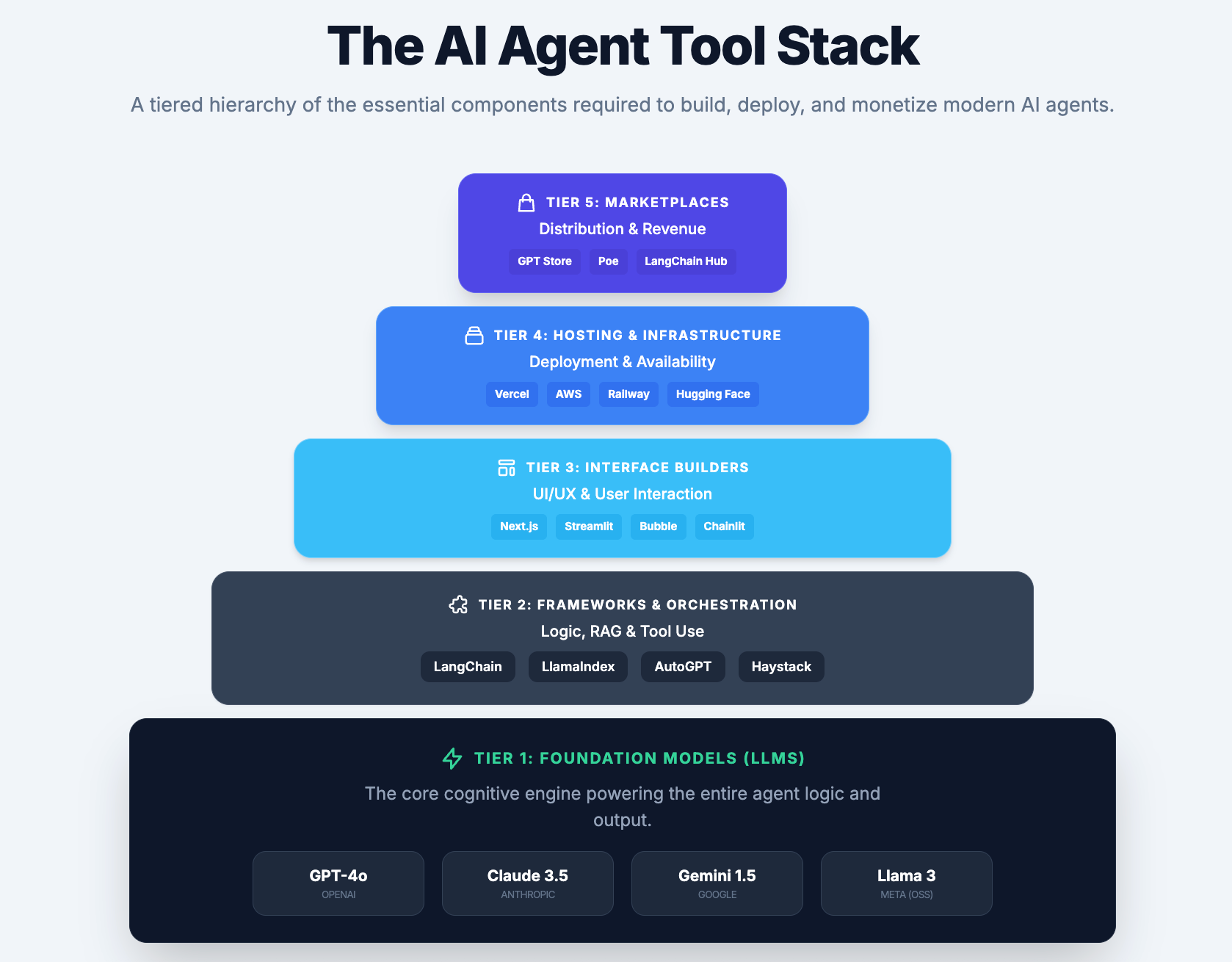
🧠 LAYER 1: The Brain (LLM APIs)
This is the engine inside your agent.
The large language model that actually understands, reasons, and responds.
You don’t build this. You plug into it via an API.
Here are your main options:
OpenAI (GPT-4o / GPT-4.1)
The most widely used. The most documented. The easiest to get started with.
If you’re building your first agent and want maximum resources, tutorials, and community support — start here.
✅ Best for: General-purpose agents, beginners, high-volume use cases
💰 Pricing: Pay-per-token. Roughly $5–$30 per 1 million tokens depending on the model.
Anthropic Claude API
This is what I use personally for anything requiring nuanced reasoning, long documents, or complex instructions.
Claude handles long context windows exceptionally well — meaning it can process entire documents, transcripts, or knowledge bases in a single call.
For agents that need to read, analyze, and respond to large amounts of information — Claude is my first choice.
✅ Best for: Document analysis agents, support bots, research agents, anything requiring careful reasoning
💰 Pricing: Competitive with OpenAI. Claude Sonnet is the sweet spot for quality vs. cost.
Google Gemini (via Vertex AI)
Google’s model, accessible through their cloud platform.
Strong multimodal capabilities — meaning it handles text, images, and video in the same pipeline.
If your agent needs to process visual inputs alongside text, Gemini is worth exploring.
✅ Best for: Multimodal agents, teams already on Google Cloud infrastructure
💰 Pricing: Pay-per-use via Vertex AI. Free tier available for testing.
Meta Llama (Open Source)
If you want full control and don’t want to pay per API call — Llama models are free, open-source, and can be self-hosted.
The tradeoff: you need technical knowledge to deploy and maintain them.
✅ Best for: Privacy-sensitive applications, cost-conscious builders at scale, technical founders
💰 Pricing: Free to use. You pay for compute/hosting.
My honest take:
Start with OpenAI or Claude.
Both have generous free tiers to experiment with.
Claude is my personal go-to for anything complex.
OpenAI is the safest choice if you want the widest ecosystem of tutorials and integrations.
Don’t overthink this decision. You can always switch the model later — your prompt engineering and product logic stay the same.
⚙️ LAYER 2: The Framework (Orchestration Tools)
Once your agent needs to do more than one thing — fetch data, make decisions, call external tools, remember context — you need an orchestration layer.
Think of this as the nervous system that coordinates everything.
The most popular framework for building multi-step AI agents.
It lets you chain together LLM calls, tool use, memory, and retrieval — in Python or JavaScript.
Massive community. Thousands of tutorials. Integrates with almost everything.
✅ Best for: Developers comfortable with Python or JS who want full flexibility
💰 Pricing: Open source and free. Pay only for the LLM API calls.
Specializes in connecting LLMs to your own data.
If your agent needs to search through documents, PDFs, databases, or knowledge bases to answer questions — LlamaIndex makes this significantly easier.
✅ Best for: RAG (Retrieval-Augmented Generation) agents, knowledge base bots, document Q&A agents
💰 Pricing: Open source and free.
A visual, open-source automation tool that lets you build complex agent workflows without writing code.
Think of it as a more powerful, AI-native version of Zapier.
Connect your LLM to any API, database, or external service through a drag-and-drop interface.
✅ Best for: No-code and low-code builders who want multi-step automation
💰 Pricing: Free self-hosted. Cloud version starts at $20/month.
Make (formerly Integromat)
Similar to n8n but with a more polished interface and a larger library of pre-built integrations.
If your agent needs to connect to tools like Gmail, Notion, Airtable, Slack, or Shopify — Make handles this beautifully with almost no code.
✅ Best for: Creators and solopreneurs building automation-heavy agents
💰 Pricing: Free tier available. Paid plans start at $9/month.
If you’re already using OpenAI — their Assistants API gives you built-in memory, file handling, and tool use without needing a separate orchestration framework.
For simpler multi-step agents, this can replace LangChain entirely.
✅ Best for: Builders who want a managed solution without setting up a separate framework
💰 Pricing: Included with your OpenAI API usage.
🖥️ LAYER 3: The Interface (How Users Interact)
Your agent needs a front door.
Something users can actually open, type into, and get value from.
Here’s where you build that.
The cleanest no-code conversation builder on the market.
Design your agent’s conversation flows visually, connect your LLM, and deploy to web, mobile, or as an embeddable widget.
Excellent for customer support agents, FAQ bots, and onboarding flows.
✅ Best for: Beginners, customer-facing agents, non-technical builders
💰 Pricing: Free tier available. Pro starts at $50/month.
More powerful than Voiceflow. Steeper learning curve — but worth it.
Handles complex conversation logic, integrates natively with LLMs, and gives you more control over the agent’s behavior.
✅ Best for: Builders who need more customization without full code
💰 Pricing: Free tier available. Cloud plans from $89/month.
A visual platform specifically designed for building AI workflows and agents.
Connect to OpenAI, Claude, or Gemini. Add RAG with your own documents. Deploy as an API or embed on a website.
No code required for most use cases.
✅ Best for: Knowledge base agents, document Q&A, internal tools
💰 Pricing: Free tier available. Paid plans from $49/month.
Open-source, self-hostable version of a visual LangChain builder.
If you want the power of LangChain without writing code — Flowise gives you a drag-and-drop interface for the same functionality.
✅ Best for: Cost-conscious builders who want LangChain power without LangChain complexity
💰 Pricing: Free and open source. Host it yourself for near-zero cost.
If you want to build a full web application around your agent — not just a chat widget — Bubble is your tool.
Build dashboards, user accounts, payment flows, and settings pages — all without code.
✅ Best for: Builders who want to launch a proper SaaS product around their agent
💰 Pricing: Free tier available. Paid plans from $29/month.
☁️ LAYER 4: Hosting and Deployment
Your agent needs to live somewhere on the internet.
Where you host it depends on how technical you are and how much traffic you expect.
The fastest way to deploy a web-based agent to production.
If you’ve built your agent as a Next.js or React app — Vercel deploys it in minutes with a live URL.
✅ Best for: Front-end web apps, fast deployment, developer-friendly projects
💰 Pricing: Free tier is generous. Pro at $20/month.
Simple, affordable cloud hosting with almost no configuration required.
Great for deploying Python or Node.js backends without the complexity of AWS.
✅ Best for: Backend APIs, LangChain agents, n8n self-hosting
💰 Pricing: Free starter tier. Usage-based pricing from there.
Build, run, and deploy your agent entirely in the browser.
Zero local setup required.
One of the fastest ways to go from prototype to live URL.
✅ Best for: Beginners who want to deploy quickly without setting up a development environment
💰 Pricing: Free tier available. Paid plans from $20/month.
AWS / Google Cloud / Azure
For when you’re ready to scale.
More complex to set up — but gives you the infrastructure to handle thousands of users, store data securely, and comply with enterprise requirements.
✅ Best for: Agents targeting enterprise clients, healthcare or finance agents with compliance requirements
💰 Pricing: Pay-as-you-go. Free tiers available for experimentation.
🏪 LAYER 5: Where to Sell
You’ve built it. You’ve deployed it.
Now you need buyers.
Gumroad
My personal go-to for selling digital products.
List your agent as a product — with a demo video, description, and price.
Instant setup. Instant payouts. No monthly fees.
✅ Best for: Creators selling direct to their audience
💰 Pricing: 10% transaction fee. No monthly cost.
Lemon Squeezy
A powerful Gumroad alternative with built-in affiliate management, upsells, and better EU tax handling.
If you want to run an affiliate program around your agent — Lemon Squeezy makes this seamless.
✅ Best for: Builders who want affiliate partners driving sales
💰 Pricing: 5% + $0.50 per transaction.
GPT Store (OpenAI)
If you build on OpenAI’s platform — list your agent here for organic discovery.
Millions of ChatGPT users browse the store daily looking for tools.
✅ Best for: Agents built with OpenAI’s Assistants API
💰 Pricing: Free to list. Revenue sharing for monetized GPTs.
Poe by Quora
Another growing marketplace where creators can publish and monetize AI bots.
Direct revenue sharing with creators based on usage.
✅ Best for: Consumer-facing agents with broad appeal
💰 Pricing: Revenue sharing model.
Your Own Newsletter
I saved this for last because it’s the most important one on this list.
Every single one of the channels above requires you to find new buyers.
Your newsletter is full of people who already trust you.
They already opened this email.
They already read this far.
That trust converts at a rate no marketplace can match.
When you build your first agent…sell it here first.
Here’s the complete stack summarized:
🧠 Brain: OpenAI API or Claude API
⚙️ Framework: n8n (no-code) or LangChain (code)
🖥️ Interface: Voiceflow (no-code) or Flowise (low-code)
☁️ Hosting: Replit (beginner) or Railway (intermediate) or Vercel (advanced)
🏪 Sell: Gumroad + Your Newsletter
This Is Your Window. Don’t Miss It.
Let me bring this full circle.
We started with a number.
$50 billion.
That’s where this market is heading.
But here’s what that number doesn’t tell you:
The creators who will capture the most value from that growth aren’t the ones who wait until the market is mature.
They’re the ones who move now.
While the tools are accessible.
While the marketplaces are hungry for new products.
While buyers are still in the early-adopter phase — willing to pay, willing to try, willing to give feedback.
The early adopters always reap the greatest rewards.
That’s not hype. That’s just how every technology wave has worked — from mobile apps to Shopify stores to newsletters.
And this wave?
It’s bigger than all of them.
Let’s recap what you now have
In this newsletter alone, you got:
✅ 52 specific AI agent ideas — organized by category, with target buyers and pricing
✅ A 7-step build guide — from validation to first sale, no coding required
✅ A complete tool stack — the exact tools to build, deploy, and sell your agent
This isn’t theory.
This is a blueprint.
The only variable left is whether you act on it.
The real question
Here’s what I’ve learned after selling 700+ digital products and helping thousands of creators build online:
Most people don’t fail because they lack information.
They fail because they never start.
They read everything. They bookmark everything. They save every newsletter.
And then they wait for the “perfect moment.”
Here’s the truth nobody wants to tell you:
There is no perfect moment.
There is only the decision to start — and the system to support you when you do.
That’s exactly what I’ve spent the last two years building.
Not just content about building digital products.
Actual systems for actually building them.
If you’re ready to go deeper
Here’s how I can help you move from “I have an idea” to “I have a product that sells.”
👉 Option 1: Start free
If you’re brand new to this and want a solid foundation before you invest anything —
Grab my free Lean AI-Powered Business Playbook for Creators.
It covers the mindset, the model, and the first steps to building a lean one-person business with AI.
No cost. No catch.
👉 Option 2: Go deeper with the AI Digital Product Builder
This is my flagship course.
Eight weeks. Step by step.
I walk you through everything — from identifying your skill, to building your product, to setting up your sales system — with AI doing the heavy lifting at every stage.
This is the exact roadmap I used to:
✅ Grow to 75K followers on X
✅ Sell 700+ digital products
✅ Build a lean, evergreen sales engine that runs in the background
If you’re serious about building an AI-powered digital product this year — this is where you start.
👉 Option 3: Get everything with Premium Membership
For $39/month — or $150/year — you get access to the full vault.
Here’s what’s inside:
✅ 45% off all paid courses (including the AI Digital Product Builder)
✅ 5 Premium Claude Skills — pre-built, ready to use
✅ The AI Agents Collection — my curated collection of agent templates and frameworks you can deploy and sell immediately
✅ Substack SEO/AEO Implementation Toolkit
✅ Full community access
The AI Agents Collection alone is worth the price of membership ten times over.
→ Join Premium — $39/month or $150/year
One last thing
I want to be honest with you about something.
I don’t share ideas like this to fill space in a newsletter.
Every framework I publish. Every blueprint I write.
It comes from real experience. Real products. Real results.
I don’t just write about this stuff — I build it.
And what I’ve shown you today?
This is one of the clearest opportunities I’ve seen in two years of building in this space.
AI agents are not a trend.
They’re the next default way businesses will operate.
The question isn’t whether this market will grow.
The question is whether you’ll be one of the builders who benefits from that growth.
You have the ideas.
You have the blueprint.
You have the tools.
Now go build something.
Your next level awaits. Go get it.
Until next time — Sharyph | Founder of The Digital Creator
The real shift isn’t just more AI tools, it’s the rise of autonomous systems that solve real problems end to end
As usual very resourceful my friend. This is another one of your gems.