

TL;DR: NotebookLM is Google's free AI research tool that trains on your specific sources to become an instant expert. Content creators use it for competitive research, newsletter curation, SEO content outlines, YouTube-to-blog repurposing, FAQ generation, and project organization…all with source citations that ensure accuracy and traceability across multiple documents.
NotebookLM is rapidly becoming my secret weapon for every stage of content creation. Unlike generic AI tools that give you surface-level responses, NotebookLM lets you train the AI on exactly the sources you need—competitor websites, research papers, client transcripts, or industry newsletters. The result is contextual, cited responses that actually understand your specific project.
I’ve tested dozens of AI tools for content work, and NotebookLM stands out because it solves the citation problem. Every answer includes source references, so you can verify information and trace insights back to the original documents. This makes it invaluable for research-heavy projects where accuracy matters.
In this guide, I’ll show you six core ways I use NotebookLM in my content business, plus 40+ additional applications you can adapt for your workflow.
These aren’t theoretical use cases…they’re the exact systems I use to research competitors, curate newsletters, optimize for SEO, and repurpose content at scale.
What Makes NotebookLM Different from Other AI Tools?
NotebookLM differs from ChatGPT and Claude because it trains exclusively on your uploaded sources rather than general internet knowledge. You create dedicated notebooks, upload up to 50 sources per notebook (PDFs, Google Drive documents, websites, YouTube videos, or text), and the AI generates responses based only on that material with full source citations.
Most AI tools pull from their massive training data, which means generic responses that might not apply to your specific niche or project. NotebookLM flips this model. When you ask a question, the AI analyzes only the sources you’ve provided and highlights exactly where it found each piece of information.
This focused approach eliminates hallucinations on topics where you’ve provided authoritative sources. If you upload your competitor’s website and ask about their pricing strategy, NotebookLM quotes directly from their pricing page. If you load client meeting transcripts and ask about recurring objections, it pulls exact quotes from those conversations.
The tool also handles multiple formats seamlessly.
Upload a PDF research paper, add three competitor websites, drop in a YouTube video transcript, and paste some Google Doc notes…NotebookLM synthesizes insights across all of them.
This multi-source analysis is where the real power emerges for content creators who need to connect dots across different materials.
How Do Content Creators Use NotebookLM for Competitive Research?
Content creators use NotebookLM for competitive research by creating dedicated notebooks containing competitor websites, marketing materials, sales pages, and customer reviews. The AI then analyzes messaging strategies, identifies market gaps, compares pricing and features, and uncovers common themes in audience discussions…all with source citations showing exactly where each insight originated.
The competitive research workflow starts with building a comprehensive swipe file.
I create a new notebook called “Competitor Analysis [Date]” and systematically add sources:
top competitor homepages,
their about pages,
blog content,
product descriptions,
any public case studies or testimonials.
For deeper analysis, I also include Reddit threads, review sites, and industry forum discussions where customers talk about these competitors.
Once your notebook is loaded, you can prompt NotebookLM with strategic questions.
Ask: “What value propositions do these competitors emphasize?”
The AI scans all sources and summarizes the messaging angles, citing specific pages where each claim appears.
Then ask: “What customer complaints appear most frequently?”
and you’ll see patterns across reviews with direct quotes.
Rick Mulready, a marketing strategist I follow, suggests an advanced technique:
Load 10-15 high-converting sales pages from your industry into one notebook, then ask NotebookLM to identify conversion copywriting best practices.
The AI extracts patterns like headline structures, objection handling, and CTA placement—creating a playbook you can apply to your own sales materials.
This approach cuts research time dramatically.
Instead of manually reading through dozens of competitor pages and taking scattered notes, NotebookLM processes everything in minutes and surfaces the patterns that matter. You still bring the strategic thinking, but the AI handles the tedious analysis work.
Using NotebookLM for Newsletter Curation
NotebookLM streamlines newsletter curation by letting you aggregate multiple industry newsletters into one notebook, then prompting the AI to extract key takeaways, identify trends, and generate draft newsletters tailored to your audience. This process preserves your unique voice while automating the time-consuming research and synthesis work.
My newsletter curation system starts by subscribing to 8-10 industry newsletters that cover my niche.
Each week, I copy the content from these newsletters and paste them into a notebook labeled “Newsletter Sources [Week of Date].”
This creates a single knowledge base of the week’s most important industry news, trends, and insights.
I then use specific prompts to extract value.
My go-to prompt is:
“Analyze these newsletters and identify the top 5 trends or insights most relevant to solo content creators building digital product businesses. Include the source for each trend.” NotebookLM scans all newsletters and surfaces the patterns, often connecting dots I wouldn’t have noticed manually.
The next step is drafting. I prompt:
“Based on these trends, create a 3-section newsletter outline with practical takeaways for my audience. Focus on actionable systems, not just news.” The AI generates a solid first draft that I then refine with personal examples, specific tactics, and my own perspective.
This hybrid approach…AI handles synthesis, human adds strategic insight and voice...cuts my newsletter research time from 3 hours to 45 minutes.
The key to making this work is adding your personal layer. NotebookLM gives you the foundation, but your subscribers are there for your unique take.
I always add a personal story, specific numbers from my business, or a contrarian angle that challenges the conventional wisdom in those source newsletters.
For more strategies on how to monetize your newsletter, check out our 30-day blueprint.
How to Generate FAQs and Study Guides with NotebookLM
Generate FAQs by uploading customer support transcripts, sales calls, or onboarding documents to NotebookLM, then prompting the AI to identify recurring questions and provide sourced answers. For study guides, use the “Notebook guide” feature to auto-generate questions based on your source materials with adjustable difficulty levels for different learning contexts.
FAQ generation works exceptionally well when you have rich conversational data. Upload your last 20 customer support conversations, sales call transcripts, or email threads with clients.
Then prompt NotebookLM:
“What are the 10 most frequently asked questions in these conversations? Provide answers with source citations.” The AI identifies patterns across all conversations and drafts answers using language from your actual customer interactions.
This creates FAQs that address real objections in authentic language, not corporate speak.
When a potential customer reads your FAQ section and thinks “that’s exactly what I was wondering,” it’s because NotebookLM extracted that question from actual customer conversations.
You can then refine these answers, add your brand voice, and publish them on your website or in onboarding materials.
Study guides leverage NotebookLM’s built-in “Notebook guide” feature.

After uploading educational content…course modules, training documents, or reference materials…click the “Notebook guide” button.
The AI automatically generates comprehension questions based on the content, ranging from basic recall to application-level thinking.
I use this for course creation.
When developing a new digital product, I upload my rough draft content to NotebookLM and generate study questions.
These become discussion prompts for community members, self-assessment quizzes, or prompts for students to reflect on how they’ll apply the concepts.
The AI saves hours of manually crafting questions while ensuring they align perfectly with your actual content.
Organizing Project Information with NotebookLM
Organize project information by creating dedicated notebooks for each client or initiative, then uploading up to 50 sources per notebook including PDFs, Google Drive documents, websites, YouTube videos, and text notes. NotebookLM makes all content searchable with full source citations, letting you quickly find specific information across multiple documents and generate comprehensive project summaries.
Here's how Notebook LM facilitates project organization:

Project organization is where NotebookLM shifts from being a research tool to a knowledge management system.
For each major project or client, I create a dedicated notebook that becomes the single source of truth. All meeting notes, client documents, research materials, and reference content go into this one place.
The power comes from cross-document search and synthesis.
Let’s say you’re working with a client on their content strategy.
Your notebook contains their brand guidelines PDF, three competitor analysis websites, a transcript from your kickoff call, notes from two strategy sessions, and their existing blog posts copied as text.
When you need to draft their content plan, you can ask:
“Based on the client’s goals from our kickoff call and their brand voice guidelines, what content topics would best differentiate them from the competitors I analyzed?”NotebookLM pulls insights from all these sources simultaneously, something you couldn't do efficiently with traditional file folders.
The AI shows you exactly which document each recommendation came from, so you can verify alignment with client requirements or expand on specific points.
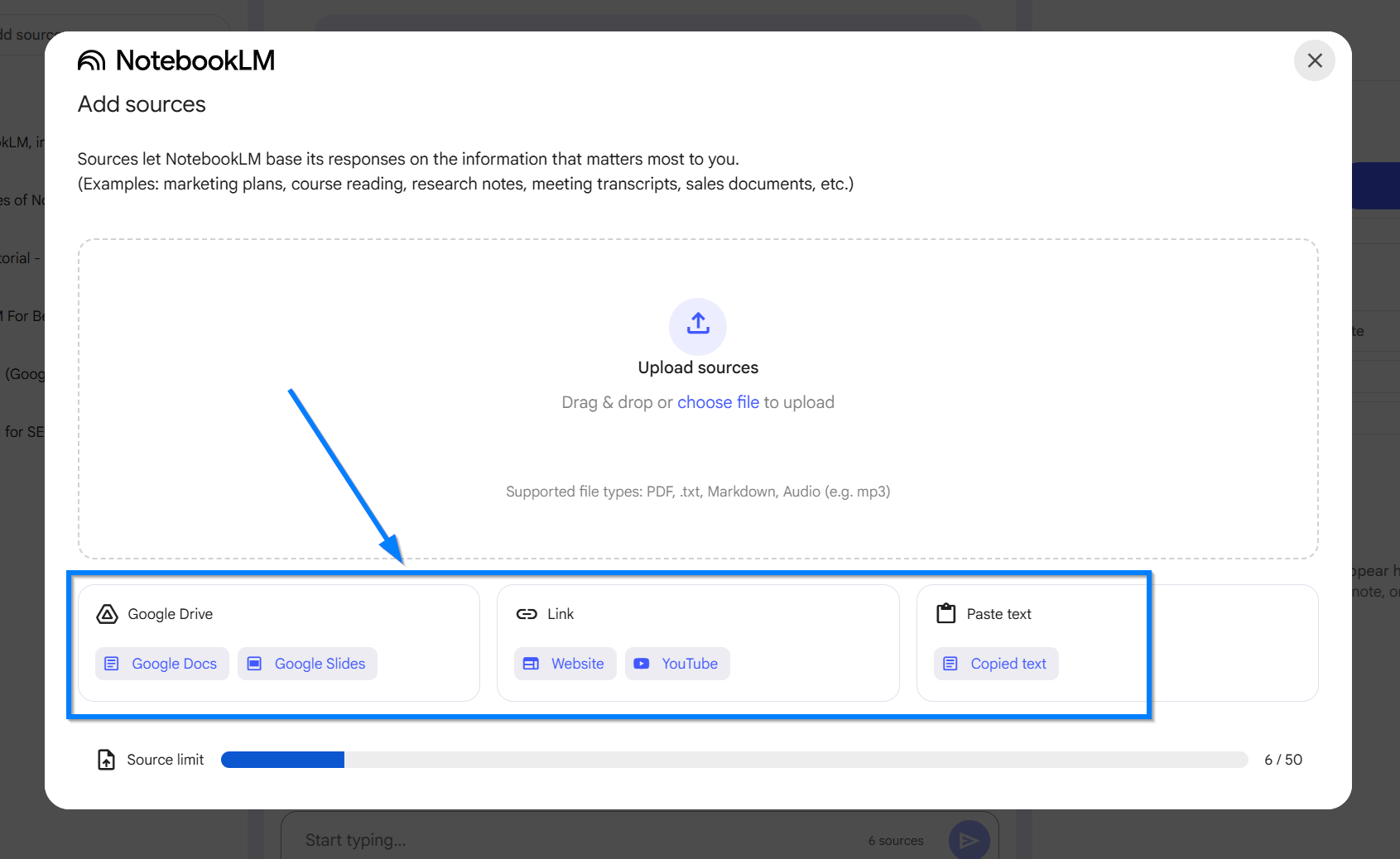
Within each notebook, you can upload and store all relevant source materials, including Google Drive documents, PDFs, website links, YouTube videos, and pasted text. You can add up to 50 sources per notebook.
I've also started using this for long-term content projects.
When researching a comprehensive guide, I create a notebook and continuously add sources over days or weeks…research papers, expert interviews, competitor content, data sources.
By the time I'm ready to write, NotebookLM has a complete knowledge base and can help me spot gaps in coverage or identify unique angles others haven't explored.
This systematic approach to building digital products ensures nothing falls through the cracks.
Creating SEO Content Outlines with NotebookLM
Create SEO content outlines by researching your target keyword, adding top-ranking competitor URLs to a NotebookLM notebook, then prompting the AI to generate a comprehensive outline including SEO title, meta description, heading structure, word count recommendations, search intent analysis, and LSI keywords based on what's currently ranking well for that term.
My SEO outline process starts with traditional keyword research…identifying target terms with decent search volume and reasonable competition. Once I have a keyword, I Google it and open the top 5-7 ranking articles. Rather than reading through each one manually, I create a new NotebookLM notebook called “SEO Research: [Target Keyword]” and add each competitor URL as a source.
The magic happens when you prompt NotebookLM strategically.
My exact prompt is:
“Analyze these top-ranking articles for [keyword].

Generate a comprehensive content outline that includes:
1) SEO-optimized title under 60 characters,
2) Meta description 155-160 characters,
3) Heading structure (H2 and H3 headings),
4) Recommended word count,
5) Primary search intent (informational, transactional, navigational),
6) LSI keywords to include naturally in the content.

Show me what’s working across these top rankers.”
NotebookLM synthesizes patterns across all the top-ranking content and delivers an outline that reflects current SERP expectations.
It identifies which subtopics every top-ranking article covers (meaning you need them too), which unique angles only one or two articles take (potential differentiation opportunities), and the typical content depth (word count range).
This outline becomes your blueprint for creating content that has structural SEO advantages before you write a single word. You know you’re covering all the topics Google expects for this keyword, using related terms that support topical authority, and matching the content depth of what’s currently ranking.
From there, you add your unique insights, personal examples, and superior explanations to outrank the competition.
The time savings are substantial. What used to take 60-90 minutes of manually analyzing competitor content now takes 10 minutes…and the AI often spots patterns I would have missed.
For creators building authority through SEO content, this workflow dramatically accelerates your production while maintaining strategic quality.
Learn more about using AI to boost your content creation efficiency.
For more prompts and complete workflows of how I use AI to write blog posts get my AI SEO Playbook
How to Repurpose YouTube Videos into SEO-Optimized Blog Posts
Repurpose YouTube videos into blog posts by obtaining the video transcript, creating a NotebookLM notebook, adding the transcript as a text source, then prompting the AI to generate an SEO-optimized article with your target keyword, proper heading hierarchy, and keyword placement. Refine the draft with additional AI tools for enhanced readability and on-page optimization.
Video-to-blog repurposing solves a major content efficiency problem:
extracting maximum value from every piece of content you create.
If you’re recording video content for YouTube or social media, you already have the raw material for blog posts…you just need a system to transform spoken content into written format optimized for search engines.
Start by getting your video transcript. YouTube provides automatic transcripts for any video, or use services like Otter.ai or Rev for higher accuracy.
Copy the transcript and create a new NotebookLM notebook named after your target keyword for the blog post.
Paste the transcript as a text source.
Here’s my detailed prompt structure:
“Using this video transcript, create an SEO-optimized blog post targeting the keyword [specific keyword]. The post should include:
1) H1 title with the target keyword,
2) Introduction paragraph that includes the keyword naturally,
3) 5-7 H2 section headings, some in question format,
4) 60-100 word paragraphs under each heading,
5) Conclusion paragraph with call to action.
Maintain a conversational tone and structure the content for easy scanning with subheadings and short paragraphs.”
NotebookLM generates a well-structured first draft that captures your main points from the video while reorganizing them for written consumption.
Videos often have tangents, repetition, and verbal filler…the AI cleans this up and presents a more linear, organized version suitable for blog format.
The draft still needs refinement.
I copy it into my editing environment and enhance it with additional AI tools for final polish…tightening paragraphs, adding transition sentences, inserting relevant links, and optimizing for featured snippets.
The key is NotebookLM handles the heavy lifting of transformation, while you handle the strategic refinement.
This workflow particularly benefits creators who are stronger in video than writing. Your natural speaking style and authentic delivery translate to blog content without forcing you to start from a blank page.
You’re not writing…you’re editing and optimizing, which most creators find significantly easier.
This is not all, and actually there is no limit, it is about your creativity.
But let me share some additional ways of how you can use the NotebookLM for your content creation game.
40+ Additional Ways to Use NotebookLM for Content Creation
Beyond the six core use cases, NotebookLM adapts to countless content creation scenarios. Here are proven applications from creators across different niches:
Content Research and Planning:
Upload YouTube video transcripts from niche experts to track emerging industry trends
Create weekly knowledge digests by compiling major publication articles into one notebook
Analyze successful content in your niche by loading top-performing blog posts and identifying common elements
Research product ideas by uploading customer survey responses and feature requests
Business and Client Management:
Organize client projects with dedicated notebooks containing all project files, transcripts, and reference materials
Make business decisions by uploading relevant business books and asking for frameworks applicable to your situation
Analyze sales calls by comparing transcripts of successful versus unsuccessful client conversations
Create personal coaching resources by loading self-help books and prompting for advice on specific challenges
Content Production:
Generate private podcast scripts for online courses by outlining topics and asking NotebookLM to create conversational frameworks
Analyze Meta ad copy by uploading examples from Facebook Ads Library and identifying persuasion patterns
Synthesize customer feedback from reviews and support tickets to inform product messaging
Document complex code by uploading technical documentation and generating plain-language explanations
Email and Marketing:
Optimize email funnels by uploading existing email sequences and requesting best-practice recommendations
Create lead magnets by compiling research on a specific topic and asking for structured mini-guide outlines
Write case studies by loading client results data and interview transcripts
Develop webinar scripts using outline notes and prompting for detailed presentation frameworks
Learning and Development:
Create course content by uploading rough notes and generating structured lesson plans
Develop certification study materials by loading exam prep resources and generating practice questions
Build resource libraries for team members with searchable, cited information on company processes
Generate personal journaling insights by uploading your journal entries and asking reflective questions
Advanced Applications:
Compile legal or compliance documentation with full source tracing for audits
Create podcast show notes by uploading episode transcripts and generating summaries with timestamps
Develop research papers by loading source materials and generating literature review sections
Build product documentation by uploading technical specs and generating user-friendly guides
The common thread across all these applications is taking scattered information, centralizing it in NotebookLM, and using AI to find patterns, answer questions, or generate new content based on that specific knowledge base.
For creators looking to build systems that work offline, NotebookLM represents a powerful tool for knowledge management and content leverage.
So there you have it – a glimpse into how I've integrated the power of Notebook LM into my daily content creation routine.

Frequently Asked Questions
Is NotebookLM free to use for content creators?
Yes, NotebookLM is completely free and provided by Google. There are no paid tiers, usage limits, or premium features…all functionality is available at no cost. You get unlimited notebooks, up to 50 sources per notebook, and full access to all AI capabilities including the Notebook guide feature for generating questions and the audio overview feature.
How is NotebookLM different from ChatGPT or Claude?
NotebookLM trains exclusively on sources you upload rather than general internet knowledge, and every response includes source citations. ChatGPT and Claude rely on their massive training data and generate responses from broad knowledge bases without specific citations. NotebookLM eliminates hallucinations for your uploaded sources by only referencing the exact documents you’ve provided.
Can I use NotebookLM commercially for client work?
Yes, NotebookLM can be used for commercial purposes including client projects, content creation services, and business applications. Upload client materials to dedicated notebooks, generate insights and content based on those sources, and deliver professional work product. Always review AI-generated content for accuracy and alignment with client requirements before delivery.
What file formats does NotebookLM accept?
NotebookLM accepts PDFs, Google Drive documents (Docs, Sheets, Slides), website URLs, YouTube video URLs (it extracts transcripts automatically), and plain text pasted directly into the interface. You can combine different formats in the same notebook—for example, adding three PDFs, two websites, and a YouTube video to one project notebook.
How accurate are NotebookLM’s source citations?
NotebookLM’s citations are highly accurate because the AI highlights the specific passages in your source documents where it found each piece of information. You can click any citation to view the original text in context, allowing you to verify every claim. However, always review AI interpretations for accuracy, especially when synthesizing complex information from multiple sources.
Key Takeaways
• Create dedicated notebooks for each project or research topic to train NotebookLM on exactly the sources you need, eliminating generic AI responses and getting contextual insights with full source citations.
• Use NotebookLM for competitive research by uploading competitor websites, marketing materials, and customer reviews to identify messaging patterns, market gaps, and conversion copywriting best practices that inform your own strategy.
• Generate SEO content outlines by adding top-ranking competitor URLs for your target keyword to a notebook, then prompting for comprehensive outlines including heading structure, search intent, and LSI keywords that match current SERP expectations.
• Repurpose video content efficiently by uploading YouTube transcripts to NotebookLM and prompting for SEO-optimized blog posts with proper heading hierarchy, saving hours of manual transcription and content transformation.
• Build searchable knowledge bases for clients and long-term projects by uploading up to 50 sources per notebook (PDFs, websites, transcripts, documents), enabling cross-document search and synthesis that surfaces insights you’d miss manually reviewing files.
Ready to take your content systems to the next level?
NotebookLM is just one tool in a comprehensive content creation stack.
Check out our complete guide on building AI agents that generate revenue to see how AI-powered systems can work together to automate research, content creation, and audience growth while you focus on strategy and monetization.
Whenever you’re ready to take the next step
Until next time - Sharyph | Founder of The Digital Creator.
Want to Sponsor the Newsletter?
Put Your Product/Service in Front of 18,000+ Creators.