

Welcome to The Digital Creator, helping creators accelerate with AI. I show you how to use AI to start, create, grow, and scale faster.
Let me ask you something.
How many hours did you spend last week researching content ideas?
I’m talking about the real work…
Scrolling through X looking for what’s trending.
Opening 15 browser tabs of competitor blogs.
Scanning Reddit threads for pain points.
Checking what topics are getting engagement in your niche.
Then trying to make sense of it all.
If you’re like most creators I talk to, content research is one of the biggest time drains in your workflow.
And here’s the frustrating part…
Even after all that effort, you’re still not sure if your content ideas are actually good.
You’re guessing.
I’ve been there.
When I started building The Digital Creator, I had a system for writing. I had a system for publishing. I even had a system for repurposing.
But content research? That was chaos.
I’d spend 2-3 hours every week manually digging through:
Trending topics in the AI and creator economy space
What my competitors were publishing (and what was working)
Gaps in the market I could fill with my content
And even then, I wasn’t confident. I was making decisions based on gut feeling… not data.
That’s a problem.
Because content that doesn’t resonate is content that doesn’t convert. And content that doesn’t convert is time wasted.
Here’s what I’ve learned after 3 years of creating content online…blogs, newsletters, email workflows…etc
The creators who win aren’t creating more content.
They’re researching smarter.
They know exactly what their audience wants before they write a single word.
They see what’s working for competitors and adapt it.
They spot trends early and ride the wave.
But doing all of this manually? It doesn’t scale.
That’s why I built something different.
I built an AI agent that does my content research for me.
One command. That’s it.
I type /content-research-agent into Claude Code… and within minutes, I have:
✅ Trending topics in my niche from the past 7-14 days
✅ Competitor analysis showing what’s working (and why)
✅ Data-backed content ideas ready to execute
No more scattered browser tabs.
No more guessing.
No more wasted hours.
Just a system that researches while I focus on creating.
In this newsletter, I’m going to show you exactly how I built it.
You’ll see:
The agent in action → watch it run a complete research workflow
The actual outputs → real examples of what it produces
The architecture → how the pieces fit together
The full implementation → so you can build it for your business
Even if you’ve never used Claude Code before… even if you’ve never written a line of code… this guide will walk you through everything.
By the end, you’ll have an AI-powered content research system that works for YOUR brand, YOUR audience, and YOUR business.
Let’s get into it.
What I Built — Meet the Content Research Agent
Before I show you how to build this… let me show you what it actually does.
Because this isn’t theory.
This is a working system I use every week to research content for The Digital Creator.
Here’s the simple version:
I built an AI agent inside Claude Code that acts as my personal content research team.
Not an assistant that waits for instructions.
An agent that thinks, researches, analyzes, and delivers… all from a single command.
When I type /content-research-agent followed by a topic or niche, three things happen automatically:
1. It finds trending topics in my niche.
The agent scans for what’s getting attention right now.
Not last month. Not “evergreen best practices.”
What people are actually talking about, searching for, and engaging with in the past 7-14 days. (you can preconfigure this duration.)
It pulls from multiple sources, cross-references them, and delivers a ranked list of trending topics… with links to the sources so I can verify.
2. It analyzes competitor content.
The agent looks at what’s working for other creators in my space.
What topics are they covering?
What formats are performing?
What gaps are they missing?
Instead of me manually reading 20 blog posts and trying to spot patterns… the agent does that analysis and gives me the insights.
This alone used to take me 2+ hours. Now it takes minutes.
3. It generates data-backed content ideas.
This is where it all comes together.
Based on the trending topics AND the competitor analysis, the agent generates content ideas that are:
Relevant to what’s happening now
Differentiated from what competitors are doing
Aligned with my audience and content pillars
Each idea comes with context…why it matters, what angle to take, and supporting data points.
No more staring at a blank page wondering what to write about.
The best part?
All of this happens because the agent already knows my business. (Business Context)
It knows my industry
It knows my audience
It knows my content pillars
It knows my standards
I configured this once. Now it runs on autopilot every time I trigger the command.
So how does it actually work?
At a high level, the agent is built from three components:
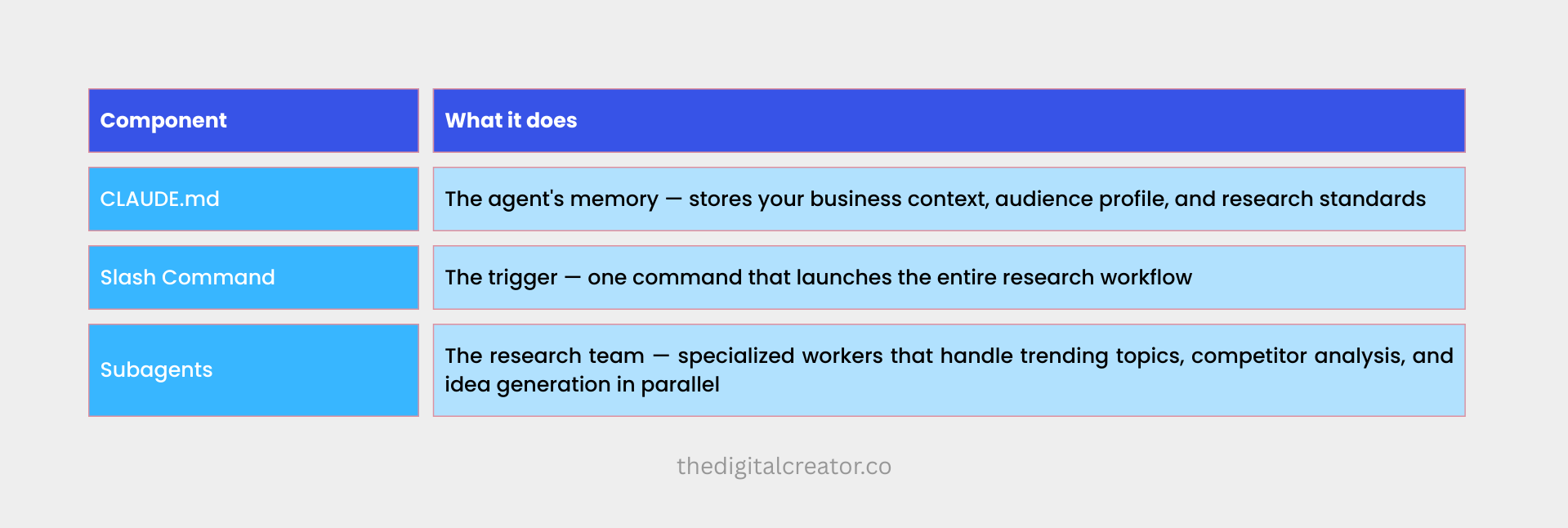
These three pieces work together.
When I run the command, Claude Code reads my business context from CLAUDE.md, then deploys the subagents to research in parallel, and finally synthesizes everything into organized outputs.
It’s like having three research assistants working simultaneously… except they never get tired, never miss details, and deliver in minutes instead of days.
Watch the Agent in Action — Live Workflow Demo
Let me walk you through exactly what happens when I run this agent.
The Setup:
I open VS Code
Claude Code is running in the sidebar panel.
I’m ready to research content ideas around a specific topic: “AI agents for solopreneurs”
Here’s what I type:
/content-research-agent AI agents for solopreneursI hit enter.
And now… the agent takes over.
Step 1: The Agent Reads My Business Context
The first thing that happens is invisible but critical.
Claude Code automatically loads my CLAUDE.md file.
This is the agent’s memory.
Within milliseconds, it now knows:
My niche
My target audience
My content pillars
My research standards
Where to save outputs (organized folders in my project)
This is why the agent doesn’t ask me 20 clarifying questions.
It already has the context. It knows who I’m creating for and what matters to my business.
Step 2: The Agent Creates a Research Plan
Before diving into research, the agent thinks.
I can see this happening in the Claude Code panel.
It outlines its approach.
It creates a research plan (based on the input)
It means the agent isn’t randomly searching. It has a structured approach before it starts gathering information.
Step 3: The Agent Deploys Subagents
Here’s where it gets powerful.
Instead of doing everything sequentially (which would take forever), the agent launches specialized subagents to work in parallel.
Think of it like this:
I’m the manager. The main agent is my team lead. And the subagents are specialized researchers who each handle one piece of the puzzle.
Subagent 1:
Trend Researcher → Scanning for trending topics, recent news, and emerging conversations around AI agents
Subagent 2:
Competitor Analyzer → Studying what other creators are publishing on this topic and what’s getting engagement
Subagent 3:
Content Idea Generator → Standing by to synthesize findings into actionable ideas
The first two subagents start working immediately.
They search the web, gather information, filter for relevance, and compile their findings.
But here’s the key…
They don’t dump everything into my main conversation. That would create noise and clutter the context.
Instead, each subagent returns a focused summary of what it found. Only the relevant insights. Only what matters.
Step 4: The Agent Synthesizes Everything
Once the subagents report back, the main agent gets to work.
It takes:
Trending topics from Subagent 1
Competitor insights from Subagent 2
My business context from CLAUDE.md
And synthesizes them into actionable outputs.
This is where the magic happens.
The agent isn’t just copying and pasting what it found. It’s thinking about how these findings apply to MY specific audience and content strategy.
It cross-references trends against what competitors are already covering.
It identifies gaps… topics that are trending but underserved.
It filters ideas through my content pillars to ensure alignment.
Step 5: The Agent Saves Organized Outputs
Finally, the agent delivers.
But it doesn’t just spit out a wall of text in the chat.
It creates organized files in my project folder:
/research/
  └── 2026-01-08-ai-agents-solopreneurs/
      ├── trending-topics.md
      ├── competitor-analysis.md
      └── content-ideas.md
Each file is structured, formatted, and ready to use.
I can open them directly in VS Code, review the findings, and start creating.

The Output — What You Actually Get
Seeing the agent run is one thing.
But what really matters is the output.
Does it actually deliver useful research?
Or is it generic fluff you could find yourself in 10 minutes?
Let me show you exactly what the agent produces.
These are real examples from the research I ran on “AI agents for solopreneurs.”
Output 1: Trending Topics Report
The first file the agent creates is trending-topics.md.
This is a curated list of what’s getting attention RIGHT NOW
Here’s a snippet of what it looks like:
📄 trending-topics.md
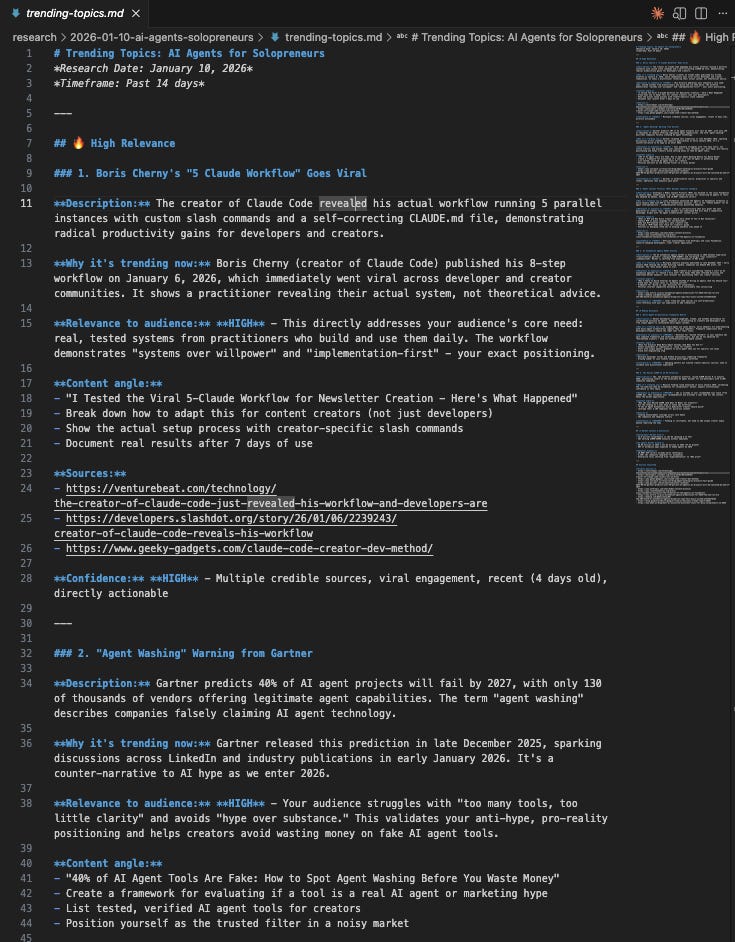
What’s included:
✅ Relevance ranking → Not just a list, but prioritized by signal strength
✅ Multiple sources → Cross-referenced, not single-source findings
✅ Content angles → Specific hooks I could use, not just topic names
✅ Confidence levels → The agent flags how certain it is about each trend
✅ Gap identification → Where the opportunity exists
This isn’t a generic Google search dump.
It’s curated, analyzed, and filtered through my business context.
Output 2: Competitor Analysis Report
The second file is competitor-analysis.md.
This shows what other creators in my space are publishing on this topic… and what’s actually working.
Here’s a snippet:
📄 competitor-analysis.md
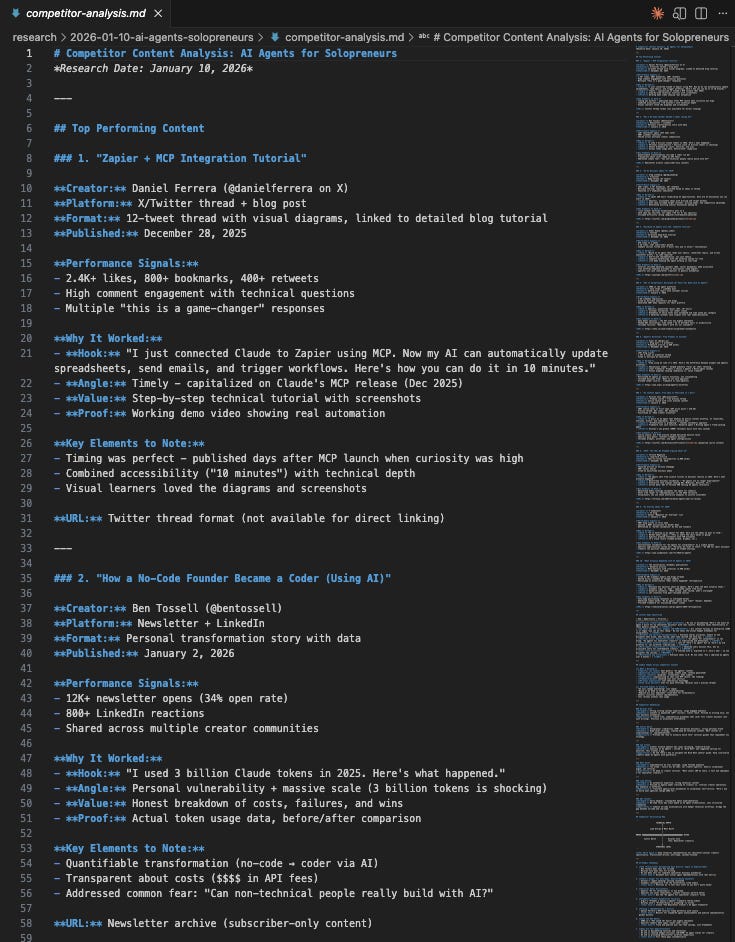
This is competitive intelligence I’d normally spend hours gathering manually.
The agent:
✅ Identifies top performers → Who’s winning and what content is resonating
✅ Analyzes why it worked → Not just “this did well” but the specific elements
✅ Finds gaps → Where competitors are weak or missing opportunities
✅ Gives strategic direction → Actionable takeaways, not just data
Output 3: Content Ideas Report
The third file is content-ideas.md.
This is where everything comes together.
Based on the trending topics AND the competitor analysis, the agent generates content ideas tailored to my audience.
Here’s a snippet:
📄 content-ideas.md
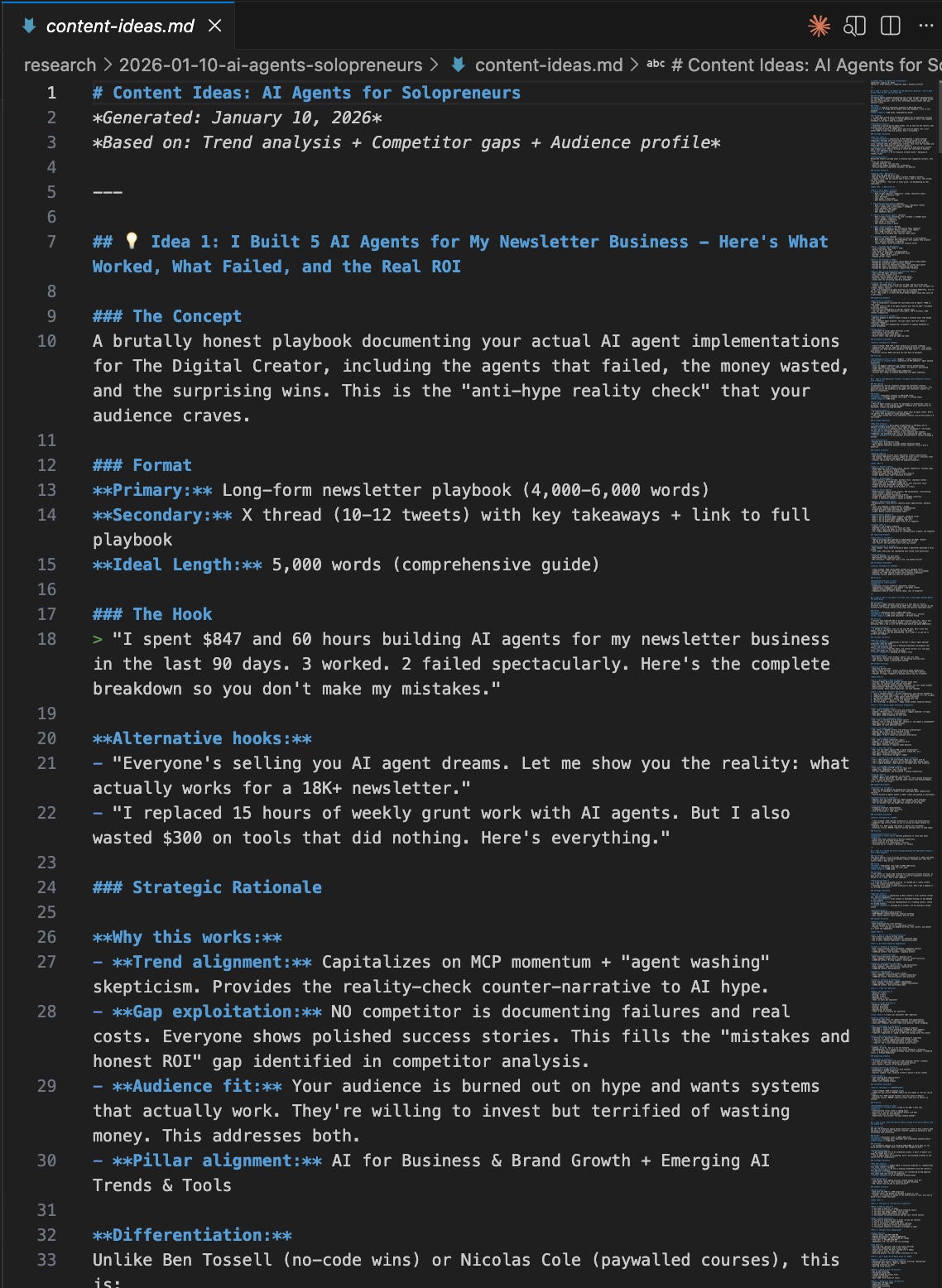
Each idea includes:
✅ Format recommendation → Newsletter, thread, video, or combination
✅ Ready-to-use hook → The attention-grabbing opener
✅ Strategic rationale → Why this idea will work (backed by research)
✅ Content structure → Outline for how to approach it
✅ Supporting data → Stats and sources to strengthen the content
✅ Confidence level → How strong the opportunity is
This isn’t just “here are some topics.”
It’s a strategic content brief I can hand to myself (or a team) and start executing immediately.
Three files. Under 5 minutes. Research that used to take me half a day.
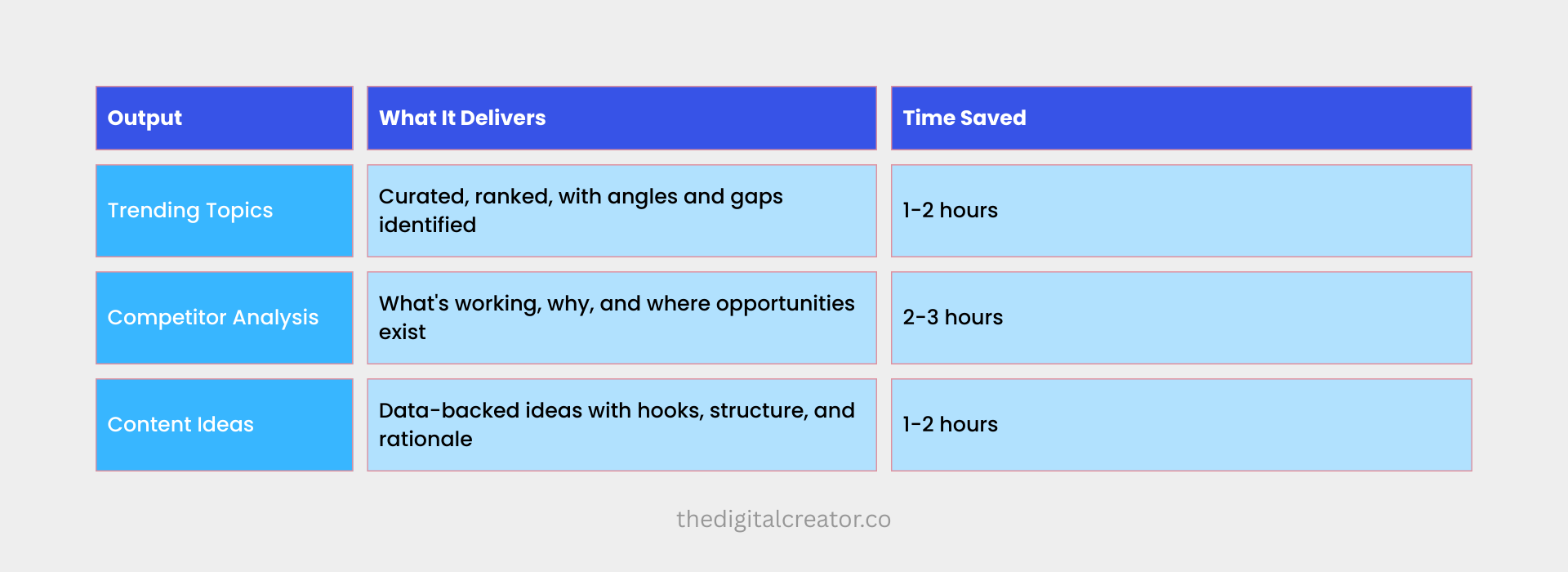
Total time saved: 4-7 hours per research session.
And the quality? Better than my manual research.
Because the agent doesn’t get distracted. It doesn’t forget to check sources. It doesn’t skip the competitor analysis because it’s “taking too long.”
It just executes. Every time.
Now let me show you the architecture that makes this possible…
The Architecture Behind the Agent (Overview)
You’ve seen what the agent does.
You’ve seen the outputs it creates.
Now let me pull back the curtain and show you how it actually works.
Because this isn’t magic. It’s architecture.
And once you understand the architecture, you can build this yourself… and customize it for any research workflow you need.
The 3 Components That Make This Work
The content research agent is built from three core pieces:
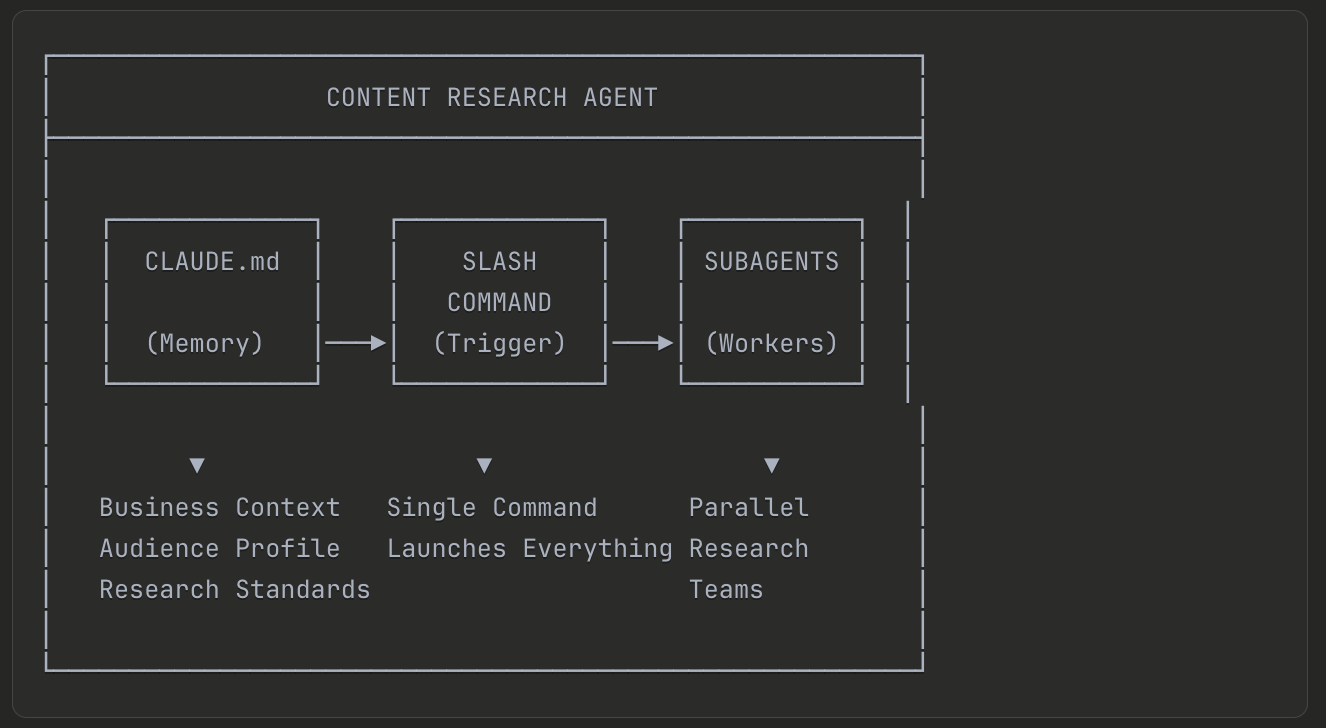
Let me break down each one.
Component 1: CLAUDE.md — The Agent’s Memory
This is the foundation of everything.
CLAUDE.md is a simple markdown file that sits in your project folder. Every time you start Claude Code, it automatically reads this file and loads it into context.
Think of it as the agent’s long-term memory.
What goes in CLAUDE.md:
Business context — What you do, what you sell, what makes you different
Audience profile — Who you’re creating for, their pain points, their goals
Content pillars — The topics you cover and your unique angles
Research standards — How thorough to be, what sources to trust, how to cite
Output preferences — Where to save files, how to format them
Without CLAUDE.md, you’d have to explain your business context every single time you run the agent.
That’s exhausting. And it wastes tokens.
Here is how I create my business context file:

With CLAUDE.md, you configure this once. The agent remembers forever.
This is why the agent doesn’t ask clarifying questions. It already knows who you are, who you serve, and how you want the research delivered.
Component 2: Slash Command — The Trigger
The slash command is how you activate the agent.
Instead of typing a long prompt every time, you create a saved command that contains all the instructions.
How it works:
You create a markdown file in a special folder: .claude/commands/
The filename becomes the command name.
So if I create .claude/commands/content-research-agent.md…
I can now type /content-research-agent in Claude Code, and it runs everything inside that file.
What’s inside the slash command:
Instructions for what research to perform
Which subagents to deploy
How to structure the output
Where to save the files
How to use the context from CLAUDE.md
The power of this:
One command. That’s all I type.
/content-research-agent AI productivity tools
And the entire workflow executes automatically.
No copy-pasting prompts. No remembering what to ask. No inconsistent results.
The same quality research, every single time.
Component 3: Subagents — The Research Team
Subagents are specialized workers that handle specific parts of the research. (as I have shown you above)
How the Components Connect
Here’s the flow when I run /content-research-agent:
Step 1: I type the command
Step 2: Claude Code loads CLAUDE.md (business context)
Step 3: Slash command instructions execute
Step 4: Main agent deploys subagents
Step 5: Main agent receives all summaries
Step 6: Content Idea Generator synthesizes everything
Step 7: Outputs saved to organized folders
Step 8: I review and start creating
The entire flow takes under 5-8 minutes.
And because everything is configured in files, it’s:
Repeatable → Same quality every time
Customizable → Adjust any component without rebuilding
Scalable → Add new subagents for new research types
The Folder Structure
Here’s what the project looks like when everything is set up:
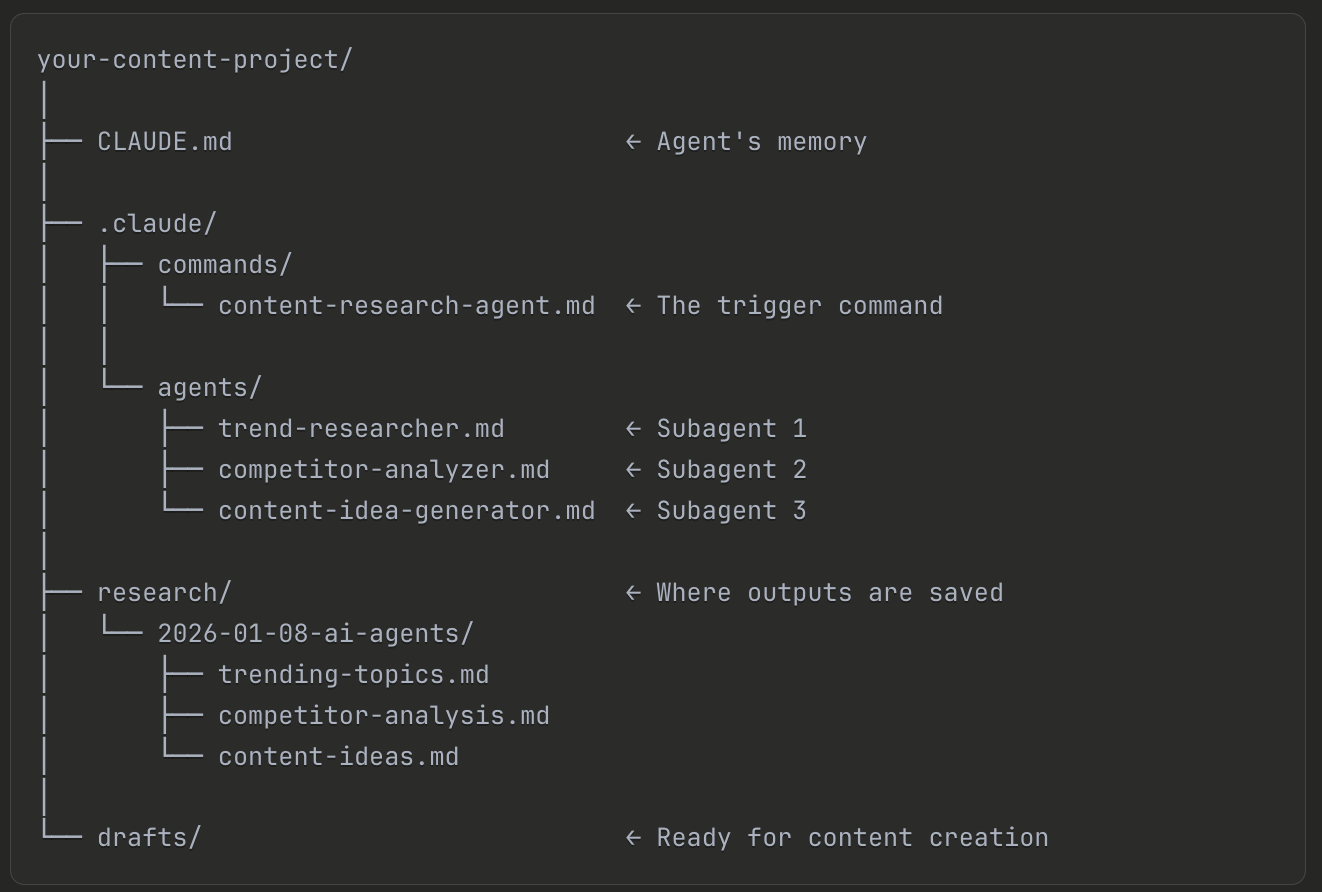
Now here’s the question…
Do you want to build this for your business?
What’s in the Full Implementation Guide
In the section below, I’m giving you everything you need to build this exact system from scratch. (one single prompt to build the complete system)
Even if you’ve never used VS Code before.
Even if you’ve never touched Claude Code.
Even if “slash commands” and “subagents” sound intimidating right now.
By the end, you’ll have a working content research agent customized for YOUR business.
Here’s what’s included:
✅ Complete Beginner Setup Guide
Step-by-step instructions with screenshots.
✅ The Full CLAUDE.md Template (Copy-Paste Ready)
The exact file I use to give the agent persistent memory. Includes sections for business context, audience profile, content pillars, research standards, and output preferences. Plus guidance on how to customize it for your niche.
✅ The Complete /content-research-agent Slash Command
The full command file that triggers the entire workflow. Every line explained. Every instruction documented. Copy it, paste it, run it.
✅ All 3 Specialized Subagent Templates
Trend Researcher → Finds what’s trending in your niche
Competitor Analyzer → Studies what’s working for others
Content Idea Generator → Synthesizes everything into actionable ideas
Each one is ready to use.
Each one is explained so you can customize it.
✅ One Prompt to Build the Complete Research Agent.
Once you build this, content research stops being a time drain.
Instead of spending 4-7 hours every week manually researching…
→ You type one command.
→ You get organized, actionable outputs.
→ You start creating with confidence…
because your ideas are backed by data, not guesswork.
This is the difference between using AI and building systems with AI.
Get the Full Implementation Guide + Prompt
The complete guide is available now for Premium Members.
What you get with Premium:
✅ Full access to this implementation guide + prompt (and all future guides)
✅ 5 Premium Claude Skills
✅ AI Agents Collection
✅ Substack SEO/AEO Implementation Toolkit
✅ 45% off all paid courses
✅ Access to the community
Pricing: $39/month or $150/year (save 40%)
If you’re already a Premium Member… keep scrolling. The full guide is below.
If you’re not yet a member…
👉 Become a Premium Member and unlock the full guide
Let’s build your content research agent.
Complete Beginner Setup Guide
Let’s build this from the ground up.
I’m assuming nothing here. If you’ve never opened VS Code before… if “extensions” and “terminals” sound foreign… this section is for you.
Follow each step exactly, and you’ll have Claude Code running in under 10 minutes.