

Your Best Substack Posts Are Invisible (And Most Creators Don’t Even Know It)
Last month, I was reviewing my newsletter analytics when I noticed something that stopped me cold.
I had 18,000+ subscribers. People were engaging with my content, replying to posts, and sharing posts on social media…
But when I dug into my traffic sources, the numbers told a different story.
Less than 2% of my traffic was coming from search.
Think about that for a second.
I was spending hours every week crafting valuable content. Writing in-depth guides. Sharing frameworks. Creating posts that genuinely helped people build better businesses.
And almost nobody outside my existing audience could find any of it.
Every post I published was like throwing a message in a bottle into the ocean… visible only to the people already on my boat.
Meanwhile, creators who understood SEO and AI optimization were getting discovered by thousands of new readers every month. Their posts from six months ago were still bringing in subscribers while they slept.
I was leaving 60% of potential readers on the table.
Here’s what most newsletter creators don’t realize:
Writing great content is only half the battle.
The other half? Making sure people can actually find it. Sharing on social media and driving traffic to your posts,…that is different.
Most of us treat Substack like it’s email-only. We write a post, send it to subscribers, and move on to the next one.
But here’s the truth: Two discovery engines matter now.
Not just Google. But also AI models like ChatGPT, Perplexity, Claude, and Gemini…etc.
When someone searches “how to grow a newsletter from scratch” on Google, your post could be the answer they find.
When someone asks ChatGPT “what’s the best way to monetize a small audience,” your framework could be what gets cited.
But only if you’ve optimized for it.
And here’s the kicker: 95% of newsletter creators are completely ignoring this. They’re focused on open rates and engagement (which matter), but they’re missing the compound effect of search and AI discovery.
The cost of this mistake?
You’re working harder than you need to
Your best content has a 7-day lifespan instead of working for you 24/7
Competitors who understand discovery are capturing YOUR potential subscribers
Every unoptimized post is a missed asset that could be bringing you readers while you sleep
This isn’t about gaming algorithms or becoming an “SEO expert.”
It’s about spending 10 extra minutes per post to structure your content so both humans AND machines can find it.
So, I dug into this, did some research, and started implementing the changes. Here’s what happened. (I wish I had known this when I started Substack…).
Before the optimization (Oct 2025):

After starting the optimization (Nov 2025):

And today, I’m going to show you exactly what I did and how you can implement this in your Substack.
Let’s dive in.
Before that, I want to share this.
I have seen creators who make over 7 figures, 6 figures… What I have noticed is they aren’t working harder… they’ve built better systems.
Switching to Kit this year transformed my business…
With Kit’s Black Friday deal (60% off for 3 months, ends Dec 2nd),
This deal is exclusive to my readers and won’t show up on Kit’s site.

Here is what you get today:
✓ Direct email marketing without algorithm interference
✓ Automated sales and relationship nurturing
✓ Polls to understand and create what your audience wants
✓ Kit App Store: a hub for Shopify, Thinkific, and Canva
Save $70-$340 depending on your list size.
Ready to scale smarter?
Valid until Dec 2nd.
Back to the post…
Outline:
1. The Dual Discovery Engine Framework
New Approach: SEO + AEO Together
2. The Substack-Specific Foundation
The Domain Decision (Your First Strategic Choice)
The Answer Capsule Pattern (Your AEO Foundation)
Structure (Answer Capsule Pattern)
Question-Based Headings Are Critical
3. The Paywall Problem & Strategic Solution
The Three Strategic Approaches
4. AEO Tactics For AI Citations
Layer 3: Getting Cited by ChatGPT, Perplexity, Claude…etc
The 5 AEO Tactics for Substack Creators
Based on what I have learned and what I have been practicing…I have created an AI Agent to optimize the posts for SEO + AEO. It usually taks 1-2 minutes to run. You can find more information about this agent here.

1. The Dual Discovery Engine Framework
New Approach: SEO + AEO Together
Before we get into the tactics, you need to understand why the game has fundamentally changed.
For the past decade, the SEO playbook was simple: optimize your content for Google, rank high in search results, and get traffic.
That playbook still works. But it’s no longer enough.
The search landscape has shifted dramatically in the last 18 months.
Here’s what’s happening right now:
60% of Google searches end without a click. People get their answers from featured snippets, AI Overviews, and rich results without ever visiting your site.
Gartner predicts 25% of search volume will shift to AI chatbots by 2026. That’s just months away.
Only 11% of websites get cited by both ChatGPT and Perplexity. Most creators are completely invisible to AI models.
Think about your own behavior for a second.
When you need a quick answer, where do you go? Maybe you still Google it. But increasingly, you might just ask ChatGPT. Or Perplexity. Or Claude.
You get a synthesized answer instantly. Maybe you click through to a source. Maybe you don’t.
Your potential readers are doing the exact same thing.
And if your content isn’t structured for AI discovery, you’re invisible at the exact moment someone needs what you know.
This is why I built my content system around two engines, not one.
The Two-Engine Discovery System
Unlike WordPress or Ghost, Substack has specific constraints. You can’t control everything. But you CAN control what matters most.
Here’s the framework:
ENGINE 1: Traditional SEO (Google Discovery)
This is the foundation. Google is still the dominant search engine, and Substack posts can rank incredibly well.
Why Substack has an advantage:
Domain Authority 78: You inherit Substack’s massive authority instantly
Fast indexing: Median Google crawl time is now 3 hours (it used to be 15+ hours)
Built-in technical optimization: Substack handles the technical SEO automatically
Compound traffic: A well-optimized post keeps bringing readers for months or years
This is your evergreen traffic source. The posts you write today can bring you subscribers in 2026, 2027, and beyond.
ENGINE 2: AI Engine Optimization (AEO)
This is the new frontier.
AEO is about structuring your content so AI models can extract, understand, and cite it when answering questions.
When someone asks ChatGPT: “How do I grow my newsletter?”
When someone searches Perplexity: “Best strategies for newsletter monetization”
When someone prompts Claude: “What’s the simplest way to build a digital product?”
Your content could be the source that gets cited.
But only if you’ve structured it the right way.
Why AEO matters now:
AI adoption is exploding: 105 million adults will use generative AI this year
Zero-click future: Most AI answers don’t require clicking through to your site, but being cited builds massive authority
First-mover advantage: Early adopters are establishing dominance before this gets competitive
Future-proofing: This is where discovery is headed, whether we like it or not
The Beautiful Part: They Work Together
Here’s what I discovered after months of testing:
Content optimized for AI citation also performs exceptionally well in traditional search.
Why? Because both systems want the same thing:
Clear, direct answers to specific questions
Well-structured, scannable content
Fact-dense information with credible sources
Natural language that actually helps humans
When you write with answer capsules (we’ll cover this next), you’re simultaneously:
Creating content AI models can easily extract and cite
Building content that wins featured snippets on Google
Writing posts that readers actually want to bookmark and share
The strategies reinforce each other.
You’re not choosing between SEO and AEO. You’re building a discovery system that works across both engines.
And most creators? They’re doing neither.
They’re writing great content that disappears into the void after seven days.
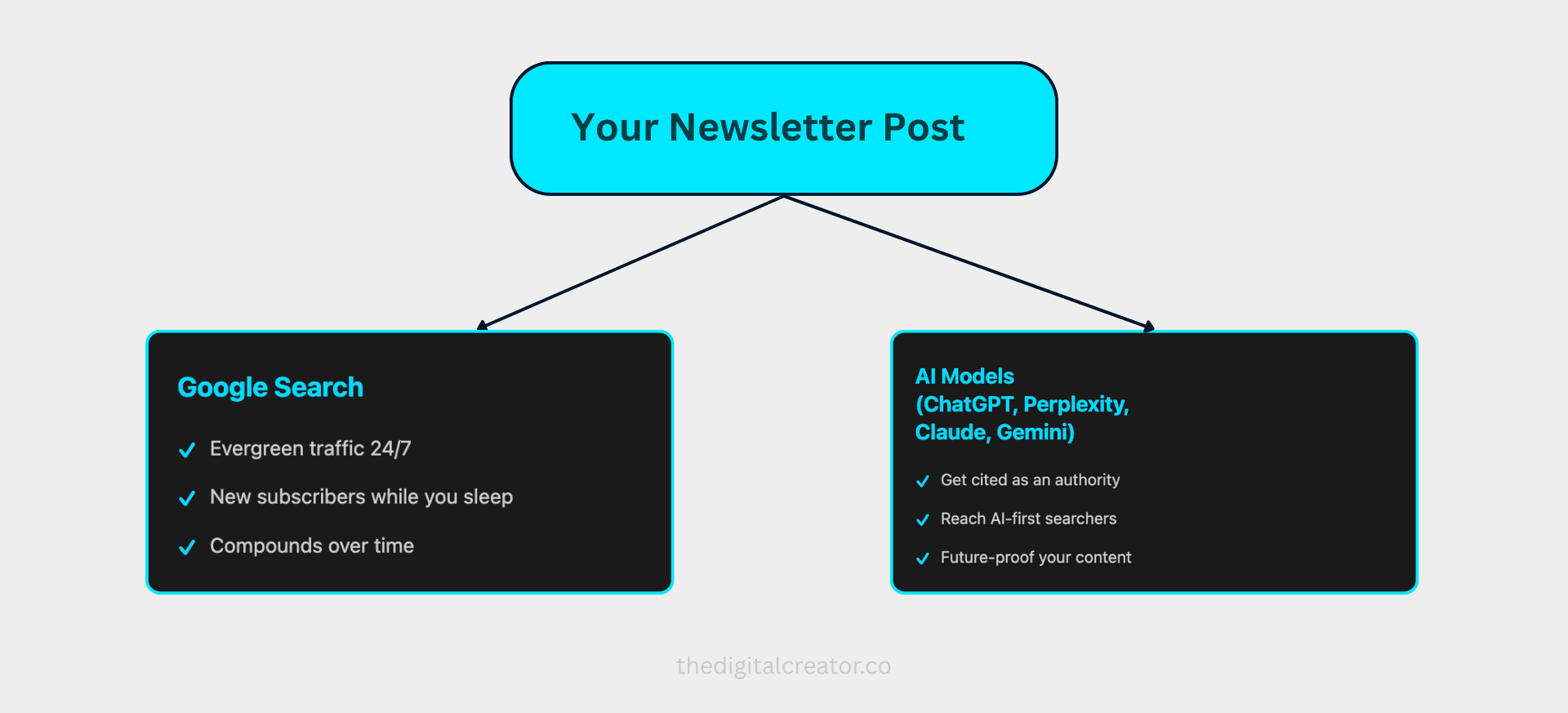
Google Search:
Evergreen traffic
Compound growth
24/7 discovery
AI Models:
Authority building
Direct citations
Future-proofed visibility
The Shift We Need.
Stop thinking: “I need to write more content.”
Start thinking: “I need to make my content discoverable.”
The creators winning in 2025 and beyond aren’t the ones publishing daily. They’re the ones who understand that every post is a discovery asset that should work for them while they sleep.
You’re already spending the time writing. The effort is already there.
Now we just need to spend 10 extra minutes per post to structure it correctly.
Let’s start with the technical foundation…the settings you need to get right before you hit publish.
2. The Substack-Specific Foundation
Layer 1: Technical Foundation
(What You Must Get Right Before Publishing)
Let’s talk about what you can actually control on Substack.
This platform isn’t WordPress.
You don’t get unlimited customization.
There are guardrails.
And honestly? That’s a good thing.
Because it forces you to focus on what actually matters instead of getting lost in technical rabbit holes.
Here’s the truth:
90% of Substack SEO comes down to mastering four settings and one strategic decision.
That’s it.
No complex plugins. No coding. No expensive tools.
Just smart choices and consistent execution.
The Domain Decision (Your First Strategic Choice)
Before you optimize a single post, you need to make one decision:
yourname.substack.com vs. Custom Domain
Here’s the real breakdown:
Option 1: Subdomain (yourname.substack.com)
What you get:
Inherits Substack’s Domain Authority 78 (massive trust signal)
Faster Google indexing (your posts get crawled in hours, not days)
Instant credibility in search results
Zero setup complexity
The trade-off:
You’re building on rented land
If you ever leave Substack, you start from scratch
Your brand is tied to the Substack platform
Option 2: Custom Domain ($50 one-time fee)
What you get:
Complete brand control (theDigitalCreator.co, not theDigitalCreator.substack.com)
Long-term brand equity you own
Professional appearance
Portability if you ever migrate
The trade-off:
Starts from zero domain authority
Takes weeks to months for Google to fully recognize and trust it
Slightly more complex setup
My recommendation:
If you’re under 1,000 subscribers → Stay on subdomain. Speed and authority matter more than brand independence right now.
If you’re building a long-term brand → Invest in the custom domain. You’re playing the long game.
There’s no wrong answer. Just know what you’re optimizing for.
The 4 SEO Settings That Actually Matter
Now let’s talk about the settings you need to optimize for every single post you publish.
These four fields are your entire SEO toolkit on Substack. Master them, and you’re ahead of 90% of newsletter creators.
Here’s where to find them:
Navigate to: Draft → Settings (gear icon) → scroll down → SEO Options
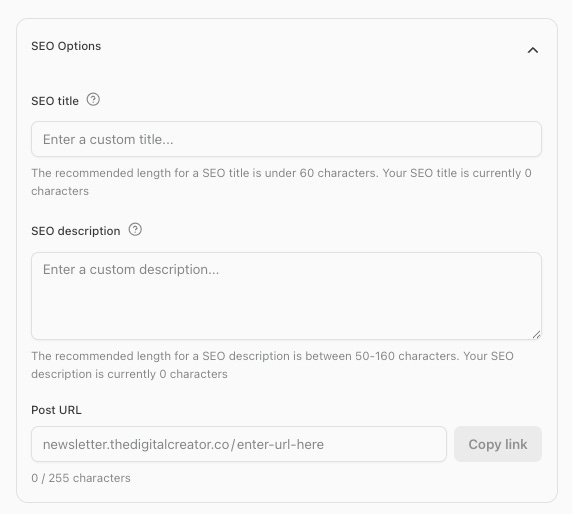
Let me walk you through each one.
Setting 1: SEO Title
This is what appears in Google search results. Not necessarily your newsletter title.
The rules:
Primary keyword in the first 30 characters
Keep total length under 60 characters
Make it compelling AND searchable
Bad example: “My Quick Thoughts on Newsletter Growth”
No keyword
Vague
Doesn’t tell Google or humans what the post is about
Good example: “Newsletter Growth: 7 Tactics That Added 1,000 Subscribers”
Keyword in first 30 characters (”Newsletter Growth”)
Specific promise (7 tactics, 1,000 subscribers)
Under 60 characters
The SEO title doesn’t have to match your post title word-for-word. In fact, sometimes it shouldn’t.
Your post title can be creative and engaging for your existing readers.
Your SEO title should be clear and keyword-focused for people discovering you through search.
Setting 2: Meta Description
This is the text snippet that appears below your title in Google results.
The rules:
155-160 characters (Google truncates anything longer)
Include your primary AND secondary keyword naturally
Make it compelling enough that people want to click
Think of this as your elevator pitch to someone who’s never heard of you.
Example for a newsletter growth post:
“Proven newsletter growth tactics that generated 1,000 subscribers in 90 days. Step-by-step system for Substack creators to scale from 0 to 1K without paid ads.”
Notice what this does:
Includes keywords: “newsletter growth,” “subscribers,” “Substack creators”
Provides social proof: “1,000 subscribers in 90 days”
Removes friction: “without paid ads”
Exactly 158 characters
Your meta description is a sales pitch. Treat it like one.
Setting 3: Post URL Slug
This is the most overlooked setting…and the most permanent.
Here’s what most people don’t know: You can only customize the URL slug BEFORE you publish. Once the post is live, you’re stuck with it forever.
Change it after publishing? Every link breaks. No redirects. No do-overs.
Yes, you can change, but that is not at all advisable.
The rules:
Use keywords only
Separate with hyphens (-)
All lowercase
Remove “stop words” (the, a, an, in, on, for, etc.)
Bad example: /p/my-quick-thoughts-on-growing-your-newsletter-in-2025
Too long
Includes stop words (”on,” “your,” “in”)
No clear keyword focus
Good example: /p/newsletter-growth-tactics-1000-subscribers
Clean
Keyword-rich
Scannable
Under 5 words
Short, readable URLs perform better in search and look better when shared.
Setting 4: Social Preview Image
This isn’t directly an SEO factor, but it impacts performance dramatically.
The data is clear:
Posts with social preview images get 2x signups
They get 40% more clicks from search results
They stand out in feeds and search results
Recommended size: 1456 × 1048 pixels (Substack’s recommended aspect ratio)
Pro tip:
Create a Canva template with your branding and reuse the format for every post. Consistency builds recognition.
Don’t have design skills? Use a simple template with:
Your post title
Your newsletter name/logo
A relevant icon or visual element
Consistent color scheme
It doesn’t need to be fancy. It just needs to exist.
In case, if you want my perview to customize, you can get it here
What You CAN’T Control (So Stop Worrying About It)
Here’s what Substack doesn’t let you customize:
❌ Canonical URLs → Substack sets these automatically. You can’t override them.
❌ Custom CSS/HTML → Platform blocks it natively (for good reason—keeps the platform fast and secure)
❌ Advanced schema markup → Limited unless you use GTM workaround (not worth it for most creators)
❌ robots.txt → Platform-controlled at the domain level
And you know what? That’s fine.
These limitations keep you from overthinking and overcomplicating.
The four settings I just walked you through are where 90% of your SEO results come from.
Master those. Ignore everything else.
The Answer Capsule Pattern For AEO
Layer 2: Content Structure
(Writing for Both Humans AND AI Models)
This is the single most important technique I’m going to share with you.
If you implement nothing else from this guide, implement this.
The Answer Capsule Pattern.
After analyzing hundreds of high-performing posts and tracking which content gets cited by AI models, one structure emerged as the clear winner.
Posts with this pattern get cited 3x more often by ChatGPT, Perplexity, and Claude..etc than traditionally formatted content.
And here’s the best part: it also makes your content better for human readers.
Let me show you exactly how it works.
The Answer Capsule Pattern (Your AEO Foundation)
The structure is simple:
## [Question-Based H2 Heading]

[Answer Capsule: 40-60 word direct answer, no preamble]

[Supporting context and examples follow]
That’s it.
But the simplicity is deceptive. This pattern does four powerful things simultaneously:
Gives AI models exactly what they need → A clear, extractable answer
Wins featured snippets on Google → The structure matches what Google looks for
Respects reader time → People scanning for quick answers find immediate value
Forces clarity in your thinking → You can’t hide behind vague language
Let me show you a real example.
Structure (Answer Capsule Pattern)
## How do I grow my newsletter from 0 to 1,000 subscribers?

**Focus on creating one high-value lead magnet, publish consistently
weekly for 90 days, and promote each post on 2-3 platforms where your
target audience already gathers. Cross-promote with 2 similar-sized
newsletters monthly. This system generates 20-50 new subscribers weekly.**

Here’s why this system works better than scattered tactics...

[Continue with detailed explanation, examples, and supporting context]
See the difference?
The answer is immediate. Clear. Extractable. Citeable.
AI models can pull that capsule and cite it directly. Google can use it for featured snippets. Readers get instant value.
Everyone wins.
The 50-80 Word Rule
Why this specific length?
Through testing, I found that 50-80 words is the sweet spot for AI extraction:
Under 50 words → Too brief, lacks context, doesn’t stand alone well
50-80 words → Perfect balance of clarity and completeness
Over 80 words → AI models often skip it, too dense to extract cleanly
Think of it like writing a tweet that actually answers the question completely.
No fluff. No setup. Just the answer.
Question-Based Headings Are Critical
Notice the heading in my example: “How do I grow my newsletter from 0 to 1,000 subscribers?”
This isn’t random.
AI models are trained to recognize question-answer patterns. When they see a clear question followed by a direct answer, they’re significantly more likely to cite it.
Bad heading: “Newsletter Growth Strategies”
Good heading: “How do I grow my newsletter from 0 to 1,000 subscribers?”
Even better heading: “What’s the fastest way to get your first 1,000 newsletter subscribers?”
The more specific and question-like your heading, the better.
Use the actual language people type into search bars and AI chatbots.
Real Examples:
Let me show you how to use this in practice.
Example 1:
## How long does it take to create your first digital product?

**Most creators spend 2-4 weeks creating their first digital product if they
follow a structured process. Using AI tools like ChatGPT and Claude can cut
this to 7-10 days. The key is starting with a validated problem, not building
in a vacuum. Validation takes 3-5 days, creation takes 4-7 days, and setup
takes 1-2 days.**

This timeline assumes you’re working on your product 5-10 hours per week.
Here’s the breakdown...
Example 2:
## What’s the simplest AI workflow for content repurposing?

**Use Claude or ChatGPT to transform one long-form piece into 10+ assets:
3 social posts, 2 email sequences, 1 landing page, and 4 short-form videos.
Input your source content with specific formatting instructions, review and
refine the outputs, then schedule distribution. Total time: 60-90 minutes
versus 6+ hours manual work.**

The workflow has three phases...
Notice the pattern?
Question-based heading using natural language
50-80 word answer with specific details
Supporting context that goes deeper
This is what gets cited. This is what ranks.
Heading Hierarchy That Search Engines Understand
Here’s something that trips up a lot of Substack creators:
Substack’s heading names don’t match actual HTML tags.
When you click “Heading 1” in the Substack editor, it doesn’t create an H1 tag. It creates an H2.
Your post title is automatically the H1. Everything else is H2, H3, H4.
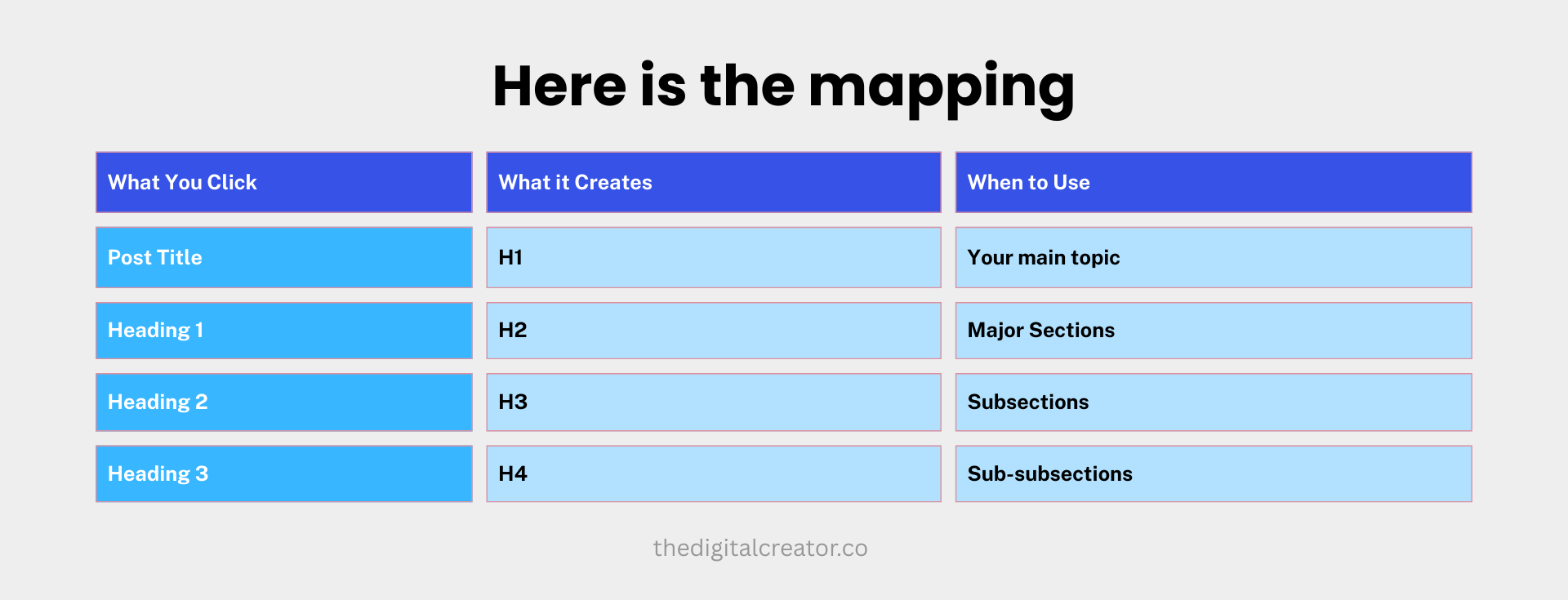
The critical rule: Never skip levels.
Always go: H1 → H2 → H3 → H4
Don’t go: H1 → H3 (skipping H2)
Why? Both search engines and AI models use heading hierarchy to understand content structure. Skipping levels confuses them.
The 3-5 Internal Link Rule
One more critical element: internal linking.
Every post you publish should link to 3-5 of your previous posts.
Why this matters:
Builds topical authority → Shows search engines you have depth on a topic
Keeps readers in your ecosystem → They discover more of your content
Distributes SEO power → Your high-ranking posts lift your newer ones
Signals expertise → Demonstrates you have a body of work, not just one post
Where to add internal links:
Within answer capsules (sparingly…don’t distract from the answer)
In supporting paragraphs as natural references
In a “Related Reading” or “You Might Also Like” section at the end
Pro tip:
Create a “Start Here” or “Essential Reading” page that links to your best 7-10 posts. Then reference this page in your navigation or as a pinned post.
This becomes your content hub. Your evergreen discovery asset.
What Makes This Different From “Regular” Writing
You might be thinking: “This feels formulaic. Where’s the personality? Where’s my voice?”
Fair question.
Here’s the truth: The answer capsule is just the first 50-80 words.
Everything after that? That’s where your voice lives.
The capsule gives AI and search engines what they need. The supporting content is where you tell stories, share examples, inject personality, and go deep.
You’re not choosing between being helpful and being human.
You’re doing both.
The answer capsule says: “Here’s the answer.”
The rest of your post says: “Here’s why it matters, how I learned it, and what it means for you.”
That’s where connection happens.
The Implementation Challenge
I know what you’re thinking: “This seems like a lot to remember.”
It’s not as hard as it looks.
After you write 5-10 posts using this structure, it becomes second nature.
You start thinking in answer capsules automatically.
Your drafts already have the right structure before you even realize it.
But to make it easier, I’ve created a pre-publish checklist you can use for every post. (you can find those at the bottom of this post)
For now, just understand the pattern:
Question-based heading
50-80 word answer capsule
Supporting details and context
Repeat for each major section
Master this, and you’ll be ahead of 95% of newsletter creators.
Now let’s talk about the elephant in the room: paywalled content.
Because if you’re building a paid newsletter, this creates a strategic dilemma that most creators don’t think through.
3. The Paywall Problem & Strategic Solution
What Most Creators Get Wrong About Paywalled Content
Let me tell you about a mistake I see all the time.
A creator spends hours crafting an incredible deep-dive post (like the posts I have been creating under Playbooks). It’s their in-depth guides. Packed with insights, frameworks, real data.
They put it behind a paywall to reward their paid subscribers.
Makes sense, right?
Here’s the problem: That post is now invisible to search engines and AI models.
Google can’t index what it can’t see. ChatGPT can’t cite what it can’t access. Perplexity can’t reference content locked behind a server-side paywall.
Your best content…the stuff that could be attracting thousands of new readers…is hidden from the exact discovery engines that would bring you those readers.
This is the strategic tension every paid newsletter creator faces:
Do you optimize for discovery (free content) or monetization (paid content)?
The answer isn’t simple. And it depends entirely on your business model.
Let me break down what’s actually happening behind the scenes.
The Technical Reality of Paywalls on Substack
Substack uses server-side paywalling.
This means: only the free preview section is included in the HTML that search engines and AI crawlers can see.
When Google crawls your paywalled post, it sees:
Your title
Your first 200-500 words (the preview)
Then: [paywall]
That’s it.
When ChatGPT tries to access your post, same thing. It hits the paywall and stops.
Your paywalled content is invisible to discovery engines.
To Google and AI models, your 3,000-word masterpiece looks like a 300-word teaser.
Now, some creators think: “But I’ve seen AI cite paywalled content before...”
True. But that’s usually because:
The content was quoted/shared extensively on social media or forums
Someone copy-pasted it into a public discussion
It was published elsewhere first (like Medium) before being paywalled
The AI was trained on an earlier, publicly accessible version
The paywall itself? Impenetrable to AI crawlers.
So what do you do?
The Three Strategic Approaches
Each works…but for different business models.
Here’s how to think about it.
Option 1: Free Posts for Discovery, Paid for Retention (My Recommendation for Most Creators)
How it works:
Publish your SEO/AEO-optimized content as free posts
Target high-volume search terms and common questions in your niche
Build topical authority with comprehensive guides (1,500+ words)
Reserve paid content for community value, Q&As, member-only deep dives
The strategy:
Use free content as your discovery engine.
Use paid content as your retention engine.
Free posts bring new people into your world. They rank in search. They get cited by AI. They compound over time.
Paid posts keep those people engaged. They deliver insider value. They build community. They reward loyalty.
Real example from my newsletter:
Free post: “My Plan to Grow an Engaging Audience with AI”
Optimized for SEO
Ranks for “Engagin audience with AI”
Brings in 50-100 new readers monthly
Converts 2-5% to email subscribers
Paid post: “AI Agent to Create Authoritative Social Media Content for Your Brand”
Behind paywall
Rewards paying members
Creates FOMO for free readers
Drives conversions to premium
The free post does the heavy lifting for discovery. The paid post creates value that makes people want to subscribe.
This is the approach I recommend if:
You’re building a subscription business
You need consistent new reader acquisition
You want compound growth from search/AI traffic
You have enough exclusive value to justify paid tiers
Option 2: Hybrid Approach (The Middle Ground)
How it works:
Even your paywalled posts start with a substantial free preview…300-500 words of genuine, keyword-rich value.
The free section must:
Answer part of the question
Provide standalone value
Include your answer capsule
Not feel like a bait-and-switch
The paywall is positioned as a “continuation” or “going deeper,” not as withholding the core answer.
Example structure:
# How to Build a $10K/Month Digital Product (Even With a Small Audience)

**TL;DR**: [Answer capsule - 50 words explaining the core concept]

[300-400 words of genuine strategy and framework]
[Specific enough to be valuable]
[Includes one clear, actionable step]

---[PAYWALL]---

Now let me show you the exact workflow I use...
[Deep implementation details]
[Templates and resources]
[Behind-the-scenes breakdown]
The strategic thinking:
The free preview gets indexed. It gets cited by AI. It ranks in search.
But it leaves people wanting more depth…which drives paid conversions.
This approach works if:
You want both discovery AND monetization from the same post
You can create genuinely valuable free sections (not just teases)
You’re comfortable with partial visibility in search/AI
You have deep enough expertise that the paywall continuation offers real value
Option 3: Everything Free + Monetize Elsewhere (The Media Brand Model)
How it works:
Keep all your newsletter content free. Maximize discovery.
Monetize through:
Digital products (courses, templates, guides)
Coaching or consulting services
Sponsorships and partnerships
Premium tools or communities
The logic:
Your newsletter is your top-of-funnel asset…not your revenue source.
Every post optimized for discovery brings more people into your ecosystem. The larger your audience, the more leverage you have for other revenue streams.
Real-world examples:
Morning Brew: Free newsletter, revenue from sponsorships
James Clear: Free blog, revenue from book sales and deals
Many creator educators: like Landon Poburan , Wes Pearce they are pro free content, revenue from courses/coaching/DFYs..etc
This approach works if:
You have (or plan to build) high-margin products/services
Sponsorship revenue is your primary model
You’re building a personal brand / thought leadership platform
You want maximum reach and don’t rely on subscription revenue
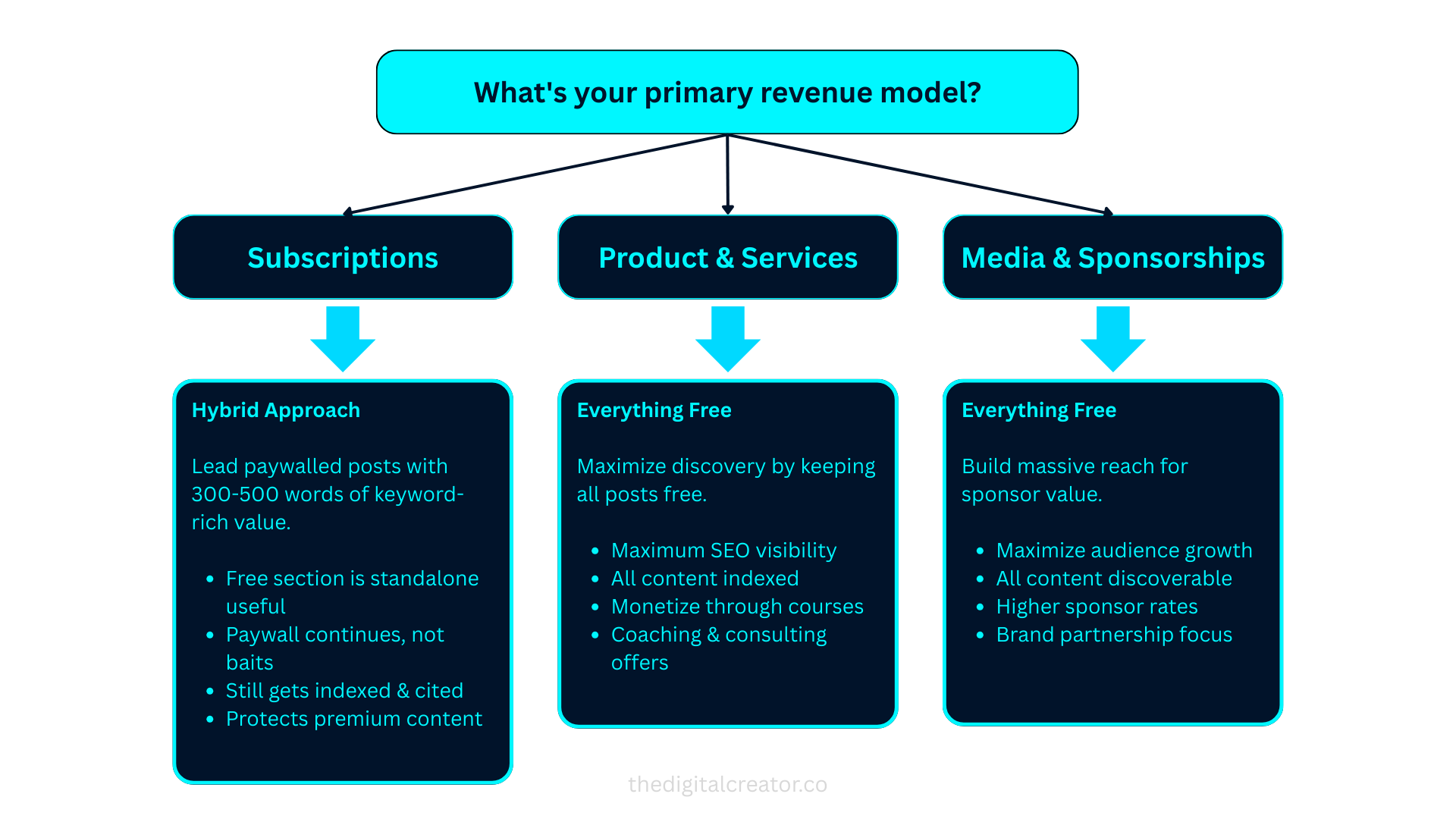
The Decision Framework
Still not sure which approach is right for you?
Ask yourself this question:
“What’s my primary revenue model in 12 months?”
If your answer is subscription revenue → Option 1 or Option 2
You need discovery (free) AND retention (paid)
Balance both strategically
Don’t lock ALL your best content behind paywalls
If your answer is products, services, or sponsorships → Option 3
Maximize discovery
Everything free
Newsletter is your marketing engine
If you’re still figuring it out → Start with Option 1
It’s the safest bet
You can always adjust later
Gives you flexibility as you learn what converts
The Biggest Mistake You Can Make
Here it is:
Putting all your best, most searchable content behind a paywall when you’re under 1,000 subscribers.
I see this constantly.
Creators write incredible pillar content…the exact posts that could rank #1 for valuable search terms…and lock them behind paywalls.
Result?
Zero search visibility
Zero AI citations
Zero compound growth
Slow, painful subscriber acquisition
You can’t grow through discovery if your discoverable content is hidden.
4. AEO Tactics For AI Citations
Layer 3: Getting Cited by ChatGPT, Perplexity, Claude…etc
Let’s talk about the future of discovery.
Because whether you’re ready for it or not, the game is changing fast.
By 2026…that’s next year…Gartner predicts 25% of traditional search volume will shift to AI chatbots.
Think about that. One in four searches that used to happen on Google will happen in ChatGPT, Perplexity, Claude, or Gemini instead.
And here’s the kicker:
60% of Google searches already end without a click.
People get their answers from AI Overviews, featured snippets, and rich results without ever visiting a website.
The old playbook…rank high, get clicks, convert visitors…is being rewritten in real-time.
The new playbook:
Get cited. Build authority. Become the source AI models reference.
And here’s the opportunity: most creators have no idea this is even happening.
Why I Say Act Now!
1. First-mover advantage is massive
Right now, only 11% of websites get cited by both ChatGPT and Perplexity. Analysis done by Josh Blyskal - Leading AEO Strategy & Research at Profound
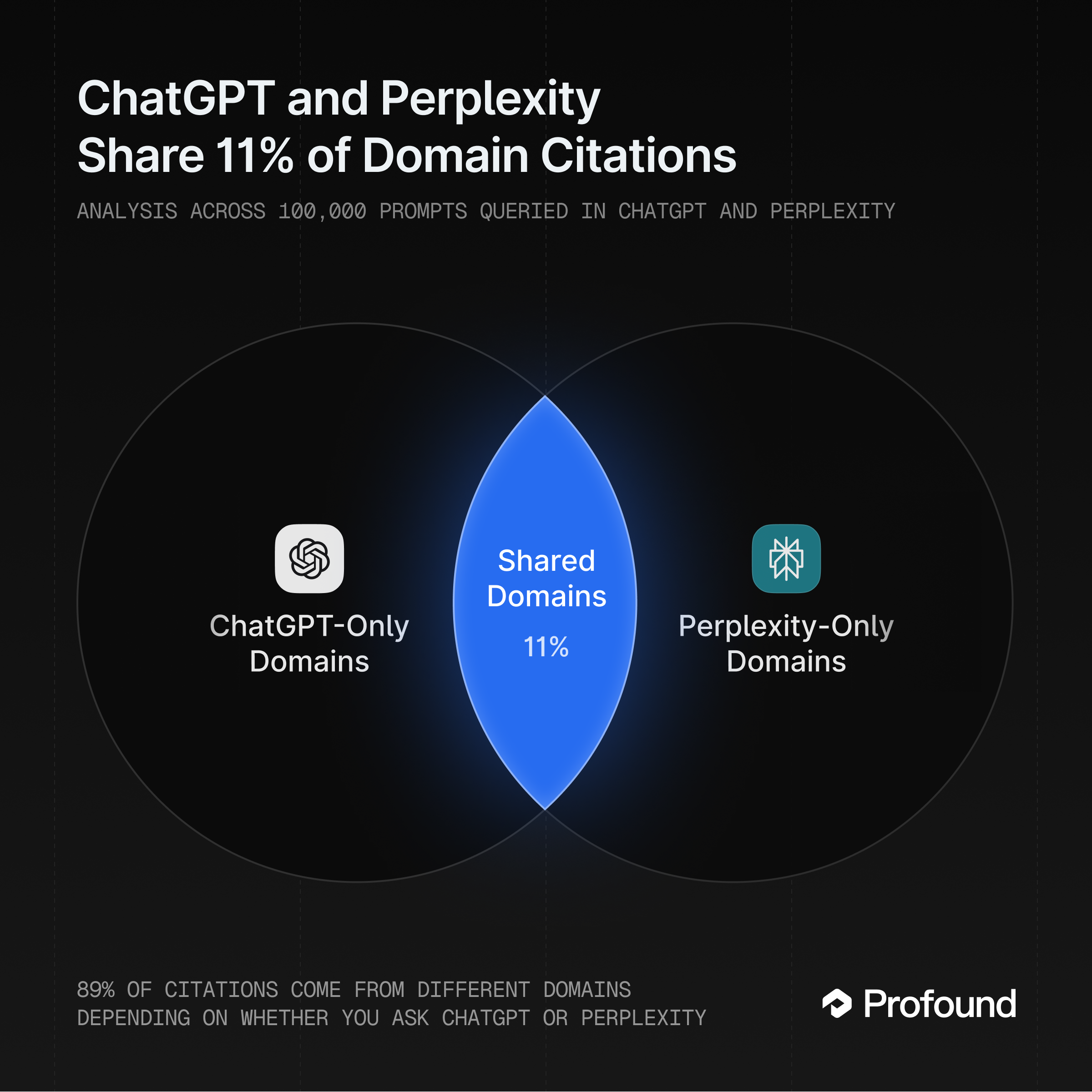
The majority of citations go to a small number of sources: Wikipedia, Reddit, major publications, and…here’s the opportunity…well-structured content from creators who understand AEO.
Early adopters are establishing authority positions before this gets competitive.
2. The strategies overlap completely
Content optimized for AI citation also:
Wins featured snippets on Google
Ranks better in traditional search
Converts better for human readers
You’re not choosing between SEO and AEO. You’re doing both simultaneously.
3. Your competition isn’t doing this
I’ve analyzed hundreds of newsletters in the creator economy space. Maybe 5% are structuring content for AI optimization.
That’s your window. That’s your advantage.
Let me show you exactly how to capture it.
The 5 AEO Tactics for Substack Creators
These are the specific techniques that drive AI citations. I’ve tested all of them. They work.
Tactic 1: Answer Capsules (Your Foundation)
We covered this above, but it’s worth repeating because it’s that important.
The pattern:
Question-based H2 heading
50-80 word direct answer
No preamble, no fluff
This is your #1 citation driver.
When AI models scan your content looking for answers to cite, they’re looking for this structure.
Why it works:
AI models are trained on question-answer patterns. When they see:
A clear question
Followed immediately by a concise, complete answer
With supporting context below
They can extract and cite it with confidence.
When you are doing this, make sure you avoid this:
❌ Burying the answer in paragraph five
❌ Making people read 300 words before getting to the point
❌ Using vague or creative headings that don’t signal questions
Instead, make sure you do this:
✅ Put the answer first
✅ Use the actual language people ask AI models
✅ Make it self-contained (readable without the surrounding context)
If you implement only one AEO tactic, make it this one.
Tactic 2: Original Data & Proprietary Insights
This is the second-strongest citation predictor after answer capsules.
AI models love unique data they can’t find anywhere else.
Why? Because it makes their answers more credible and differentiated.
Examples of original data:
“According to our survey of 500 newsletter creators...” “Our analysis of 1,000 Substack posts revealed...” “I tracked my own growth for 90 days and discovered...” “In testing 47 different subject lines, we found...”
Notice the pattern? You’re the source. You did the research. Nobody else has this exact data.
This doesn’t mean you need to run massive studies.
Small, specific data is often more useful than broad generalizations:
“I tested 12 email subject lines. The top 3 got 40%+ open rates...”
“After analyzing 50 viral tweets in my niche, here’s what 90% had in common...”
“I interviewed 10 creators making $10K+/month. Here’s what they all do...”
The key: be specific with numbers and attribution.
Vague: “Most creators struggle with consistency.” Better: “In our survey, 73% of creators said maintaining consistency was their #1 challenge.”
Even better: “In our January 2025 survey of 247 newsletter creators, 73% identified maintaining weekly publishing consistency as their primary obstacle to growth.”
See the difference?
The more specific you are, the more citeable you become.
Tactic 3: Minimal Links in Answer Text
This one surprised me when I discovered it.
AI models prefer clean, standalone answers with minimal hyperlinks.
Why? Because links introduce uncertainty. The model can’t verify where those links go or if they’re still active.
When you pack your answer capsule with links, you’re actually reducing the likelihood of citation.
Bad example:
“To grow your newsletter, use this lead magnet strategy, promote on Twitter and LinkedIn, and follow this email sequence.”
Good example:
“To grow your newsletter, create one high-value lead magnet, promote consistently on 2-3 platforms where your audience gathers, and set up a 5-email welcome sequence. Tools like Kit make this simple.”
The second version is self-contained. Clean. Citeable.
Where to put your links:
✅ In supporting paragraphs below the answer capsule
✅ In examples and case studies
✅ In “resources” or “tools” sections at the end
❌ Not in the 50-80 word answer capsule itself
Keep the answer clean. Put context and links below.
Tactic 4: Short Paragraphs (60-100 Words Max)
AI models extract information in chunks.
Long, dense paragraphs make extraction harder. Short, focused paragraphs make it easy.
The rule: One idea per paragraph.
Same information. But now each paragraph has one clear idea.
AI models can extract individual concepts cleanly. Readers can scan and absorb information faster.
The 60-100 word range is the sweet spot.
Short enough to stay focused. Long enough to develop an idea completely.
Tactic 5: Semantic Structure Over Keyword Stuffing
Here’s the good news about 2025: AI understands context.
You don’t need to repeat your keyword 47 times. You don’t need awkward phrases like “best newsletter growth strategies for beginners.”
AI models…and modern Google search…understand semantic relationships.
What this means practically:
Don’t write like this:
“Newsletter growth is important. Newsletter growth strategies include many newsletter growth tactics. The best newsletter growth method is to use proven newsletter growth techniques.”
(This is how people wrote for SEO in 2010. It doesn’t work anymore.)
Write like this:
“Growing your subscriber base requires clear strategy. Focus on three high-leverage tactics: lead magnets, consistent publishing, and strategic distribution. These methods compound over time.”
Same topic. Natural language. Semantic variations (growing, subscriber base, tactics, methods, distribution).
Use question-based headings with natural language:
✅ “How do I grow my newsletter from 0 to 1,000 subscribers?”
✅ “What’s the fastest way to get my first 100 email subscribers?”
✅ “Which lead magnet formats convert best for newsletter creators?”
❌ “Newsletter Growth Strategies”
❌ “Email Subscriber Acquisition”
❌ “Lead Magnet Best Practices”
Write like you’re teaching a smart friend. Use the actual phrases people type into ChatGPT.
AI understands context, intent, and semantic relationships. Optimize for clarity, not keyword density.
How to Measure AEO Success
Okay, you’re implementing these tactics. Now how do you know if it’s working?
Unlike traditional SEO where you can check rankings in Google Search Console, AEO measurement is trickier.
Here’s what I use:
Free Tools:
HubSpot AEO Grader (Free)
Checks your brand visibility across GPT-4o, Perplexity, and Gemini
Shows whether you’re being cited for key topics in your niche
Gives you a baseline to improve from
Link: Just search “HubSpot AEO Grader”
Manual Checks (Free but time-consuming)
Ask ChatGPT questions related to your expertise
Ask Perplexity the same questions
Try Claude and Gemini
Track whether your content gets cited
Paid (If you’re serious about this):
Multi-platform AI citation tracking
Shows exactly which of your pages get cited
Tracks visibility across ChatGPT, Perplexity, Gemini, and others
Best for established brands with budget
Focuses on ChatGPT and Perplexity visibility
Good middle-ground option
Tracks keyword-level citations
The Reality Check:
You don’t need paid tools when you’re starting. Manual checks work fine.
Test your content monthly. Look for patterns. Double down on what works.
As you grow and AEO becomes more central to your strategy, consider investing in tracking tools.
Addon: But Important to Set this to Measure - Google Search Console
You can’t improve what you don’t measure.
Google Search Console is free, takes 15 minutes to set up, and gives you all the data you need.
Step-by-step setup:
Go to Google Search Console
Click “Add Property”
Choose “URL prefix” option
Enter your Substack URL:
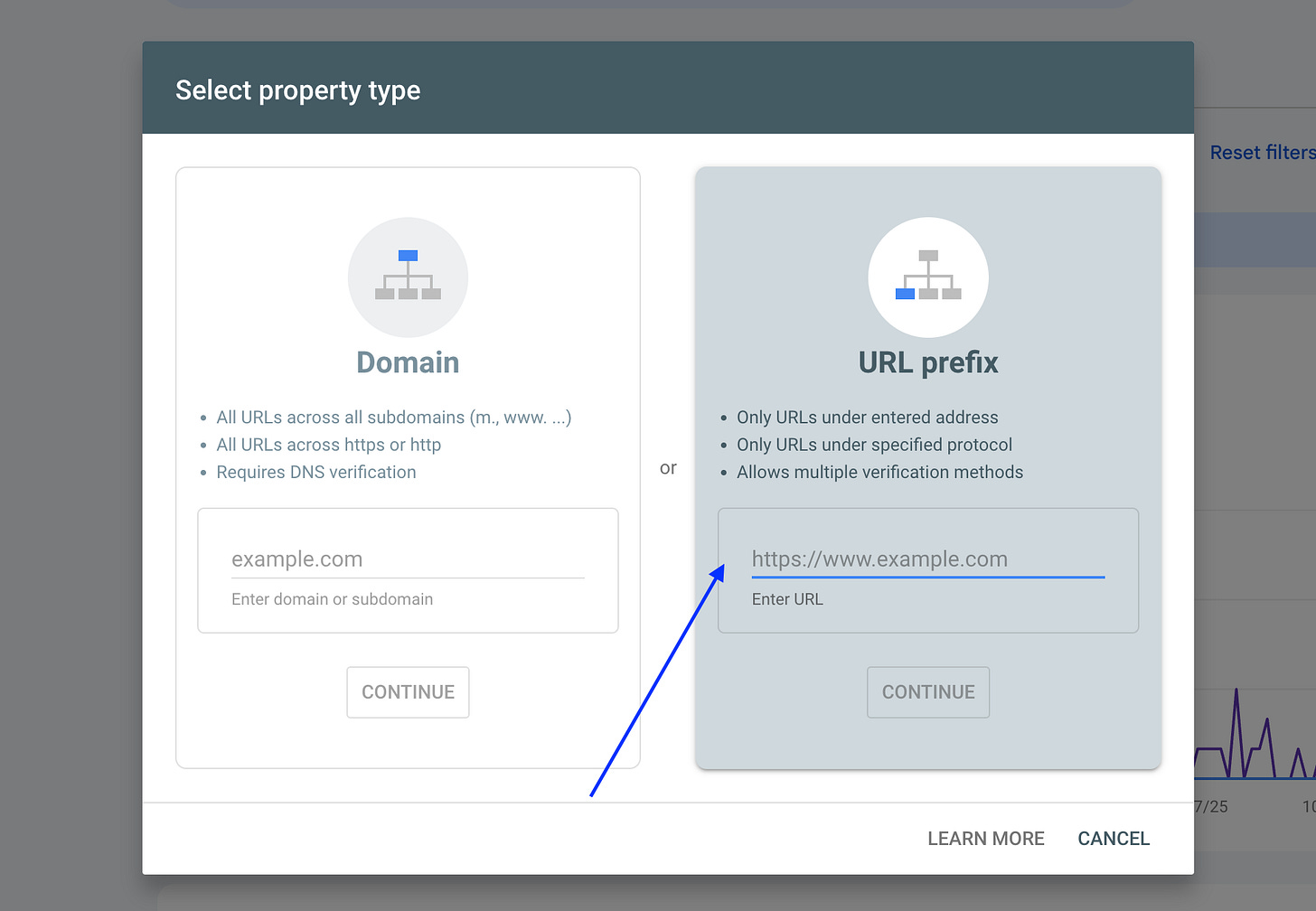
Verify ownership.
To set this up with Substack and Google Analytics, check this post from Casandra Campbell
What you’ll see after 48-72 hours:
Which search queries bring you traffic
Your ranking position for each keyword
Click-through rates from search results
My Advice:
Focus on depth, not breadth. Build real expertise in your niche. Structure every post with answer capsules. Publish consistently for 6 months.
The creators who win at AEO won’t be the ones who publish daily.
They’ll be the ones who publish strategically…with structure, clarity, and genuine expertise.
The Bottom Line
SEO and AEO work. But they require patience.
If you can commit to:
Optimizing every post using the checklist
Publishing consistently for 6 months
Building genuine expertise in your niche
Trusting the process even when results are slow
You will see compound growth.
Your posts will work for you while you sleep. Your back catalog will become a lead generation machine. Your authority will build month by month.
But you have to stick with it long enough to reach the inflection point.
🎁 Take This From Guide to Implementation
Reading this guide is step one. But implementing it consistently?
That’s where most creators fall off.
That’s why I’ve built everything you need to turn this into a system you can actually use.
The Complete Substack SEO/AEO Implementation Toolkit
Everything from this guide, turned into plug-and-play templates:
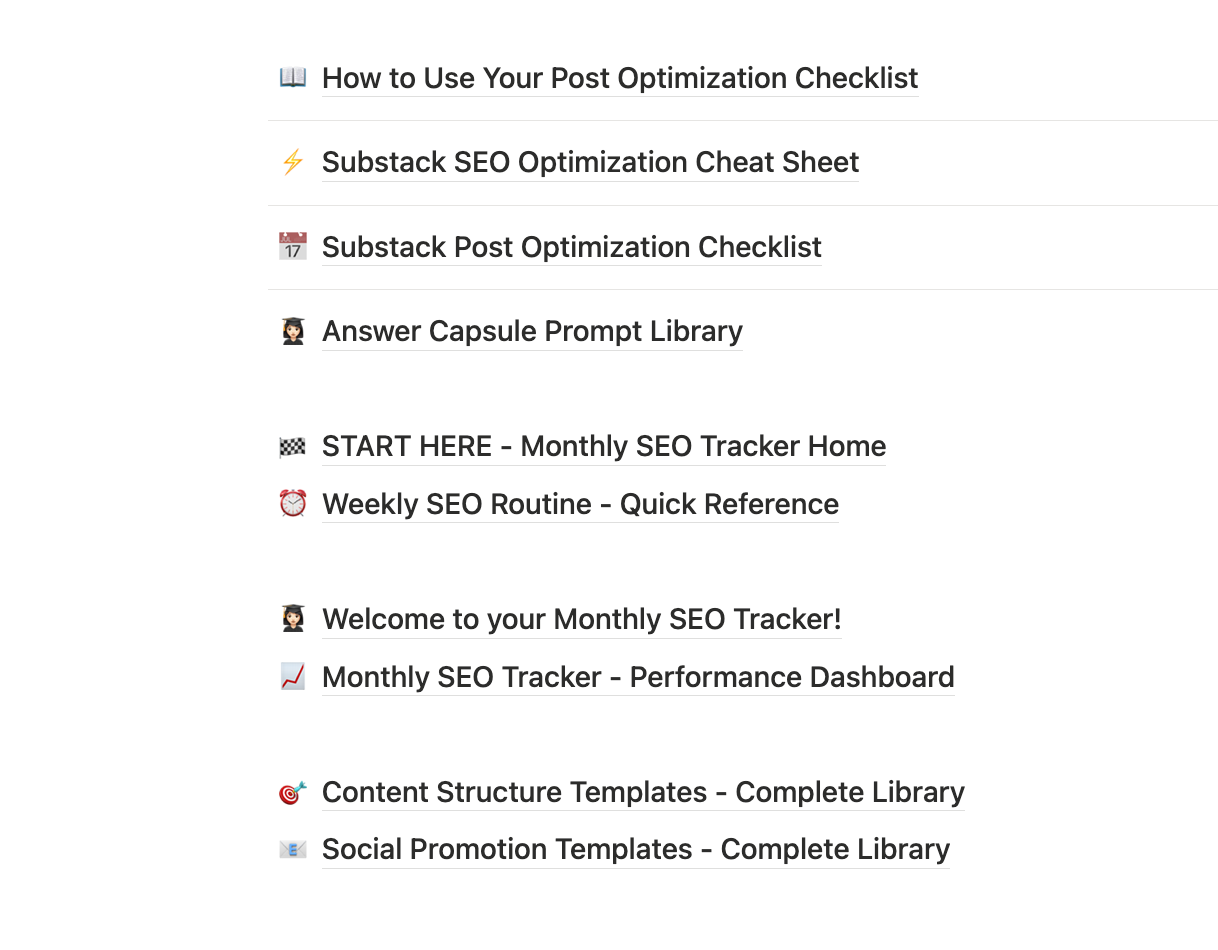
📖 How to Use Your Post Optimization Checklist Quick-start guide showing you exactly how to use the pre-publish checklist to optimize every post in under 10 minutes.
⚡ Substack SEO Optimization Cheat Sheet One-page reference with the essential SEO settings, meta tag specifications, and technical requirements for Substack posts.
📅 Substack Post Optimization Checklist Complete pre-publish checklist covering SEO essentials, AEO optimization, content structure, internal linking, and conversion elements—use this before every post.
🤖 Answer Capsule Prompt Library AI prompts to help you write perfect 40-60 word answer capsules that get quoted by ChatGPT, Perplexity, and Claude.
🏁 START HERE - Monthly SEO Tracker Home Your command center for the Monthly SEO Tracker system—includes overview, workflows, success timeline, and navigation to all resources.
⏰ Weekly SEO Routine - Quick Reference The 10-minute Monday morning ritual and 30-minute monthly review process to track performance and identify optimization opportunities.
🎉 Welcome to your Monthly SEO Tracker! Read-me-first page with quick setup instructions, next steps, and links to all system components.
📊 Monthly SEO Tracker - Performance Dashboard The main database where you track views, rankings, AI citations, conversions, and all SEO/AEO metrics for every post you publish.
🎯 Content Structure Templates - Complete Library 8 proven templates (Complete Guide, How-To, List Post, Case Study, Comparison, Newsletter, Thread, Opinion) with full structures, examples, and optimization checklists.
📧 Social Promotion Templates - Complete Library 50+ ready-to-use templates for X/Twitter, LinkedIn, Threads, and email—promote every post 7 different ways without starting from scratch.
Value if sold separately: $200+ Included with Premium Membership
PLUS: All my digital products
$150/year gets you everything.
Join Premium Membership 👇