

Most creators treat AI like a writing assistant.
They open a chat window, type a long prompt, get something decent, tweak it, copy it out, and do it all over again the next day.
That’s not leverage. That’s just a fancier keyboard.
What I’ve been building is different.
Instead of asking Claude the same things over and over, I gave it five jobs…specific, repeatable roles that run on command, every single time, without me rewriting a single instruction.
I call them Skills.
And today, I’m sharing the exact skill files I use with you…
What Is a Claude Code Skill?
If you’ve never used Claude Code before, here’s the simplest way to think about it:
A Skill is a saved prompt file that becomes a slash command.
Instead of typing a paragraph of instructions every time you want to do a task, you type /tweet and it’s done.
The instructions are already there, pre-loaded, ready to execute exactly the way you trained it.
Think of it like a recipe card that never expires.
You write it once. Claude follows it perfectly every single time.
No code knowledge required. No technical background needed. Just one folder on your computer.
How to Set It Up (5 Minutes, One Time)
Here’s all you need to get started:
Step 1: Download Claude Code — it’s available as a desktop app or VS Code extension at claude.ai/code
Step 2: Open your project folder inside Claude Code
Step 3: Create a folder called .claude/commands/ inside your project
Step 4: Drop the skill files inside that folder
Step 5: Restart Claude Code — the commands appear automatically
That’s it. From that point on, every skill is one command away.
The 5 Skills — And the System They Form
Here’s where most people get this wrong: they see 5 tools and think 5 separate things.
These aren’t separate. They’re one connected system.
Let me show you how they actually work together.
Skill 1: /tweet
What it does: Takes any newsletter URL and generates 8-12 viral tweet variations in under 2 minutes.
Not the same tweet in different fonts. Real variety…short punchy wisdom bombs, personal realizations, contrarian takes, question-answer formats, story nuggets. Each one structured differently. Each one under 280 characters. No hashtags, no emojis, no filler.
What you get: A full week’s worth of standalone tweets, ready to review and post.

Skill 2: /create-thread
What it does: Transforms the same newsletter into a full X/Twitter thread…with a hook that stops the scroll, clean separators between tweets, mentions for any companies referenced, exact URLs preserved, and a CTA back to your newsletter at the end.
What you get: A properly structured thread, formatted and ready to copy-paste into X.
Skill 3: /push-to-typefully
What it does: Takes everything generated by /tweet and /create-thread and pushes it directly into Typefully as scheduled drafts…distributed intelligently across your preferred posting days and times.
It shows you a schedule preview before pushing anything. You confirm. Done.
What you get: Your entire week of social content, scheduled in one session, without touching Typefully manually.
Skill 4: /authority-post
What it does: This one runs fully autonomous…no newsletter URL needed.
It analyzes recent posts from 20+ thought leaders you specify, identifies what’s trending, spots the gaps nobody is talking about, and comes back with 5 post concepts for you to choose from.
You pick one. It runs a quality gate (8 yes/no questions to make sure the concept is strong enough to write). If it passes, it writes 3 detailed, multi-paragraph authority posts…100 to 500+ words eac…in your voice.
Not tweets. Proper long-form social posts that build positioning.
What you get: Deep, detailed authority content that fills the gaps between your newsletters.
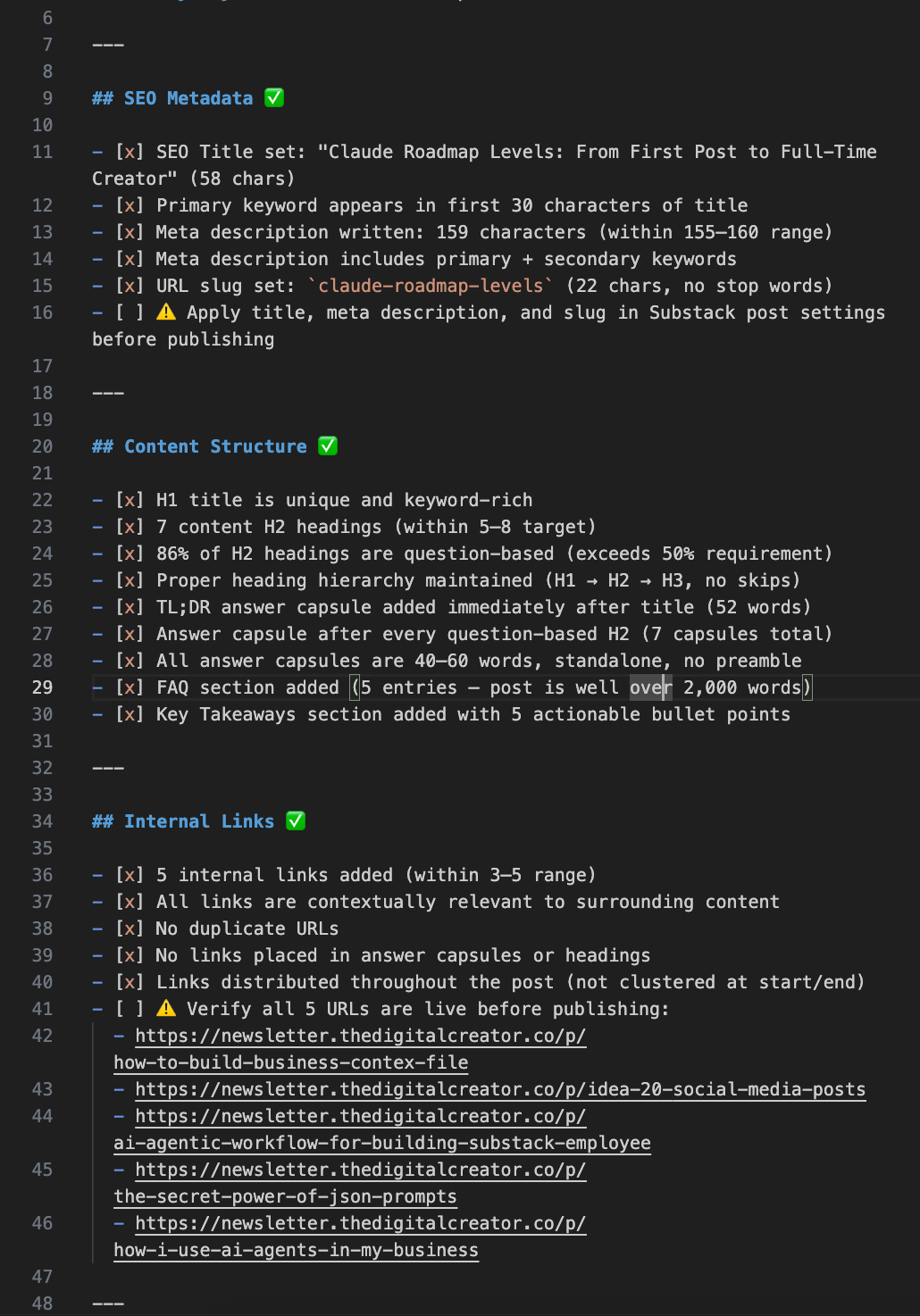
Skill 5: /seo-optimize
What it does: Optimizes any blog post or article for Google and AI answer engines like ChatGPT, Perplexity, and Claude.
It walks through a 10-step process…title tags, meta descriptions, a TL;DR answer capsule, restructured headings, paragraph optimization, internal links, FAQ section, and key takeaways.
What you get: 4 clean output files in an organized folder, ready to publish.
Here’s the Full System in One View
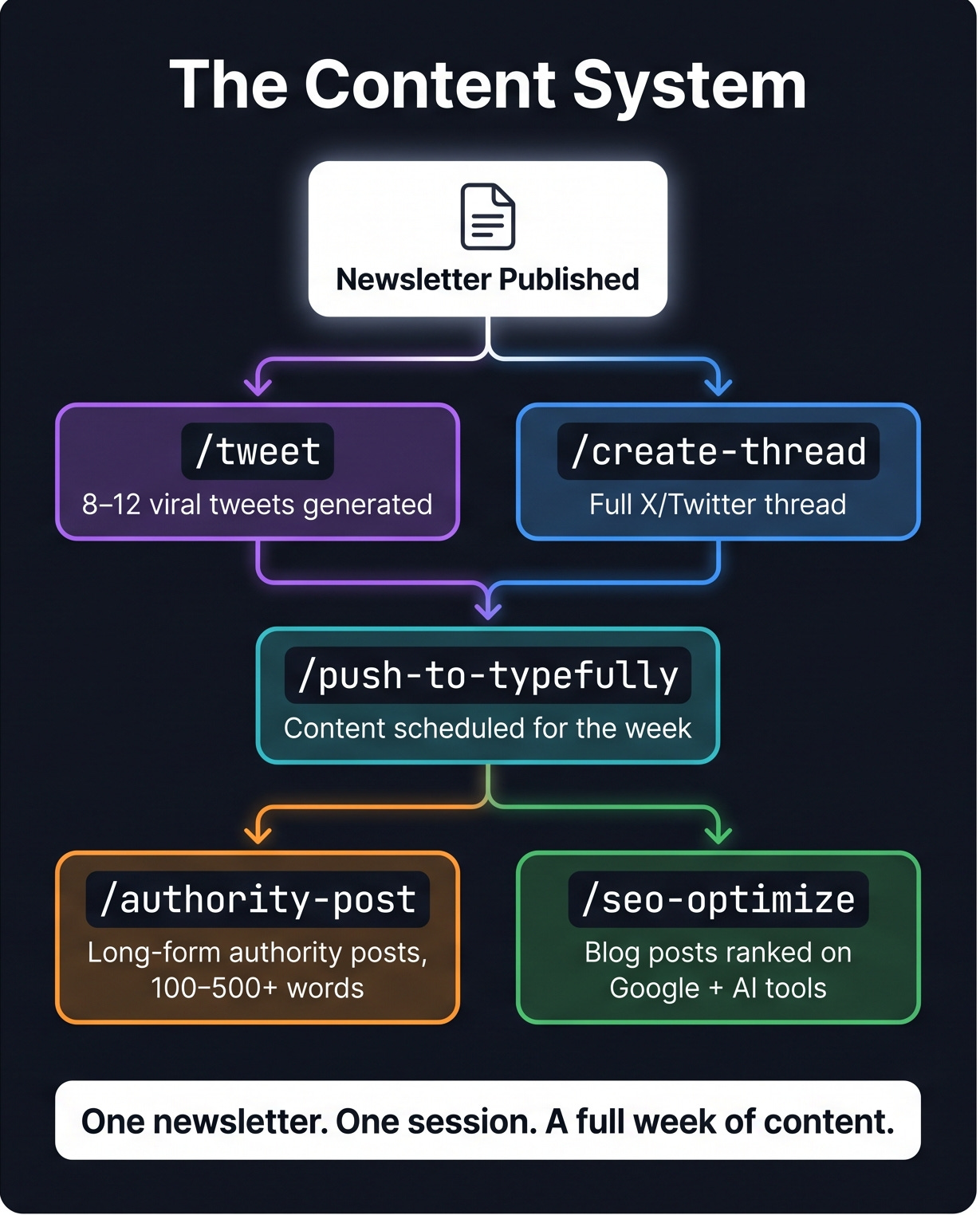
This is how the workflow actually runs for me every week:
Newsletter published
        ↓
/tweet          → 8-12 viral tweets from the newsletter
/create-thread  → Full X thread from the newsletter
        ↓
/push-to-typefully → Everything scheduled for the weeks and month. One confirmation.
        ↓
/authority-post → Mid-week long-form posts that build authority
        ↓
/seo-optimize   → Blog posts ranked on Google and cited by AI tools
One newsletter. One session.
An entire week of content across multiple platforms.
All written in your voice. All formatted for the right platform. All scheduled.
This is the shift from Content Creator to Digital Architect.
You stop creating disposable posts every day and start running a system that creates for you.
What This Actually Changed for Me
Before I built these skills, repurposing one newsletter issue took me 3 to 4 hours. Sometimes I skipped it entirely because I didn’t have the energy after writing the newsletter itself.
Now the entire repurposing workflow takes under 30 minutes.
And the output quality is better…because I’m not rewriting the same prompts from memory, making format decisions when I’m already tired, or forgetting to include a CTA.
The system holds all of that. I just review and publish.
How to Get the Skill Files
These 5 skill files are available exclusively to paid members of The Digital Creator.
Here’s what you unlock when you join:
✅ All 5 Claude Code Skills (the exact files I use…ready to install)
✅ AI Agents Collection
✅ Substack SEO/AEO Implementation Toolkit
✅ 45% off all paid courses
✅ Community access
$39/month. Or $150/year — that’s a 40% discount.
If you’re already a paid member…just scroll down… you have it.
Most creators are still cooking from scratch every day — rewriting prompts, reformatting manually, guessing at what to post next.
You don’t have to.
The system is built. The files are ready.
You just have to run the command.
— Sharyph
P.S. If you have any trouble setting up the skills after joining, reply to this email. I’ll help you personally.
P.P.S. Not a paid member yet? Here’s the link again → Join The Digital Creator