

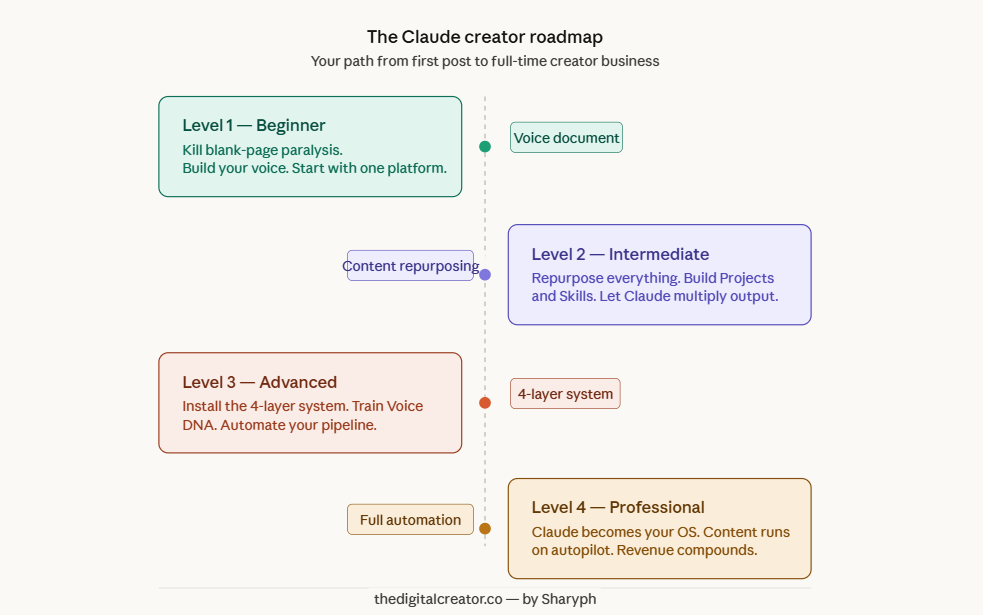
TL;DR: The Claude roadmap has four levels: Beginner (eliminate blank-page paralysis and build your voice document), Intermediate (repurpose content across platforms using Claude Projects), Advanced (install the 4-Layer System and Voice DNA method), and Professional (run fully automated content pipelines). Each level builds on the last…start where you are, build the next layer.
Here’s a number that should stop you in your tracks.
86%
That’s how many creators now use generative AI in their workflows.
Which means if you’re not using AI yet... you’re already in the minority.
But here’s the thing nobody talks about:
Most of those 86% are still struggling.
They’re publishing generic content that sounds like everyone else.
They’re burning hours “prompting” their way through bad drafts.
They’re wondering why their engagement is flat... even with AI doing “the work.”
The problem isn’t the tool.
The problem is they have no system.
They use AI like a vending machine…put in a request, get out content.
That’s not a workflow. That’s a recipe for mediocre output at scale.
Here’s the truth:
The creator economy hit $253 billion globally in 2025. And AI-powered creators are capturing a disproportionate share of that.
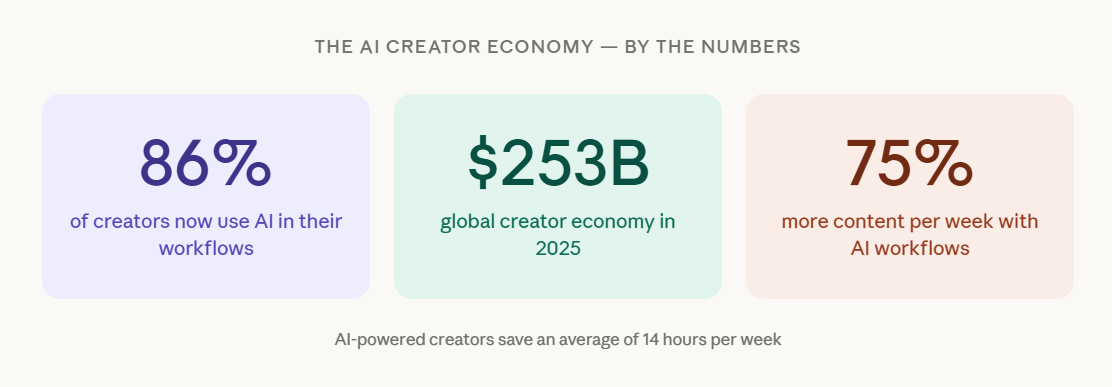
Teams using AI for both creation and automation produce 75% more content per week while saving an average of 14 hours.
But the gap between creators who get results and those who don’t isn’t about which AI they use.
It comes down to how systematically they use it.
That’s what today’s newsletter is about.
I’m going to give you the complete Claude roadmap...from your very first post to running a full-time creator business.
Four levels. Specific workflows at each stage. Real creator examples. And the exact mistakes that keep people stuck.
This is not theory.
Let’s get into it.
Why Claude Is the Right AI for Serious Creators
Now, before we get into the roadmap...
Let me address the obvious question.
Why Claude?
You’ve got ChatGPT. You’ve got Gemini. You’ve got a dozen other AI tools fighting for your attention.
Here’s why Claude sits at the center of my stack…and why serious creators keep coming back to it.
It writes like a human.
Not perfectly. Not magically. But in head-to-head comparisons, Claude consistently produces writing that sounds more natural than its competitors. G2’s testing found Claude “better at writing, rephrasing, and code generation.” Zapier’s 2026 analysis put it bluntly: “Claude doesn’t feel like a generic task completer…it thinks strategically and offers options unprompted.”
In A/B tests, Claude-written emails achieved a 32% open rate and 4.8% CTR. Those aren’t vanity metrics. That’s revenue.
It has memory…real memory.
Claude’s context window holds up to 200,000 tokens. That’s roughly 500 pages of content in a single conversation.
Upload your brand guide. Your writing samples. Your audience personas. Claude holds all of it and stays consistent throughout.
But the real unlock? Claude Projects.
Set up a Project for your newsletter. Upload your voice document, your past issues, your formatting rules…once. Every conversation inside that Project follows your standards automatically.
No more re-explaining yourself every time you open a new chat.
And then there’s Claude Skills.
Launched in October 2025, Skills let you encode your expertise into reusable workflow modules. Think of it like hiring a specialist who never forgets your standards…even when your energy doesn’t show up that day.
(More on this when we get to Level 2 and 3.)
But let me be honest with you.
Claude is not perfect. And pretending otherwise would be doing you a disservice.
❌ It can’t generate images or video.
❌ It doesn’t have native voice chat.
❌ It won’t pull live keyword difficulty data for SEO.
So here’s the smart setup…the one I use and recommend:
→ Claude for long-form writing, editing, scripting, and voice consistency
→ ChatGPT for brainstorming
→ Perplexity for real-time web research
Each tool has a lane. Keep it that way.
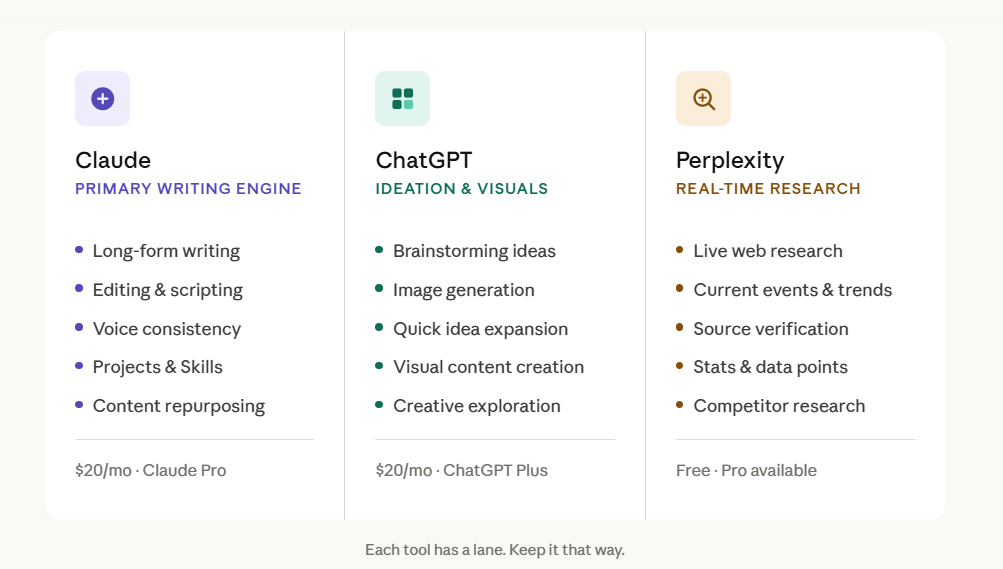
The creators wasting money are the ones who pay for 10 overlapping subscriptions and use none of them well.
“More tools doesn’t mean more productive.”…I’ve said this before, and I’ll keep saying it.
Now. Let’s talk about how to actually use Claude…at every stage of your journey.
Level 1 — Beginner: How Do You Start Creating With Claude?
Start by building a voice document before writing a single post. Feed Claude your best writing, ask it to extract your patterns, then use that document to open every content session. Pair this with the 4-part prompt formula…role, task, outcome, format…to eliminate blank-page paralysis and cut first-draft time from 2–3 hours to 30–45 minutes.
Most creators quit here.
Not because they lack talent. Not because the market is too crowded.
They quit because of one thing:
The blank page.
You open a new doc. You stare at it. You write a sentence. Delete it. Write another one. Close the tab.
Sound familiar?
Here’s what I know about you if you’re at this stage:
You have ideas. Probably a lot of them.
What you don’t have is a system to turn those ideas into content…consistently, without burning out.
That’s exactly where Claude earns its place.
At Level 1, Claude’s highest-value function isn’t writing your content.
It’s eliminating blank-page paralysis.
What used to take 2–3 hours of staring at a screen? With a clear AI workflow, it shrinks to 30–45 minutes.
Let me show you how.
🔹 Step 1: Find Your Niche Positioning First
Before you write a single post, you need to know what you stand for and who you’re standing for.
Ask Claude to identify the intersection of:
Your skills and expertise
Unique experiences only you have
Perspectives only you can offer
Underserved audiences you can serve
Then have it generate a Content Positioning Framework…covering your core themes, the content types that suit your strengths, a sustainable posting frequency, and a CTA strategy per content type.
This is your foundation. Build on sand here, and everything else wobbles.
🔹 Step 2: Use the 4-Part Prompt Formula
Most people write terrible prompts. Then they blame the AI.
Content strategist Amber Figlow teaches beginners a simple framework that fixes this immediately:
Tell Claude what to act as
State exactly what you want done
Describe the expected outcome
Specify the format
Here’s the difference in practice.
❌ Bad prompt: “I’m an online business coach. Generate 20 content ideas.”
✅ Good prompt:
“I’m an online business coach who helps women find their self-worth and create online businesses aligned with their passions so they can leave corporate careers. Act as my social media strategist and develop 20 Twitter thread ideas touching on their pain points: they can’t stand their jobs, don’t know how to translate skills into a business, and don’t know where to start.”
Same tool. Completely different output.
The prompt is the brief. Garbage in, garbage out.
🔹 Step 3: Build Your Voice Document (Do This Before Anything Else)
This is the step most beginners skip.
And it’s the reason their AI content sounds like everyone else’s.
Invest 15 minutes to create a voice document:
→ Paste your best writing into Claude
→ Ask it to extract your patterns…vocabulary, sentence rhythm, tone, paragraph structure
→ Save that document
→ Start every content session by feeding it to Claude first
Newsletter creator Ruben Hassid — who has built 290,000+ subscribers…goes even further:
“Don’t write better prompts…write better text files.”
Your voice is your most valuable asset as a creator. Protect it. For a deeper walkthrough of this method, read how to build a business context file…it covers the exact structure that makes Claude stay consistent across every session.
🔹 The Beginner Tool Stack (Keep It Minimal)
Here’s what you actually need to start:
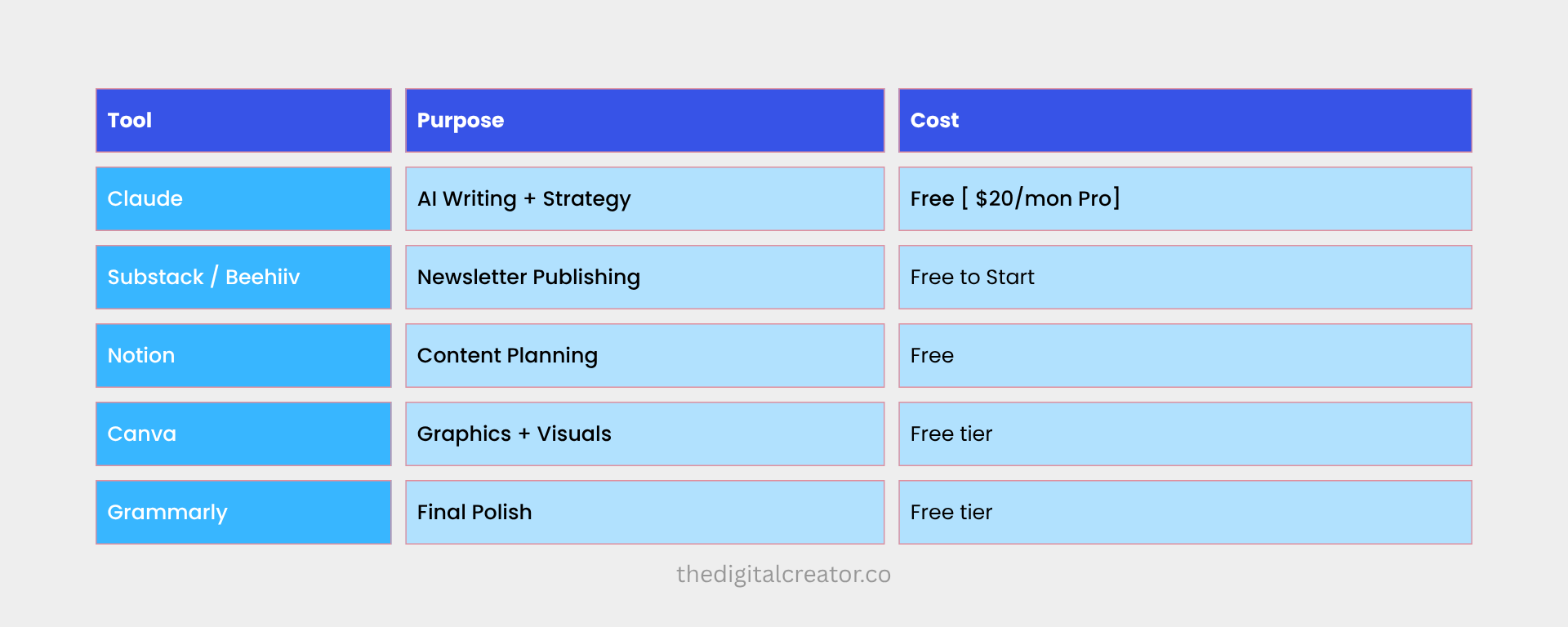
That’s it.
Resist the urge to add more.
Creator Carrie from Thrive with Carrie learned this the hard way…she was running 12 simultaneous AI subscriptions before she consolidated to 3 core tools. After simplifying? She published twice as much content.
More tools is not more leverage.
Fewer, better tools…used consistently…win every time.
⚠️ The Mistakes That Kill Beginners
Mistake #1: Publishing Claude’s output without editing.
As Amber Figlow puts it bluntly: “AI is actually kind of dumb” without detailed input.
Every output is a first draft. Treat it like one.
Mistake #2: Skipping the brand voice step.
Generic AI content damages trust immediately. Your readers will feel it — even if they can’t name it.
Mistake #3: Trying to automate everything at once.
Start with one content type. Get good at it. Then expand.
Mistake #4: Posting identical AI output across platforms.
X is not LinkedIn. LinkedIn is not your newsletter. Adapt the format, tone, and length for every platform…every time.
“AI gives you speed. You give it soul.”
Get the voice document right first. Everything else builds on top of it.
Level 2 — Intermediate: How Do You Scale Content Without Working More Hours?
The answer is content repurposing from a single source…never from scratch. Record or write one original piece, upload the transcript to Claude, and generate a newsletter draft, blog post, 30+ social threads, titles, show notes, and platform captions in one session. Pair this with Claude Projects to stop re-explaining your brand every time you open a new chat.
You’re publishing consistently.
You have an audience…maybe small, but real.
People are opening your emails. Replying to your posts. Sharing your content.
Now the question shifts.
It’s no longer “how do I create content?”
It becomes: “how do I create more of it…without working more hours?”
This is where most creators hit a ceiling.
And it’s where Claude stops being a helpful assistant...
...and starts becoming a productivity multiplier.
Welcome to Level 2.
🔹 Your New Superpower: Content Repurposing
Let me paint you a picture.
You record one podcast episode. Or film one YouTube video. Or write one long newsletter.
That single piece of original content becomes:
✅ A newsletter draft
✅ A blog post
✅ 30+ social media threads
✅ Titles and descriptions
✅ Show notes
✅ Platform-specific captions
All from one source. One session. One Claude chat.
This is the exact workflow Amber Figlow uses…and it saves her 10+ hours every single week:
→ Record original content (YouTube or podcast)
→ Open a new Claude chat
→ Upload the transcript
→ Ask Claude to generate every format listed above
The key principle she lives by: “Claude is always working with my original content. My transcript, my ideas, my voice. Never ask it to create from scratch.”
Read that again.
Never ask Claude to create from scratch.
Always feed it YOUR raw material first. Your words. Your ideas. Your stories.
The research backs this up.
Content repurposing saves 60–80% of creation time versus starting fresh. Buffer reported a 400% increase in reach when content was repurposed across new platforms.
One creator built a system producing content for 9 platforms in 17 minutes from a single YouTube video.
17 minutes.
That’s not magic. That’s a system.
🔹 Claude Projects + Skills: The Game-Changer Most Creators Skip
Here’s where intermediate creators pull away from the pack.
Most people use Claude like this:
Open chat → type prompt → get output → close tab → repeat tomorrow from scratch.
That’s leaving 80% of Claude’s power on the table.
The smarter move? Build Projects.
Set up separate Claude Projects for each area of your business:
→ Newsletter writing
→ Social media content
→ Content strategy
→ Client work (if applicable)
→ Product creation
Inside each Project, upload:
Your brand voice document
Writing samples
Audience personas
Platform-specific formatting rules
Every conversation inside that Project inherits all of it automatically.
You stop re-explaining yourself. Claude stops giving you generic output.
But Skills take this even further.
Substack creator Daria Cupareanu built three core Claude Skills:
Audience Profile — five distinct personas with conversion triggers
Voice DNA — her exact writing patterns, including what she never does
Business Profile — her offers, positioning, and content goals
Her result? “The first output is already 80% there. I go from draft to almost-final in a fraction of the time.”
Here’s how she explains the difference between a prompt and a Skill:
“A prompt gets you one answer. You come back tomorrow, you start over. A Claude Skill is a structured instruction set you build once.”
Build once. Use forever.
That’s the shift from content creator to systems builder.
🔹 Newsletter Writing at Speed
One creator used Claude to write 12 newsletters in 4 days for a topical series.
Her reflection:
"I had more knowledge than time, and I needed a real-time thought partner to help me organize, structure, and draft."
Creator Carrie cut her newsletter writing time from 4.5 hours to 2 hours while increasing open rates by 23% and doubling engagement.
Same audience. Same topics. Better system.
If you want to see this applied to a Substack-specific setup, the AI-powered newsletter workflow shows exactly how to build it.
🔹 The Intermediate Tool Stack
At this stage, you’re adding integration…not complexity.
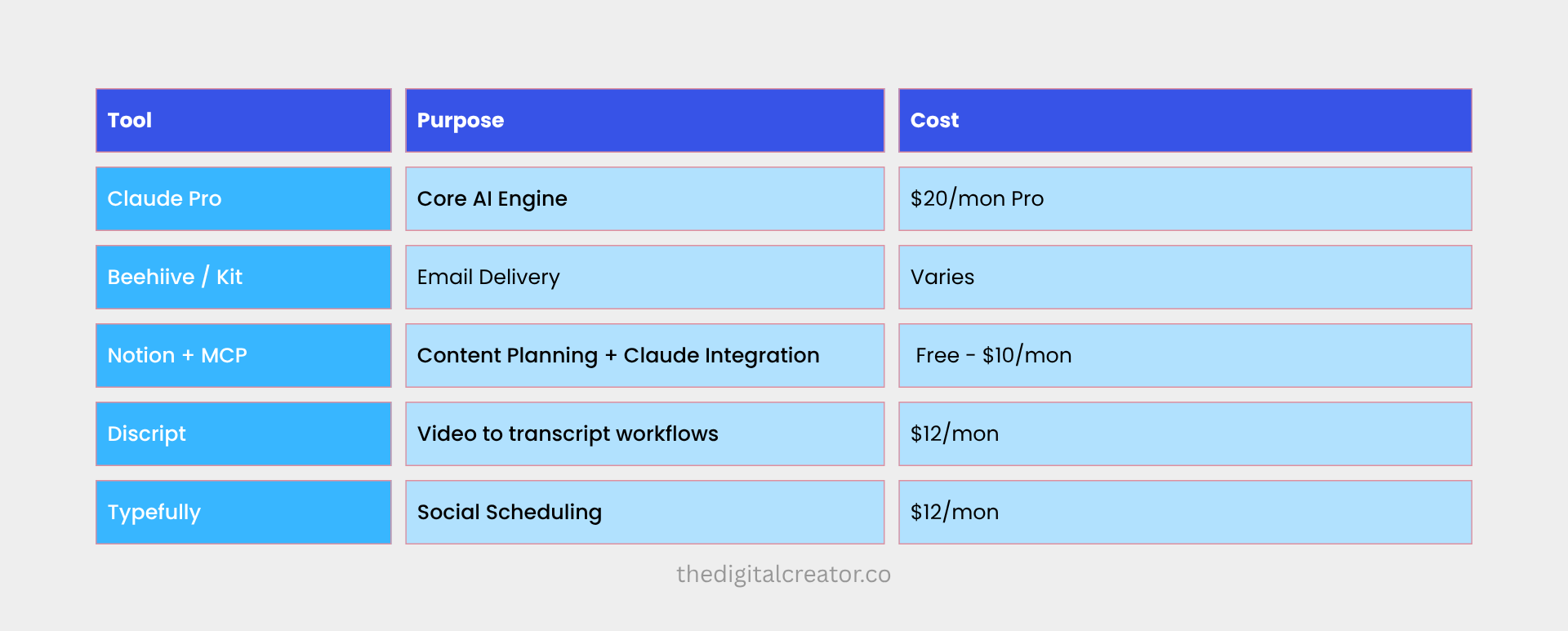
Total: $40–100/month.
To put that in perspective…this replaces what used to require agencies charging $8,000+ per month.
Let that sink in.
⚠️ Intermediate Mistakes to Avoid
Mistake #1: Tool overload.
Most creators benefit from 2–3 AI tools, not 10. Overlapping tools create confusion, not efficiency.
Mistake #2: Letting your brand documents go stale.
Your voice evolves. Your positioning sharpens. Update your Project documents every 60–90 days or your AI output starts drifting.
Mistake #3: Ignoring disclosure.
71% of audiences say it’s important to know when AI was used in content creation. Platforms like YouTube and Meta now label AI content. Be transparent. It builds trust…it doesn’t erode it.
Mistake #4: Letting AI make the strategy calls.
The creator who wrote 12 newsletters in 4 days made every strategic decision herself. Claude handled the execution. That’s the right division of labor.
You direct. Claude executes.
Never the other way around.
💡 This is exactly the system I teach inside the AI Digital Product Builder…how to build Claude workflows that run your content operation while you focus on the thinking, the strategy, and the ideas only you can provide.
Level 3 — Advanced: How Do You Maintain Voice Consistency Across Every Platform?
The solution is Voice DNA: upload 3-5 writing samples, ask Claude to analyze what you write and what you deliberately avoid, then build override rules that stop Claude from "correcting" your intentional stylistic choices.
Pair this with the 4-Layer System…Personal Preferences, Projects, Skills, and Automation…to run a content operation that improves with every piece you publish.
You’ve built the habit.
You’ve built the audience.
You’re creating consistently across multiple formats. Revenue is coming in. The business is real.
But something new is breaking.
Consistency.
Not posting consistency…you’ve cracked that.
Voice consistency.
When you’re producing content across your newsletter, X threads, LinkedIn posts, YouTube scripts, and course material simultaneously... maintaining a coherent, recognizable voice across all of it becomes brutally hard.
One post sounds like you. The next sounds like a press release. The one after that sounds like it was written by a well-meaning stranger.
This is the Advanced creator’s central challenge.
And the solution isn’t working harder.
It’s building infrastructure.
At Level 3, Claude stops being a tool you use.
It becomes a system that runs.
🔹 Voice DNA: The Method That Reduces Editing Time by 60–70%
Most creators train Claude on what they do write.
The advanced move is training it on what you don’t.
Substack creator Daria Cupareanu developed what she calls the Voice DNA method:
→ Upload 3–5 of your best writing samples
→ Ask Claude to analyze not just your patterns…sentence rhythm, vocabulary, paragraph structure…but your absences
→ What words do you deliberately avoid?
→ What structures do you never use?
→ What tones are completely off-brand for you?
→ Build override rules that stop Claude from “correcting” your intentional stylistic choices
The result: 60–70% reduction in editing time.
Because Claude stops fighting your voice and starts protecting it.
Amber Figlow takes this even further. She maintains an 80-page Brand Blueprint covering:
Core identity, values, mission, vision
Ideal customer profiles
Voice and writing style
Full offer suite
Brand messaging frameworks
All uploaded as Project knowledge.
Every piece of content she creates draws from that blueprint automatically.
That’s not a prompt. That’s an operating standard.
🔹 Advanced Prompting: XML Structure + Chain-of-Thought
If you’re still writing prompts as plain paragraphs, you’re leaving quality on the table.
Here’s what most people don’t know:
Claude is fine-tuned to pay special attention to XML tags.
Wrapping your inputs in structured tags like:
<instructions> </instructions>
<context> </context>
<draft> </draft>
<examples> </examples>
...reduces misinterpretation significantly and can improve response quality by up to 30%.
Two more advanced techniques worth building into your workflow:
1. Document placement matters.
Place long documents at the top of your prompt. Put your query at the end. Claude processes context better this way — and your output quality improves noticeably.
2. Self-critique loops.
Generate a draft → have Claude review it against specific criteria → refine based on the review.
This chaining pattern is the most effective method for consistently high-quality output at scale. For more on structured input methods, the power of JSON prompts covers the techniques that produce the best Claude outputs.
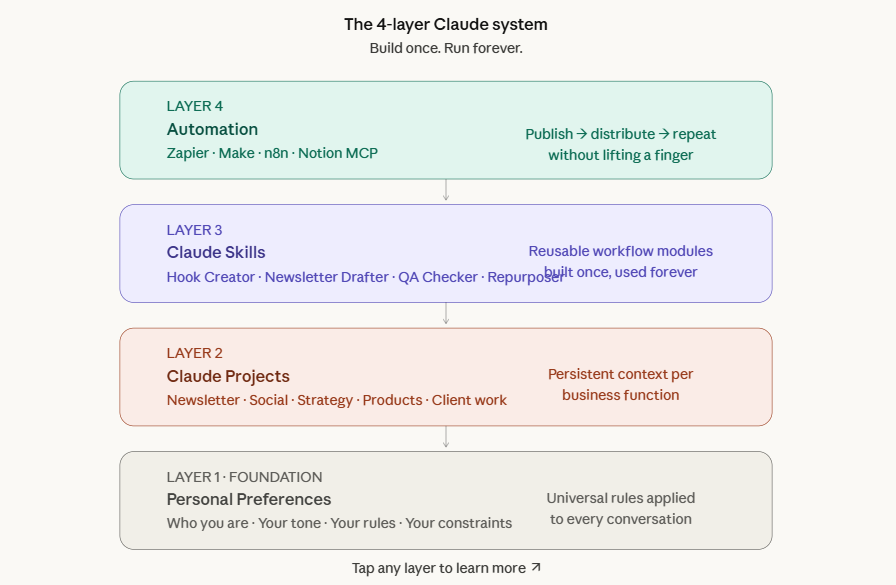
🔹 The 4-Layer Claude System
This is the architecture that separates advanced creators from everyone else.
Layer 1: Personal Preferences (Available on all plans)
In Claude’s settings, define universal rules…who you are, your default tone, behavioral constraints.Keep this under 500 words. Focus on the 20% of rules that cover 80% of your use cases.
Layer 2: Claude Projects (One per business function)
Separate Projects for newsletter writing, social media, client work, content strategy, and product creation. Each contains your brand documents, voice guides, and formatting templates. Link them from a central Notion dashboard.
Layer 3: Claude Skills (Reusable workflow modules)
Build specific Skills for every recurring task:
→ Hook Creator
→ Newsletter Drafter
→ SEO Optimizer
→ Content Repurposer
→ QA Checker
Each Skill is a markdown file encoding a complete workflow…with standards, expected output format, and brand context baked in.
Layer 4: Automation (Connecting Claude to your full tool stack)
This is where the machine truly runs itself.
Use Zapier or Make to trigger Claude workflows automatically:
→ Blog published → social content generated → routed for approval → scheduled via Typefully→ posted across channels
Notion's official MCP integration lets Claude read and write to your content databases directly.
To see how this works in practice, how to use AI agents in business walks through real automation setups for solo creators.
🔹 Quality Control at Scale
Here’s the problem nobody warns you about:
When you scale content production, quality variance scales with it.
One issue sounds sharp. The next feels rushed. Readers notice — even when they don’t say so.
The fix is a Creative QA Check Skill.
The fix is a Creative QA Check Skill that audits every draft across five dimensions: voice authenticity, structure and flow, scanability, SEO fundamentals, and accessibility.
It returns prioritized recommendations:
Critical → Important → Nice to Have.
The principle driving the best quality systems:
"Every mistake becomes a rule."
When an error surfaces in review, the guidelines update. Claude never repeats it.
This creates a compounding quality flywheel…the system gets better with every single piece of content you produce.
Pair this with a separate Publication Proofreader Skill for final technical polish: curly quotes, bullet inconsistencies, broken links, missing alt text.
🔹 Advanced SEO: Real Results From Real Workflows
Creator Wyndo built an SEO Optimizer Claude Skill that:
→ Fetches newsletter URLs
→ Searches Google for relevant keywords
→ Creates full SEO reports — keyword density, heading structure, meta descriptions
→ Generates optimized versions without losing voice
Result: 3,500 Google clicks in 28 days.
The workflow pairs Claude for content optimization with dedicated tools like Ahrefs or SEMrush for competitive keyword data…the one area Claude cannot natively provide.
💡 The 5 Premium Claude Skills inside The Digital Creator Premium Membership are built specifically for this layer—Hook Creator, Newsletter Drafter, Voice DNA, Content Repurposer, and QA Checker.
Ready to install into your Projects immediately. → $39/month or $150/year.
⚠️ Advanced Mistakes to Avoid
Mistake #1: Asking Claude to create from scratch.
Author Kenny Kane’s rule: “Don’t ask Claude to write first. Ask it to analyze first.”
When working with manuscripts, he asks Claude to “tell me what this manuscript is really about and where it loses energy” — before any editing begins.
Always analyze before you generate.
Mistake #2: Mega-prompts.
Cramming multiple tasks into one giant prompt consistently underperforms. Modular, single-purpose prompts win every time.
Mistake #3: Ignoring your analytics.
One creator doubled their average YouTube watch time from 2.5 to 5.2 minutes by feeding retention data back into their scripting prompts.
Your analytics aren’t just a report card.
They’re training data for your next piece of content.
💡 The 5 Premium Claude Skills inside The Digital Creator Premium Membership are built specifically for this layer of your system — Hook Creator, Newsletter Drafter, Voice DNA, Content Repurposer, and QA Checker. Ready to install into your Projects immediately.
The Authenticity Section
Let’s talk about the fear.
You’ve been reading this entire newsletter and somewhere in the back of your mind, a question has been quietly sitting there.
“But will I lose my voice?”
It’s the number one concern I hear from creators when the topic of AI comes up.
And I want to address it directly.
Because it’s a legitimate fear.
More than 50% of audiences say they’re less likely to engage with content they believe is AI-generated. Only 20% trust AI-driven content by default.
Those numbers are real. And they matter.
But here’s what the data also shows:
Creators who use Claude systematically report the opposite of what they feared.
Their voice becomes more consistent.
Not less authentic.
Read that again.
Does Using Claude Kill Your Authentic Voice?
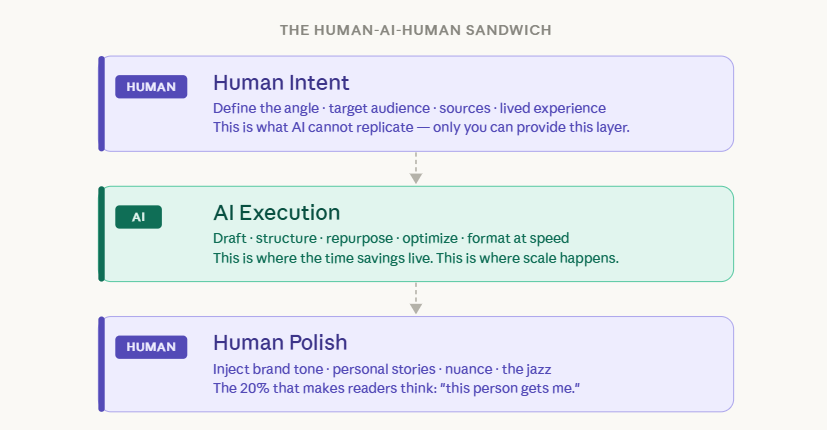
No…when used correctly, Claude makes your voice more consistent, not less authentic. The key is the Human-AI-Human Sandwich: you define the intent and angle, Claude handles drafting and repurposing, then you inject personal stories and lived experience.
Creators who feed Claude their own raw material first consistently produce more authentic output than those who start from blank prompts.
More than 50% of audiences say they’re less likely to engage with content they believe is AI-generated. Only 20% trust AI-driven content by default.
Those numbers are real.
But creators who use Claude systematically report the opposite of what they feared…their voice becomes more consistent, not less authentic.
Why Most Creators Lose Their Voice With AI
The fear is justified…but only when creators use AI wrong.
Wrong looks like this: opening Claude and typing
“Write me a newsletter about productivity,” taking the output, doing a light edit, and hitting publish.
Then repeating this until everything you produce sounds identical…and identical to everyone else doing the same thing.
Buffer put it perfectly:
“AI is exceptionally good at producing average content at scale. What it can’t do is have experiences worth sharing, develop genuine taste, build trust with an audience over time, or know which rules to break.”
The creators who sound like robots chose to become robots.
They handed AI the wheel instead of using it as an engine.
🔹 The Human-AI-Human Sandwich
The framework that actually works has a simple name.
The Human-AI-Human Sandwich.
Here’s how it’s layered:
🍞 Front End (Human):
You define the intent. The angle. The target audience. The sources.
This anchors everything in real experience…your experience.
AI cannot replicate this layer. It doesn’t know what happened to you last Tuesday. It doesn’t know the conversation you had with a subscriber that gave you a new perspective. It doesn’t know which insight hit different at 11pm when you finally figured something out.
That’s yours.
🥩 Middle (AI):
Claude handles the structural heavy lifting — draft alternatives, comprehensive coverage, optimization, formatting, repurposing.
This is where the time savings live. This is where the scale happens.
🍞 Back End (Human):
You inject what AI cannot access:
→ Brand tone that’s truly yours
→ Local nuance and cultural context
→ First-party data and original research
→ Personal stories and lived experience
→ The judgment to know which rules to break
Teams using this approach cut basic drafting time by roughly 50% while increasing output volume by 50%+.
Speed and authenticity.
Not one or the other.
🔹 The Non-Negotiable Rule Every Top Creator Follows
The most successful creators share one practice above everything else.
They always start from their own original material.
Not a blank prompt.
Their material.
Amber Figlow always begins with her podcast transcript or video recording.
The AI never gets a blank canvas.
Author Kenny Kane’s technique when editing with AI:
“Keep the imperfections that make this sound human.”
The deliberate pauses. The sentence that breaks a grammar rule on purpose.
The aside that goes slightly off-topic because you’re a real person with a real train of thought. That’s not a bug in your writing.
That’s the feature.
Ali Abdaal’s Head of Content Ines Lee captured it perfectly:
“AI is really good at giving us adequate stuff. It’s like a cover band that hits all the notes perfectly, but you’re never gonna feel that element of jazz.”
The jazz is yours. Claude handles the notes. You bring the jazz.
🔹 The Mindset Shift That Changes Everything
I’ve said this before and I’ll keep saying it:
“AI isn’t a cheat code... it’s the new standard.”
The creators thriving right now are not the ones who delegated their thinking to AI.
They’re the ones who used AI to handle the mechanical parts…research, formatting, repurposing, optimization…while doubling down on what only humans can provide.
Perspective.
Lived experience.
Emotional nuance.
The judgment to know which rules to break.
The tool costs $20–40 per month.
The voice it amplifies is priceless.
Let me bring this full circle.
When I started my creator journey, I had ideas.
But no direction. No clear offer. No system.
Just noise.
I was doing what most creators do…showing up every day on willpower, hoping consistency alone would compound into something. Writing posts from scratch. Starting every session staring at a blank page. Rebuilding context every single time I opened a new chat.
It worked. Slowly. Painfully.
Then I stopped treating AI like a shortcut and started treating it like infrastructure.
I built the voice document. Then the Projects. Then the Skills. Then the automations.
And the business started running differently.
Not because I was working harder.
Because I had stopped making the same decisions twice.
How Do You Move Through the Claude Levels Faster?
Move faster by focusing on one level at a time…build the voice document before Projects, build Projects before Skills, build Skills before automation. The creators who plateau built scattered systems: automations without voice docs, Skills without Projects. Build the foundation at each level before climbing to the next. The infrastructure compounds; the shortcuts don’t.
When I started my creator journey, I had ideas but no direction, no clear offer, no system. Just noise.
I was showing up on willpower, hoping consistency alone would compound.
Writing posts from scratch. Starting every session staring at a blank page.
Rebuilding context every single time I opened a new chat.
Then I stopped treating AI like a shortcut and started treating it like infrastructure.
I built the voice document. Then the Projects. Then the Skills. Then the automations.
The business started running differently…not because I was working harder, but because I had stopped making the same decisions twice.
Here’s the entire progression…distilled:
Level 1 — Beginner: Kill blank-page paralysis. Build your voice document. Learn the 4-part prompt formula. Start with one content type and one platform. Done beats perfect.
Level 2 — Intermediate: Stop creating from scratch. Repurpose your original content across every platform. Build Claude Projects for each area of your business. Write your first Skills. Let the system do the execution…you do the thinking.
Level 3 — Advanced: Install the 4-Layer System. Train Claude on your Voice DNA. Use XML prompting and self-critique loops. Automate your distribution pipeline. Build quality control into the workflow itself. Let every mistake become a rule.
Level 4 — Professional: Claude becomes the operating system of your business. Content pipelines run with minimal input. Teams work from Claude-powered SOPs. Revenue compounds because the infrastructure holds…even when you’re not in the room.
The gap between creators who build this and those who don’t is widening.
Fast.
🔹 Where To Go From Here
The $4.35 billion AI-creator economy is growing at 31% annually.
The creators building Claude systems right now are not waiting for the technology to get better.
They're building while others are watching.
If you’re just starting out:
→ Grab the free Lean AI-Powered Business Playbook for Creators
It’s the foundation document I wish I had at the beginning — covering the mindset shifts, the tool stack, and the first workflows to build before anything else.
It’s free. Start there.
If you’re ready to monetize and build your first digital product:
→ The AI Digital Product Builder is the most comprehensive course I’ve built on using AI to create, launch, and sell digital products…even if you’re starting from zero.
The system that took me years to figure out…delivered in hours.
If you want the SEO layer built into your content system:
→ The AI SEO Playbook gives you the exact workflows, content planning frameworks, and on-page optimization processes I use to make content that ranks and converts.
One ranking post pays for it many times over.
If you’re ready to go all in on the full system:
→ The Digital Creator Premium Membership gives you everything in one place:
✅ 5 Premium Claude Skills (Hook Creator, Newsletter Drafter, Voice DNA, Content Repurposer, QA Checker)
✅ AI Agents Collection
✅ Substack SEO/AEO Implementation Toolkit
✅ 45% off all paid courses
✅ Community access
$39/month or $150/year…less than a single hour of agency work.
🔹 One Last Thing
The research is clear.
The $4.35 billion AI-creator economy is growing at 31% annually.
The creators building Claude systems right now are not waiting for the technology to get better.
They’re building while others are watching.
The best time to start was six months ago.
The second-best time is today.
Don’t get left behind.
Your next level awaits…go get it.
Until next time,
Sharyph Founder of The Digital Creator
P.S. — If this issue was useful, forward it to one creator who needs to read it. The best way to grow is to give first.
P.P.S. — Not a Premium Member yet? Everything I build…the Skills, the toolkits, the systems…lives inside the membership. → Join here
. Have you found one specific input that makes the biggest difference to voice consistency in practice?
Very well put together! Excellent