

TL;DR: Claude Code Skills are SKILL.md files that teach Claude to perform specific tasks your way…reliably, every time. Skills 2.0 adds automated testing, benchmarking, and trigger tuning so your AI workflows never break silently. Build a skill once, run evals to verify it works, tune the trigger, and let it run without re-prompting.
Let me ask you something.
When you use Claude…
Do you type a prompt, get a result, and hope it’s close enough to what you wanted?
Do you re-explain your preferences every single time?
Do you feel like Claude is talented…but not quite yours?
If you’re nodding your head right now, you’re not alone.
Here’s the truth:
Most people are using Claude like a search engine.
Type. Get output. Repeat.
And they’re leaving 80% of the power on the table.
There’s a layer most creators never touch.
A layer that transforms Claude from a “pretty good AI” into a personalized expert that knows exactly how you work.
It’s called Skills.
And Anthropic just made them dramatically more powerful.
Anthropic shipped a major upgrade to the Skills framework inside Claude Code.
They called it Skills 2.0.
And I’ve been stress-testing it since it dropped.
Here’s what it does, simply put:
Skills are text-based recipe cards you give to Claude.
They teach your AI agent how to perform specific tasks — your way — reliably and on-command.
No more re-prompting.
No more “AI slop” outputs that look like everyone else’s.
No more guessing whether Claude understood what you meant.
A skill tells Claude exactly what to do. Every time.
But Skills 2.0 takes this further.
Anthropic just added something creators have never had before:
The rigor of software development…automated testing, benchmarking, iterative improvement…applied to your prompts.
Without writing a single line of code.
Read that again.
You can now test whether your skill actually works.
Catch when a model update breaks it.
Optimize it automatically until it performs at its peak.
This isn’t theory. This is a real system change…and the creators who learn it now will have a serious advantage over everyone still typing raw prompts.
In today’s issue, here’s what you’ll get:
✅ The two types of skills every creator needs to build
✅ The “Meta-Skill” that builds, tests, and improves all your other skills automatically
✅ How to run evals and benchmarks so your skills never silently break
✅ How to fix the “wrong skill fires” problem as your library grows
✅ How to wire your skills to external APIs and MCPs to build a full content pipeline
✅ What Anthropic is building next…and why early adopters win big
Let’s get into it.
What Are Claude Skills? (And Why They Matter Now)
Claude Code Skills are SKILL.md files that teach Claude to perform tasks your way…every time. Unlike prompts, skills persist across sessions without re-explanation. They encode your exact workflow, tone, and standards. With Skills 2.0, you can also test, benchmark, and auto-optimize them to stay reliable as Claude models update.
Here’s the simplest way I can explain it.
Imagine you hired a brilliant assistant.
Smart. Fast. Capable of almost anything.
But every morning, you had to sit down and re-explain your entire process to them.
Your tone. Your format. Your standards. Your workflow.
From scratch.
Every. Single. Time.
That’s exhausting. And that’s exactly what most people are doing with Claude right now.
Skills fix that.
A Claude Skill is a SKILL.md file…a simple, text-based instruction set that lives in your Claude Code environment.
Think of it like a recipe card.
You write it once.
Claude reads it automatically when it’s relevant.
And from that point on, it follows your process…without you having to explain it again.
No code. No complex setup. Just a markdown file with clear instructions.
Here’s what makes this powerful for creators:
Skills live in one of two places:
👉 Your personal skills folder — available across all your projects. These are your evergreen workflows. Your writing system. Your content process. Your brand voice.
👉 A project-specific folder — skills that only activate inside a particular project. Useful for team workflows or niche tasks tied to one client or campaign.
And here’s where most people get confused.
They think skills are just “long prompts.”
They’re not.
A long prompt tells Claude what to do this one time.
A skill tells Claude what to do every time — consistently, reliably, without you babysitting the output.
The difference?
❌ Without a skill: You get generic AI output. Competent, but forgettable. The kind of content that looks like it could’ve come from anyone.
✅ With a skill: You get output built around your exact process. Your structure. Your voice. Your standards. Output that looks like you made it.
I’ll give you a real example.
Let’s say you write LinkedIn posts. You have a specific format…a punchy hook, a 3-point framework, a CTA that links to your newsletter.
Without a skill, you re-explain that structure every time. Sometimes Claude nails it. Sometimes it doesn’t. Results are inconsistent.
With a skill, Claude knows the format. It knows the hook style. It knows where the CTA goes. Every post it generates follows your blueprint…even if you just say “write a LinkedIn post about AI productivity.”
That’s the shift.
From hoping Claude gets it right…to knowing it will.
And before Skills 2.0, there was one big problem.
Skills would break silently.
Anthropic would update the Claude model. Something in your skill would stop working. And you’d have no idea until the outputs started looking off.
Or the opposite: Claude would get so much better that your skill became unnecessary …and you’d keep using it anyway, wasting tokens on instructions the model no longer needed.
Skills 2.0 solves both of those problems. (More on that in a moment.)
What Are the Two Types of Claude Code Skills You Need to Build?
There are two types of Claude Code Skills: Capability Uplift Skills raise Claude’s output quality beyond its defaults, while Encoded Preference Skills lock in your exact workflow sequence. Capability skills can be retired as models improve; preference skills compound over time because your process…not the model’s capability…is what they encode.
Not all skills are built the same.
Anthropic officially categorizes skills into two types.
And understanding the difference will save you a lot of wasted effort…because each one serves a completely different purpose in your workflow.
Let’s break them down.
Type 1: Capability Uplift Skills
These are skills that raise Claude’s floor.
They help Claude do something the base model either can’t do at all — or can’t do consistently.
Think about the gap between what Claude produces by default… and what you actually want.
Generic front-end design vs. a polished, distinctive UI.
A passable document vs. a properly formatted, professional Word report.
A decent social post vs. one that actually sounds like you and stops the scroll.
Capability Uplift Skills close that gap.
They encode specific patterns, techniques, and standards that push Claude well beyond its baseline output — producing results that would take you 10 rounds of re-prompting to get manually.
Here’s a real-world example.
Anthropic’s own frontend-design skill is a capability uplift skill.
Without it, Claude generates clean but generic UI.
With it? Claude channels a specific design philosophy….distinct aesthetics, intentional typography, the kind of output that doesn’t look like “AI made this.”
For creators, the use cases are everywhere:
✅ A skill that writes newsletters in your exact structure and voice
✅ A skill that turns raw ideas into polished X threads with your formatting style
✅ A skill that creates professional PDF documents instead of raw markdown dumps
✅ A skill that produces on-brand carousels….not generic AI visuals
One important thing to know about Capability Uplift Skills:
They have a shelf life.
As Claude models improve, the base model gradually absorbs techniques that used to require a dedicated skill. What needed a skill six months ago…Claude might now do by default.
This isn’t a bad thing. It’s actually one of the most valuable signals Skills 2.0 gives you.
👉 When your evals show the base model passing your tests without the skill loaded… that’s your signal. The skill has done its job. Retire it. Move on.
More on evals in a moment.
Type 2: Encoded Preference Skills
These are skills that lock in your workflow.
Where Capability Uplift Skills raise quality, Encoded Preference Skills enforce process.
They take a sequence of steps…your steps, your way of doing things….and bake them into Claude permanently.
These aren’t about making Claude smarter.
They’re about making Claude follow your exact system without deviation.
Think about the workflows you run manually right now.
Every time you write a new newsletter, you probably follow some version of the same process.
Research the topic. Draft the hook. Structure the body. Write the CTA. Format for Substack.
You do it the same way because it works.
But right now, you’re holding all of that in your head…and explaining pieces of it to Claude every time you sit down to write.
An Encoded Preference Skill automates that entirely.
You define the exact sequence once, in the skill file.
Claude follows it every time, step by step, in the right order, to your exact specification.
No guesswork. No skipped steps. No “close enough.”
For creators, these are the most durable skills you can build.
Here’s why:
Because they’re not about Claude’s capability…they’re about your process.
And your process doesn’t become obsolete just because the model gets smarter.
✅ Your newsletter drafting workflow
✅ Your weekly content repurposing system
(newsletter → X thread → LinkedIn post → carousel)
✅ Your SEO audit process, run the same way every time
✅ Your product launch email sequence — built once, reused forever
These are the skills that compound over time.
Build them now. Let them run in the background. And focus your energy on the work that actually requires your human judgment.
Here’s a simple way to think about both types together:
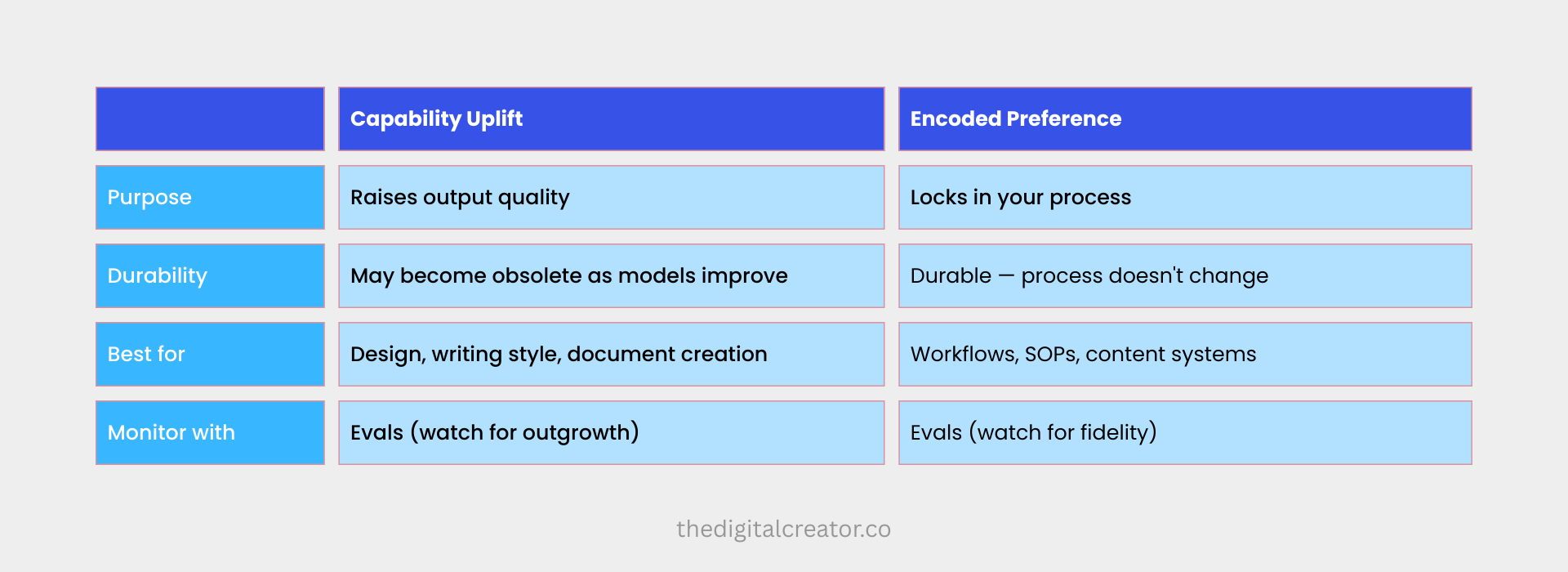
Both types need to be tested regularly.
Both types can be built…and improved automatically…with the same tool.
Which brings us to the most powerful thing Anthropic just shipped…
What Is the Skill Creator and How Does It Work?
The Skill Creator is a built-in meta-skill in Claude Code that automates the entire skill-building lifecycle. Describe what you want in plain English. It drafts the skill file, writes test cases, runs evaluations, analyzes failures, and iterates automatically…up to five times…until your skill performs reliably. No coding required.
Here’s where it gets really interesting.
Building skills manually is powerful.
But what if you didn’t have to build them from scratch?
What if there was a skill… that builds your skills for you?
That’s exactly what Anthropic shipped.
It’s called the Skill Creator.
And it might be the single most important tool in the entire Skills 2.0 framework.
Think of it as the meta-skill.
The skill that sits above all your other skills.
You point it at what you want to build.
It drafts the skill, writes the tests, runs the evaluations, analyzes the results, and iterates…automatically…until the skill performs the way it should.
All you have to do is describe what you want in plain English.
No engineering background required.
No prompt engineering expertise required.
No hours of manual trial and error required.
The Skill Creator handles the full optimization loop so you don’t have to.
How to Access It
The Skill Creator is available right now in three places:
👉 As a plugin inside Claude Code — invoke it with /skill-creator
👉 Inside Claude.ai and Cowork
👉 Directly from Anthropic’s official GitHub skills repository
If you’re using Claude Code, just type /skill-creator and it walks you through everything interactively.
The 4 Operating Modes
The Skill Creator doesn’t just do one thing.
It operates in four distinct modes…each one designed for a specific stage of the skill-building lifecycle.
1. CREATE
This is where you start from zero.
Describe what you want the skill to do. The Skill Creator helps you narrow down the scope, drafts the initial SKILL.md file, and writes your first set of test cases.
You don’t need to know what the skill should look like. You just need to know what problem you want it to solve.
2. EVAL
Once the skill exists, you need to know if it actually works.
EVAL mode runs your skill against a set of test prompts and tells you…pass or fail…whether Claude is doing what the skill is supposed to make it do.
This is the quality gate. Every skill should go through it before you trust it with real work.
3. IMPROVE
This is where the magic happens.
IMPROVE mode looks at the eval results — specifically the failures — and automatically rewrites and refines the skill to fix them.
It doesn’t guess. It analyzes why each test failed, generalizes the pattern, and produces an improved version of the skill.
Then it tests again. And again. Up to five iterations — automatically.
4. BENCHMARK
Once your skill is performing well, BENCHMARK mode gives you a standardized performance baseline.
It tracks three concrete metrics across your full eval set:
✅ Pass rate — how often the skill produces the right output
✅ Elapsed time — how fast the skill runs
✅ Token usage — how much it costs to run
Store that baseline. Come back to it after the next model update. If something changed — you’ll know immediately.
The 4 Agents Working Under the Hood
Here’s what’s actually running inside the Skill Creator when you kick off a cycle.
Anthropic built four composable sub-agents that work in parallel:
🔹 The Executor — runs your skill against every eval prompt
🔹 The Grader — evaluates each output against your defined expectations
🔹 The Comparator — performs blind A/B comparisons between skill versions (or skill vs. no skill) — without knowing which output came from which version
🔹 The Analyzer — surfaces patterns from the failures that aggregate stats alone would miss, and suggests targeted improvements
These four agents work together in parallel.
That means no context bleed between test runs. Faster results. And objective data — not gut feeling — driving every improvement decision.
Why This Is a Big Deal for Creators
Most of us are subject matter experts. Not engineers.
We know our workflows. We know our content process. We know what “good” looks like.
But we’ve never had the tools to prove a skill works — or to fix it systematically when it doesn’t.
The Skill Creator changes that equation entirely.
It essentially packages Anthropic’s own internal best practices for skill-building and puts them directly in your hands.
Every shortcut they’ve learned. Every optimization pattern they’ve tested. Every framework they use internally.
All of it — baked into a single tool you can invoke with one command.
This is not theory. Anthropic used this exact system to improve 5 out of 6 of their own public skills after running the trigger optimization loop.
If it works for Anthropic’s own skills… it’ll work for yours.
How Do Evals and Benchmarks Protect Your AI Workflows?
Evals are automated tests for your Claude Code Skills. Define prompts and expected outputs; the system reports pass or fail on whether your skill works correctly. Run evals after every model update to catch silent regressions before they damage real work, and to identify skills the base model has outgrown so you can retire them.
Let me paint you a picture.
You spend an hour building a skill.
It works beautifully.
Your outputs are clean.
Your workflow runs smoothly.
You’re getting exactly what you want from Claude.
Then Anthropic ships a model update.
You keep working. Everything seems fine.
But quietly, invisibly…your skill has started producing slightly off outputs.
A step is being skipped.
The tone has drifted.
The format isn’t quite right anymore.
You don’t notice for weeks.
By the time you do, you’ve published content that didn’t meet your standard. Delivered work that wasn’t up to scratch. Trusted a system that had already broken.
This is the silent regression problem.
And before Skills 2.0, there was no reliable way to catch it.
Now there is.
It’s called Evals.
And if you’ve never heard that term before…here’s the simplest way to understand it:
An eval is a test for your skill.
You define a set of prompts. You describe what “good output” looks like for each one. You run the skill against those prompts. And the system tells you…pass or fail…whether your skill is still doing its job.
That’s it.
No code. No engineering background. No complexity.
Just: does the skill still work the way it’s supposed to?
The Two Things Evals Are Built to Catch
There are two critical scenarios every creator with a skill library needs to monitor for.
1. Regressions
This is when a model update…or a change you made to the skill itself…breaks something that was previously working.
Claude gets updated. The way it interprets your instructions shifts slightly. A step in your workflow stops executing correctly.
Without evals, you find out the hard way…through bad outputs in real work.
With evals, you find out immediately…before it touches anything that matters.
Run your evals after every model update. Think of it like a health check for your entire skill library.
2. Outgrowth
This is the flip side…and it’s just as important.
As Claude’s base models improve, they naturally absorb techniques and patterns that used to require a dedicated skill.
Something that needed 200 lines of instruction six months ago…Claude might now do perfectly well without any instruction at all.
If you don’t test for this, you’ll keep running skills that are no longer necessary. Burning tokens on instructions the model doesn’t need. Adding complexity to your system for zero gain.
👉 Here’s the signal to watch for: if the base model starts passing your evals without the skill loaded…the skill has done its job. Retire it. Your library stays lean.
A Real Example from Anthropic
This isn’t hypothetical.
Anthropic ran evals on their own PDF skill…a skill designed to help Claude handle PDF form-filling tasks.
The evals revealed a specific failure point: the skill was struggling with non-fillable forms. Claude had to place text at exact coordinates with no defined fields to guide it…and it was getting the positioning wrong.
Without evals, that failure would have stayed invisible. Just slightly broken outputs that looked almost right.
With evals, they isolated the exact failure in one test run. Shipped a fix that anchored positioning to extracted text coordinates. Problem solved.
That’s the power of testing. Not vague “it seems worse” feedback. Precise, actionable data pointing directly at what broke and where.
Benchmark Mode: Your Performance Baseline
Running a single eval tells you whether your skill works today.
Benchmark mode tells you whether it still works tomorrow.
Here’s how it works:
You run a standardized assessment across your full eval set. Benchmark mode records three concrete metrics for every run:
✅ Pass rate — the percentage of test cases your skill handles correctly
⏱️ Elapsed time — how long the skill takes to execute end to end
🪙 Token usage — the cost to run the skill, measured in tokens
That becomes your baseline.
The next time Anthropic ships a model update, you run the benchmark again. Compare the numbers. If pass rate dropped — you have a regression to fix. If token usage spiked — something in the skill is becoming inefficient. If pass rate improved without changes — the base model got better and your skill might be ready for retirement.
Concrete numbers. No guesswork.
Parallel Testing: Faster Results, Cleaner Data
Here’s a detail worth knowing.
Before Skills 2.0, evals ran sequentially…one test at a time, in the same context window.
The problem? Context accumulates. Earlier test runs bleed into later ones. Results get contaminated.
Skills 2.0 fixes this with multi-agent parallel testing.
Each eval now spins up its own independent agent, in its own clean context, with its own token and timing metrics.
All tests run simultaneously.
Faster results. No cross-contamination. Data you can actually trust.
The A/B Comparator: Objective Improvement Data
One of the most useful additions in Skills 2.0 is the Comparator agent.
Here’s the problem it solves:
When you make changes to a skill, it’s very easy to think the new version is better — because you made it, you want it to be better.
That’s human bias. And it leads to skills that feel improved but actually aren’t.
The Comparator removes that bias entirely.
It runs two versions of a skill — or a skill versus the base Claude with no skill — and evaluates the outputs without knowing which came from which.
Blind comparison. No bias. Just objective data on whether your change actually helped.
If Version B outperforms Version A across the eval set, you have real evidence to act on.
If it doesn’t…you know not to ship that change.
How Does Trigger Tuning Fix the Wrong Skill Firing Problem?
Trigger tuning fixes Claude Code Skills that activate at the wrong time. Every skill has a trigger description Claude uses to decide when to fire it. Vague or overlapping descriptions cause misfires as your library grows. The automated trigger tuner rewrites and tests descriptions against held-out prompts until they activate precisely…every time.
Here’s a problem nobody talks about when they start building skills.
You build one skill. It works great.
You build a second. Still smooth.
You build a third, fourth, fifth…
And then things start getting weird.
Claude triggers the wrong skill for a task. Or doesn’t trigger any skill at all…even when one clearly applies. Or fires two skills at once when you only needed one.
Your library is growing. But your reliability is shrinking.
This is the misfire problem.
And it’s more common than you think.
Why It Happens
Here’s how Claude actually decides which skill to use.
Every skill has a description…a short block of text in the SKILL.md frontmatter that tells Claude what the skill is for and when to activate it.
When you give Claude a task, it scans all the available skill descriptions in your library and makes a judgment call: does this task match any of these skills?
If the description is too broad…Claude triggers the skill when it shouldn’t.
If the description is too narrow…Claude never triggers it, even when it should.
And as your library grows, descriptions that seemed perfectly clear when you wrote them start colliding with each other. Two skills with overlapping language. A description that made sense for three skills… but creates confusion when you have fifteen.
The result?
False triggers. Missed triggers. Inconsistent behavior.
And the frustrating part…you often don’t even know it’s happening.
You just notice your outputs feel slightly off and can’t pinpoint why.
The Automated Fix
Skills 2.0 ships with a dedicated solution for this: Trigger Tuning.
It’s built directly into the Skill Creator, and here’s how it works.
You point the Skill Creator at a skill you want to tune.
It analyzes the current description against a set of sample prompts…some that should trigger the skill, some that shouldn’t.
It runs each prompt multiple times to get a reliable trigger rate.
Then it calls Claude to propose improvements…not by listing specific failed cases (which would cause overfitting) but by generalizing to broader categories of user intent that the description is missing or misrepresenting.
It tests the new description. Compares it against the original. Iterates up to five times.
When it’s done, it surfaces the best-performing description…selected by held-out test score, not training score.
That last detail matters.
By splitting the eval set into 60% training / 40% held-out test, the system ensures it’s not just optimizing for the examples it already knows. It’s finding a description that generalizes…one that fires correctly for prompts it’s never seen before.
What Good Trigger Tuning Looks Like in Practice
Let me give you a concrete example.
Anthropic tested this on their own frontend-design skill.
The original description: “A frontend design agent channeling a specific aesthetic philosophy.”
Sounds reasonable, right?
Here’s what happened when they ran trigger evals against it:
❌ “Build me a landing page hero section” — FAIL (should trigger, didn’t)
❌ “My UI feels cluttered. How do I fix it?” — FAIL (should trigger, didn’t)
❌ “Make my app look more modern and polished” — FAIL (should trigger, didn’t)
The description was technically accurate. But it was too abstract. Too vague. Claude couldn’t reliably map real user requests to that description.
After running the trigger optimization loop, the description was rewritten to be specific, concrete, and grounded in the actual language creators use when they need front-end design help.
The result? All three prompts above now trigger the skill correctly. Every time.
That’s the difference between a skill that works in theory and one that works in practice.
Why This Matters More As You Scale
If you’re just getting started with skills, trigger tuning might feel like an edge case.
It’s not.
Here’s the reality:
The more skills you build, the more critical precise descriptions become.
A library of 3 skills is forgiving. Descriptions can overlap a little and you’ll barely notice.
A library of 10, 15, 20 skills? Overlapping descriptions become a real problem. False triggers start compounding. Missed activations become a regular frustration.
The creators who build systematic skill libraries…and tune their triggers as they grow…end up with AI workflows that run like clockwork.
The creators who skip this step end up with a messy library they don’t fully trust. And eventually, they stop using it.
Don’t be in that second group.
The Action Step
After you build any new skill…run the trigger tuning loop.
It takes minutes.
And it’s the difference between a skill that fires when you want it to… and one that fires whenever it feels like it.
Inside the Skill Creator, the trigger description improver is a separate script you run after the skill is built.
You don’t need to write a single line of code.
Just invoke /skill-creator, point it at the skill you want to tune, and let the optimization loop run.
Then check the HTML report it generates…it shows you pass/fail results per iteration, side by side, so you can see exactly how the description improved across each cycle.
How Do Context Engineering and Integrations Create a Full Content Pipeline?
Context engineering makes Claude sound like you by loading your tone guide, best content examples, and brand positioning directly into your skill. Add external API integrations to pull live data before Claude generates anything, then MCP integrations to publish outputs automatically. Together, they turn individual skills into a complete, end-to-end content pipeline.
Everything we’ve covered so far makes your skills more reliable.
More consistent. Better tested. Precisely triggered.
But there’s one more layer that separates a good skill library from a genuinely powerful creator system.
And most people never get here.
It’s the difference between Claude following your instructions…
And Claude operating with your full context…your voice, your brand standards, your live data, your publishing tools…all wired together into a single automated workflow.
This is Context Engineering. And it’s where skills stop being prompts and start becoming assets.
Context Engineering: Make Claude Sound Like You
Here’s the honest truth about most AI content.
You can tell it was written by AI.
Not because the grammar is wrong. Not because the facts are off.
But because it has no soul. No distinct voice. No personality.
It reads like it could have come from anyone…because it did.
Skills alone don’t fully solve this.
You can tell Claude to “write in a conversational tone.” But “conversational” means something different to every creator on the planet.
Context Engineering is how you close that gap entirely.
The idea is simple:
Instead of describing your brand voice in abstract terms, you show Claude exactly what it looks like…by grounding your skills with specific reference files.
Here’s what this looks like in practice.
Inside your skill file, you can reference documents that Claude loads automatically before executing the skill:
📄 Your tone of voice guide — a document that captures your specific writing style, your sentence patterns, your recurring phrases, your formatting rules. Not “write conversationally.” This is what conversational looks like for you…with examples.
📄 Examples of your best-performing content — your top 5 newsletter issues. Your highest-engagement X threads. Your most-shared LinkedIn posts. Claude studies these and internalizes the pattern.
📄 Your content frameworks — the specific structures you use. Your hook formulas. Your CTA templates. Your section headers. Your signature sign-off.
📄 Your brand positioning doc — your audience, your niche, your core message, your unique angle. So every output Claude produces is anchored to what you actually stand for.
When you load these files into your skill, something shifts.
Claude stops producing generic AI content.
It starts producing content that sounds like you wrote it on a good day.
That’s the goal. Not AI that replaces your voice. AI that amplifies it.
This is exactly how I use skills inside my own workflow at The Digital Creator.
My newsletter skill doesn’t just say “write a newsletter.”
It loads my tone of voice reference. It references examples of past issues that performed well. It follows the exact structure I use….welcome line, hook, body sections, CTA, sign-off.
The result isn’t “AI-generated content.”
It’s a first draft that already sounds like me…that I can edit and refine in a fraction of the time it would take to start from scratch.
That’s leverage. Real leverage.
If your bigger goal is how to grow your audience with AI, context engineering is the piece that makes every content output actually compound. Without it, you’re generating more noise…not building a recognizable voice.
External APIs: Pull the World Into Your Skills
Context Engineering makes your skills sound right.
External integrations make them work at a level that manually would take hours.
Here’s the concept:
Skills don’t have to be self-contained. You can wire them to live data from the outside world…pulling real-time information directly into your workflow before Claude starts generating anything.
Let me show you what this looks like for a creator content system.
Example: Automated Content Ideation from Trending Topics
Imagine a skill designed to generate LinkedIn post ideas.
A basic version asks Claude to brainstorm topics based on your niche.
Fine. But still guesswork.
An advanced version…with an external API integration…does this:
The skill makes a call to Reddit’s JSON API, pulling the top trending posts from your target subreddits right now
It filters for posts above a certain engagement threshold
It passes that live data to Claude as context
Claude generates post ideas anchored to what your audience is actually talking about today…not what it thinks might be relevant
You go from generic brainstorming…
To content ideas rooted in real-time signal.
Every time you run the skill, the inputs are fresh. The ideas are timely. The relevance is built in.
And you didn’t manually browse Reddit for 45 minutes to get there.
MCP Integrations: Close the Loop Automatically
APIs bring data in.
MCP integrations push your content out.
This is where a collection of individual skills becomes a fully automated content pipeline.
Here’s the example I find most compelling for creators:
You’ve used your context-engineered skill to draft a LinkedIn post.
You’ve used your trigger-tuned, eval-tested skill to ensure the format and tone are right.
Now what?
Without MCP integration…you copy the output, open LinkedIn, paste it in, schedule it manually. Every time.
With MCP integration…Claude hands the finished post directly to a connected tool like the Blot MCP, which schedules and publishes it to LinkedIn automatically.
No copy-paste. No manual scheduling. No switching between tools.
The content goes from:
idea → draft → published….entirely inside your Claude workflow.
That’s not just a productivity win.
That’s a fundamentally different way of operating.
Think about what this unlocks for a creator running a lean business:
✅ A skill that monitors trending topics via API → drafts content ideas → formats them to your brand → schedules posts via MCP → all triggered by one command
✅ A skill that takes your weekly newsletter → repurposes it from one idea to 20 social posts across X, LinkedIn, and Substack → queues them for the week → automatically
✅ A skill that pulls your latest product testimonials → formats them into social proof posts → schedules them across platforms → on a rolling basis
For a deeper look at building revenue-generating AI agents that connect across your full creator stack, that guide breaks down the exact architecture.
This is what I mean when I say the goal is to build AI systems…not just use AI tools.
A tool does one thing when you tell it to.
A system does many things, in sequence, automatically, while you focus on the work that actually needs you.
The Offer That Makes This Easier
I’ll be honest with you.
Building this kind of system from scratch takes time.
You need to build the skills.
Write the reference files.
Set up the evals.
Tune the triggers.
Wire the integrations.
It’s absolutely doable. Everything in this newsletter gives you the roadmap.
But if you want a shortcut…
That’s exactly what my Premium Membership is built for.
Inside, you get:
👉 5 Premium Claude Skills — pre-built, tested, and ready to drop into your Claude Code environment. Each one designed specifically for digital creators.
👉 AI Agents Collection — a curated library of agents built around the exact workflows I use to run The Digital Creator
👉 Substack SEO/AEO Implementation Toolkit — so your content doesn’t just get created, it gets found
👉 45% off all paid courses — including the AI Digital Product Builder
👉 Community access — so you’re building alongside other creators doing the same work
All of it for $39/month — or $150/year (that’s 40% off).
→ Join the Premium Membership here
And if you want to go even deeper on building AI-powered systems for your creator business — the AI Digital Product Builder course ($67) walks you through the entire architecture, step by step.
→ https://sharyph.gumroad.com/l/ai-digital-product-builder
The Future of Skills:
Why Do Early Adopters of Claude Code Skills Win Big?
Creators who build Claude Code Skills now compound advantages that get harder to close over time. Every skill built and tested today becomes a documented, optimized workflow asset. When models improve, your skills get better too. When automation advances further, your library is the foundation new tools build on…not something you rebuild from scratch.
We’ve covered a lot of ground today.
Skills. Types.
The Skill Creator.
Evals.
Benchmarks.
Trigger tuning.
Context engineering.
API integrations.
MCP pipelines.
That’s a complete system.
But here’s the thing Anthropic quietly mentioned…and I don’t want you to miss it.
This is still early.
Right now, building a great skill requires some deliberate effort.
You write the SKILL.md file. You define your test cases. You run the eval loop. You tune the trigger description. You wire in your reference files.
It’s not complicated. But it does require intention.
Here’s where Anthropic is heading next.
Their stated vision for the future of skills is this:
You describe what you want in plain, natural language.
“I want a skill that drafts my weekly newsletter in my voice, pulls trending topics from my niche, and formats everything for Substack.”
And the model…on its own…figures out the technical specifications, writes the skill, builds the eval set, runs the optimization loop, and hands you a finished, tested, production-ready skill.
No SKILL.md file to write.
No test cases to define.
No trigger descriptions to tune.
Just: describe the outcome you want. Get the skill.
We’re not fully there yet.
But the trajectory is clear.
And here’s what that means for you right now:
The creators who build their skill libraries today will have a compounding advantage that gets harder to close over time.
Think about it.
Every skill you build and test today becomes a documented, optimized workflow asset.
When the model improves, your skills get better…because they’re already structured, already tested, already integrated.
When automation improves further, your existing skill library becomes the foundation that the new tools build on top of.
You don’t start from zero.
You start from ahead.
The creators who wait?
They’ll catch up eventually. But they’ll be doing in 2027 what you could have done in 2025.
And in the creator economy, being 18 months behind isn’t just a skills gap.
It’s a revenue gap. An audience gap. A leverage gap.
The early adopters will reap the greatest rewards. They always do.
Here’s Your Action Plan — Starting Today
Don’t let this newsletter become something you read, nod at, and forget.
Here’s the exact sequence to get started:
Step 1: Open Claude Code. Install the Skill Creator plugin. Type /skill-creator and explore the interface. Just get familiar with it. 15 minutes.
Step 2: Identify the ONE workflow you repeat most in your creator business. Your newsletter drafting. Your content repurposing. Your social post creation. Just one.
Step 3: Use the Skill Creator in CREATE mode to build your first skill around that workflow. Describe what you want in plain English. Let it draft the skill for you.
Step 4: Run EVAL mode. Write 5 test prompts…things you’d actually say to trigger this skill. See how it performs. Fix what fails.
Step 5: Run the trigger tuning loop. Make sure Claude activates the skill exactly when you want it to…and not when you don’t.
That’s it. Five steps. One afternoon.
By the end of it, you’ll have a tested, optimized, reliably-triggering skill that runs your most important workflow automatically.
Then you build the next one.
And the next.
Until Claude isn’t just a tool you use…
It’s a system that runs your business.
One Last Thing
I want to be real with you for a second.
AI is moving fast. Faster than most people are comfortable admitting.
The gap between creators who have systems and creators who don’t is widening every single month.
But here’s what I’ve learned after building my own AI-powered creator business from the ground up:
The creators who win aren’t the ones who understand every technical detail.
They’re the ones who take what they learn and actually implement it.
You now have the blueprint.
The Skills 2.0 framework. The Skill Creator. Evals. Benchmarks. Trigger tuning. Context engineering. Integrations.
Everything you need to transform Claude from a prompt-and-hope tool into a personalized, tested, automated system built around your workflows.
The only question left is whether you use it.
Don’t get left behind.
Frequently Asked Questions
How do I get started with Claude Code Skills 2.0?
Open Claude Code and type `/skill-creator`. The tool walks you through everything interactively. Start by identifying one workflow you repeat regularly—your newsletter drafting, social post creation, or content repurposing—and use CREATE mode to build your first skill from a plain English description. No coding required to get started.
Can I use Claude Code Skills without knowing how to code?
Yes. Skills are plain text SKILL.md files written in markdown. The Skill Creator builds them from your plain English descriptions, writes the test cases, and runs evaluations automatically. You need to understand your own workflow process—but zero technical or coding knowledge is required to build, test, and deploy skills that work reliably.
How often should I run evals on my Claude Code Skills?
Run evals after every Anthropic model update—treat it like a health check for your entire skill library. Also run them any time you manually edit a skill or notice outputs drifting from expected quality. Benchmark mode stores baseline metrics so you can compare against previous runs and immediately spot whether an update improved or degraded your skill’s performance.
What’s the difference between a Claude skill and a system prompt?
A system prompt tells Claude what to do in one session. A skill persists across sessions and activates automatically when relevant to your request—no re-explaining required. Skills include structured frontmatter with trigger descriptions, support evals and benchmarks for quality assurance, and can reference external files to automatically load your voice, brand standards, and workflows before every execution.
Why do my Claude Code Skills sometimes fire at the wrong time?
This is the trigger misfire problem. Each skill has a description Claude uses to decide when to activate it. Vague or overlapping descriptions cause false triggers and missed activations—especially as your library grows beyond 5 skills. Run trigger tuning: the Skill Creator analyzes your description against test prompts, rewrites it, and validates against held-out prompts it’s never seen before.
Key Takeaways
• Build Encoded Preference Skills first…they encode your workflow process and compound over time, unlike Capability Uplift Skills that become redundant as Claude models improve naturally.
• Use the Skill Creator (`/skill-creator` in Claude Code) to build, test, and optimize skiautomatically.describe what you want in plain English and it handles the full optimization loop, no coding required.
• Run evals after every model update to catch silent regressions before they affect real published work, and to identify when a skill has become unnecessary so your library stays lean.
• Tune trigger descriptions for every skill using the automated tuner…precision matters more as your library grows beyond 5 skills and descriptions start overlapping and causing misfires.
• Add context engineering files (your tone guide, best content examples, brand positioning doc) to every skill so Claude produces outputs that sound like you…not generic AI content that could come from anyone.
Want to Shortcut the Build?
If you’re ready to move fast…here are three ways I can help:
🆓 Start here for free:
→ The Lean AI-Powered Business Playbook for Creators
The exact framework I use to build lean, AI-powered creator systems. No fluff. No theory. Just the blueprint.
⚡ Ready to go deeper:
→ Premium Membership — $39/month or $150/year
Everything you need to build your skill library without starting from scratch:
✅ 5 Premium Claude Skills (pre-built, tested, creator-ready)
✅ AI Agents Collection
✅ Substack SEO/AEO Implementation Toolkit
✅ 45% off all paid courses
✅ Community access
🚀 Want the full system:
→ AI Digital Product Builder — $67
The complete course for building an AI-powered creator business from the ground up. Validated offers, automated workflows, digital products that sell — all of it.
That’s everything for this week.
I genuinely believe Skills 2.0 is one of the most underrated shifts in the AI creator space right now.
Most people are sleeping on it.
You’re not.
Now go build something.
Until next time — Sharyph | Founder of The Digital Creator
P.S. — The Skill Creator is available right now inside Claude Code, Claude.ai, and Cowork. There’s zero reason to wait. Build your first skill today. Even a simple one. The best time to start your skill library was when skills first launched. The second best time is right now.
P.P.S. — If you found this issue valuable, forward it to one creator in your circle who uses Claude. They’ll thank you for it. And if someone forwarded this to you — subscribe here so you never miss an issue.
Love this deep dive, Sharyph. It goes into a lot more depth than most of the articles out there on Skills.
Hi Sharyp...first of all...thank you for the work you do! it's amazing...I subscribed a while back, but cannot seem to find the Lean AI Powered playbook when I joined...can you please send me link again? appreciate it. Thanks! Also, quick question, I've started playing around with Code, is it better to download Visual Studio code and add the Extension? or do it viceversa? from Claude Code connect Visual Studio Code? or do you recommend Antigravity? Thanks!