

Welcome to The Digital Creator…helping creators accelerate with AI.
Most people are still using AI like a search engine with a chat box.
They type a question. They get an answer. They move on.
And if that’s you…you’re not alone. But you are falling behind.
Here’s what nobody tells you:
The gap between casual AI users and true AI power users isn’t closing. It’s widening. Studies now show that top AI performers are running 6 to 17x more prompts per task than average users…and spending more time reviewing, refining, and directing output. Not less.
That’s not a hack. That’s a fundamentally different relationship with the tool.
We are no longer in the era of “AI tips and tricks.” If you’ve been collecting prompts trying to find the magic words, I need you to hear this: the prompt era is over.
We are now in the Agent-Native Era.
Being agent-native means you don’t just use AI…you orchestrate it. You delegate to it. You build systems around it. You think like the CEO of a small AI workforce, not like someone filling in a chatbot form.
The question for 2026 isn’t “are you using AI?”
It’s: “are you running AI like a team, or still treating it like a tool?”
In this issue, I’m going to break down the 9 skills that separate the people operating at the top 1% of AI capability from everyone else.
This isn’t a list of shiny apps or hidden features.
These are foundational skills, the kind that compound. The kind that, once you build them, make every AI tool you touch 10x more powerful.
Here’s what we’re covering:
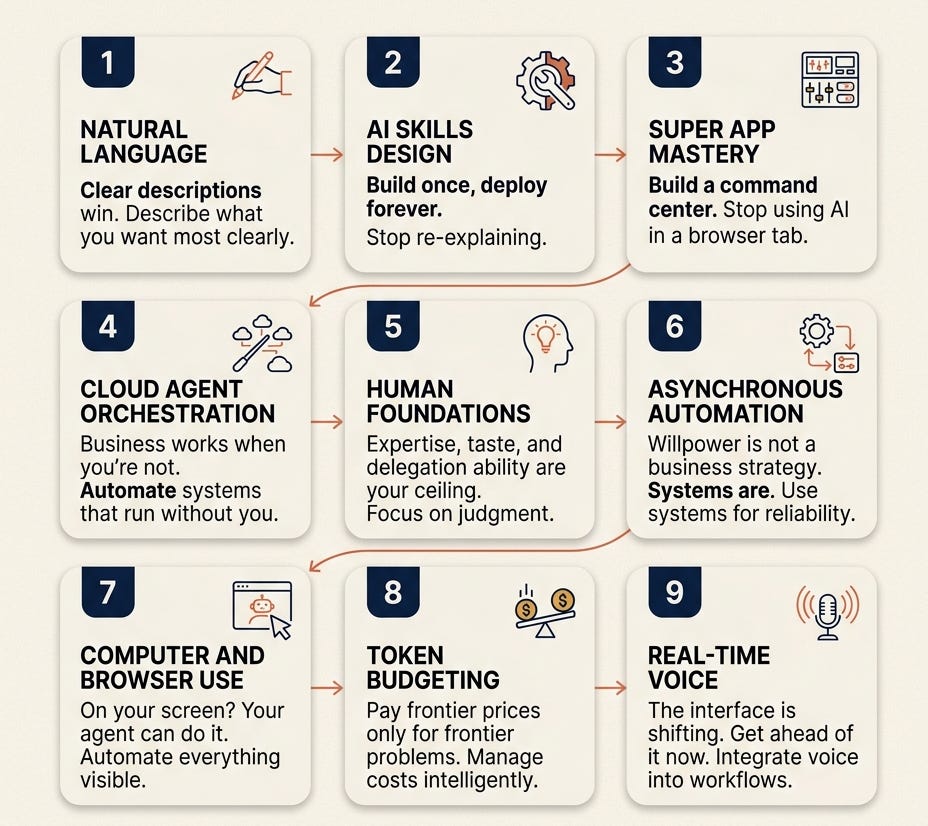
Natural Language Mastery — English is the new code
Designing and Curating AI Skills — Your reusable instruction library
Mastering Super App Platforms — Your AI command center
Orchestrating Cloud-Based Agents — AI that runs 24/7, even when you’re offline
Human Foundations — The real 1% differentiator (it’s not technical)
Asynchronous Automation — Building your 24/7 workforce
Computer and Browser Use — Agents that take the wheel
Token Budgeting and Model Selection — The cost advantage nobody talks about
Real-Time Voice — The Jarvis workflow
Let’s get into it.
Skill 1: Natural Language Mastery (English is the new code)
Let me say something that might sting a little.
If your prompts still look like this...
“Act as a senior marketing expert with 10 years of experience. You are professional, insightful, and data-driven. Your task is to...”
...you are using 2023 techniques in a 2026 world.
Those templated prompts were necessary back when AI models needed rigid structure just to understand what you wanted. You had to essentially program them with roles and constraints because they couldn’t infer intent on their own.
That era is gone.
Today’s models don’t need you to assign them a persona. They don’t need you to format your request like a job description. What they need... is clarity. Real, human clarity.
The shift is from prompting to describing.
Andrej Karpathy, one of the original researchers behind modern AI, put it simply: “The hottest new programming language is English.”
He wasn’t being poetic. He was being literal. The person who can articulate what they want with the most precision and context... wins. Every time.
This is what practitioners are now calling Context Engineering.
It’s not about finding magic words or secret formulas. It’s about giving the model enough rich, specific context to do genuinely great work. Think of it less like filling in a template and more like briefing a highly capable team member who just joined your business today.
What does that look like in practice?
Instead of:
“Write a newsletter about AI productivity.”
Try:
“I’m writing a weekly newsletter called The Digital Creator, aimed at solo creators and one-person businesses who are intermediate AI users. They already use Claude but haven’t built any systems around it yet. This issue needs to feel like a breakthrough moment for them... like they just learned something that changes how they see AI entirely. The tone is direct, no fluff, and always actionable. Start with a hook that challenges how they currently think about prompting.”
See the difference?
Same tool. Same model. Completely different output.
The quality of what you get from AI is a direct reflection of the quality of what you put in. Not the cleverness of a prompt hack. Not a special format you copied from a YouTube video. Just clear, specific, contextual description of what you actually want.
This is also why I wrote an entire issue on the Prompting Playbook from Claude earlier this year. Prompting is not dead... it just grew up. It’s no longer about tricks. It’s about communication.
The practical takeaway here is simple.
Before you type your next message to any AI... pause. Ask yourself: “If I were briefing a new hire on this task right now, what would I tell them?” Write that. Send that.
That habit alone will put you ahead of 80% of AI users.
Skill 2: Designing and Curating AI “Skills” (Your reusable instruction library)
Here’s a question worth sitting with.
How many times this week did you write the same type of prompt... for the same type of task?
A newsletter draft. A thread hook. A product description. A content brief.
If you’re doing that repeatedly, you’re not building leverage. You’re just doing manual labor with a fancier keyboard.
This is the problem that AI Skills solve.
A Skill is a task-specific instruction file that tells your AI agent exactly how to do a recurring job... every single time... without you having to re-explain it.
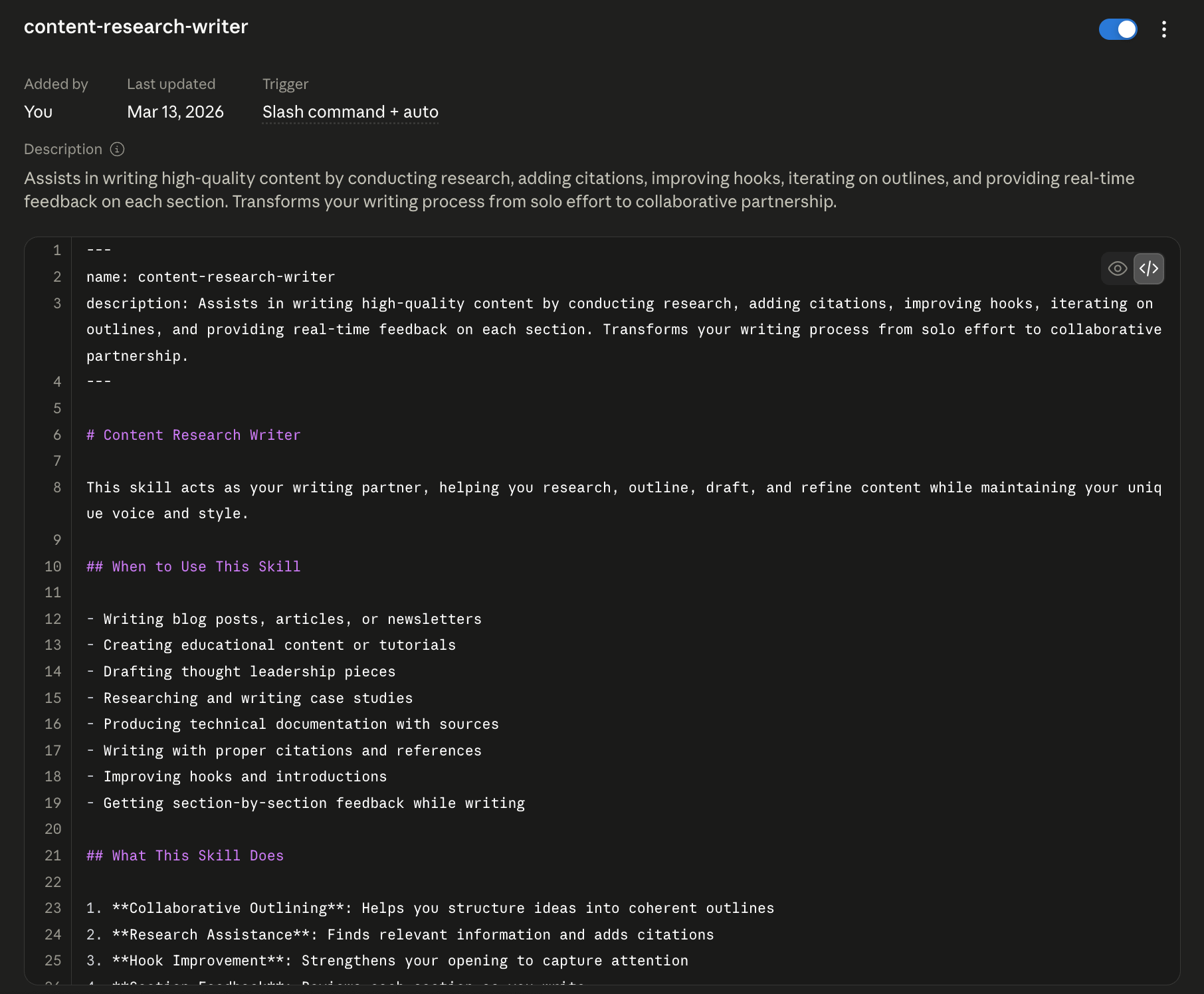
Think of it like this. Imagine you hired a brilliant new team member. On their first day, you spent two hours walking them through your brand voice, your content format, your standards, your audience, and your process. They took notes. They understood.
Now imagine you had to give that same two-hour briefing every single morning before they could do anything.
That’s what most people are doing with AI today.
A Skill solves this. You brief the agent once. It learns your standards. And every time you call on it, it already knows what you need.
Here’s the part most people get wrong though.
They think building a Skill means sitting down and writing a long instruction document from scratch. That sounds tedious, so they never do it.
The actual workflow is the opposite of that.
Here’s how I do it and how I teach it:
Do the task first. Have a conversation with Claude, write the thing, get the output you want.
Refine it. Push back, adjust, iterate until the output is exactly where you want it.
Then ask Claude to document it. Literally say: “Based on everything we just did, turn this into a reusable Skill file I can use next time.”
Claude builds the Skill for you. From the work you already did.
That’s it. No blank page. No manual writing. Just capture what worked and bottle it.
I’ve published an entire issue on exactly how this works, including the difference between a Skill file and a Claude.md context file, which are two different things that most people confuse. If you haven’t read it yet, this is the one.
And if you want to go deeper on the technical side of building and organizing these Skills inside Claude Code, this guide walks through the full setup.
The real power of Skills is what happens over time.
Every mistake becomes a rule. Every time an output misses the mark, you update the Skill so it never happens again. The system gets better every week... without you having to think harder or work longer.
Creator Daria Cupareanu documented this beautifully. She built three core Claude Skills covering her audience profile, voice DNA, and business context. Her result? “The first output is already 80% there. I go from draft to almost-final in a fraction of the time.”
That’s the compounding effect of Skills. You invest a little time building them once. And they pay you back on every single task after that.
The future of this is even more interesting.
We are already moving toward agents that auto-update their own Skill files based on your feedback. You correct an output, and the agent notes the correction and updates its own instructions. The system teaches itself... from you.
That’s not science fiction. That’s where this is heading in 2026.
The one-person business that masters Skill design today will have a compounding advantage that’s almost impossible to replicate later.
Skill 3: Mastering the “Super App” Platforms (Your AI command center)
Here is how most people use AI right now.
They open a chat tab. They ask a question. They wait. They copy the answer. They paste it somewhere else. They close the tab. They open a new tab. They start over.
One task. One tab. One result.
That’s not a workflow. That’s a bottleneck.
The people in the 1% are not working like this. They’ve set up what I call an AI command center. A single, centralized platform where multiple agents run simultaneously, connected to their tools, their files, and their browser... all at once.
This is what the new generation of “super app” AI platforms is designed for.
The two biggest right now are Claude Desktop and Cursor. And as of April 2026, both have been redesigned from the ground up around one core idea: you should not be waiting for one task to finish before starting the next.
Claude Code’s April 2026 desktop redesign shipped parallel sessions, an integrated terminal, file editor, diff viewer, and drag-and-drop panes. The mental model shifted completely: you’re not waiting for one task to finish, you’re running several at once and checking in as results arrive.
You are running several agents at once. And checking in when results arrive.
That is a fundamentally different relationship with AI than what most people have today.
What does this look like in practice?
Imagine you start your morning and you launch Claude Desktop. In one session, you have an agent researching competitors in your niche and pulling together a summary. In another, a second agent is drafting this week’s newsletter based on the Skill you built last month. In a third, another agent is reviewing your last five X posts and identifying which format drove the most engagement.
You go make your coffee.
You come back to three completed outputs.
The built-in browser changes everything too.
One of the most underrated features of these platforms is the built-in browser. Instead of you manually visiting a URL, copying content, pasting it into a chat, and then prompting... the agent just navigates the web itself. It reads the page. It processes the information. It brings back what you need.
All three major platforms... Claude, Codex, and Cursor... are converging on the same vision: one environment where you can chat, do knowledge work, write and run code, and automate workflows, connected to your existing tools, with an in-app browser as the interface layer.
The browser is becoming the agent’s hands.
And here’s how I think about choosing between these platforms, because this question comes up constantly in my inbox.
Claude Desktop / Claude Cowork is the best choice for knowledge work. Writing, research, content strategy, newsletter drafting, product building. If you are a one-person business or a creator, this is your home base. I wrote an entire issue on how I turned Claude into a full operating system for my business earlier this year. That is what is possible when you stop treating it like a chat window and start treating it like infrastructure.
Cursor is built for developers who want an IDE with AI baked in. If you write code regularly, it’s worth knowing. But for the creators and solopreneurs reading this, Claude Desktop is where you want to be.
The practical move right now is this.
Stop opening AI in a browser tab like it’s Google. Download Claude Desktop. Set it up as your morning workspace. Organize your Projects inside it. And start running more than one thing at a time.
Because while everyone else is waiting for one tab to load...
You’ll already be three tasks ahead.
Skill 4: Orchestrating Cloud-Based Agents (AI that never clocks out)
Let me ask you something.
What happens to your business when you close your laptop?
For most people, the answer is: everything stops.
Tasks pause. Research stops. Follow-ups don’t get sent. Content doesn’t get drafted. The business is only as productive as the hours you’re actively sitting in front of a screen.
That was acceptable before agents existed.
It is not acceptable anymore.
The single biggest shift happening in AI right now is this: the move from desktop tools to cloud-based agents that run 24/7... whether your laptop is open or not.
This is a fundamentally different category from the AI tools most people are using today. A chat session is something you have to show up for. A cloud agent is something that shows up for you.
Here’s what that looks like in practice.
Right now, you can set up an agent connected to your Telegram. You message it at 7am: “Draft a content brief on the top AI trends from this week, and have a first draft of Thursday’s newsletter ready by 9.” You put your phone down. You go for a walk. You come back to a brief, a draft, and a summary of sources... waiting for you in the same chat.
You didn’t sit at a desk. You didn’t open a browser. You texted your AI like you’d text a team member.
That’s exactly the model behind tools like OpenClaw, which connects AI to your existing messaging apps including WhatsApp, Telegram, Slack, and Discord... running 24/7, even when your laptop is closed. One creator who tested it described the experience simply: it turns rough notes into ready posts and queues them on schedule. No more blank-page mornings.
OpenClaw crossed 100,000 GitHub stars within its first week of launch in early 2026. That’s not hype. That’s developers and creators voting with their attention because they recognized something real: this is what the agent era actually looks like.
And it’s not just third-party tools catching up.
Claude Code now supports native Channels... a plugin-based feature that connects your Claude sessions directly to Telegram, Discord, and iMessage. You send a message from the app, Claude processes it using your local environment, and replies in the same chat.
Think about what that means for a one-person business.
Your AI is now reachable anywhere you already are. Not in a new app you have to remember to open. Not in a dashboard you have to log into. In the apps you’re already checking 30 times a day.
The interaction model stops being “sit at terminal, type a command.” It becomes “text your assistant whenever something comes up.”
This is also where MCP changes everything.
MCP stands for Model Context Protocol. Think of it as the USB standard for AI... a universal connector that lets agents plug into your existing tools and take real actions inside them.
With MCP active, your agent isn’t just answering questions about your calendar. It’s reading your calendar, checking for conflicts, rescheduling meetings, and sending confirmations. It’s not just writing a draft based on your Notion notes. It’s reading your Notion directly, pulling the relevant context, and delivering a finished piece.
Over 50 official MCP connectors now exist for Claude alone... covering Google Workspace, Slack, Notion, HubSpot, Canva, Asana, and more. The agent doesn’t just live inside a chat box. It lives inside your entire tool stack.
The practical setup I recommend for creators and solopreneurs is this:
Start simple. Connect your AI to one messaging channel you already use every day. Telegram is the fastest setup... roughly 5 minutes. Then give your agent one repeating job. A morning content brief. A weekly newsletter research pull. A daily inbox summary.
Let it run for a week.
You will feel the shift immediately. Because for the first time, your business will be doing work while you’re not working.
That’s not a productivity hack. That’s leverage.
And once you feel what it’s like to wake up to work already done... you won’t go back to the one-tab, one-task, one-result model. Ever.
Skill 5: The “Human Foundations” (The real 1% differentiator)
Here’s the part nobody wants to say out loud.
All four skills we’ve covered so far... the natural language mastery, the Skills library, the super app platform, the cloud agents... none of them will save you if this one is missing.
And this one isn’t technical at all.
The single most important skill for operating in the top 1% of AI users in 2026 is a fundamentally human one.
It’s the ability to delegate well.
Let me explain what I mean. Because most people misunderstand this.
When I talk about delegation in the context of AI, I’m not just talking about handing off tasks. I’m talking about three specific human capabilities that directly determine the quality of everything your agents produce.
1. Communication
The agent can only work with what you give it. If you can’t articulate what you want with clarity and specificity... the output will be average. Every time. No model upgrade in the world fixes a vague brief.
This is why the best AI users are almost always the best communicators. Not the most technical people. Not the ones with the most tools. The ones who can describe a desired outcome so precisely that even a new team member would know exactly what to produce.
2. Taste
Here’s the uncomfortable truth about AI output.
It will always produce something. It will rarely produce something great without a human who knows the difference.
That’s what taste is. It’s the ability to look at a piece of work and know whether it’s good enough... or whether it misses the mark and why.
And taste can’t be prompted. It can’t be automated. It comes entirely from domain expertise and experience.
If you’ve spent five years building an audience on X, you have taste for what makes a thread perform. If you’ve written 60 newsletters, you know when a hook lands and when it doesn’t. If you’ve sold over $30,000 in digital products... you know exactly what a compelling offer sounds like versus one that goes quiet on launch day.
Your AI doesn’t have that knowledge. You do.
That expertise is the ceiling of what your agents can produce.
Raise your expertise, and you raise your AI output. It compounds in both directions.
3. The Managerial Mindset
Think about the best manager you’ve ever seen or worked with.
They didn’t do everything themselves. They didn’t micromanage every decision. But they knew the work well enough to set clear expectations, spot when something was off, and give precise feedback that actually improved the output.
That’s exactly the mindset you need with AI agents.
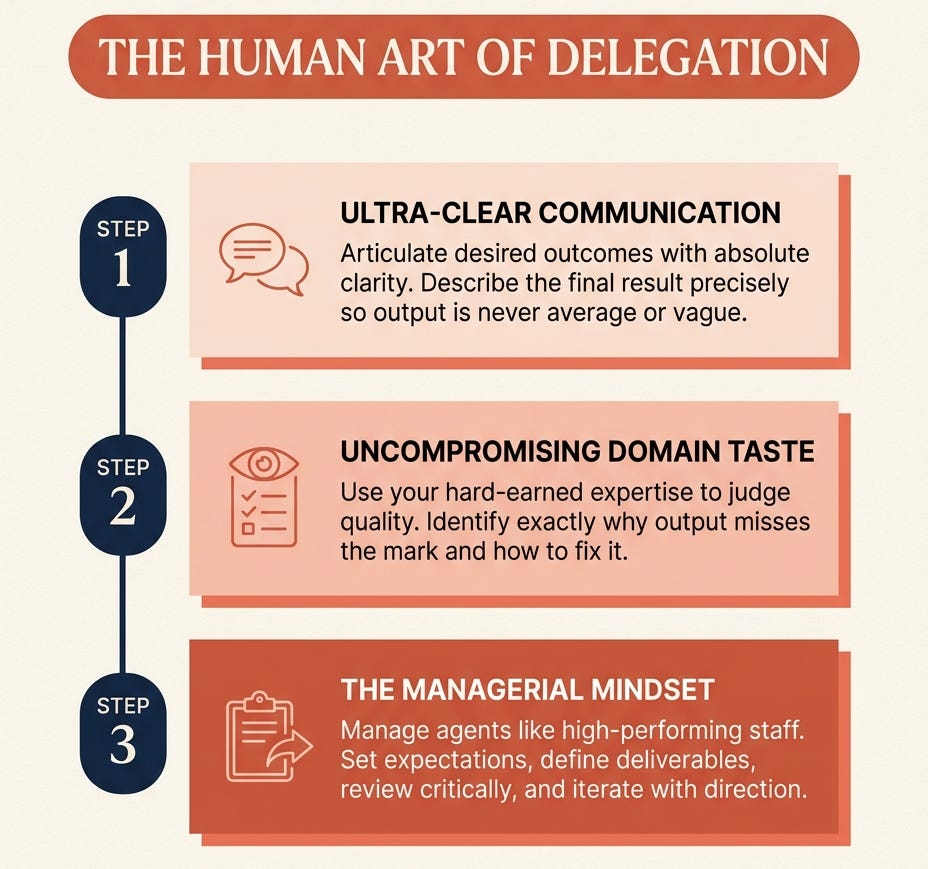
If you’re a good manager of people, you will be a good manager of agents. The skills translate almost perfectly. Setting context. Defining deliverables. Reviewing critically. Iterating with direction rather than just saying “make it better.”
This is also why I built the AI Digital Product Builder course the way I did. The entire framework is built around one principle: your AI-powered business is only as strong as the human judgment running it. The tools are the easy part. Knowing what to build, who to build it for, and whether what you’ve built is actually good... that’s the skill that creates the separation.
The course walks you through that judgment development step by step. From identifying your monetizable skill... to building and validating your offer... to using AI to create, launch, and sell it. All 8 weeks of it.
If you’re ready to stop experimenting and start building something real with AI, the AI Digital Product Builder is $67 and it’s the most complete system I’ve built.
Back to the point…
Studies now consistently show that top AI performers don’t just fire off more prompts. They spend significantly more time on the front end... defining what they want. And more time on the back end... reviewing, refining, and redirecting output.
They are deeply involved. Just at the strategic level, not the execution level.
That’s the distinction most people miss.
They either do everything themselves and burn out. Or they hand everything to AI and wonder why the output is flat and generic.
The 1% lives in the middle. They think deeply. They delegate precisely. They review critically. And they improve continuously.
That’s not a software feature. That’s a human skill.
And it’s one you can start building today.
Skill 6: Asynchronous Automation (Your 24/7 workforce)
I want you to think about something for a second.
How many tasks in your business happen at the same time every week?
Researching content ideas. Pulling your newsletter brief together. Summarizing your inbox. Repurposing last week’s post into threads and LinkedIn content. Sending follow-up emails after someone downloads your lead magnet.
Same tasks. Same sequence. Every single week.
You do them manually. They take hours. And because they take hours, you either rush them, skip them, or burn out trying to stay consistent.
Here’s the thing.
Every repeating task in your business is an automation waiting to happen.
And in 2026, setting that automation up no longer requires you to know how to code. It doesn’t even require you to drag and drop blocks in a visual builder for 45 minutes.
It requires you to describe what you want in plain English.
That’s it.
This is what I mean by asynchronous automation. You build the system once, in your own words. And then it runs... on a schedule... in the background... while you focus on the work that actually needs your brain.
Let me show you exactly how this works.
You open Claude with n8n connected via MCP. You type:
“Build a workflow. Every morning at 8am, pull the latest item from my RSS feed, summarize it into 3 key points, then rewrite it as a LinkedIn post, an X thread, and a 1000-word newsletter paragraph. Queue each one to the right platform.”
Claude reads that. Asks one clarifying question. Then builds the entire workflow... node by node... directly inside your n8n instance. No manual configuration. No dragging. No debugging for an hour.
n8n’s own team confirmed that the first generation of a workflow with Claude now takes roughly three minutes instead of the usual 10 to 30 minutes it takes to build one manually. What used to require knowing node types, connection logic, and configuration options now just requires you to describe what you want.
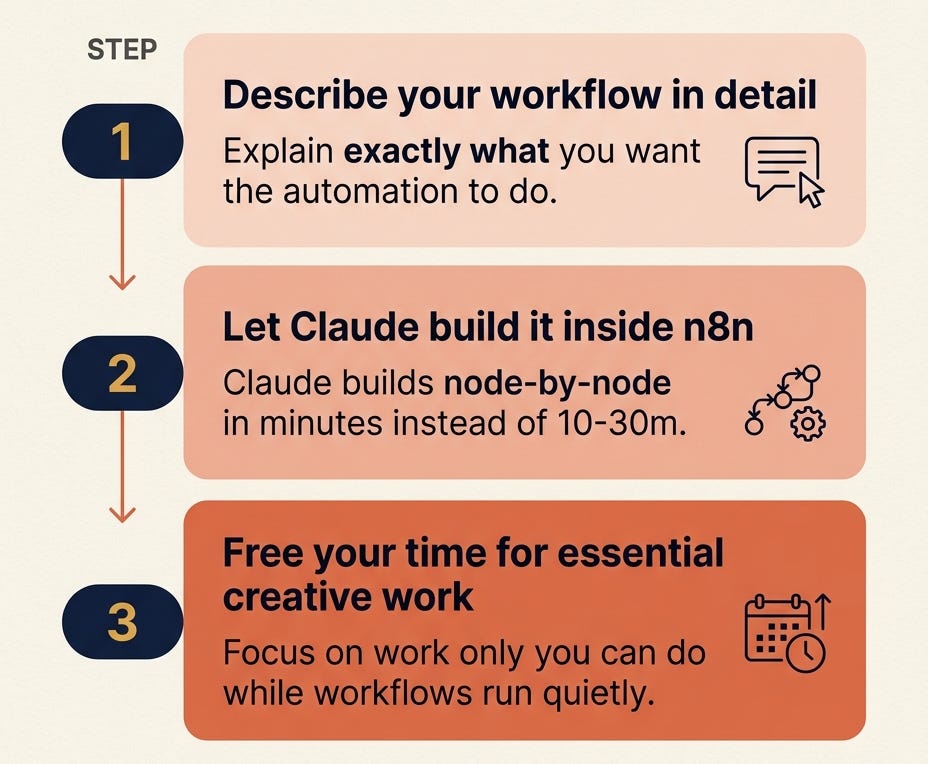
That is a fundamental shift in who can build automation.
Before, automation was for developers. Now it’s for anyone who can explain a task clearly.
And this is where it gets really interesting for creators.
The workflows that move the needle most for a one-person business are not complex. They are simple, repeating pipelines that currently eat hours every week.
Here are three I would build first if I were starting from scratch today:
The Content Repurposing Pipeline. One newsletter issue goes in. Out comes an X thread, a LinkedIn post, a Substack Note, and three hook variations. Scheduled automatically. One source, four outputs. This alone gives you back 3 to 5 hours per week.
The Morning Intelligence Brief. A scheduled trigger fires at 7am. It pulls your top newsletter metrics from the past 7 days, checks for new replies, scans a curated RSS feed of your niche, and delivers a clean summary to your Telegram. You start every day already informed, before you open a single tab.
The Lead Magnet Follow-Up Sequence. Someone downloads your free playbook. A trigger fires automatically. Claude drafts a personalized follow-up based on which resource they downloaded. It queues in Kit. You review and approve in 60 seconds. Done.
These are not complex systems. They are simple workflows... described in plain English... running quietly in the background while you do the work only you can do.
I’ve covered the agentic workflow side of this in depth in a previous issue that walks you through the exact setup. If you haven’t read it, that’s a good next step after this one.
The bottom line is this.
Willpower is not a business strategy. Systems are.
Every hour you spend doing a repeating task manually is an hour you are choosing not to build leverage. Asynchronous automation is how you get the same output... with a fraction of the ongoing input.
Build it once. Let it run. Move on to the next thing.-world
Skill 7: Computer and Browser Use (Agents that take the wheel)
Picture this.
You’re on your phone between meetings. You need a pitch deck exported as a PDF and attached to a calendar invite before the call starts in 12 minutes.
Old world: you rush to your laptop, open the file, export it, find the invite, attach it, pray you didn’t make a typo in the filename.
New world: you message Claude from your phone. “Export the pitch deck as a PDF and attach it to today’s 2pm meeting invite.” You put your phone back in your pocket.
By the time you sit down... it’s done.
This is not a concept. This is what Claude Computer Use, launched in March 2026, actually does. Claude opens your apps, navigates your browser, fills in forms, clicks buttons, moves files... all by itself. It sees your screen the same way you do. And it acts on what it sees.
Anthropic described it simply when they launched it: “Anything you’d do sitting at your desk.”
Anything you’d do sitting at your desk.
That is an extraordinary statement. And it’s one that most people haven’t fully absorbed yet.
Here’s how it works under the hood.
Claude Computer Use runs on a continuous loop. It takes a screenshot of your current screen. It analyzes what it sees... the buttons, the text, the state of the application. It decides the next action. It executes it. It takes another screenshot to verify it worked. Then it repeats.
There’s no API required. No pre-built connector. No special integration. If a task exists on your screen... Claude can do it. Because it’s working exactly the way you work. Eyes on the screen, hands on the keyboard.
This closes a gap that has frustrated AI users since the beginning.
Up until now, AI could only help you with tools that had connectors or APIs. If your tool wasn’t integrated... you were on your own. Computer Use removes that wall entirely. If it lives on your screen... Claude can touch it.
The priority order matters here though.
When Claude executes a task in Cowork, it follows a smart hierarchy. First, it checks whether a connector exists for the tool you need... Gmail, Google Drive, Notion, Slack. If a connector is available, it uses that. Faster. More reliable. If no connector exists, it pivots to Chrome, navigating the browser directly to get the job done.
This is the right approach. Connectors when possible. Browser when necessary. Full computer use as the last resort for anything that requires real desktop interaction.
Where this is most useful right now:
For creators and one-person businesses, the highest-value use cases are the ones that currently require too many manual steps to be worth your time:
Filling out a form on a platform that has no API. Navigating a CMS to format and publish a draft. Pulling data from a dashboard that doesn’t export cleanly. Cross-referencing information across two or three open tabs. Logging into a tool, running a report, downloading it, and saving it to the right folder.
All of that is fair game now.
The honest caveat.
This is still early. Anthropic said so themselves when they launched it. The vision-action loop is slower than API-based automation. Complex tasks with lots of steps can still trip up. And as of March 2026, it’s macOS only... with Windows support confirmed but not yet shipped.
The right mental model is this: use Computer Use for supervised tasks, not fully autonomous ones. Set it up, watch it run the first few times, build trust gradually. Don’t hand it access to your bank account or your email on day one.
But for the right tasks... the ones that are repetitive, multi-step, and tedious... it is genuinely one of the most impressive things I have seen AI do in the last two years.
The gap between “cool demo” and “actually useful daily tool” closed in March 2026.
And most people haven’t noticed yet.
Skill 8: Token Budgeting and Model Selection (The cost advantage nobody talks about)
Here’s a cost most people are paying without realizing it.
Every time you open a frontier AI model and throw a routine task at it... you are using the equivalent of a Formula 1 car to pick up groceries.
Technically capable. Massively overkill. And getting more expensive every month.
This is the reality of AI in 2026 that almost no one is talking about in creator circles. Frontier models... the most powerful, most capable AI available... are not getting cheaper. They are getting more expensive as labs add capability and raise prices simultaneously.
GPT-5.5 on OpenRouter currently runs at $5 per million input tokens and $30 per million output tokens. Meanwhile, open-source models like DeepSeek V4 run agentic tasks at $0.094 per million tokens. That is a 30x price differential for tasks that often produce indistinguishable output.
This is the skill nobody teaches: using the right model for the right task.
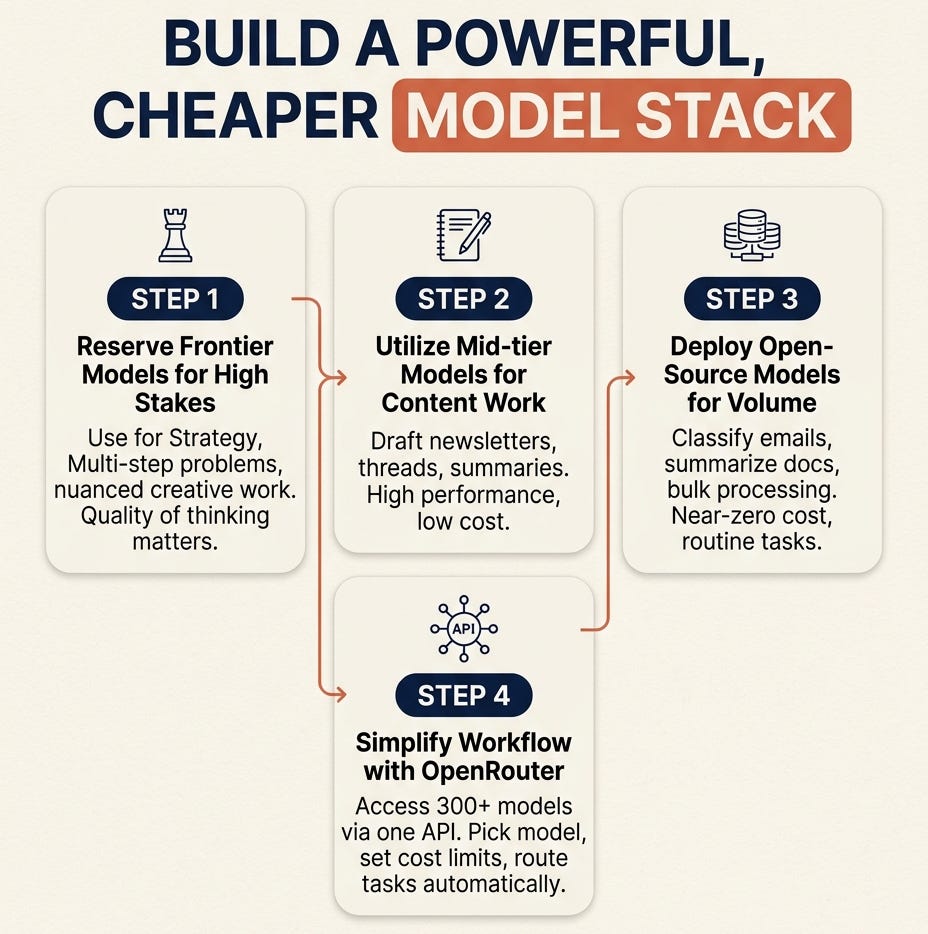
Not every task deserves your most expensive model. In fact, most tasks don’t. And once you internalize this, you stop paying frontier prices for everything and start building a model stack that is both more powerful and dramatically cheaper.
Here’s a simple mental framework I use:
Frontier models for high-stakes, complex reasoning.
Strategy. Multi-step problem solving. Nuanced creative work. Anything where the quality of thinking directly determines the quality of the output. Claude Opus, GPT-5.5... these are tools for your hardest problems. Not your routine ones.
Mid-tier models for standard content work.
Drafting newsletters. Writing threads. Summarizing research. Repurposing content. Claude Sonnet handles almost all of this at a fraction of Opus pricing. A 1,500-word blog post via Claude Sonnet costs roughly $0.02 to $0.03. That is not a typo. Two to three cents.
Open-source models for high-volume, low-complexity tasks.
Classifying emails. Summarizing documents. Generating outlines. Bulk processing. DeepSeek V4, Llama, Qwen... these models handle routine production work at near-zero cost and they are better than GPT-4 was just two years ago.
This is where OpenRouter changes the game entirely.
OpenRouter is a single API that gives you access to over 300 models from Anthropic, OpenAI, Google, Meta, DeepSeek, Mistral, and dozens more... all from one interface. No separate accounts. No switching tools. No rebuilding your workflow.
You pick the model. You set cost limits. You route different tasks to different models automatically based on what makes sense.
OpenRouter recently raised $113 million in funding and now processes 25 trillion tokens per week... a fivefold increase from just six months ago. That growth tells you everything about where serious AI users are heading. They are not defaulting to one expensive model for everything. They are routing intelligently.
The practical setup for a one-person business looks like this:
Use Claude Sonnet as your default for content creation, newsletter drafting, research summaries, and anything customer-facing. Switch to Claude Opus or a comparable frontier model only when you need deep strategic thinking or genuinely complex multi-step reasoning. Run high-volume background tasks... content classification, inbox triaging, bulk repurposing... on open-source models through OpenRouter at a fraction of the cost.
The people doing this well are spending $30 to $50 per month total on AI inference while running workflows that would cost $300 to $500 per month if they used frontier models for everything.
That’s not a small difference. That’s the difference between AI being an expense and AI being leverage.
One more thing worth knowing.
The open-source models available today are not the limited, inferior alternatives they were in 2023. DeepSeek, Qwen, Kimi, and GLM are on serious shortlists for agentic workflows... not because they’re cheap, but because for many tasks they perform at or near frontier quality. The gap is closing fast.
Knowing which model to use for which task... that is a compounding skill. Every month you get better at it, your output improves and your costs go down at the same time.
That’s a rare combination. Build it.
Skill 9: Real-Time Voice and the “Jarvis” Workflow (The interface shift nobody sees coming)
Think about every Iron Man movie you’ve ever watched.
Tony Stark doesn’t sit at a desk typing prompts into a chat window.
He talks. His AI listens. Things happen.

That scene... the one where he’s walking around his workshop, speaking out loud, and his entire digital world responds in real time... used to be pure fiction.
It’s not fiction anymore.
Real-time voice AI is the final interface shift. And most people reading this are still ignoring it completely because they think it’s just a gimmick. A slightly hands-free version of typing.
It’s not. It’s a fundamentally different way of working.
Here’s the gap that most people don’t see.
You type at roughly 40 to 50 words per minute. You speak at 120 to 150 words per minute. That’s a 3x speed difference before we’ve even talked about what you can do with your hands while your mouth is working.
When your interface is voice... you are not sitting at a desk. You are walking. Cooking. Commuting. Exercising. Moving through your day. And your AI is keeping up with you the entire time.
That’s not a minor productivity upgrade. That’s a different relationship with your work.
The landscape in 2026.
Several platforms are now competing seriously in this space.
ChatGPT Voice with GPT-4o is currently the benchmark for conversation quality. Near-instant responses, emotional awareness, handles interruptions naturally. The voice doesn’t feel robotic. It feels like a conversation. For brainstorming, thinking out loud, and working through creative problems verbally... this is the strongest option available right now.
Gemini Live from Google made a significant move by making real-time voice free and globally available. It also adds camera and screen-sharing capabilities... meaning your AI can see what you’re looking at while you talk to it. You point your phone at something and ask questions. That is a multimodal shift that matters.
Claude’s voice mode is available on mobile and now includes Claude Code voice mode specifically for developers who want to speak instructions to their coding agent in the terminal. Claude powered by ElevenLabs technology means the voice quality is noticeably natural compared to earlier iterations.
All three are moving fast. Every month the latency drops, the quality improves, and the capabilities expand.
But here’s where it gets genuinely powerful for one-person businesses.
Voice isn’t just for answering questions. When you combine real-time voice with the computer use capability we covered in Skill 7... you get something that is very close to the Jarvis experience.
You speak. Your AI listens. And then it acts on your computer.
“Open Notion and create a new project page for the product launch.”
“Draft a reply to the last email from my subscriber and save it as a draft.”
“Pull last week’s newsletter metrics and give me a verbal summary while I make coffee.”
You’re not sitting at a keyboard. You’re not copying and pasting. You’re not switching between tabs. You’re just... talking. And your digital workspace is responding.
The most productive professionals in 2026 are not choosing between AI and voice. They’re using both simultaneously. They dictate into Claude. They let Claude respond by voice. They continue the conversation while their hands do something else entirely.
The practical entry point right now.
If you’re on iOS or Android, start simple. Open the Claude app or ChatGPT and switch to voice mode. Take a task you’d normally type... a content brief, a thread outline, a product idea... and just talk through it instead.
Don’t type. Don’t plan what you’ll say. Just speak like you’re explaining it to a smart colleague over coffee.
You’ll be surprised how fast the ideas move when you remove the keyboard from the equation.
Then notice what changes. Your thinking becomes more natural. Your briefs become richer because you ramble in useful ways when you speak. And the AI keeps up... asking clarifying questions, pushing back, building on what you said.
That’s the beginning of the Jarvis workflow.
And the gap between where we are today and the full vision... an AI that listens, acts, executes, and reports back entirely through voice... is closing faster than most people realize.
By the end of 2026, not having a voice workflow will feel like not having a smartphone in 2012.
You’ll still function. But you’ll be visibly, measurably slower than the people who figured it out early.
Your Roadmap to the 1%
Let’s bring this home.
9 Skills. That’s what separates the top 1% of AI users from everyone else in 2026.
Not nine apps. Not nine subscriptions. Not nine prompt hacks copied from a YouTube video.
Nine foundational skills that compound into a genuine operating advantage.
Let me give you the one-sentence version of each:
✅ Natural Language Mastery ... the person who describes what they want most clearly wins every time.
✅ AI Skills Design ... stop re-explaining yourself. Build once, deploy forever.
✅ Super App Mastery ... stop using AI in a browser tab. Build a command center.
✅ Cloud Agent Orchestration ... your business should be working when you’re not.
✅ Human Foundations ... your expertise, taste, and delegation ability are the ceiling of your AI output.
✅ Asynchronous Automation ... willpower is not a business strategy. Systems are.
✅ Computer and Browser Use ... if it lives on your screen, your agent can do it.
✅ Token Budgeting ... pay frontier prices only for frontier problems.
✅ Real-Time Voice ... the interface is shifting. Get ahead of it now.
Notice something?
The first four are about building the infrastructure. The fifth is about developing the human judgment to run it. The last four are about deploying it at maximum leverage.
That’s the complete picture of what agent-native looks like in 2026.
Not someone who uses more AI tools. Someone who thinks differently about AI altogether.
They don’t ask: “How can I use this tool?”
They ask: “What does this agent need from me to do this job well?”
That shift... from user to orchestrator... is the whole game.
The one thing to do this week.
Don’t try to implement all nine skills at once. That’s how you end up overwhelmed and back to your old workflow by Thursday.
Pick one skill. Just one.
If you’re still explaining yourself from scratch every time you open Claude... start with Skill 2. Build your first Skill file this week.
If you’re still running one AI tab at a time... start with Skill 3. Download Claude Desktop today and set up three Projects.
If you have repeating tasks eating your mornings... start with Skill 6. Map out one automation in plain English and set it up in n8n.
One skill. One week. One system running that didn’t exist before.
That’s how the 1% is actually built. Not in a weekend sprint. In small, compounding moves made consistently over time.
Want a more in-depth and practical route?
If you want to skip the trial and error and get the actual tools I use to run my business on these 9 skills... that’s exactly what the Premium Membership is built for.
For $39/month (or $150/year, which saves you 40%), you get:
✅ Premium Claude Skills ... ready-to-use instruction files for the exact recurring tasks creators face every week. Hook writing, newsletter drafting, content repurposing, SEO optimization, and more. Built and tested. Plug in and run.
✅ AI Agents Collection ... a curated library of agent setups you can deploy for your business without building from scratch.
✅ Substack SEO/AEO Implementation Toolkit ... the system I use to optimize every issue for both search and AI-powered discovery.
✅ 45% off all paid courses ... including the AI Digital Product Builder.
✅ Community access ... a group of builders who are actually implementing, not just consuming content.
The goal of the membership is simple. You read the newsletter and get the thinking. You join the membership and get the tools.
Join as a Premium Member here →
The transition from AI user to AI orchestrator doesn’t happen all at once.
It happens one skill at a time. One system at a time. One task you never have to do manually again.
But here’s what I know after building this for two years and helping thousands of creators do the same.
Once you feel what it’s like to wake up to work already done... once you feel your output double while your working hours stay the same... once you realize your AI team is quietly compounding in the background while you focus on the things only you can do...
You don’t go back.
That’s not hype. That’s just what systems do.
Now go build yours.
Until next time,
Sharyph
Founder, The Digital Creator
That’s a really comprehensive one!! Also, appreciate the emphasis on clarity. Because that’s sth no agents can really provide. Thanks, Sharyph!
Awesome piece, Sharyph, and thanks so much for the shoutout!