

Welcome to The Digital Creator, helping creators accelerate with AI. I show you how to use AI to start, create, grow, and scale faster.
Let me ask you something honest.
How many times have you fixed a prompt… and broken it again two weeks later?
Maybe you added a new instruction. Maybe you migrated to a newer Claude model. Maybe you just changed one line — and suddenly the output you depended on stopped making sense.
You didn’t change your goal. You didn’t change your business. You just changed one thing.
And now it doesn’t work.
Here’s what that chaos actually looks like:
You paste in the same prompt you’ve been using for months
The output is vague, too long, or misses the point entirely
You add more instructions to “fix” it
Now it’s over-explained and the new instructions conflict with the old ones
You delete things. Add things. Move things around.
One hour later, you’re not sure what’s in the prompt or why
And the worst part?
You have no way to know if the change you made actually helped — or just shifted the problem somewhere else.
You’re not engineering. You’re guessing.
I’ve been there.
When I first started building Claude workflows for The Digital Creator — my content research agent, my newsletter Skills, my offer analysis system — I made every mistake in the book.
I’d pile instructions on top of instructions. I’d tell Claude to “always do X correctly” without actually giving it the capability to do X. I’d patch one failure and create three new ones.
The result was a graveyard of half-working prompts and a lot of wasted hours.
Here’s what I’ve learned after building AI systems inside a real creator business:
Prompting isn’t guessing. It’s engineering. And engineering has a process.
The creators who get consistent, reliable output from Claude aren’t smarter. They’re not using secret prompts.
They’re using a system.
Last month, Anthropic released a session from their internal engineering team called The Prompting Playbook. It was a live demo by a real applied AI engineer showing exactly how they debug prompts, fix failure modes, and build new agents from scratch.
I watched it, took it apart, and rebuilt it as a framework you can actually apply…whether you’re fixing a broken Claude Skill or building a new AI agent for your business.
By the end of this issue, you’ll have:
✅ A 3-step process for cleaning up any prompt before you touch the logic
✅ The 3 most common Claude failure modes — and the exact fix for each one
✅ A proven loop for building new AI agents that work reliably from day one
✅ 5 rules you can apply to every prompt you write going forward
This isn’t theory. This is the exact playbook Anthropic engineers use…applied to the kind of systems you and I are actually building.
Let’s get into it.
The Two Scenarios You’ll Always Face
Every prompting problem you’ll ever have falls into one of two buckets.
Scenario A:
You have an existing prompt that used to work — and now it doesn’t.
Maybe you migrated to a newer Claude model. Maybe someone on your team edited it. Maybe your use case grew and the prompt didn’t grow with it. Whatever the reason, the output has degraded and you’re not sure why.
Scenario B:
You’re building something new from scratch.
A new agent. A new Claude Skill. A new workflow you’ve never built before. You have a goal, a blank page, and no idea where to start.
Both scenarios feel completely different.
But here’s what most people miss:
Both scenarios need the exact same foundation before you do anything else.
That foundation is evaluations.
You Can’t Fix What You Can’t Measure
Here’s the trap most creators fall into.
They change something in their prompt. The next output looks better. They move on.
Two days later, it breaks again in a different way. They fix that. Something else breaks.
They’re not improving the prompt. They’re playing whack-a-mole.
The reason this keeps happening is simple: they have no way to measure whether a change actually worked.
An evaluation — or “eval” — is just a set of test cases you run your prompt against every time you make a change.
Think of it like this.
You wouldn’t redesign your newsletter layout and just assume it improved open rates. You’d check the numbers. Before and after.
Prompts work the same way. Every time you change something, you need a before and after. Without that, you’re not iterating — you’re drifting.
What Goes Into a Good Eval
You don’t need 100 test cases. You need the right test cases.
Anthropic engineers use three types:
1. Control cases — The easy ones. Unambiguous questions your prompt should always get right. These make sure your changes didn’t break what was already working.
2. Edge cases — The tricky ones. Scenarios where the model has failed before. By including these, you’re making sure old failure modes don’t quietly slip back in.
3. Boundary cases — The limit cases. Situations where Claude needs to know what’s outside its scope. Where it should hand off to a human, refuse a request, or escalate instead of guessing.
For most creator workflows…a newsletter Skill, a content research agent, an offer analysis system…five to ten test cases is enough to get real signal.
The key isn’t quantity. It’s that your eval suite is representative of how the prompt actually gets used.
Why This Matters For Your Claude Skills
If you’ve been building Claude Skills or Claude Code workflows for your business, this is the piece most people skip.
They build the Skill. It works on the first try. They ship it.
Then three weeks later…after a model update, after adding new instructions, after the use case evolved slightly…it starts producing inconsistent output. And because there’s no eval, there’s no systematic way to diagnose what changed.
Before you touch your next prompt, write down three to five test cases first.
What should it always get right? What has it gotten wrong before? Where should it stop and ask instead of guess?
That list becomes your eval suite. It takes fifteen minutes to build. It will save you hours of debugging later.
💡 Pro tip: If you’ve built a CLAUDE.md context file for your business…like I showed here…your eval cases should reflect the specific outputs that file is meant to produce. That’s your control group.
Now that you have the foundation, let’s get into the actual work.
The next section covers the single most impactful thing you can do before you touch any logic in a broken prompt.
It’s not glamorous. But it works every single time.
Clean the House Before You Redecorate
Here’s a mistake I see constantly.
A prompt stops working. The creator immediately starts adding new instructions. More rules. More context. More constraints.
The prompt gets longer. The problem gets worse.
What they should have done first…before adding a single new word…is clean up what’s already there.
Anthropic engineers call this general prompt hygiene. And in their live demo, just applying basic hygiene to a broken prompt…without touching any of the actual logic…immediately improved performance.
No new instructions. No clever tricks. Just cleanup.
Here’s exactly what that looks like.
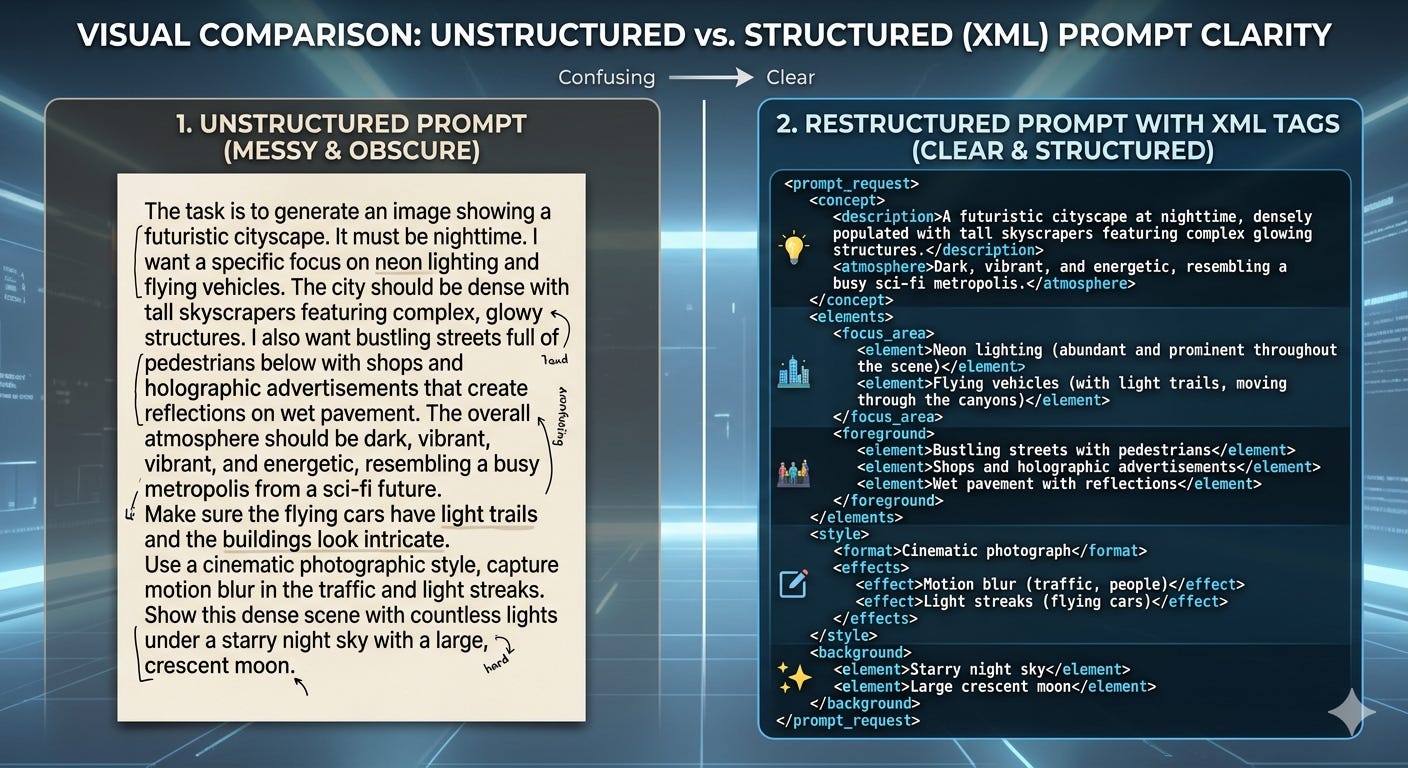
Rule 1: Structure Your Prompt With XML Tags
If your prompt is one long block of text, Claude is doing extra work just to figure out what each part means.
Is this a rule? A suggestion? A data point? A tone guideline? Without structure, Claude has to guess — and guessing introduces inconsistency.
The fix is simple: wrap every distinct section in XML tags.
<role>
You are a newsletter writing assistant for a creator business...
</role>

<guidelines>
Always write in a direct, educational tone...
</guidelines>

<policy>
Never fabricate statistics or attribute quotes without a source...
</policy>

<tone>
Conversational. Short paragraphs. One idea per line...
</tone>

<output_format>
Return the response inside <newsletter_draft> tags...
</output_format>
This one change does more than you’d expect.
Claude is fine-tuned to pay close attention to XML structure. When you separate role from guidelines from policy from tone, the model processes each section with the right weight — instead of blending everything into one vague instruction set.
The Anthropic engineer put it perfectly:
“If you can’t tell guidelines from policy when you read your own prompt — most likely the model can’t either.”
Read that again.
If you get confused reading your own prompt, Claude is definitely confused running it.
Rule 2: Delete Old Patches Before Adding New Ones
This one is subtle. And it causes more problems than almost anything else.
Every time a model behaves unexpectedly, the instinct is to add a defensive instruction.
“Never give the customer wrong information.” “Always double-check before responding.” “Do not make assumptions.”
These patches make sense when you write them. They fix a specific failure mode in a specific model at a specific point in time.
But models evolve. Claude 3 behaved differently than Claude 4. What needed a defensive patch six months ago might not need one today — and that old patch might now be causing Claude to over-correct in the opposite direction.
In the Anthropic demo, a prompt had an old instruction that said: “Never give a customer the wrong plan details — point them to the URL instead.”
That instruction was written to stop Claude from hallucinating plan information it didn’t have.
But the newer model had the correct information right there in the customer data. The old patch was now telling Claude to withhold accurate information it actually had access to.
The patch that fixed a problem in an old model created a new problem in the current one.
⚠️ Every time you migrate to a new model or update your Claude Skills — audit your prompt for old patches. Ask: “Did I add this instruction to fix a specific failure? Is that failure still relevant today?”
If the answer is no, delete it.
This applies directly to anyone who has been iterating on Claude Skills over time. Version control your prompts. Track why you added each instruction — not just what it says.
Rule 3: Define an Output Contract
Claude doesn’t know what “good output” looks like unless you tell it.
Not in vague terms. In structural terms.
An output contract is simply a section of your prompt that defines exactly what the response should look like — the format, the structure, where it starts, where it stops.
For a newsletter Skill, that might look like:
<output_format>
Return your response using this exact structure:

<newsletter_draft>
[Your full newsletter draft here]
</newsletter_draft>

Do not include any preamble, explanation, or notes outside of these tags.
</output_format>
You can pair this with a stop sequence in your API call — a signal that tells Claude to stop generating the moment it hits the closing tag. This ensures you never get trailing text, extra commentary, or output that bleeds past where you wanted it to end.
For creators building newsletter content systems or agentic workflows, output contracts are non-negotiable. Especially when the output of one step feeds directly into the next.
If the format is inconsistent, the whole pipeline breaks.
The Hygiene Checklist
Before you touch the logic of any broken prompt, run through these three questions:
✅ Is every section clearly separated with XML tags — role, guidelines, policy, tone, output format?
✅ Are there any old defensive patches that were written for a previous model and may no longer apply?
✅ Have I defined an exact output contract — what format Claude should return, where it should start, where it should stop?
If the answer to any of these is no — fix that first. Before you add a single new instruction.
Most creators skip this step because it doesn’t feel like “real” work. It feels like housekeeping.
But this is exactly where Anthropic engineers start…every single time.
And in their demo, this cleanup alone — no new logic, no new instructions…immediately fixed one of their five failing test cases.
Clean prompt. Better output. Before you’ve done anything “clever.”
Now that the house is clean, we can start targeting the actual failure modes.
There are three of them. Each has a specific cause and a specific fix.
Let’s go through them one by one.
Targeting Failure Modes One by One
Once your prompt is clean and structured, you can start the real diagnostic work.
This is where most people want to start. They see a broken output and immediately try to fix the logic.
Don’t.
Do the hygiene first. Then — and only then — isolate each failure mode and address it individually.
The reason you tackle them one at a time is important: if you fix three things at once, you don’t know which fix actually worked. And if something breaks again later, you have no idea where to look.
One change. One eval run. One conclusion.
That’s the process.
Here are the three failure modes you’ll encounter most…and the exact fix for each.
Failure Mode 1: Claude Withholds Information It Already Has
What it looks like:
You ask Claude a direct question. It has the answer sitting right there in the context — in your CLAUDE.md file, your brand document, your customer data, your uploaded knowledge base.
But instead of using it, Claude deflects. It gives a vague response. It tells the user to “check the website” or “consult the documentation.” It hedges when it should be direct.
The output isn’t wrong. It’s just... empty. Unhelpfully cautious.
Why it happens:
Nine times out of ten, this is an old defensive patch doing damage.
At some point — probably when Claude made a confident mistake — you (or someone before you) added an instruction like:
“Never give information you’re not 100% sure about.” “Always direct users to the official source.” “Do not make assumptions about the customer’s situation.”
That instruction was written to stop hallucination. But now it’s stopping Claude from using accurate information it genuinely has access to.
The model isn’t hallucinating. It’s over-correcting.
The fix:
Clarify what the actual source of truth is — and give Claude explicit permission to use it.
<policy>
The customer's account data provided in <customer_context> is the
authoritative source of truth for all plan details, usage limits,
and billing information. Always use this data to answer questions
directly. Only refer the customer to external URLs when the specific
information is NOT present in their account data.
</policy>
Creator application:
If you’ve built a CLAUDE.md context file or uploaded brand documents to a Claude Skill — your prompt needs to explicitly tell Claude that those documents are the source of truth.
Don’t assume Claude knows to prioritise them. Tell it directly.
<guidelines>
The brand voice document in your knowledge base is the definitive
reference for tone, style, and formatting. When in doubt, defer to
it — do not default to generic AI writing patterns.
</guidelines>
The difference between Claude Skills that produce consistent output and Skills that drift over time often comes down to this single instruction.
Failure Mode 2: Claude Can’t Do the Calculation
What it looks like:
You ask Claude to do something that requires precise, reliable execution. A calculation. A structured data lookup. A comparison across multiple variables.
Claude tries. It reasons through it. It shows its working. But the final answer is wrong — or inconsistent. Run it again and you get a different number.
Why it happens:
This one has a simple cause: you gave Claude an instruction, but not a capability.
Telling Claude “always calculate correctly” doesn’t make it better at maths. Telling it “never give vague answers” doesn’t give it the ability to be precise.
Instructions describe what you want. They do not create the ability to deliver it.
The Anthropic engineer was direct about this:
“Instructions don’t add capability. Telling the model it’s critical to do a calculation right doesn’t make it better at mental math.”
The fix:
Give Claude a tool.
For technical calculations — proration billing, SEO scoring, word counts, data comparisons — the right solution is not a better instruction. It’s an external function Claude can call.
In Claude Code, that looks like a tool definition:
tools: [
  {
    name: "calculate_proration",
    description: "Use this tool whenever you need to calculate
    a prorated amount. Do not attempt this calculation manually.",
    input_schema: {
      type: "object",
      properties: {
        days_remaining: { type: "number" },
        monthly_rate: { type: "number" },
        days_in_month: { type: "number" }
      }
    }
  }
]
Claude calls the tool. The tool returns the correct answer. Claude includes it in the response.
No mental maths. No variance. No guessing.
Creator application:
You might not be building billing calculators. But this principle applies everywhere in a creator business.
If you’ve built an AI agent for content research and it’s inconsistently pulling data — the problem probably isn’t the prompt. The problem is you’re asking Claude to do something that needs a reliable external process.
If you’re building an SEO content machine and Claude is producing inconsistent keyword targeting — the fix isn’t “always target the right keyword.” The fix is a structured input that feeds the keyword directly into the prompt as a variable.
⚠️ The rule: Whenever you catch yourself writing “always do X correctly” in a prompt — stop. Ask: “Have I actually given Claude the capability to do X reliably?” If the answer is no, find the tool, the structured input, or the external function. Then write the instruction.
Failure Mode 3: Claude Refuses to Make a Decision
What it looks like:
You’ve told Claude what to do in a specific scenario. But when that scenario arrives, Claude hesitates. It explains the situation to the user instead of acting. It presents options instead of making a call. It does everything except the one thing you told it to do.
In the Anthropic demo, the agent was supposed to escalate a billing conflict to a human operator. Instead, it tried to diagnose the problem itself and explain possible causes to the customer.
It was told to escalate. It didn’t escalate. It over-explained instead.
Why it happens:
Look at your prompt. Somewhere in there, you’ve probably written a one-sided instruction.
In the demo, the prompt said:
“Avoid escalating to a care specialist unless absolutely necessary — it costs $8 and counts against the team’s resolution targets.”
Read that carefully.
The instruction tells Claude the cost of escalating. It says nothing about the cost of NOT escalating.
So Claude…which is increasingly good at reasoning through trade-offs — does exactly what a rational agent would do with that information. It avoids the expensive action.
The problem isn’t that Claude disobeyed. The problem is that Claude was only given one side of the equation.
The fix:
Give Claude both sides of every trade-off.
<policy>
Escalating to a human specialist costs approximately $8 and affects
resolution time metrics. However, failing to escalate a genuine
billing error costs significantly more — including refunds,
account credits, and customer trust.

Escalate immediately when: there is a confirmed billing discrepancy,
the customer has been charged incorrectly, or the issue cannot be
resolved with the information available in this session.

Do not attempt to diagnose or explain billing errors. Escalate them.
</policy>
Now Claude has the full picture. It understands why the rule exists — not just what the rule says.
Creator application:
This failure mode shows up constantly in creator AI systems — and it’s almost always invisible until something goes wrong.
If your newsletter Skill keeps adding hedging language when you told it to write with confidence — check your instructions. Have you told it why confidence matters? Or just that it should be confident?
If your offer analysis agent keeps presenting “both options” when you asked it to make a recommendation — check your trade-off framing. Have you told it the cost of NOT making a call?
As Claude becomes more capable at reasoning, one-sided instructions produce increasingly one-sided behaviour.
The more intelligent the model, the more important it becomes to show your reasoning — not just your rules.
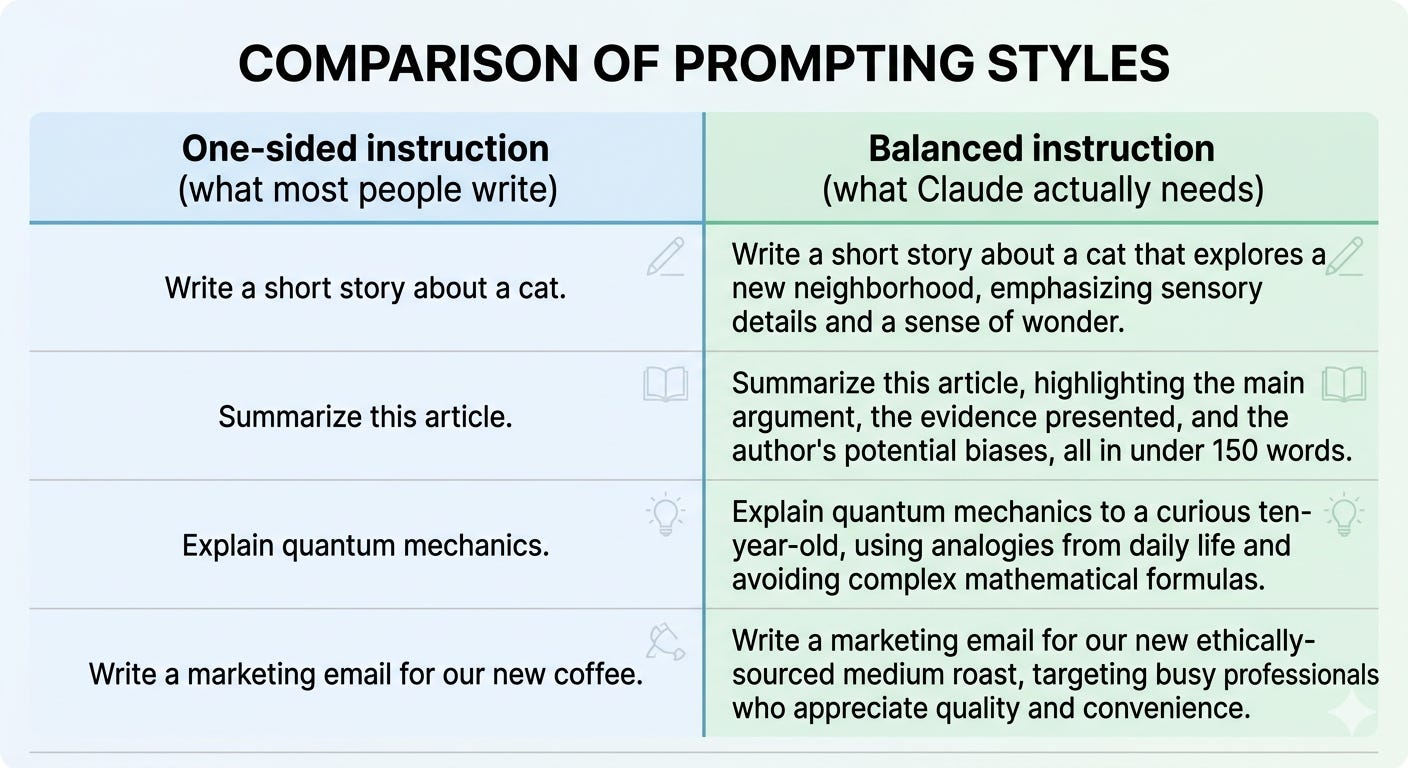
💡 Pro tip: For any instruction that tells Claude to avoid something, always add the counter-case. “Avoid X because Y — but if Z happens, do X because the cost of not doing it is W.” That structure forces you to think through the trade-off. And it gives Claude what it needs to make the right call.
Three failure modes. Three targeted fixes.
None of them required rewriting the entire prompt. Each one was a surgical change to a specific problem — tested against a specific eval case — with a measurable before and after.
That’s the process.
Now let’s talk about the scenario where you’re not fixing an existing prompt — you’re building something brand new from the ground up.
This is where most creators overcomplicate things. And there’s a much better approach.
The Mistake Everyone Makes When Building Something New
When most creators decide to build a new AI agent, they do the same thing.
They open Claude. They write one big, detailed prompt. They try to make it do everything at once — research, reason, format, validate, output — in a single pass.
It works okay on the first try. Maybe even the second.
Then it starts failing in unpredictable ways. The output is too long in some runs. It misses a constraint in others. Sometimes it gets everything right. Sometimes it gets nothing right.
And because everything is happening inside one giant prompt, there’s no way to know which part broke.
Here’s the truth:
One prompt trying to do everything is not a system. It’s a liability.
The Anthropic engineers ran this exact experiment live. They gave a scheduling problem — build a week-long staff roster that satisfies eight employees and multiple hard constraints — to a single prompt running on a capable model.
All five test cases failed.
They then tried a bigger model. Still failing, just with fewer violations.
They tried extended thinking. It worked — but it was slow and expensive. Triple the tokens. Triple the latency.
Then they tried something different.
They split the task into three simple prompts.
And everything changed.
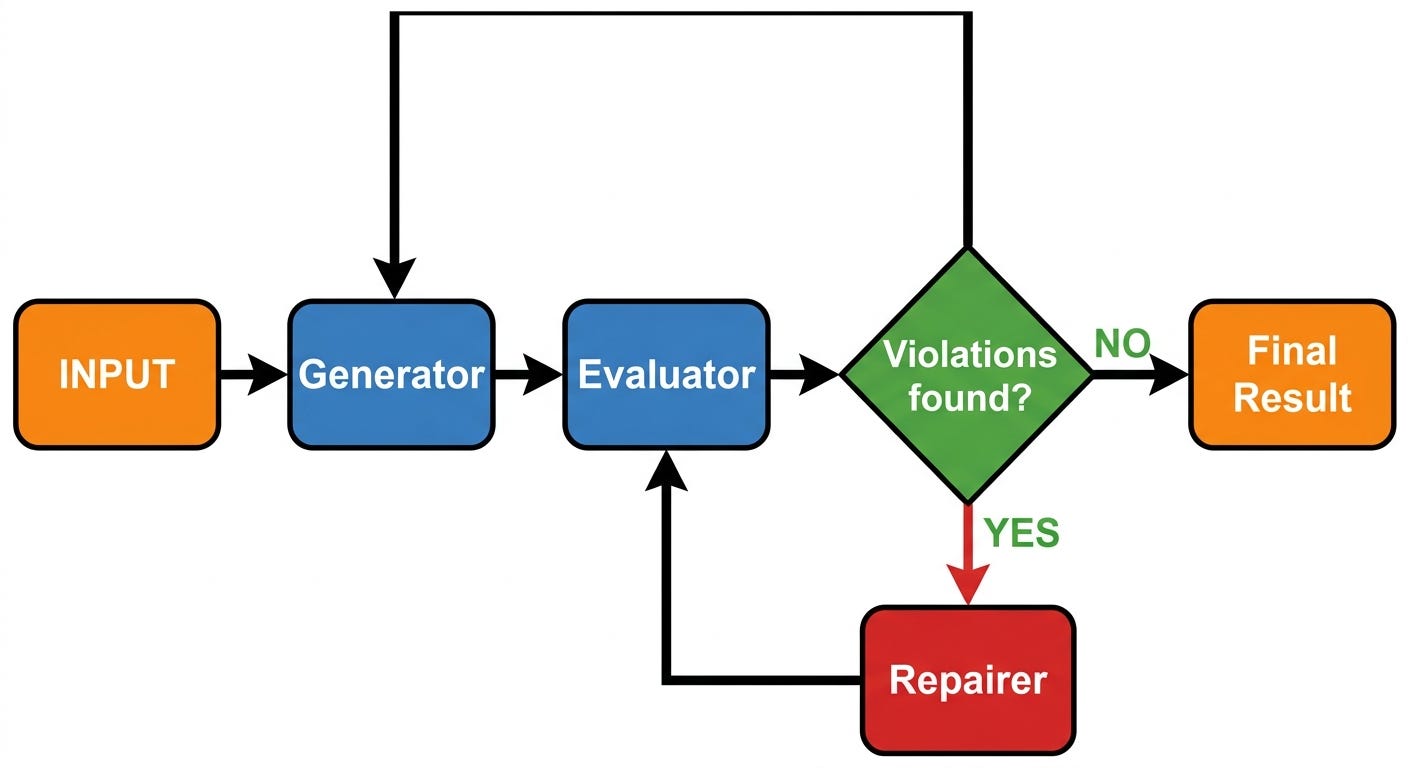
The Generate → Evaluate → Repair Loop
Instead of one prompt doing everything, you build three small prompts that work in sequence.
Prompt 1: The Generator
This prompt does one job only. It takes the inputs — the constraints, the data, the goal — and produces a first draft output.
It doesn’t check its work. It doesn’t validate. It doesn’t second-guess.
It generates.
<role>
You are a scheduling assistant. Your job is to create a first-draft
weekly schedule based on the employee availability and shift
requirements provided.
</role>

<task>
Generate a complete schedule. Do not validate it. Do not check for
violations. Just produce the best schedule you can given the inputs.
</task>

<output_format>
Return the schedule as a JSON object using this structure:
<schedule>
[JSON output]
</schedule>
</output_format>
Prompt 2: The Evaluator
This prompt receives the Generator’s output and does one job only. It checks the draft against every rule and constraint — and reports exactly what’s wrong.
Not a vague “this looks off.” Specific violations. Specific evidence.
<role>
You are a schedule auditor. Your job is to check a draft schedule
against the constraints provided and identify every violation.
</role>

<task>
Review the schedule in <draft_schedule> against every constraint
in <constraints>. For each violation found, state:
1. Which constraint was violated
2. Where in the schedule it occurred
3. What the correct behaviour should be
</task>

<output_format>
Return your findings inside <violations> tags.
If no violations are found, return <violations>NONE</violations>
</output_format>
Prompt 3: The Repairer
This prompt receives both the original draft AND the list of violations. Its one job is to make targeted fixes — without touching anything that isn’t broken.
<role>
You are a schedule repair specialist. Your job is to fix specific
violations in a draft schedule without changing anything that
isn't broken.
</role>

<task>
You will receive:
- A draft schedule in <draft_schedule>
- A list of violations in <violations>

Fix each violation. Do not restructure the entire schedule.
Make surgical changes only.
</task>

<output_format>
Return the corrected schedule inside <final_schedule> tags.
</output_format>
Three prompts. Three jobs. Each one simple enough to do reliably.
Why This Works Better Than One Big Prompt
The results from the Anthropic demo were clear.
The three-prompt agentic loop solved all five test cases — with fewer tokens and lower latency than a single large prompt on a bigger model.
Read that again.
Three small prompts beat one expensive model running one complex prompt.
Here’s why.
When you put everything into one prompt, you’re asking Claude to hold the full problem in working memory — generate a solution, check its own work, identify its own errors, and fix them simultaneously. That’s a lot of competing cognitive load in a single pass.
When you split it into three prompts, each one has a narrow, well-defined job. The Generator doesn’t need to be a validator. The Evaluator doesn’t need to be a creator. The Repairer doesn’t need to understand the full problem from scratch.
Each prompt is easier to write, easier to debug, and easier to improve independently.
💡 The key insight: You’re not making Claude smarter. You’re making the task simpler. And simpler tasks produce more reliable outputs.
The Bonus: Soft Constraints at Runtime
Here’s something the single-prompt approach can never give you.
Because the Evaluator is a separate Claude call — not hardcoded logic — you can pass it soft constraints at runtime without changing the underlying system.
In the Anthropic demo, they showed examples like:
“Harry doesn’t like working with Sally — try to separate their shifts.”
“We need a third shift on Wednesday this week only.”
These aren’t permanent rules. They’re one-off requests.
With a single-prompt approach, handling these would mean editing the prompt every time. Or writing conditional logic that gets messier with every new edge case.
With the three-prompt loop, you just include the soft constraint in the Evaluator’s input for that run. The next run, it’s gone. No permanent changes. No accumulating complexity.
Creator application:
Think about how this maps to the systems you’re already building.
If you’re building a newsletter content system, you don’t need one giant prompt that writes, checks tone, validates the CTA, and formats for Substack simultaneously.
You need:
A Generator that writes the draft
An Evaluator that checks voice, structure, and CTA alignment
A Repairer that makes targeted edits based on the evaluation
If you’re building one of the 50 AI agents you can sell — whether that’s a lead qualifier, a content repurposer, or an onboarding assistant — the three-prompt loop is the architecture to default to.
It scales. It’s debuggable. And it produces consistent output without requiring a more expensive model.
When to Use Which Approach
The Anthropic demo tested four approaches head to head. Here’s what the results showed:

The two viable approaches are extended thinking on a large model — for genuinely complex one-off reasoning tasks — and the three-prompt loop for anything that needs to run repeatedly and reliably.
For most creator business workflows, the three-prompt loop is the right default.
The 5 Rules You Can Apply Starting Today
Everything we covered in this issue — the hygiene, the failure modes, the three-prompt loop — distills down to five rules.
Print these. Put them next to your screen. Run every prompt you write through them before you ship it.
Rule 1: Structure first. Always.
Before you write a single instruction, decide how your prompt is organised.
Role. Guidelines. Policy. Tone. Output format. Each one in its own XML tag.
If you can’t read your prompt and instantly know what each section does — Claude can’t either.
This is not optional. This is the foundation every other rule builds on.
Rule 2: Delete old patches before adding new ones.
Every time you update a prompt — especially after a model migration — audit what’s already there.
Find every defensive instruction. Ask: “Did I add this to fix a specific failure in a previous model? Is that failure still relevant today?”
If the answer is no, delete it.
Old patches become new problems. The cleaner your prompt history, the more predictable your output.
⚠️ Best practice: Every time you add a defensive instruction, leave a comment explaining why. One line. “Added 2026-05 — Claude 3 was hallucinating plan data. Remove if no longer needed.” Future you will be grateful.
Rule 3: Instructions don’t add capability — tools do.
This is the most important rule in this entire issue.
Whenever you catch yourself writing “always do X correctly” — stop.
Ask: “Have I given Claude the actual capability to do X reliably?”
If the answer is no, find the tool, the structured input, the external function, or the workflow step that gives Claude what it needs. Then write the instruction as a direction to use it.
Telling Claude to be accurate doesn’t make it accurate.
Giving Claude accurate data — or a reliable process to retrieve accurate data — does.
This is exactly why the 30-day one-person business playbook is built around systems, not prompts. Prompts direct. Systems deliver.
Rule 4: Always give both sides of every trade-off.
For every instruction that tells Claude to avoid something, write the counter-case.
Not just: “Don’t do X.”
But: “Don’t do X because Y — unless Z happens, in which case do X because the cost of not doing it is W.”
This sounds like extra work. It is — by about thirty seconds.
But it prevents Claude from optimising for one side of a decision and ignoring the other. And as models become more capable at reasoning through trade-offs, this matters more, not less.
The smarter Claude gets, the more important it becomes to show your reasoning — not just your rules.
Rule 5: Split complex tasks into three prompts, not one.
If a task requires generating something, checking it, and fixing it — that is three prompts.
Not one.
Generator. Evaluator. Repairer.
Each prompt has one job. Each job is simple enough to do reliably. Each failure is isolated enough to diagnose and fix independently.
This architecture scales. It’s debuggable. And it produces better output at lower cost than throwing a harder problem at a bigger model.
When in doubt, split it out.
What You Built Today
Let’s take stock of what you now have.
You have a diagnostic process — not a list of tips, but an actual engineering workflow for fixing broken prompts systematically.
You have three targeted fixes for the three failure modes you’ll encounter most: Claude withholding information it has, Claude failing at tasks that need real capability, and Claude refusing to make decisions because it only has one side of the story.
You have a default architecture for any new agent you build — the Generate → Evaluate → Repair loop that outperforms single-prompt approaches on reliability, cost, and speed.
And you have five rules you can run every prompt through before you ship it.
This isn’t theory. Every piece of this came from a live engineering session at Anthropic — applied to the kind of AI systems you and I are actually building inside creator businesses.
The One Thing to Do This Week
Pick one prompt you use regularly — your newsletter Skill, your content research agent, your offer analysis system, your CLAUDE.md context file.
Run it through the hygiene checklist from Section 3:
✅ Is every section separated with XML tags?
✅ Are there any old defensive patches that may no longer apply?
✅ Is there a clear output contract defining exactly what Claude should return?
Just the cleanup. Don’t touch the logic yet.
Run it. Compare the output to what you were getting before.
Most of the time, that’s all it takes.
Ready to Go Deeper?
If this issue gave you a new way of thinking about how you build with Claude — the next step is putting it into practice inside a real system.
Here’s where to go next depending on where you are:
If you’re just getting started with Claude Skills: → The 3 Claude Skills Every One-Person Business Needs — the minimal Skill stack that maps to the three core jobs of a creator business.
If you want to build your first AI agent: → How to Build an AI Agent to Research Content for Your Business — the complete workflow and prompts, built exactly the way this issue teaches.
If you want the full Claude roadmap: → The Claude Roadmap: From First Post to Full-Time Creator — where all of this fits inside a longer-term creator business strategy.
And if you want all of this pre-built — the Skills, the agents, the workflows — already structured and ready to deploy inside your business:
👉 Join as a Premium Member — you get Premium Claude Skills, the AI Agents Collection, and the full implementation toolkit. Everything this issue taught you to build, already built.
Sharyph
Founder, The Digital Creator
Evals are the key! It’s a mandatory skill for any product manager operating today. And just solid practice for everyone else…
Looking forward to the next step!